
What is Azure DevOps?
Azure DevOps is a mixture of the simplest of technology and therefore the application of best practices. We can say, It is the Next Big thing in IT Industries. Azure DevOps is a Software as a service (SaaS) platform from Microsoft that provides an end-to-end DevOps toolchain for developing and deploying software. Microsoft recently launched this as a result of they perceive that DevOps has become more and more vital to a team’s success. It’s concerning culture and an amendment within the manner we tend to do things, yet as our mental attitude. Azure DevOps captures over fifteen years of investment and learnings in providing tools to support software packages, development groups. more to the present.
How does Azure DevOps work?
In the easiest terms, Azure DevOps is the evolution of VSTS (Visual Studio Team Services). Azure DevOps works both public and private cloud configurations – the services include:
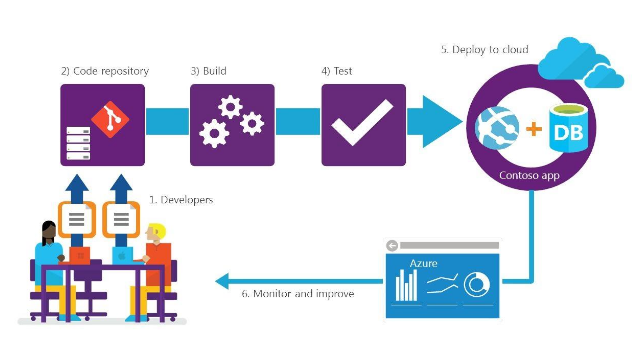
- Azure Boards – A work tracking system with Kanban boards, dashboards, and reporting
- Azure Pipelines – A CI/CD, testing, and deployment system that can connect to any Git repository
- Azure Repos – A cloud-hosted private Git repository service
- Azure Test Plans – A solution for tests and capturing data about defects
- Azure Artifacts – A hosting facility for Maven, npm, and NuGet packages
Azure DevOps use cases include – 1. Planning 2. Developing 3. Delivery 4. Operations
Is Azure DevOps secure?
Absolutely Azure DevOps is secure, and All data is encrypted. Azure DevOps has multilevel security across all of their data centers and security controls integrated into the hardware. This can be a good defense against denial of service attacks.
What are Advantages of Azure DevOps?
These are some Advantages of Azure DevOps:-
- Suitable Access to New Features
- No Upgrades to Worry About
- Platform & Cloud agnostic
- Azure Cloud-hosted Services
- Integrated Collaboration Services
- CI/CD (Continuous Integration, Deployment)
- Reliability, Flexibility and Dashboard Control
- Support for Manual and Exploratory Testing
- Updated Source Control and Plan & Track Your Work
If you planning to become an Azure DevOps Engineer, and finding to the best institute for preparing for certifications, then I would suggest you one of the best Institutes that is DevOpsSchool.com. This institute has 10 to 15+ years of experienced trainers who provide you quantity with quality training.

I’m Rajesh Kumar, a DevOps, SRE, DevSecOps, Cloud, and Platform Engineering expert passionate about sharing practical knowledge, real-world experiences, and industry best practices. I have worked at Cotocus and regularly write about technology, travel, investing, health, product reviews, and digital marketing through my various platforms.
I publish technical articles at DevOps School, travel stories at Holiday Landmark, stock market insights at Stocks Mantra, health and fitness guidance at My Medic Plus, product reviews at TrueReviewNow, and SEO and digital marketing strategies at Wizbrand.
Find Trusted Cardiac Hospitals
Compare heart hospitals by city and services — all in one place.
Explore Hospitals