
Are you confused about what IT Operations Management is? Don’t worry; you’re not alone. Many people are unsure of what IT Operations Management is and what it entails. In this blog post, we’ll dive into the world of IT Operations Management and explore what it is, what it does, and why it’s essential.
Understanding IT Operations Management
IT Operations Management, or ITOM, is the process of managing the day-to-day operations of an organization’s IT infrastructure. It involves managing and maintaining the hardware, software, networks, and services that enable an organization to function. In other words, IT Operations Management is responsible for ensuring that an organization’s IT systems are up and running, and any issues are resolved quickly.
The Importance of IT Operations Management
IT Operations Management is critical for businesses of all sizes. It ensures that an organization’s IT systems are functioning correctly, which is essential for business continuity. Any downtime or system failure can result in lost revenue, decreased productivity, and damage to a company’s reputation.
IT Operations Management is also essential for ensuring that an organization’s IT infrastructure is secure. Cybersecurity threats are becoming more prevalent, and IT Operations Management plays a crucial role in mitigating these risks. By monitoring and managing an organization’s IT systems, IT Operations Management can identify potential threats and take action to prevent them.
The Role of IT Operations Management
IT Operations Management encompasses a wide range of responsibilities. Here are some of the most important roles of IT Operations Management:
Monitoring and Maintenance
One of the primary roles of IT Operations Management is to monitor an organization’s IT systems continually. This involves keeping an eye on the hardware, software, and networks to ensure that everything is running smoothly. IT Operations Management is also responsible for performing regular maintenance tasks to keep the systems in good working order.
Incident Management
When issues do arise, IT Operations Management is responsible for resolving them quickly. This involves identifying the root cause of the problem and implementing a solution. IT Operations Management also works to prevent similar issues from occurring in the future.
Change Management
IT Operations Management is responsible for managing changes to an organization’s IT systems. This includes implementing new hardware or software, making updates to existing systems, and ensuring that any changes are made in a controlled and secure manner.
Capacity Planning
IT Operations Management is also responsible for ensuring that an organization’s IT systems have sufficient capacity to handle the workload. This involves forecasting future demand and ensuring that the systems can handle it.
The Benefits of IT Operations Management
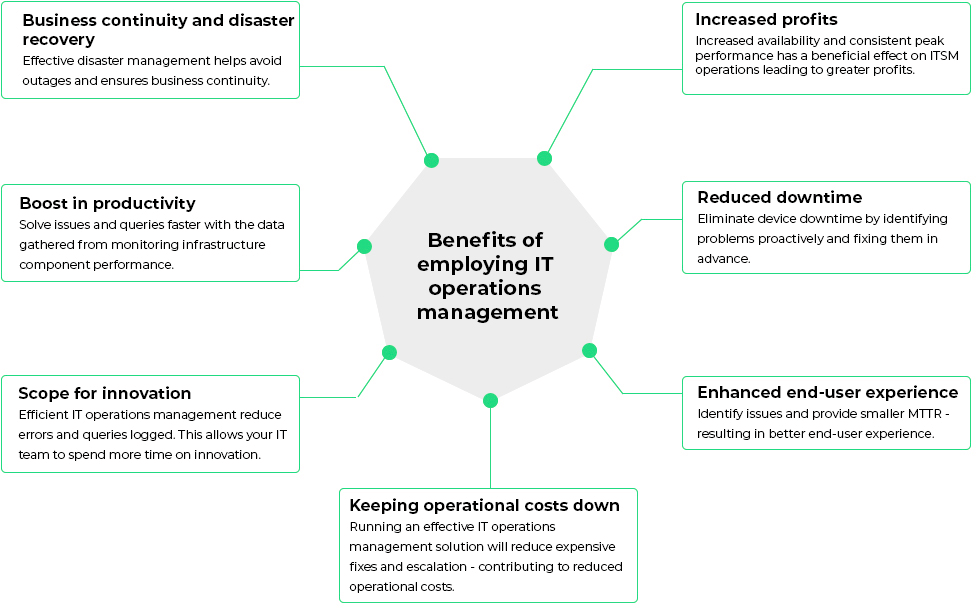
Effective IT Operations Management can provide several benefits to an organization. Here are some of the most significant benefits:
Improved Efficiency
By ensuring that an organization’s IT systems are functioning correctly, IT Operations Management can improve efficiency. This can result in increased productivity, reduced downtime, and faster response times to issues.
Increased Security
IT Operations Management plays a crucial role in ensuring that an organization’s IT systems are secure. By monitoring for potential threats and taking action to prevent them, IT Operations Management can minimize the risk of a cybersecurity breach.
Cost Savings
Effective IT Operations Management can result in cost savings for an organization. By identifying and resolving issues quickly, organizations can reduce the costs associated with downtime and lost productivity.
Conclusion
In conclusion, IT Operations Management is a critical function for any organization that relies on IT systems. It involves managing and maintaining an organization’s IT infrastructure to ensure that it is functioning correctly and securely. Effective IT Operations Management can provide several benefits, including improved efficiency, increased security, and cost savings. As such, it is essential to invest in IT Operations Management to ensure the smooth operation of an organization’s IT systems.

👤 About the Author
Ashwani is passionate about DevOps, DevSecOps, SRE, MLOps, and AiOps, with a strong drive to simplify and scale modern IT operations. Through continuous learning and sharing, Ashwani helps organizations and engineers adopt best practices for automation, security, reliability, and AI-driven operations.
🌐 Connect & Follow:
Website: WizBrand.com
Facebook: facebook.com/DevOpsSchool
X (Twitter): x.com/DevOpsSchools
LinkedIn: linkedin.com/company/devopsschool
YouTube: youtube.com/@TheDevOpsSchool
Instagram: instagram.com/devopsschool
Quora: devopsschool.quora.com
Email– contact@devopsschool.com
Find Trusted Cardiac Hospitals
Compare heart hospitals by city and services — all in one place.
Explore Hospitals