
What is Octopus Deploy?
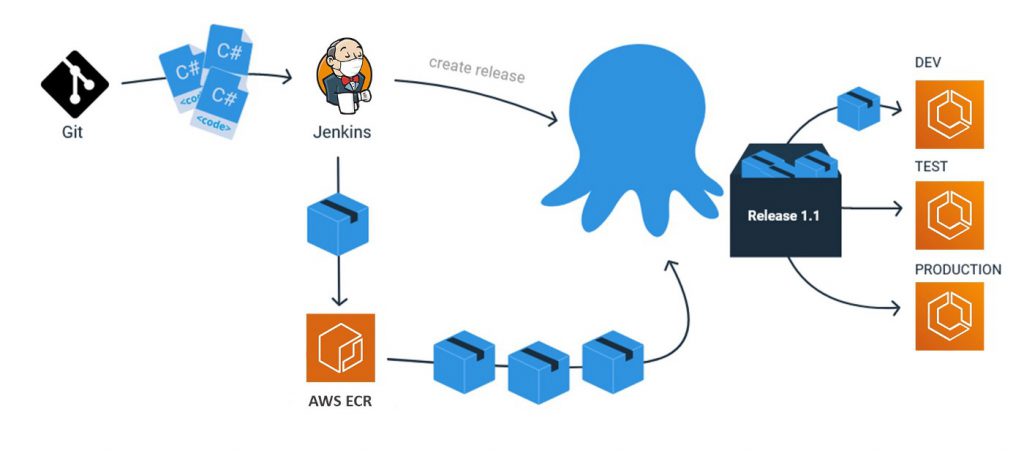
It designed to make easy to release and deploy applications, whether on-premises or in the cloud.
It is a deployment automation tool that helps you manage releases and automate complex application deployments and DevOps tasks.
The Octopus Deploy platform enables developers, release managers, and operations teams to bring all automation into a single place.
By reusing configuration variables, environment definition, API keys, connection strings, permissions, service principals, and automation logic, teams work together from a single platform. The vendor states that with Octopus Deploy, silo’s break down, collaboration begins, and teams can ship and operate software with greater confidence.
History
Octopus deployment started in 2010.It’s Based on our experiences with the difficulty of deploying software and delivering projects when consulting enterprises and medium-sized companies. Deployment was often bolted at the end of the CI/build process.
Feature
- An easy to read, often single page, real-time user interface, showing a graphical presentation of the current status and historical trends of an organization’s Key Performance Indicators (KPIs) to enable instantaneous and informed decisions to be made at a glance.
- Integrates with other development and testing software, such as continuous delivery or test automation tools.
- Grants feature flag capabilities to alter app functionality without redeploying.
- Enables full control over test types and parameter definitions for effective automated testing.
Founder of company
Paul Stovell
Advantages
- It uses the same deployment packages across environments and makes it easy to track their progress across those environments.
- It makes it easy to handle configuration across environments which is usually a particularly difficult task.
- It is used by our department to facilitate the deployment of many applications to many servers.
- Octopus Deploy makes it very easy to deploy applications to one or several servers with the click of a button.
- Many different platforms, languages, and operating systems are supported. You can deploy to your own server or the cloud.
- You can deploy to Windows, Linux, etc.
- Many different “step templates” are included, which make it very easy to deploy what you want, how you want. Such as deploying over SSH, FTP, etc.
Alternatives of Octopus Deploy
- Azure DevOps Server
- GitHub
- SpiraTeam
- Cyclr
- mabl
- Travis CI
- Circle CI
- Incredibuild
- MyGet
- CodeScan
- Splunk Enterprise
- Wrike
- ScriptRunner
Interview Questions and Answers
Best Tutorials and Guide for Octopus Deploy
Best Courses and Insitute for learning
If you want certification course for such top course. So please visit “DevOpsSchool.com”. You will find more certification courses here.


I’m Rajesh Kumar, a DevOps, SRE, DevSecOps, Cloud, and Platform Engineering expert passionate about sharing practical knowledge, real-world experiences, and industry best practices. I have worked at Cotocus and regularly write about technology, travel, investing, health, product reviews, and digital marketing through my various platforms.
I publish technical articles at DevOps School, travel stories at Holiday Landmark, stock market insights at Stocks Mantra, health and fitness guidance at My Medic Plus, product reviews at TrueReviewNow, and SEO and digital marketing strategies at Wizbrand.
Find Trusted Cardiac Hospitals
Compare heart hospitals by city and services — all in one place.
Explore Hospitals
You might like to consider getting a native English speaker to check out your site – there are a lot of mistakes.