The URL format for Knative Service (KService or ksvc) objects in Kubernetes is typically determined by the DNS configuration and domain suffixes within your Kubernetes cluster. The format http://<service-name>.<namespace>.svc.cluster.local is the default URL structure for services within a Kubernetes cluster, where:
<service-name>is the name of your Knative service.<namespace>is the namespace where the service is deployed.svc.cluster.localis the default DNS suffix for services within the cluster.
If you want to use a custom domain name like http://devops.default.example.com instead of the default URL, you need to configure DNS and customize the Knative Service accordingly.
Here are the steps to configure a custom domain for your Knative Service:
- Configure DNS:To use a custom domain like
example.com, you need to configure your DNS to point to the IP address of your Kubernetes cluster’s load balancer or the external IP of your Ingress controller. This typically involves creating a DNS A or CNAME record in your DNS provider’s control panel. Ensure that the custom domain resolves to the correct IP address. - Ingress Configuration:If you’re using an Ingress controller to expose your Knative services to the external network, you’ll need to configure the Ingress resource to map the custom domain to your Knative Service. Here’s an example of an Ingress resource YAML that routes traffic from
example.comto your Knative Service:
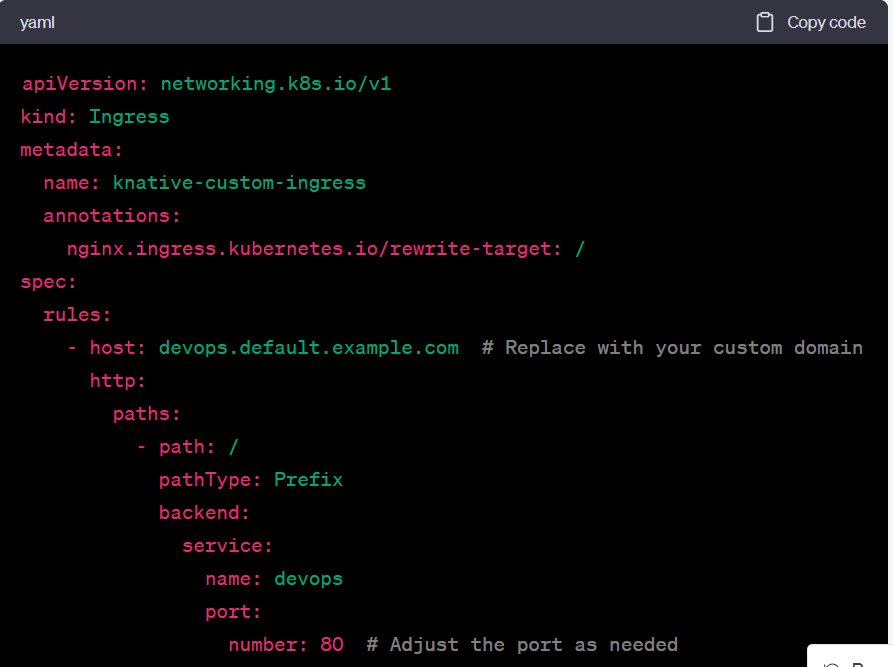
- Apply this Ingress configuration to your cluster to route traffic from your custom domain to the Knative Service.
- Knative Service Configuration:Ensure that the Knative Service resource (
KServiceorksvc) specifies the correct hostname in its configuration. You can set thehostnamefield in thespecsection of your Knative Service YAML to match your custom domain:
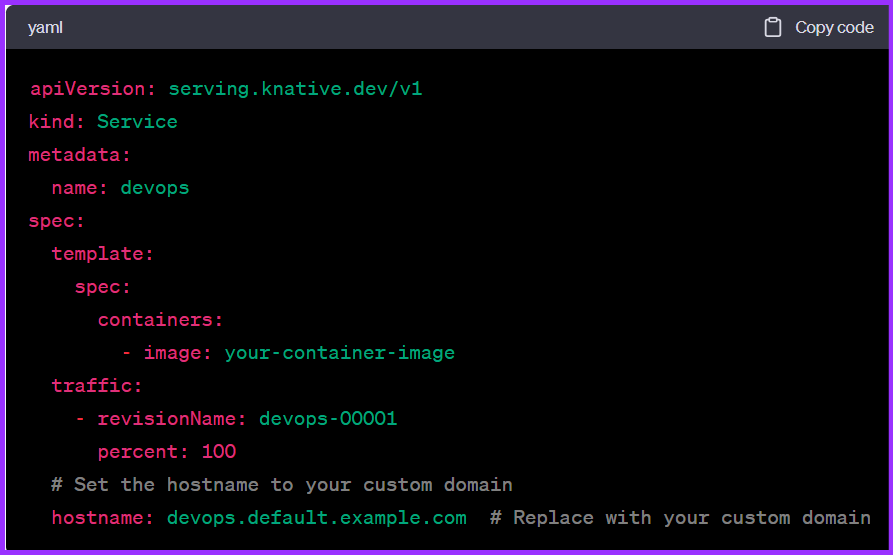
- Make sure to replace
devops.default.example.comwith your actual custom domain. - Verify Configuration:After making these changes, ensure that your custom domain (
http://devops.default.example.com) is working as expected. You may need to wait for DNS propagation, which can take some time depending on your DNS provider.
By following these steps, you can configure a custom domain for your Knative Service, allowing it to be accessed using the desired URL format.
Example
The http://devops.default.svc.cluster.local URL is the Kubernetes internal DNS name for the devops Knative Service. The default is the namespace where the Knative Service is created, and svc is the Kubernetes service subdomain. cluster.local is the Kubernetes cluster domain.
The http://devops.default.example.com URL is an external DNS name for the devops Knative Service. The example.com is the domain name of the Kubernetes cluster.
The Kubernetes cluster administrator can configure the external DNS name for a Knative Service. The external DNS name is used by clients outside of the Kubernetes cluster to access the Knative Service.
In your case, the Kubernetes cluster administrator has not configured an external DNS name for the devops Knative Service. Therefore, the only way to access the Knative Service is to use the internal DNS name.
To access the devops Knative Service from outside of the Kubernetes cluster, you can use a service mesh, such as Istio, to create an external DNS name for the Knative Service.

I’m Rajesh Kumar, a DevOps, SRE, DevSecOps, Cloud, and Platform Engineering expert passionate about sharing practical knowledge, real-world experiences, and industry best practices. I have worked at Cotocus and regularly write about technology, travel, investing, health, product reviews, and digital marketing through my various platforms.
I publish technical articles at DevOps School, travel stories at Holiday Landmark, stock market insights at Stocks Mantra, health and fitness guidance at My Medic Plus, product reviews at TrueReviewNow, and SEO and digital marketing strategies at Wizbrand.
Find Trusted Cardiac Hospitals
Compare heart hospitals by city and services — all in one place.
Explore Hospitals