
This page shows how to start a temporary BusyBox pod in OpenShift with oc run. The pod passes the restricted security policies, so you can test DNS, service connectivity and network policies from inside a namespace. The command below is a corrected version you can copy and paste, followed by a YAML alternative, test commands and fixes for the errors you are most likely to hit.
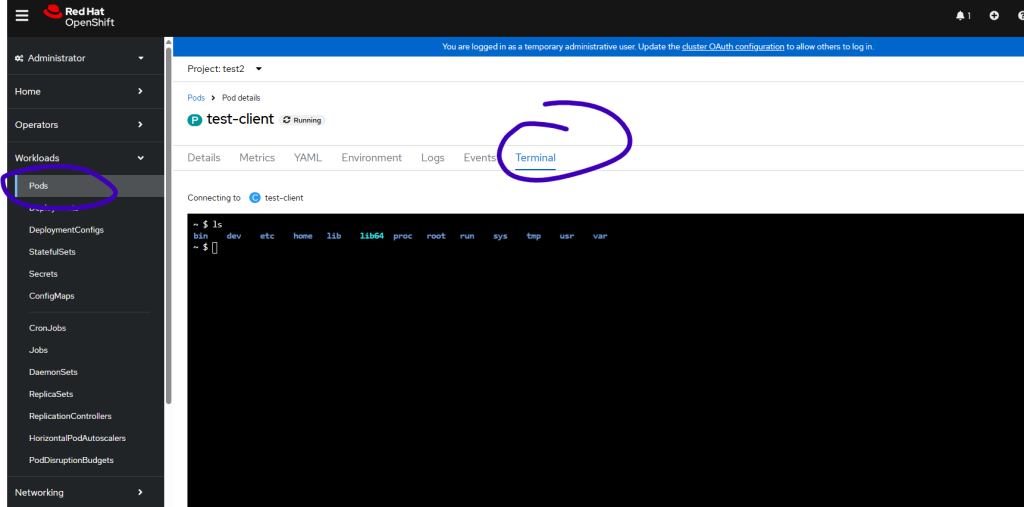
oc run test-client
  --rm -it
  --restart=Never
  --image=docker.io/library/busybox:1.35
  -n test2
  --overrides='
{
  "apiVersion": "v1",
  "spec": {
    "securityContext": {
      "runAsNonRoot": true,
      "seccompProfile": { "type": "RuntimeDefault" }
    },
    "containers": [{
      "name": "test-client",
      "image": "docker.io/library/busybox:1.35",
      "command": ["sh"],
      "stdin": true,
      "tty": true,
      "securityContext": {
        "allowPrivilegeEscalation": false,
        "capabilities": {
          "drop": ["ALL"]
        },
        "runAsNonRoot": true
      }
    }]
  }
}
'
Code language: PHP (php)
What the example above does and why
A throwaway BusyBox pod is a common way to troubleshoot from inside a cluster. It gives you a small shell with nslookup, wget, ping and telnet, all running inside the same namespace and network as your application. You can then check whether a Service resolves, whether a port answers and whether a NetworkPolicy blocks traffic.
A plain oc run --image=busybox often produces warnings or gets rejected on OpenShift 4. The cluster enforces Security Context Constraints (SCCs), and recent versions also apply Kubernetes Pod Security Admission. The --overrides JSON in the example above adds the settings that the restricted profile requires:
| Setting | Why it is needed |
|---|---|
runAsNonRoot: true | The container must not run as UID 0. On OpenShift the restricted-v2 SCC gives the pod a random UID from the project's range. |
seccompProfile.type: RuntimeDefault | The restricted profile requires a seccomp profile, and this uses the container runtime's default one. |
allowPrivilegeEscalation: false | Blocks setuid binaries and similar mechanisms from gaining extra privileges. |
capabilities.drop: ["ALL"] | Removes all Linux capabilities. BusyBox does not need any of them for basic network tests. |
stdin: true, tty: true, command: ["sh"] | Keeps an interactive shell attached when the overrides replace the container definition. |
The other flags matter too. --rm -it attaches your terminal and deletes the pod when you exit the shell. --restart=Never creates a bare Pod rather than a controller-managed workload. -n test2 sets the target project.
Corrected, copy-paste ready command
The command above is split across lines without line-continuation backslashes. A shell runs each line as a separate command, so oc run test-client fails on its own with error: required flag(s) "image" not set. The remaining lines then fail as unknown commands. Here is the same command with continuations:
oc run test-client \
  --rm -it \
  --restart=Never \
  --image=docker.io/library/busybox:1.35 \
  -n test2 \
  --overrides='
{
  "apiVersion": "v1",
  "spec": {
    "securityContext": {
      "runAsNonRoot": true,
      "seccompProfile": { "type": "RuntimeDefault" }
    },
    "containers": [{
      "name": "test-client",
      "image": "docker.io/library/busybox:1.35",
      "command": ["sh"],
      "stdin": true,
      "tty": true,
      "securityContext": {
        "allowPrivilegeEscalation": false,
        "capabilities": { "drop": ["ALL"] },
        "runAsNonRoot": true
      }
    }]
  }
}'Code language: PHP (php)
Expected output:
If you don't see a command prompt, try pressing enter.
/ $ id
uid=1000680000(1000680000) gid=0(root) groups=1000680000
/ $ exit
pod "test-client" deleted
The UID will be different on your cluster because OpenShift picks it from the project's range. The $ prompt, instead of #, confirms the shell is not running as root.
Note: The containers array in --overrides replaces the generated container definition completely. Keep name and image in the JSON, and make sure name matches the pod name, or the pod spec will be incomplete.
Prerequisites
- The
ocCLI installed and logged in (oc whoamireturns your user). - A project to work in. Create one with
oc new-project test2or switch to an existing one withoc project test2. - Permission to create pods in that project. The default
editoradminrole is enough. - Image pull access to Docker Hub. In a disconnected cluster, mirror the BusyBox image to your internal registry and change both
imagevalues.
Alternative: a YAML manifest for a longer-lived debug pod
Inline JSON is hard to edit and needs different quoting in PowerShell or cmd.exe. A manifest is easier to keep in Git and reuse. This version sleeps for an hour, so you can open a shell in it several times:
apiVersion: v1
kind: Pod
metadata:
  name: test-client
  namespace: test2
  labels:
    app: test-client
spec:
  restartPolicy: Never
  securityContext:
    runAsNonRoot: true
    seccompProfile:
      type: RuntimeDefault
  containers:
  - name: test-client
    image: docker.io/library/busybox:1.35
    command: ["sh", "-c", "sleep 3600"]
    resources:
      requests:
        cpu: 10m
        memory: 16Mi
      limits:
        cpu: 100m
        memory: 64Mi
    securityContext:
      allowPrivilegeEscalation: false
      capabilities:
        drop: ["ALL"]
      runAsNonRoot: trueCode language: JavaScript (javascript)
oc apply -f busybox-debug.yaml
oc wait --for=condition=Ready pod/test-client -n test2 --timeout=60s
oc rsh -n test2 test-client # or: oc exec -it -n test2 test-client -- sh
# Check which SCC admitted the pod (expect restricted-v2)
oc get pod test-client -n test2 -o jsonpath='{.metadata.annotations.openshift\.io/scc}{"\n"}'
# Clean up when finished
oc delete pod test-client -n test2Code language: PHP (php)The resource requests and limits are included because many projects have a ResourceQuota that rejects pods without them.
Useful tests to run inside the pod
# DNS: resolve a Service (use the full name to avoid search-domain surprises)
nslookup my-svc.test2.svc.cluster.local

# HTTP: fetch a page from a Service, with a 5-second timeout
wget -T 5 -qO- http://my-svc.test2.svc.cluster.local:8080/

# Show response headers only
wget -T 5 -S --spider http://my-svc.test2.svc.cluster.local:8080/

# Raw TCP check against a non-HTTP port (Ctrl+] then 'quit' to leave)
telnet my-db.test2.svc.cluster.local 5432

# Check the pod's own network settings
cat /etc/resolv.conf
ip addrCode language: PHP (php)
Replace my-svc, my-db and the ports with your own Service names and ports. If DNS resolves but wget times out, look at NetworkPolicies, the Service's selector and endpoints (oc get endpoints my-svc -n test2), and whether the application listens on the target port. For HTTP 5xx responses, see the Kubernetes 500 errors troubleshooting guide.
Note: BusyBox has no curl or dig, and its nslookup output differs from the BIND version. If you need full DNS tools, use an image that includes dig, running with the same security settings.
Common errors and fixes
| Error | Cause | Fix |
|---|---|---|
required flag(s) "image" not set followed by --rm: command not found | Line breaks without trailing backslashes | Use the corrected command above, or put the whole command on one line. |
pods "test-client" already exists | An earlier run did not clean up, for example after the session was disconnected | oc delete pod test-client -n test2, then run the command again. |
ErrImagePull or toomanyrequests in oc describe pod | Docker Hub pull rate limit, or no internet access from the nodes | Add a Docker Hub pull secret, or mirror the image to an internal registry. |
container has runAsNonRoot and image will run as root | No UID was assigned. This is typical on plain Kubernetes, where no SCC sets a UID. | On non-OpenShift clusters add "runAsUser": 1000 to the container securityContext. On OpenShift, check that the pod was admitted by restricted-v2. |
unable to validate against any security context constraint | The spec asks for something restricted-v2 forbids, such as a fixed runAsUser outside the project range | Remove the hard-coded UID and let OpenShift assign one. |
would violate PodSecurity "restricted:latest" warning | The security settings from the overrides are missing | Include the full --overrides block or use the YAML manifest. |
timed out waiting for the condition | The pod is stuck in Pending because of quota, scheduling or image pull problems | Run oc describe pod test-client -n test2 and read the Events section. |
Best practices
- Pin the image tag (as
busybox:1.35does) instead of usinglatest, so test results stay consistent. - Do not grant the
anyuidorprivilegedSCC just to run a debug shell. The restricted settings above are enough for network testing. - Use
--rmfor one-off checks so debug pods do not pile up, and delete long-lived ones when you are done. - Run the test pod in the same namespace as the client application you are debugging, because NetworkPolicies and DNS search domains depend on the namespace.
- Give debug pods a label such as
app: test-clientso they are easy to find and clean up withoc delete pod -l app=test-client.
For more pod and workload examples, browse the Kubernetes tutorials.
Frequently asked questions
Why does my BusyBox pod run as a large random UID on OpenShift?
The restricted-v2 SCC assigns every pod a UID from the project's allocated range, such as 1000680000, unless the pod is granted a more permissive SCC. This is expected and is why runAsNonRoot: true works even though the BusyBox image defaults to root.
Does this command work with kubectl on plain Kubernetes?
Mostly, yes. Replace oc with kubectl. Plain Kubernetes does not assign a non-root UID automatically, so add "runAsUser": 1000 to the container securityContext or the pod fails with a runAsNonRoot error.
How do I keep the BusyBox pod running after I exit the shell?
Remove --rm and use a long-running command such as sleep 3600, as in the YAML manifest above. Then reconnect with oc rsh or oc exec -it test-client -- sh.
Why is curl not found in the BusyBox pod?
BusyBox does not include curl. Use wget -qO- URL for HTTP requests, or use a different image that contains curl with the same restricted security settings.
What is the difference between oc run and oc debug for troubleshooting?
oc run creates a new standalone pod from any image. oc debug makes a copy of an existing workload or node with a shell, so you can troubleshoot with the same configuration as the original.
Related tutorials
- More Kubernetes tutorials
- Troubleshooting Guide to Resolving 500 Errors in Kubernetes Production Environments
- Kubernetes Job & CronJob Explained: API Resource, YAML Example, and Use Cases

I’m Rajesh Kumar, a DevOps, SRE, DevSecOps, Cloud, and Platform Engineering expert passionate about sharing practical knowledge, real-world experiences, and industry best practices. I have worked at Cotocus and regularly write about technology, travel, investing, health, product reviews, and digital marketing through my various platforms.
I publish technical articles at DevOps School, travel stories at Holiday Landmark, stock market insights at Stocks Mantra, health and fitness guidance at My Medic Plus, product reviews at TrueReviewNow, and SEO and digital marketing strategies at Wizbrand.
Find Trusted Cardiac Hospitals
Compare heart hospitals by city and services — all in one place.
Explore Hospitals