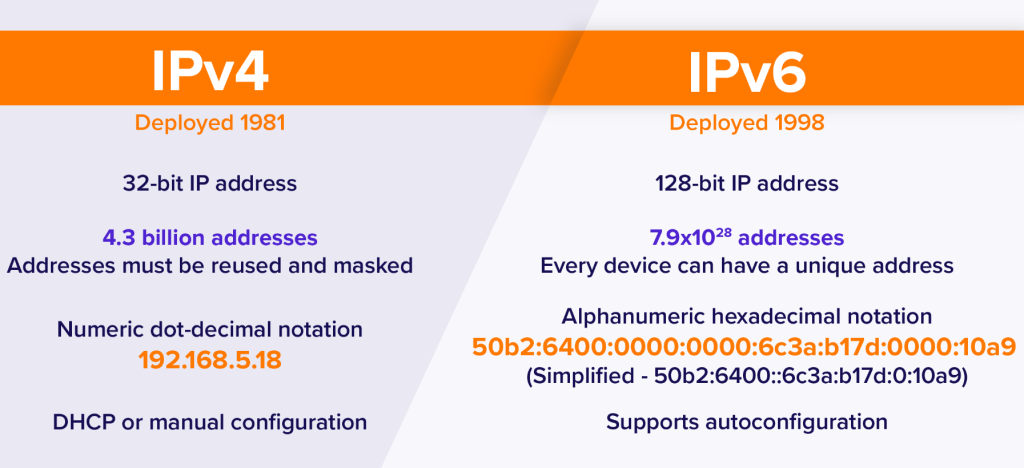
IPv4 and IPv6 are two versions of the Internet Protocol (IP) used for addressing and routing data across networks. Here are the key differences between IPv4 and IPv6:
Address Space
- IPv4: Uses 32-bit addresses, allowing for approximately 4.3 billion unique addresses.
- IPv6: Uses 128-bit addresses, providing an astronomically larger address space of 3.4 x 10^38 unique addresses.
Address Format
- IPv4: Addresses are represented in dot-decimal notation (e.g., 192.168.1.1).
- IPv6: Addresses are represented in hexadecimal notation, separated by colons (e.g., 2001:0db8:85a3:0000:0000:8a2e:0370:7334).
Header Structure
- IPv4: Has a variable header length of 20-60 bytes.
- IPv6: Has a fixed header length of 40 bytes, simplifying packet processing.
Security
- IPv4: Security features are not built-in and rely on applications.
- IPv6: Includes built-in security features like IPsec, improving overall network security.
Quality of Service (QoS)
- IPv4: QoS is not inherent to the protocol.
- IPv6: Includes built-in QoS capabilities, allowing for better traffic prioritization.
Configuration
- IPv4: Supports manual and DHCP address configuration.
- IPv6: Supports stateless address autoconfiguration (SLAAC) in addition to manual and DHCPv6 configuration[1][3].
Fragmentation
- IPv4: Fragmentation is performed by both sender and forwarding routers.
- IPv6: Fragmentation is only performed by the sender, improving network efficiency[1][3].
Broadcast
- IPv4: Uses broadcast messages for network-wide communication.
- IPv6: Eliminates broadcast in favor of multicast and anycast[1][3].
Checksum
- IPv4: Includes a checksum field in the header.
- IPv6: Removes the checksum field, reducing processing overhead[1].
Transition and Coexistence
IPv4 and IPv6 are designed to coexist, with various transition mechanisms in place to ensure compatibility between the two protocols[6].
In summary, IPv6 offers significant improvements over IPv4 in terms of address space, security, efficiency, and functionality, addressing many of the limitations of its predecessor.

I’m Rajesh Kumar, a DevOps, SRE, DevSecOps, Cloud, and Platform Engineering expert passionate about sharing practical knowledge, real-world experiences, and industry best practices. I have worked at Cotocus and regularly write about technology, travel, investing, health, product reviews, and digital marketing through my various platforms.
I publish technical articles at DevOps School, travel stories at Holiday Landmark, stock market insights at Stocks Mantra, health and fitness guidance at My Medic Plus, product reviews at TrueReviewNow, and SEO and digital marketing strategies at Wizbrand.
Find Trusted Cardiac Hospitals
Compare heart hospitals by city and services — all in one place.
Explore Hospitals