The CoreOS corporation was acquired by Red Hat in May 2018 for $250 million; post-acquisition, the main enterprise Container Linux distribution, combined with Red Hat’s similar Project Atomic, has been renamed Red Hat CoreOS, while its open source community has been aligned with the Fedora Project as Fedora CoreOS.
Today, both teams(CoreOS & redhat) are working to incorporate the best components of CoreOS Tectonic into Red Hat OpenShift Container Platform.
However, CoreOS is a Linux distribution with very minimal services installed and the primary goal is to have a scalable clustering system.
Since Docker, brought containers to the forefront of enterprise infrastructure software innovation back in 2014, the community of both vendors and enterprise developers have been struggling to implement containers in true enterprise scenarios.
Among the missing pieces: container orchestration and container management. Orchestration provides companies with the ability to deploy containers at scale, handling the ins and outs of the elastic scaling essential to the container value proposition. Kubernetes, however, does not directly address the complexities of container management – and it’s this niche that CoreOS sought to fill with its Tectonic product.
Container Linux by CoreOS, originally named CoreOS Linux, is an open source operating system (OS) that provides the functionality required to deploy and manage applications within containers. Based on the Gentoo Linux kernel, Container Linux by CoreOS is designed for massive scale, with management features to ensure minimal operational overhead. with some of the online updating features inspired by Google’s ChromeOS for notebooks.
A software developer or administrator can use the CoreOS on bare-metal systems or run the platform as a VM. It also runs on public cloud instances, such as those from Amazon Web Services Elastic Compute Cloud (AWS EC2), Microsoft Azure and Google Compute Engine (GCE), as well as on OpenStack and other cloud frameworks.
CoreOS offers several products in addition to Container Linux, including the Rkt container engine and a commercial enterprise version of Kubernetes named Tectonic. While Container Linux is open source, CoreOS sells support for the OS.
CoreOS developed Tectonic, an entire container management platform built around Kubernetes. “Tectonic combines Kubernetes, the leading container management solution, with everything needed to run containers at scale that means the best open source components, battle-tested security systems, and fully automated operations. Tectonic is enterprise Kubernetes.
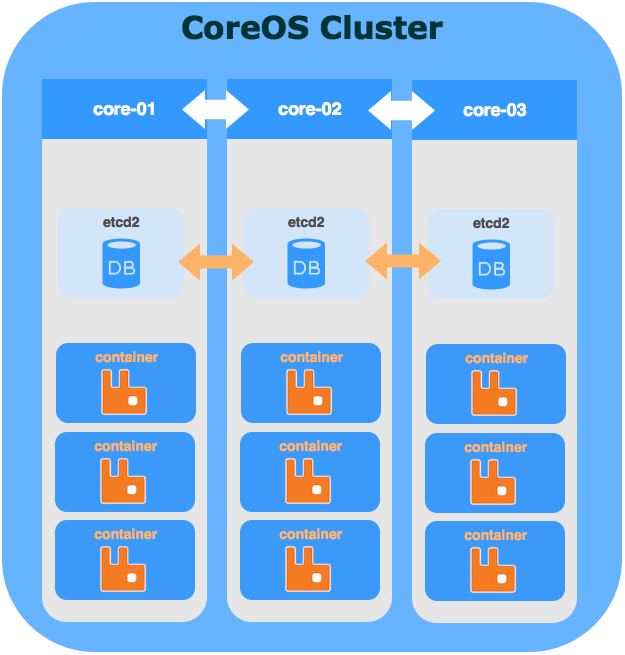
The CoreOS Tectonic Kubernetes container has following components.
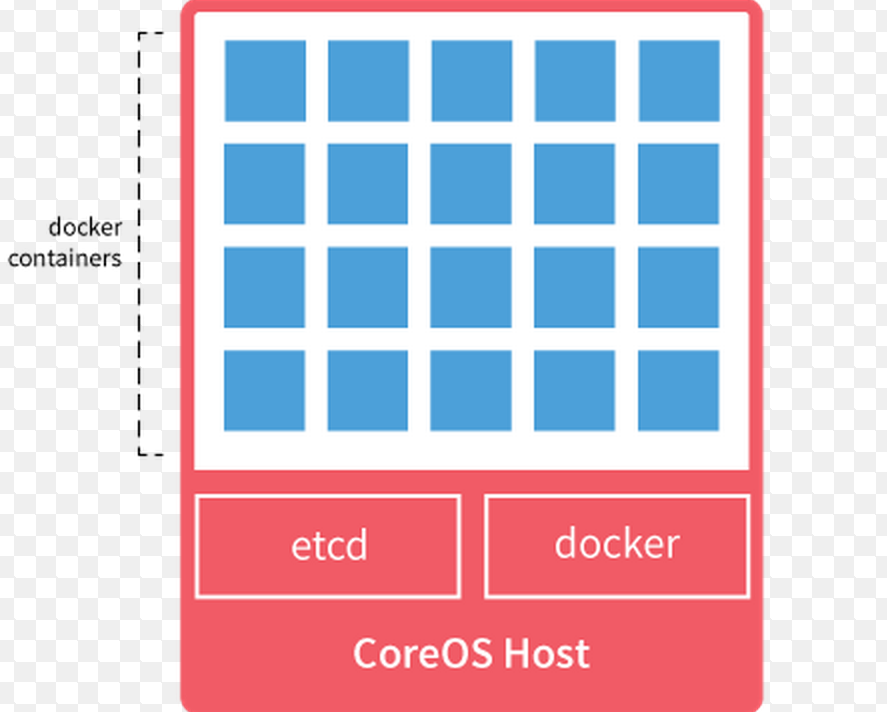
- etcd – The system management tools. Container Linux uses the etcd daemon, which is installed across all servers in the cluster to provide a common registry for cluster nodes to share configuration data. It reinforces server abstraction for consistent configuration across cluster hosts. The etcd daemon also provides service discovery capabilities, which offer visibility into applications. etcd is a distributed key, value store that is used for service discovery. The key, value can be read and written from any of the host systems as well as the containers running inside the host systems. Examples could be service port numbers, database details etc.
- fleet – Container Linux also provides the fleet cluster manager which controls Container Linux’s separate systemd instances at the cluster level. As of 2017 “fleet” is no longer actively developed and is deprecated in favor of Kubernetes. Fleet is a service orchestrator that schedules the containers across CoreOS cluster based on different constraints. Fleet uses systemd that runs in each host. Fleet is the cluster manager that is responsible for orchestration of containers into the cluster of hosts. Fleet allows to treat the entire cluster as a single system. Fleet interacts with systemd in each individual host. Fleetctl is the interface used by Fleet.
- Flannel – Flannel is used for networking containers across hosts so that containers across hosts can talk to each other. Flannel(Previously called Rudder) is used to network the containers running in hosts that are part of the CoreOS cluster. This allows containers on 1 host to talk to another.
- Docker – Docker is the Container manager that runs the containers.
- systemd – CoreOS uses systemd, another central daemon in the OS package for initialization and process management.
- cgroups – CoreOS uses isolated user space instances for security. These instances are based on the Linux kernel’s control groups called cgroups feature. This offers namespace isolation and manages resource usage, such as processor, memory and disk I/O, for every process.
- CoreUpdate – Container Linux also offers an auto update capability, CoreUpdate, for secure operations. CoreUpdate pushes updates to the kernel and system-level components, rather than waiting for the administrator to request an update. It helps keep the OS patched and consistent with kernel changes.
- The Prometheus system monitoring tool – The Prometheus Operator creates, configures, and manages Prometheus monitoring instances. Automatically generates monitoring target configurations based on familiar Kubernetes label queries
- The Quay container registry add-ons – Quay, an image registry that not only allowed you to manage your container images, but do so securely and reliably.
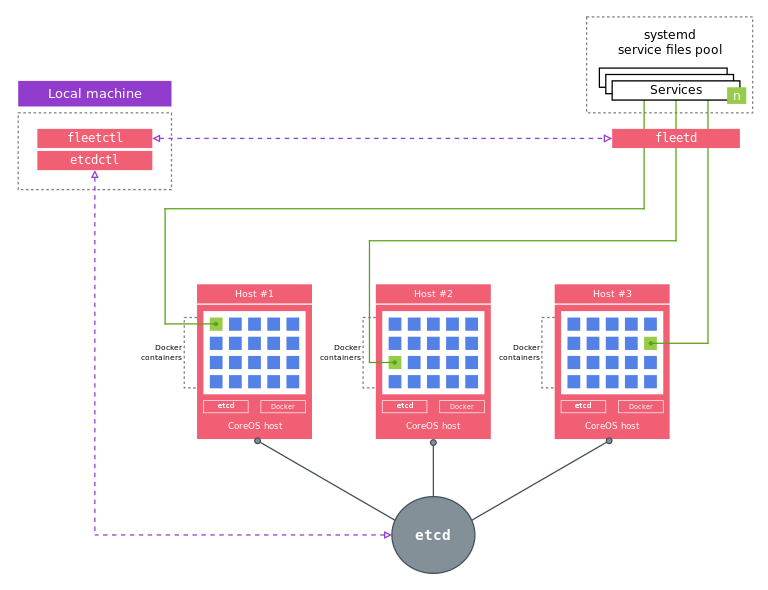
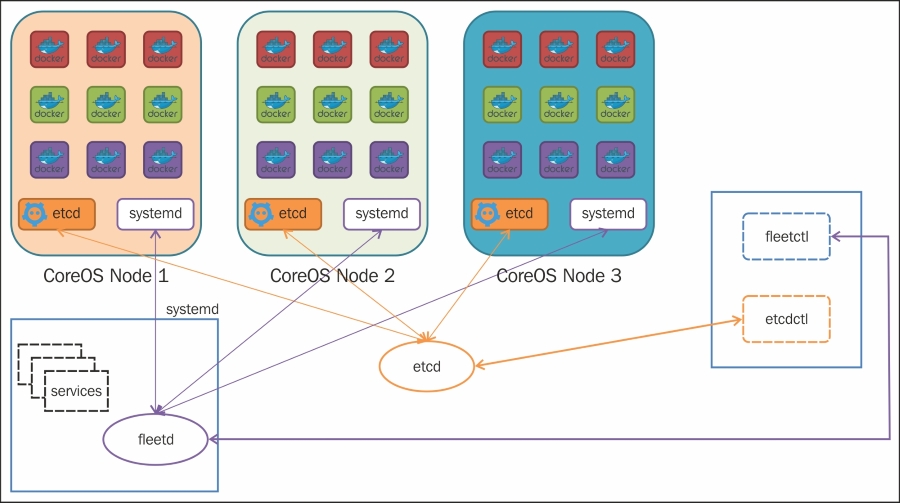
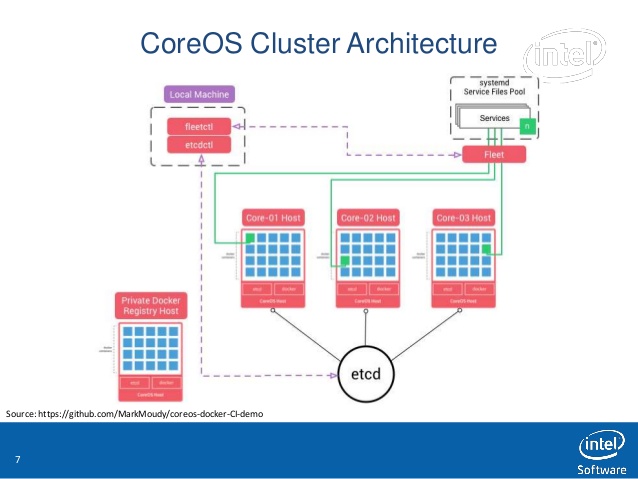
Try Tectonic for free up to 10 nodes at https://coreos.com/tectonic.
Demo of CoreOS Tectonic

I’m Rajesh Kumar, a DevOps, SRE, DevSecOps, Cloud, and Platform Engineering expert passionate about sharing practical knowledge, real-world experiences, and industry best practices. I have worked at Cotocus and regularly write about technology, travel, investing, health, product reviews, and digital marketing through my various platforms.
I publish technical articles at DevOps School, travel stories at Holiday Landmark, stock market insights at Stocks Mantra, health and fitness guidance at My Medic Plus, product reviews at TrueReviewNow, and SEO and digital marketing strategies at Wizbrand.
Find Trusted Cardiac Hospitals
Compare heart hospitals by city and services — all in one place.
Explore Hospitals