
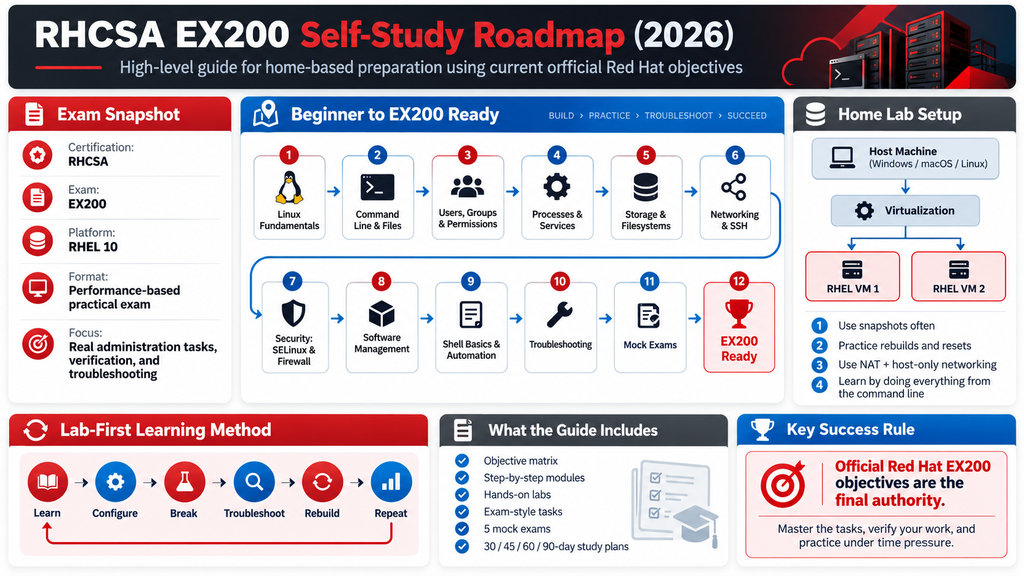
Gold-standard home-study roadmap for the Red Hat Certified System Administrator (RHCSA) exam EX200 Research cut-off: 2026-10-06 Primary authority: current official Red Hat EX200 page, Red Hat Certification Program Guide, Red Hat Training Policies, and RHEL 10 documentation. IMPORTANT: Red Hat can change objectives and policies. Re-check the official EX200 page immediately before booking and again during the final week of study.
How to use this guide
This guide is designed for a learner studying at home without requiring Red Hat classroom training. The learning loop is: Learn -> Configure -> Break -> Troubleshoot -> Rebuild -> Repeat -> Time yourself. The exam-objective wording in this guide is deliberately paraphrased. This avoids reproducing Red Hat material verbatim while preserving the current scope. The current official EX200 page is the final authority. Legend: REQUIRED means the skill is represented by the current official EX200 objectives. SUPPORTING means it helps perform or troubleshoot a required skill but is not separately listed as an objective. OUTSIDE CURRENT SCOPE means it should not be treated as an EX200 requirement unless Red Hat later changes the objectives.
Part 1 – RHCSA / EX200 Overview
1. What is RHCSA?
Red Hat Certified System Administrator (RHCSA) is the certification awarded when a candidate passes EX200. It validates practical administration skills on Red Hat Enterprise Linux. In the current 2026 Red Hat framework, RHCSA is a foundational credential for the Enterprise Linux and Ansible certification tracks. At RHCSA level you should be able to work from the command line, administer users and groups, manage software, services, processes, storage, file systems, basic networking, firewalls, SSH, SELinux, scheduling, system logs, time configuration, and simple shell automation. The current exam also explicitly includes RPM and Flatpak repository/package tasks, GPT storage, systemd timers, tuning profiles, and persistent system journals. RHCSA does not by itself certify advanced Ansible automation, OpenShift administration, Kubernetes administration, advanced Linux troubleshooting at the EX342 level, or advanced network/storage engineering.
2. What is EX200?
| Item | Current verified status |
|---|---|
| Certification exam | EX200 – Red Hat Certified System Administrator (RHCSA) exam |
| Platform | Red Hat Enterprise Linux 10 |
| Format | Performance-based, hands-on practical exam |
| Result of passing | Red Hat Certified System Administrator |
| Internet during exam | Not provided |
| Personal notes/books | Not permitted |
| Product documentation | For most exams, documentation shipped with the product is available; follow the current exam environment rules |
| Current public duration | Not officially specified on the current EX200 page reviewed for this guide |
| Configuration persistence | Required: exam configurations must survive reboot without intervention |
| Training requirement | RH124+RH134 or RH199 are recommended paths; comparable RHEL administration experience is accepted. Training attendance is not the focus of this self-study guide. |
Do not confuse the certification, the exam, and training: RHCSA is the credential; EX200 is the assessment; RH124/RH134/RH199 are preparation options; this document is a self-study path.
Part 2 – Current EX200 Objective Map
The following matrix covers every skill currently listed on the official EX200 objective page, paraphrased and assigned an internal ID for study tracking.
| ID | Verified domain | Paraphrased current objective | Topic | Skills/tools | Priority | Lab |
|---|---|---|---|---|---|---|
| E01 | Essential tools | Open a shell and run commands with correct syntax | CLI | shell, command syntax | High | Yes |
| E02 | Essential tools | Redirect standard input/output/error and use pipelines | Redirection | >, >>, 2>, | High | |
| E03 | Essential tools | Search and analyze text with grep and regular expressions | Text processing | grep, regex | High | Yes |
| E04 | Essential tools | Connect to remote systems securely with SSH | Remote access | ssh | High | Yes |
| E05 | Essential tools | Log in and change user identity in multi-user operation | Sessions/users | login, su, sudo | High | Yes |
| E06 | Essential tools | Archive and compress/uncompress data with tar, gzip, and bzip2 | Archives | tar, gzip, bzip2 | Medium | Yes |
| E07 | Essential tools | Create and edit text files from the command line | Editing | vi/vim or available editor | High | Yes |
| E08 | Essential tools | Create, remove, copy, and move files and directories | Files | touch, mkdir, rm, cp, mv | High | Yes |
| E09 | Essential tools | Create hard links and symbolic links | Links | ln | Medium | Yes |
| E10 | Essential tools | Inspect and change standard owner/group/other rwx permissions | Permissions | ls, chmod | High | Yes |
| E11 | Essential tools | Find and use local system documentation | Documentation | man, info, /usr/share/doc | High | Yes |
| S01 | Software | Configure access to RPM package repositories | RPM repos | dnf, repo files | High | Yes |
| S02 | Software | Install and remove RPM packages | RPM packages | dnf, rpm | High | Yes |
| S03 | Software | Configure access to Flatpak repositories | Flatpak repos | flatpak remotes | Medium | Yes |
| S04 | Software | Install and remove Flatpak applications | Flatpak apps | flatpak install/uninstall | Medium | Yes |
| B01 | Shell scripts | Conditionally execute commands in a script | Conditionals | if, test, [ ] | High | Yes |
| B02 | Shell scripts | Use loops to process files or command-line input | Loops | for | High | Yes |
| B03 | Shell scripts | Process positional script arguments | Arguments | $1, 2,# | High | Yes |
| B04 | Shell scripts | Use command output inside scripts | Command substitution | $(command) | High | Yes |
| R01 | Running systems | Perform normal boot, reboot, and shutdown operations | Power/boot | systemctl, reboot, shutdown | Medium | Yes |
| R02 | Running systems | Boot manually into alternate systemd targets | Targets | systemctl isolate, kernel args | High | Yes |
| R03 | Running systems | Interrupt boot to recover access to a system | Boot recovery | GRUB/system recovery | High | Yes |
| R04 | Running systems | Find CPU or memory heavy processes and terminate them | Processes | ps, top, kill | High | Yes |
| R05 | Running systems | Adjust process scheduling priority | Scheduling priority | nice, renice | Medium | Yes |
| R06 | Running systems | Select and manage system tuning profiles | Tuning | tuned-adm | Medium | Yes |
| R07 | Running systems | Locate and interpret logs and the system journal | Logs | journalctl, /var/log | High | Yes |
| R08 | Running systems | Configure the journal to persist across reboot | Persistent journal | journald | Medium | Yes |
| R09 | Running systems | Start, stop, and inspect network-facing services | Services | systemctl | High | Yes |
| R10 | Running systems | Transfer files securely between systems | Secure copy | scp, sftp | Medium | Yes |
| L01 | Local storage | Inspect, create, and remove GPT disk partitions | GPT partitions | lsblk, fdisk/parted | High | Yes |
| L02 | Local storage | Create and remove LVM physical volumes | LVM PV | pvcreate, pvremove | High | Yes |
| L03 | Local storage | Add physical volumes to volume groups | LVM VG | vgcreate, vgextend | High | Yes |
| L04 | Local storage | Create and remove logical volumes | LVM LV | lvcreate, lvremove | High | Yes |
| L05 | Local storage | Configure boot-time mounts using UUID or filesystem label | Persistent mounts | blkid, /etc/fstab | High | Yes |
| L06 | Local storage | Add partitions, LVs, and swap without destroying existing data | Storage growth | partition/LVM/swap | High | Yes |
| F01 | File systems | Create and use VFAT, ext4, and XFS file systems | Local file systems | mkfs, mount | High | Yes |
| F02 | File systems | Mount and unmount NFS network file systems | NFS client | mount, nfs utilities | High | Yes |
| F03 | File systems | Configure on-demand mounts with autofs | Autofs | autofs maps/service | High | Yes |
| F04 | File systems | Extend existing logical volumes and associated file systems | LVM growth | lvextend, grow fs | High | Yes |
| F05 | File systems | Diagnose and repair file permission problems | Permission troubleshooting | namei, ls, chmod/chown | High | Yes |
| D01 | System maintenance | Schedule one-time and recurring work with at, cron, and systemd timers | Scheduling | at, crontab, timer units | High | Yes |
| D02 | System maintenance | Start/stop services and enable them at boot | Services | systemctl start/stop/enable | High | Yes |
| D03 | System maintenance | Set the default systemd boot target | Boot target | systemctl set-default | Medium | Yes |
| D04 | System maintenance | Configure a time synchronization client | Time | chrony/chronyc | Medium | Yes |
| D05 | System maintenance | Install or update packages from Red Hat CDN, remote repos, or local files | Packages | dnf | High | Yes |
| D06 | System maintenance | Modify system bootloader configuration | Bootloader | grubby/GRUB tools | High | Yes |
| N01 | Networking | Configure IPv4 and IPv6 addressing | IP | nmcli, ip | High | Yes |
| N02 | Networking | Configure hostname and name resolution | Name resolution | hostnamectl, hosts/DNS | High | Yes |
| N03 | Networking | Ensure required network services start automatically | Network services | systemctl enable, autoconnect | Medium | Yes |
| N04 | Networking | Restrict network access using firewalld/firewall-cmd | Firewall access | firewall-cmd | High | Yes |
| U01 | Users/groups | Create, remove, and modify local users | Users | useradd/usermod/userdel | High | Yes |
| U02 | Users/groups | Set passwords and local password aging rules | Passwords | passwd, chage | High | Yes |
| U03 | Users/groups | Create/modify/delete groups and memberships | Groups | groupadd/groupmod/groupdel/usermod | High | Yes |
| U04 | Users/groups | Configure privileged administrative access | Privilege | sudo, visudo | High | Yes |
| X01 | Security | Configure host firewall rules with firewalld | Firewall | firewall-cmd | High | Yes |
| X02 | Security | Manage default permissions for newly created files/directories | Default permissions | umask | High | Yes |
| X03 | Security | Configure SSH public-key authentication | SSH keys | ssh-keygen, ssh-copy-id | High | Yes |
| X04 | Security | Switch SELinux between enforcing and permissive modes | SELinux mode | getenforce, setenforce | High | Yes |
| X05 | Security | Inspect SELinux labels for files and processes | SELinux contexts | ls -Z, ps -Z | High | Yes |
| X06 | Security | Restore default SELinux file contexts | SELinux restore | restorecon | High | Yes |
| X07 | Security | Manage SELinux network port labels | SELinux ports | semanage port | High | Yes |
| X08 | Security | Manage SELinux booleans | SELinux booleans | getsebool, setsebool | High | Yes |
Objective interpretation rules
- Do not add an old RHCSA topic merely because it appears in RHEL 8/9 study material. 2. Supporting commands may be taught when they help complete or verify a current objective. 3. Containers/Podman are not a separate objective on the current EX200 objective list reviewed here; treat them as background unless Red Hat changes the page. 4. Persistence after reboot is a cross-cutting requirement, so every persistent configuration lab ends with a reboot test.
Part 3 – Complete Curriculum From Beginner to Exam Ready
Module 1 – Command Line, Documentation, Files, Text, Links and Archives
1. Learning objectives
- Use the shell confidently
- Redirect data and build pipelines
- Use grep and basic regular expressions
- Manage files/directories/links
- Archive and compress files
- Use man/info/product documentation
2. Concepts
Practice creating a workspace tree, copying and moving content, making hard/symbolic links, filtering logs with grep, redirecting stdout/stderr separately, and creating/restoring compressed tar archives. Use man pages before searching the web so local documentation becomes normal.
3. Core commands
pwd, ls, cd, touch, mkdir, cp, mv, rm, ln, cat, less, head, tail, grep, find, tar, gzip, gunzip, bzip2, bunzip2, man, info
4. Configuration files/directories
/usr/share/doc~/.bash_history
5. Step-by-step tutorial pattern
- Inspect the current state before changing anything.
- Read the relevant local man page or help output.
- Make the smallest change that satisfies the requirement.
- Verify from a second command or second host where appropriate.
- If persistence is expected, reboot and verify again.
6. Hands-on labs
- Lab 1: Build /root/rhcsa-lab with data, logs, backups, and links.
- Lab 2: Create a tar.gz and tar.bz2 backup and restore each to a clean directory.
- Lab 3: Use grep plus redirection to produce a report from a log file.
- Lab 4: Break a symbolic link and diagnose why it fails.
- Lab 5: Find a command option only from man/info.
7. Verification
Use at least two independent checks: state/configuration command plus functional behavior. For persistent tasks, include a reboot test.
8. Troubleshooting drills
- Wrong path
- Permission denied
- Accidental overwrite due to > versus >>
- Broken symbolic link
- Archive extracted to unexpected path
9. Exam-style practice tasks
- Create a compressed archive from a supplied directory and restore only one requested file.
- Create a report containing matching lines and errors in separate output files.
10. Knowledge check
- Can I work without a GUI?
- Can I distinguish stdout from stderr?
- Can I explain hard versus symbolic links?
11. Completion criteria
Move on only when common file operations, redirection, grep, tar, and local documentation feel automatic.
Module 2 – Users, Groups, Passwords, Privileged Access and Default Permissions
1. Learning objectives
- Administer local users/groups
- Set and inspect password aging
- Configure supplementary groups
- Use sudo safely
- Manage umask/default permissions
2. Concepts
Create users with explicit UID, shell, home, and group settings; modify memberships; expire and unexpire passwords; create a least-privilege sudo rule in /etc/sudoers.d and validate it with visudo. Set umask temporarily and through an appropriate shell startup file when persistence is required.
3. Core commands
useradd, usermod, userdel, groupadd, groupmod, groupdel, id, passwd, chage, su, sudo, visudo, umask, chown, chmod
4. Configuration files/directories
/etc/passwd/etc/shadow/etc/group/etc/gshadow/etc/sudoers/etc/sudoers.d/
5. Step-by-step tutorial pattern
- Inspect the current state before changing anything.
- Read the relevant local man page or help output.
- Make the smallest change that satisfies the requirement.
- Verify from a second command or second host where appropriate.
- If persistence is expected, reboot and verify again.
6. Hands-on labs
- Lab 1: Create three users and two groups with controlled memberships.
- Lab 2: Configure password aging and verify with chage -l.
- Lab 3: Grant one administrative command through sudoers.d.
- Lab 4: Set a restrictive umask and prove resulting modes.
- Lab 5: Break ownership and permissions on a shared directory, then fix them.
7. Verification
Use at least two independent checks: state/configuration command plus functional behavior. For persistent tasks, include a reboot test.
8. Troubleshooting drills
- User cannot log in
- Supplementary group not applied to current session
- Malformed sudoers file
- Wrong ownership
- Unexpected file mode caused by umask
9. Exam-style practice tasks
- Create an account with stated UID/group/password-aging requirements.
- Configure privileged access without giving everyone full root access.
10. Knowledge check
- Can I tell primary from supplementary group?
- Can I read /etc/passwd fields?
- Can I calculate permissions after umask?
11. Completion criteria
Move on when user/group/sudo/permission tasks can be completed and verified quickly from CLI.
Module 3 – SSH and Secure Remote Administration
1. Learning objectives
- Connect with SSH
- Create and deploy SSH keys
- Transfer files securely
- Troubleshoot client/server access
2. Concepts
Build key-based trust from servera to serverb. Confirm correct ownership and modes under ~/.ssh. Verify sshd status and listening sockets. Transfer files with scp or sftp and validate hashes or sizes.
3. Core commands
ssh, ssh-keygen, ssh-copy-id, scp, sftp, ss, systemctl, journalctl
4. Configuration files/directories
/etc/ssh/sshd_config~/.ssh/authorized_keys~/.ssh/config
5. Step-by-step tutorial pattern
- Inspect the current state before changing anything.
- Read the relevant local man page or help output.
- Make the smallest change that satisfies the requirement.
- Verify from a second command or second host where appropriate.
- If persistence is expected, reboot and verify again.
6. Hands-on labs
- Lab 1: Generate an SSH key pair.
- Lab 2: Deploy the key and log in without password.
- Lab 3: Copy a backup to the second VM.
- Lab 4: Break authorized_keys permissions and troubleshoot.
- Lab 5: Enable sshd at boot and verify after reboot.
7. Verification
Use at least two independent checks: state/configuration command plus functional behavior. For persistent tasks, include a reboot test.
8. Troubleshooting drills
- Connection refused
- No route to host
- Permission denied (publickey,password)
- Bad .ssh permissions
- Firewall issue
9. Exam-style practice tasks
- Configure key-based login for a named account and transfer a file to a specified path.
10. Knowledge check
- What is client-side versus server-side?
- Which file contains public keys?
- How do I prove sshd listens?
11. Completion criteria
Move on when you can distinguish network, daemon, firewall, authentication, and file-permission SSH failures.
Module 4 – Software Management: RPM, DNF, Repositories and Flatpak
1. Learning objectives
- Configure RPM repos
- Install/remove/query packages
- Install/update from remote or local sources
- Configure Flatpak remotes
- Install/remove Flatpak apps
2. Concepts
Create or use a valid DNF repository, verify it, install and remove packages, query ownership with rpm, install a local RPM with dnf, and inspect transaction history. Separately add/list/remove Flatpak remotes and applications in a lab where a suitable remote is available.
3. Core commands
dnf, rpm, subscription-manager, flatpak
4. Configuration files/directories
/etc/yum.repos.d/*.repo
5. Step-by-step tutorial pattern
- Inspect the current state before changing anything.
- Read the relevant local man page or help output.
- Make the smallest change that satisfies the requirement.
- Verify from a second command or second host where appropriate.
- If persistence is expected, reboot and verify again.
6. Hands-on labs
- Lab 1: Build a local/remote DNF repo definition.
- Lab 2: Install and remove a package.
- Lab 3: Install a local RPM with dependency handling.
- Lab 4: Disable a broken repo and recover DNF.
- Lab 5: Add a Flatpak remote and install/remove an app.
7. Verification
Use at least two independent checks: state/configuration command plus functional behavior. For persistent tasks, include a reboot test.
8. Troubleshooting drills
- Repo metadata unreachable
- Wrong baseurl
- GPG/repository configuration problem
- Package dependency issue
- Flatpak remote missing
9. Exam-style practice tasks
- Configure a supplied repository and install named packages.
- Configure a Flatpak remote and remove an installed application.
10. Knowledge check
- When should I use dnf instead of rpm -i?
- How do I list enabled repos?
- How do I list Flatpak remotes?
11. Completion criteria
Move on when RPM and Flatpak tasks can be completed without confusing the two packaging systems.
Module 5 – Simple Bash Scripting for EX200
1. Learning objectives
- Use if/test/[ ]
- Use for loops
- Read positional parameters
- Use command substitution
- Return useful exit status
2. Concepts
Write very small administration scripts. Keep them readable and predictable. Focus on conditionals, loops, arguments, and command substitution rather than advanced Bash programming.
3. Core commands
bash, test, printf, echo
4. Configuration files/directories
#!/bin/bash
5. Step-by-step tutorial pattern
- Inspect the current state before changing anything.
- Read the relevant local man page or help output.
- Make the smallest change that satisfies the requirement.
- Verify from a second command or second host where appropriate.
- If persistence is expected, reboot and verify again.
6. Hands-on labs
- Lab 1: Script that verifies a file exists.
- Lab 2: Loop through usernames and report id output.
- Lab 3: Script taking a directory as $1 and reporting disk usage.
- Lab 4: Capture hostname/date with command substitution.
- Lab 5: Make scripts executable and test good/bad input.
7. Verification
Use at least two independent checks: state/configuration command plus functional behavior. For persistent tasks, include a reboot test.
8. Troubleshooting drills
- Quoting errors
- Missing spaces around [ ]
- Unquoted positional parameters
- Wrong exit status
- Script lacks execute bit
9. Exam-style practice tasks
- Write a script that checks multiple paths supplied on the command line and prints a status for each.
10. Knowledge check
- Why quote “$1”?
- What does $? mean?
- What is the difference between (cmd)and(( ))?
11. Completion criteria
Move on when you can write small scripts from memory and debug syntax errors with bash -n.
Module 6 – Processes, systemd Services, Targets, Boot, Tuning and Logs
1. Learning objectives
- Manage processes
- Adjust nice priority
- Manage services
- Select targets/default target
- Recover through boot interruption
- Use tuning profiles
- Read/persist journals
2. Concepts
Practice service lifecycle and enablement, process identification/termination, nice/renice, boot targets, default target, basic bootloader changes through supported tooling, tuning profile selection, and journal filtering. Configure persistent journal storage and verify after reboot.
3. Core commands
ps, top, pgrep, kill, pkill, nice, renice, systemctl, journalctl, tuned-adm, reboot, shutdown, grubby
4. Configuration files/directories
/etc/systemd/system//etc/systemd/journald.conf/var/log/journal//etc/default/grub
5. Step-by-step tutorial pattern
- Inspect the current state before changing anything.
- Read the relevant local man page or help output.
- Make the smallest change that satisfies the requirement.
- Verify from a second command or second host where appropriate.
- If persistence is expected, reboot and verify again.
6. Hands-on labs
- Lab 1: Find and terminate a resource-heavy process.
- Lab 2: Change scheduling priority.
- Lab 3: Enable/start a network service and verify boot persistence.
- Lab 4: Change default target and revert.
- Lab 5: Make journal persistent and prove old-boot records survive.
- Lab 6: Select a tuning profile and verify.
- Lab 7: Perform a controlled boot-recovery lab on a disposable VM snapshot.
7. Verification
Use at least two independent checks: state/configuration command plus functional behavior. For persistent tasks, include a reboot test.
8. Troubleshooting drills
- Service fails due to config
- Unit disabled after reboot
- Target changed unintentionally
- Journal not persistent
- Process restarts because a service manager owns it
- Wrong bootloader setting
9. Exam-style practice tasks
- Enable a service at boot, verify its logs, then prove persistence after reboot.
- Set a requested target and tuning profile.
10. Knowledge check
- Can I distinguish start from enable?
- Can I filter journal by unit/boot/time?
- Can I safely recover after a bad boot setting?
11. Completion criteria
Move on when service/process/boot/log tasks can be performed and rolled back safely.
Module 7 – Local Storage: GPT, LVM and Swap
1. Learning objectives
- Create/delete GPT partitions
- Build PV/VG/LV
- Grow storage non-destructively
- Configure swap
- Identify devices safely
2. Concepts
Attach extra virtual disks to practice repeatedly. Identify the correct disk before writing. Create GPT partitions, LVM PVs/VGs/LVs, swap, and persistent entries. Practice extending rather than recreating resources.
3. Core commands
lsblk, blkid, fdisk, parted, partprobe, pvcreate, pvs, vgcreate, vgextend, vgs, lvcreate, lvextend, lvs, lvremove, mkswap, swapon, swapoff
4. Configuration files/directories
/etc/fstab/dev/mapper/
5. Step-by-step tutorial pattern
- Inspect the current state before changing anything.
- Read the relevant local man page or help output.
- Make the smallest change that satisfies the requirement.
- Verify from a second command or second host where appropriate.
- If persistence is expected, reboot and verify again.
6. Hands-on labs
- Lab 1: Create GPT partitions on a blank disk.
- Lab 2: Create PV/VG/LV and display each layer.
- Lab 3: Create and persist swap.
- Lab 4: Extend a VG using a second PV.
- Lab 5: Extend an LV without data loss.
- Lab 6: Break an fstab storage entry and recover from snapshot/console.
7. Verification
Use at least two independent checks: state/configuration command plus functional behavior. For persistent tasks, include a reboot test.
8. Troubleshooting drills
- Wrong disk selected
- PV already in use
- Insufficient VG free extents
- Swap not active after reboot
- Bad fstab identifier
- Partition table not re-read
9. Exam-style practice tasks
- Create a requested LV size and mount it persistently by UUID.
- Add swap non-destructively and prove it survives reboot.
10. Knowledge check
- Can I explain disk->partition->PV->VG->LV->filesystem?
- Can I distinguish UUID from device name?
- Can I extend without recreating?
11. Completion criteria
Move on only after repeated rebuilds from blank virtual disks with zero data-loss mistakes.
Module 8 – File Systems, Persistent Mounts, NFS and autofs
1. Learning objectives
- Create VFAT/ext4/XFS
- Mount by UUID/label
- Use /etc/fstab
- Mount NFS
- Configure autofs
- Extend logical volumes and file systems
- Troubleshoot permissions
2. Concepts
Create each required file-system type on disposable devices, mount manually, then persist appropriate mounts by UUID or label. Build NFS client mounts between two VMs. Configure autofs maps and validate on-demand behavior. Grow an LV and then the file system using the correct method.
3. Core commands
mkfs.vfat, mkfs.ext4, mkfs.xfs, mount, umount, findmnt, blkid, df, du, mount.nfs, showmount, automount
4. Configuration files/directories
/etc/fstab/etc/auto.master/etc/auto.master.d//etc/auto.*
5. Step-by-step tutorial pattern
- Inspect the current state before changing anything.
- Read the relevant local man page or help output.
- Make the smallest change that satisfies the requirement.
- Verify from a second command or second host where appropriate.
- If persistence is expected, reboot and verify again.
6. Hands-on labs
- Lab 1: Create VFAT/ext4/XFS and mount them.
- Lab 2: Persist an ext4/XFS mount by UUID or label.
- Lab 3: Mount an NFS export.
- Lab 4: Configure autofs indirect map.
- Lab 5: Extend an LV and file system.
- Lab 6: Break execute permission on a parent directory and diagnose traversal failure.
7. Verification
Use at least two independent checks: state/configuration command plus functional behavior. For persistent tasks, include a reboot test.
8. Troubleshooting drills
- Wrong filesystem type
- Mount point missing
- Bad fstab option
- NFS server unreachable
- autofs map syntax error
- Filesystem not grown after LV extension
9. Exam-style practice tasks
- Configure persistent storage and verify after reboot.
- Configure an autofs path that appears only when accessed.
10. Knowledge check
- What happens if fstab contains a bad mandatory mount?
- Why can an LV be larger but df unchanged?
- How does autofs differ from fstab?
11. Completion criteria
Move on when local, NFS, and autofs mounts can be created, verified, reboot-tested, and repaired.
Module 9 – Networking, Hostname Resolution and Firewalld
1. Learning objectives
- Configure IPv4/IPv6
- Set hostname and name resolution
- Manage NetworkManager connections
- Enable network-related services
- Manage firewalld
2. Concepts
Use nmcli as the primary configuration tool. Practice static IPv4, IPv6, gateway, DNS, connection autoconnect, hostname, and verification. Apply firewalld services/ports permanently and validate both runtime and permanent state.
3. Core commands
nmcli, ip, hostnamectl, getent, ping, ss, systemctl, firewall-cmd
4. Configuration files/directories
/etc/hosts/etc/resolv.conf/etc/NetworkManager/system-connections/
5. Step-by-step tutorial pattern
- Inspect the current state before changing anything.
- Read the relevant local man page or help output.
- Make the smallest change that satisfies the requirement.
- Verify from a second command or second host where appropriate.
- If persistence is expected, reboot and verify again.
6. Hands-on labs
- Lab 1: Configure static IPv4 on lab interface.
- Lab 2: Add an IPv6 address and verify.
- Lab 3: Set hostname and test local resolution.
- Lab 4: Enable autoconnect.
- Lab 5: Allow one service with firewalld and remove it.
- Lab 6: Break DNS settings and diagnose with getent.
7. Verification
Use at least two independent checks: state/configuration command plus functional behavior. For persistent tasks, include a reboot test.
8. Troubleshooting drills
- Connection profile down
- Wrong prefix/gateway
- DNS failure despite IP connectivity
- Service not listening
- Firewall runtime/permanent mismatch
- Wrong zone
9. Exam-style practice tasks
- Configure a static address, hostname resolution, and firewall allowance; prove all persist after reboot.
10. Knowledge check
- Can I separate link/IP/route/DNS/service/firewall problems?
- Can I inspect active connection profiles?
- Can I prove a firewall rule is permanent?
11. Completion criteria
Move on when network configuration and firewall rules survive a reboot and can be diagnosed layer by layer.
Module 10 – Scheduling and Time Synchronization
1. Learning objectives
- Use at
- Use cron
- Create systemd timer units
- Configure time sync client
- Verify scheduling/time
2. Concepts
Schedule one-time and recurring work using each required mechanism. For systemd timers, pair a .timer with a .service and use systemctl list-timers. Configure and verify a time client with chrony/timedatectl as appropriate.
3. Core commands
at, atq, atrm, crontab, systemctl, systemd-analyze, timedatectl, chronyc
4. Configuration files/directories
/etc/crontab/etc/cron.d//etc/systemd/system/*.timer/etc/systemd/system/*.service/etc/chrony.conf
5. Step-by-step tutorial pattern
- Inspect the current state before changing anything.
- Read the relevant local man page or help output.
- Make the smallest change that satisfies the requirement.
- Verify from a second command or second host where appropriate.
- If persistence is expected, reboot and verify again.
6. Hands-on labs
- Lab 1: Schedule a one-time job.
- Lab 2: Create user cron entry.
- Lab 3: Create systemd timer+service pair.
- Lab 4: Break a timer by wrong Unit name and troubleshoot.
- Lab 5: Configure time source and verify synchronization.
7. Verification
Use at least two independent checks: state/configuration command plus functional behavior. For persistent tasks, include a reboot test.
8. Troubleshooting drills
- Job never ran
- PATH/environment differences under cron
- Timer not enabled
- Service unit fails
- Time source unreachable
9. Exam-style practice tasks
- Schedule a recurring job with a systemd timer and verify invocation in the journal.
10. Knowledge check
- When is at different from cron?
- Why does cron PATH differ?
- How do I prove a timer fired?
11. Completion criteria
Move on when all three scheduling mechanisms and time verification are comfortable.
Module 11 – SELinux Focused Administration
1. Learning objectives
- Manage enforcing/permissive state
- Inspect contexts
- Restore labels
- Manage port labels
- Manage booleans
- Troubleshoot denials without disabling SELinux
2. Concepts
Keep SELinux enforcing during normal labs. Learn to identify whether a failure is caused by UNIX permissions, firewall, service configuration, or SELinux. Use semanage for persistent policy mappings such as port labels, restorecon for default labels, and setsebool -P for persistent boolean changes when required.
3. Core commands
getenforce, setenforce, sestatus, ls -Z, ps -Z, restorecon, semanage, getsebool, setsebool
4. Configuration files/directories
/etc/selinux/config/var/log/audit/audit.log
5. Step-by-step tutorial pattern
- Inspect the current state before changing anything.
- Read the relevant local man page or help output.
- Make the smallest change that satisfies the requirement.
- Verify from a second command or second host where appropriate.
- If persistence is expected, reboot and verify again.
6. Hands-on labs
- Lab 1: Switch permissive/enforcing and verify.
- Lab 2: Inspect file/process labels.
- Lab 3: Mislabel a test file and restore default context.
- Lab 4: Add/remove an allowed SELinux port mapping.
- Lab 5: Change a boolean persistently.
- Lab 6: Troubleshoot a service blocked by wrong context.
7. Verification
Use at least two independent checks: state/configuration command plus functional behavior. For persistent tasks, include a reboot test.
8. Troubleshooting drills
- Wrong file label
- Wrong port type
- Boolean off
- Confusing DAC permissions with SELinux
- Using chcon as a permanent fix
9. Exam-style practice tasks
- Repair a mislabeled path and configure an approved nondefault service port without disabling SELinux.
10. Knowledge check
- Can I explain type enforcement at a practical level?
- Why is restorecon preferred for default labeling?
- How do I verify a boolean persisted?
11. Completion criteria
Move on when your first response to an SELinux failure is diagnosis, not setenforce 0.
Module 12 – Integrated Troubleshooting and Persistence
1. Learning objectives
- Diagnose multi-layer failures
- Verify persistence after reboot
- Use logs/documentation efficiently
- Recover safely
2. Concepts
Use a fixed diagnostic order: understand the requested end-state, inspect current state, isolate the failing layer, make the smallest persistent change, verify, reboot if safe, and verify again. Build confidence by intentionally breaking one layer at a time.
3. Core commands
journalctl, systemctl, findmnt, lsblk, ip, nmcli, ss, firewall-cmd, getenforce, ls -Z, df, du, id, namei
4. Configuration files/directories
/etc/fstab/etc/yum.repos.d//etc/ssh/sshd_config/etc/systemd/system//etc/selinux/config
5. Step-by-step tutorial pattern
- Inspect the current state before changing anything.
- Read the relevant local man page or help output.
- Make the smallest change that satisfies the requirement.
- Verify from a second command or second host where appropriate.
- If persistence is expected, reboot and verify again.
6. Hands-on labs
- Lab 1: Service + firewall + SELinux three-layer failure.
- Lab 2: Storage mount + permissions failure.
- Lab 3: Network IP + DNS failure.
- Lab 4: Repo misconfiguration.
- Lab 5: User + sudo failure.
- Lab 6: Boot target or fstab recovery.
7. Verification
Use at least two independent checks: state/configuration command plus functional behavior. For persistent tasks, include a reboot test.
8. Troubleshooting drills
- Symptom-chasing without checking state
- Changing multiple variables at once
- Fix works only until reboot
- Using chmod 777 or disabling SELinux as shortcuts
9. Exam-style practice tasks
- Complete a 45-minute mixed lab with no notes and reboot verification.
10. Knowledge check
- Can I state evidence for each diagnosis?
- Can I undo my changes?
- Can I prove persistence?
11. Completion criteria
You are ready for mock exams only when integrated failures no longer cause random guessing.
Part 4 – Home Lab Environment
Recommended topology
Practical recommendation (not an official exam hardware specification): use two RHEL 10 VMs. A third VM is optional for extra NFS/network practice. HOST COMPUTER | +– servera (primary practice VM) | 2 vCPU, 4 GiB RAM, 50+ GiB disk | extra virtual disks for LVM/partition practice | +– serverb (SSH/NFS/network peer) | 2 vCPU, 2-4 GiB RAM, 30+ GiB disk | +– serverc (optional rebuild/NFS target)
Legal access to RHEL
Red Hat currently offers the no-cost Red Hat Developer Subscription for Individuals. The current Red Hat support article says registration in the Red Hat Developer Portal provides the entitlement and recommends installing RHEL on physical hardware or a VM using VirtualBox, VMware, Microsoft Hyper-V, or Linux KVM/libvirt. The Individual subscription is self-supported and intended for individual use; review current terms before use.
Windows
Preferred practical options: Hyper-V (where available), VMware, or VirtualBox. Give each VM its own virtual disk and add 2-3 small extra disks to servera. Use NAT for Internet access and an internal/host-only network for predictable lab addresses.
macOS
VMware or another hypervisor capable of running the correct RHEL architecture is practical. On Apple Silicon, use a RHEL aarch64 image when using an ARM virtual machine. UTM can be practical, but it was not one of the virtualization products named in the current Red Hat no-cost subscription support article reviewed for this guide; treat UTM as a third-party practical option, not an official exam recommendation.
Linux
KVM/libvirt is the most natural option. VirtualBox or VMware can also work. Use virsh/virt-manager if you prefer. Keep a dedicated isolated network plus NAT.
Snapshot and rebuild strategy
- Baseline snapshot immediately after clean RHEL 10 install and updates.
- Module snapshot before destructive boot/storage exercises.
- Never rely only on snapshots: rebuild servera from scratch at least twice during preparation.
- Keep lab scripts/config snippets on the host so a VM can be destroyed and recreated.
- For storage labs, attach disposable virtual disks; never practice destructive partition commands on the host.
Example lab addressing
| Node | IPv4 example | Role |
|---|---|---|
| servera | 192.168.56.11/24 | Primary admin target |
| serverb | 192.168.56.12/24 | SSH/NFS peer |
| serverc | 192.168.56.13/24 | Optional break/fix target |
These addresses are examples only. Adapt them to your hypervisor network.
Part 5 – Lab-First Learning System
For every major domain run six progressively harder labs. The pattern is intentionally repetitive because speed and recovery skill come from repeated reconstruction.
| Domain | Lab 1 | Lab 2 | Lab 3 | Lab 4 | Lab 5 | Lab 6 |
|---|---|---|---|---|---|---|
| CLI/files | Basic configure | Real-world end state | Break one dependency | Diagnose from evidence | No-notes objective task | Repeat under a shorter timebox |
| Users/groups | Basic configure | Real-world end state | Break one dependency | Diagnose from evidence | No-notes objective task | Repeat under a shorter timebox |
| SSH | Basic configure | Real-world end state | Break one dependency | Diagnose from evidence | No-notes objective task | Repeat under a shorter timebox |
| RPM/DNF/Flatpak | Basic configure | Real-world end state | Break one dependency | Diagnose from evidence | No-notes objective task | Repeat under a shorter timebox |
| Bash | Basic configure | Real-world end state | Break one dependency | Diagnose from evidence | No-notes objective task | Repeat under a shorter timebox |
| systemd/processes/logs | Basic configure | Real-world end state | Break one dependency | Diagnose from evidence | No-notes objective task | Repeat under a shorter timebox |
| Storage/LVM/swap | Basic configure | Real-world end state | Break one dependency | Diagnose from evidence | No-notes objective task | Repeat under a shorter timebox |
| Filesystems/NFS/autofs | Basic configure | Real-world end state | Break one dependency | Diagnose from evidence | No-notes objective task | Repeat under a shorter timebox |
| Networking/firewalld | Basic configure | Real-world end state | Break one dependency | Diagnose from evidence | No-notes objective task | Repeat under a shorter timebox |
| Scheduling/time | Basic configure | Real-world end state | Break one dependency | Diagnose from evidence | No-notes objective task | Repeat under a shorter timebox |
| SELinux | Basic configure | Real-world end state | Break one dependency | Diagnose from evidence | No-notes objective task | Repeat under a shorter timebox |
Part 6 – Command Mastery List
This is not a general Linux dictionary. These commands directly support current EX200 objectives or their verification/troubleshooting.
| Category | Command | Syntax | Purpose | Key options | Examples | Common mistake | Verification |
|---|---|---|---|---|---|---|---|
| Files | ls | ls [opts] [path] | List files | -l -a -Z | ls -l /etc ; ls -ld /srv/data | Forgetting directory execute permission | ls -ld PATH |
| Files | cp | cp [opts] SRC DST | Copy | -a -p -r | cp -a src/ dst/ ; cp file /tmp/ | Losing attributes when they matter | stat destination |
| Files | mv | mv SRC DST | Move/rename | -i | mv old new ; mv file /var/tmp/ | Overwriting unintended target | ls -l target |
| Files | rm | rm [opts] PATH | Remove | -r -f | rm file ; rm -r dir | Using -rf on wrong path | ls parent |
| Files | ln | ln [opts] TARGET LINK | Create links | -s | ln file hard ; ln -s /opt/app current | Confusing hard/symbolic link behavior | ls -li links |
| Text | grep | grep [opts] PATTERN FILE | Filter text | -E -i -n -v | grep root /etc/passwd ; grep -E “err | fail” file | Quoting regex poorly |
| Find | find | find PATH tests actions | Locate files | -name -type -user -perm | find /var -name “*.log” ; find /home -user alice | Running destructive actions too broadly | Run without -delete/-exec first |
| Archives | tar | tar FLAGS ARCHIVE FILES | Archive | -c -x -t -z -j -f | tar -czf a.tgz dir ; tar -xjf a.tbz2 | Wrong extraction directory | tar -tf archive |
| Docs | man | man TOPIC | Local docs | -k | man fstab ; man -k selinux | Searching web first | man page found |
| Users | useradd | useradd [opts] USER | Create user | -u -g -G -s -d | useradd -m alice ; useradd -u 2100 -G ops bob | Wrong primary/supplementary group | id user |
| Users | usermod | usermod [opts] USER | Modify user | -aG -s -L -U | usermod -aG wheel alice ; usermod -s /bin/bash bob | Using -G without -a and replacing memberships | id user |
| Users | passwd | passwd [opts] USER | Passwords | -l -u -S | passwd alice ; passwd -S alice | Assuming password age changed | chage -l user |
| Users | chage | chage [opts] USER | Password aging | -M -m -W -E | chage -M 90 alice ; chage -l alice | Mixing account expiry and password max age | chage -l |
| Groups | groupadd | groupadd GROUP | Create group | -g | groupadd ops ; groupadd -g 3000 app | Duplicate GID/name | getent group ops |
| Permissions | chmod | chmod MODE PATH | Change rwx | u,g,o,+,-,= | chmod 640 file ; chmod g+w dir | Using 777 as fix | stat -c %A path |
| Permissions | chown | chown OWNER[:GROUP] PATH | Change ownership | -R | chown alice:ops file ; chown -R root:ops dir | Recursive change too broad | ls -l |
| Permissions | umask | umask [MASK] | Default permission mask | umask 027 ; umask | Expecting it to alter existing files | touch test; stat test | |
| Privilege | sudo | sudo COMMAND | Run permitted command | -l | sudo -l ; sudo systemctl restart sshd | Editing sudoers unsafely | visudo -c |
| SSH | ssh | ssh [user@]host | Remote shell | -i -p | ssh alice@serverb ; ssh -i key root@host | Diagnosing auth before network | ssh -v host |
| SSH | ssh-keygen | ssh-keygen [opts] | Generate key | -t -f | ssh-keygen -t ed25519 ; ssh-keygen -t rsa -f key | Overwriting existing key | ls -l ~/.ssh |
| SSH | scp | scp SRC DEST | Secure copy | -r -P | scp file serverb:/tmp/ ; scp -r dir serverb:/srv/ | Confusing -P port with ssh -p | ls on destination |
| Packages | dnf | dnf SUBCOMMAND | Package management | repolist install remove update info | dnf repolist ; dnf install httpd | Ignoring broken repo | dnf repolist -v |
| Packages | rpm | rpm [opts] PACKAGE | Query RPM database/packages | -q -qi -ql -qf | rpm -q bash ; rpm -qf /bin/bash | Using rpm directly when dependencies needed | rpm -q package |
| Flatpak | flatpak | flatpak SUBCOMMAND | Flatpak apps/remotes | remotes remote-add install uninstall list | flatpak remotes ; flatpak list | Confusing RPM repos with Flatpak remotes | flatpak remotes |
| Bash | bash | bash [opts] SCRIPT | Run/check shell script | -n -x | bash -n script.sh ; bash -x script.sh arg | Not quoting variables | Test paths with spaces |
| Processes | ps | ps [opts] | Process list | aux -ef -o | ps aux ; ps -eo pid,ni,cmd | Reading snapshot as live monitor | Compare with top |
| Processes | kill | kill [-SIGNAL] PID | Signal process | -TERM -KILL | kill PID ; kill -TERM PID | Jumping to SIGKILL first | ps -p PID |
| Processes | nice | nice -n N command | Start with priority | nice -n 10 job ; nice command | Confusing nice value with priority percent | ps -o pid,ni,cmd | |
| Processes | renice | renice N -p PID | Change priority | renice 5 -p 1234 ; renice 10 -p 1234 | Permission issue when raising priority | ps -o ni -p PID | |
| Services | systemctl | systemctl ACTION UNIT | systemd control | status start stop restart enable disable set-default | systemctl enable –now sshd ; systemctl status sshd | Confusing active with enabled | systemctl is-enabled/is-active |
| Logs | journalctl | journalctl [opts] | Read journal | -u -b -p –since | journalctl -u sshd ; journalctl -b -1 | No previous boot because journal volatile | journalctl –list-boots |
| Tuning | tuned-adm | tuned-adm COMMAND | Tuning profiles | list active profile recommend | tuned-adm active ; tuned-adm profile throughput-performance | Choosing profile without verifying | tuned-adm active |
| Storage | lsblk | lsblk [opts] | Inspect block devices | -f | lsblk ; lsblk -f | Assuming device name by memory | Compare size/serial/path |
| Storage | blkid | blkid [device] | Show UUID/type/label | blkid ; blkid /dev/vdb1 | Copying wrong UUID | findmnt target | |
| Storage | parted | parted DEVICE | GPT partitioning | mklabel mkpart print rm | parted /dev/vdb print ; parted /dev/vdb mklabel gpt | Operating on wrong disk | lsblk before/after |
| LVM | pvcreate | pvcreate DEVICE | Create PV | pvcreate /dev/vdb1 ; pvs | Using mounted/valuable partition | pvs | |
| LVM | vgcreate | vgcreate VG PV | Create VG | vgcreate vgdata /dev/vdb1 ; vgs | Name collision | vgs | |
| LVM | lvcreate | lvcreate [opts] VG | Create LV | -L -n | lvcreate -L 2G -n data vgdata ; lvs | Allocating all space unintentionally | vgs; lvs |
| LVM | lvextend | lvextend [opts] LV | Extend LV | -L + -r | lvextend -L +1G /dev/vg/data ; lvextend -r -L +1G … | Growing LV but not filesystem | df -h; lvs |
| Swap | mkswap | mkswap DEVICE | Initialize swap | mkswap /dev/vg/swap ; mkswap /dev/vdb2 | Wrong device | blkid device | |
| Swap | swapon | swapon [opts] | Enable swap | –show | swapon /dev/vg/swap ; swapon –show | Not persisting in fstab | swapon –show after reboot |
| FS | mkfs.xfs | mkfs.xfs DEVICE | Create XFS | -L | mkfs.xfs /dev/vg/data ; mkfs.xfs -L DATA … | Formatting wrong device | blkid |
| FS | mkfs.ext4 | mkfs.ext4 DEVICE | Create ext4 | -L | mkfs.ext4 /dev/vdb1 ; mkfs.ext4 -L EXT … | Formatting mounted data | lsblk -f |
| FS | mkfs.vfat | mkfs.vfat DEVICE | Create VFAT | -n | mkfs.vfat /dev/vdb1 ; mkfs.vfat -n EFI2 … | Package/tool missing | blkid |
| FS | mount | mount SOURCE TARGET | Mount FS | -t -o | mount /dev/vg/data /data ; mount -a | Editing fstab then forgetting mount -a test | findmnt |
| FS | findmnt | findmnt [target] | Inspect mounts | –verify | findmnt /data ; findmnt –verify | Trusting fstab without verifying | mount -a; findmnt |
| Network | nmcli | nmcli OBJECT COMMAND | NetworkManager CLI | con show/add/mod/up | nmcli con show ; nmcli con mod … | Editing wrong connection profile | nmcli -f GENERAL,IP4 con show NAME |
| Network | ip | ip OBJECT | Inspect IP/routes | addr route link | ip addr ; ip route | Using ip changes as persistent config | nmcli con show |
| Network | hostnamectl | hostnamectl set-hostname NAME | Hostname | hostnamectl ; hostnamectl set-hostname servera.lab | Forgetting resolution | getent hosts name | |
| Network | getent | getent DATABASE KEY | NSS resolution | getent hosts serverb ; getent passwd alice | Using ping alone for DNS evidence | getent hosts | |
| Network | ss | ss [opts] | Socket inspection | -lntup | ss -lnt ; ss -lntup | Assuming service open because installed | ss -lntup |
| Firewall | firewall-cmd | firewall-cmd [opts] | firewalld control | –list-all –add-service –add-port –permanent –reload | firewall-cmd –list-all ; firewall-cmd –permanent –add-service=ssh | Forgetting permanent config or reload | firewall-cmd –list-all; –permanent –list-all |
| Scheduling | at | at TIME | One-time job | echo “date >> /tmp/run” | at now + 2 minutes ; atq | Expecting cron syntax | |
| Scheduling | crontab | crontab [opts] | Recurring jobs | -e -l | crontab -e ; crontab -l | PATH/environment assumptions | Check output/journal/log |
| Time | timedatectl | timedatectl | Time status | timedatectl ; timedatectl status | Assuming NTP synced from enabled flag | chronyc tracking | |
| Time | chronyc | chronyc COMMAND | Chrony verification | sources tracking | chronyc sources -v ; chronyc tracking | Not separating source reachability from sync | chronyc tracking |
| SELinux | getenforce | getenforce | Mode | getenforce ; sestatus | Treating permissive as fix | Return to enforcing and test | |
| SELinux | restorecon | restorecon [opts] PATH | Restore default label | -R -v | restorecon -Rv /srv/app ; restorecon -v file | Using chcon as lasting policy fix | ls -Z |
| SELinux | semanage | semanage OBJECT … | Persistent SELinux mappings | port -a/-m/-d ; fcontext supporting | semanage port -l ; semanage port -a -t ssh_port_t -p tcp 2222 | Adding duplicate port mapping | semanage port -l |
| SELinux | setsebool | setsebool [-P] BOOL STATE | Boolean control | -P | setsebool -P httpd_can_network_connect on ; getsebool … | Forgetting -P when persistence needed | getsebool |
Part 7 – Configuration File Mastery
| File/directory | Purpose | Candidate should know |
|---|---|---|
| /etc/fstab | Persistent local/NFS/swap mounts | Use UUID or label where required; test with findmnt –verify and mount -a before reboot |
| /etc/yum.repos.d/*.repo | DNF/RPM repository definitions | Know baseurl/enabled/gpgcheck concepts; validate with dnf repolist |
| /etc/passwd | Local account metadata | Read fields; use account tools rather than manual edits |
| /etc/shadow | Password hashes/aging metadata | Inspect through supported tools; protect permissions |
| /etc/group | Local groups/membership | Use group tools; verify with getent/id |
| /etc/sudoers and /etc/sudoers.d/ | Privileged access | Edit with visudo; validate syntax |
| ~/.ssh/authorized_keys | SSH key authorization | Ownership/modes matter |
| /etc/ssh/sshd_config | SSH daemon configuration | Validate daemon before restart when changing it |
| /etc/hosts | Static hostname mapping | Useful for local resolution objective |
| /etc/resolv.conf | Resolver view | Normally managed by NetworkManager; prefer nmcli for persistent DNS |
| /etc/NetworkManager/system-connections/ | Persistent NetworkManager profiles | Understand location, but prefer nmcli rather than hand editing |
| /etc/systemd/system/ | Local unit/timer definitions | Run systemctl daemon-reload after changes |
| /etc/systemd/journald.conf | Journal behavior | Use for persistent journal configuration when appropriate |
| /var/log/journal/ | Persistent journal storage path | Presence/configuration affects persistence |
| /etc/chrony.conf | Chrony client sources/settings | Verify with chronyc |
| /etc/auto.master and /etc/auto.master.d/ | autofs master maps | Point to map files/directories |
| /etc/auto.* | autofs maps | Correct key/options/location syntax |
| /etc/selinux/config | Persistent SELinux mode policy setting | Do not use disabling SELinux as troubleshooting shortcut |
| /etc/firewalld/ | Persistent firewalld configuration | Prefer firewall-cmd for normal exam-style management |
| /etc/default/grub | GRUB defaults used by tooling | Use supported RHEL tooling for bootloader changes |
| /boot/grub2/ | GRUB generated configuration/artifacts | Do not blindly edit generated files; understand recovery and supported update tools |
Part 8 – Dedicated Troubleshooting Curriculum
| Problem | Investigate | Likely diagnosis | Fix pattern | Verification |
|---|---|---|---|---|
| Service will not start | systemctl status, journalctl -u | Unit/config/dependency/permission | Fix smallest cause; restart | is-active + functional test |
| Port unavailable | ss -lntup, systemctl status | Service not listening or wrong bind | Correct service/listener | ss then remote test |
| Permission denied | id, namei -l, ls -ld | DAC ownership/mode/traversal | Correct owner/mode/group | Retry as target user |
| SELinux denial | getenforce, ls -Z, ps -Z, journal/audit evidence | Label/port/boolean mismatch | restorecon/semanage/setsebool as appropriate | Retry enforcing |
| Firewall blocks traffic | firewall-cmd –list-all, ss | Wrong zone/service/port | Add minimal permanent rule | runtime+permanent+remote test |
| User cannot log in | id, passwd -S, chage -l, shell/home checks | Locked/expired/shell/SSH issue | Correct account state | login/ssh test |
| Filesystem will not mount | findmnt –verify, blkid, lsblk | Bad UUID/type/options/mountpoint | Correct fstab/filesystem | mount -a then reboot test |
| Disk full | df -h, df -i, du -x | Blocks/inodes/log growth | Clean/extend appropriately | df after fix |
| LVM issue | pvs, vgs, lvs, lsblk | Missing PV/free extents/device | Repair topology or extend safely | pvs/vgs/lvs + mount |
| Network unavailable | nmcli, ip addr, ip route | Profile/link/IP/route | Correct profile and activate | ping gateway/peer |
| DNS problem | getent hosts, nmcli con show | Resolver/DNS config | Correct NetworkManager DNS | getent hosts name |
| SSH failure | ssh -v, systemctl status sshd, ss, firewall | Network/daemon/firewall/auth/key mode | Fix identified layer | ssh from peer |
| Wrong ownership | ls -l, namei -l, id | Owner/group mismatch | chown/chgrp | Access test |
| Failed boot after config | console/GRUB recovery, fstab review | Bad fstab/target/bootloader | Repair offline/recovery | Normal reboot |
| systemd dependency issue | systemctl status, list-dependencies, journalctl | Unit dependency/order/config | Correct unit/config | restart + enable check |
| Package/repository issue | dnf repolist -v, dnf info | Bad repo metadata/baseurl/network | Correct repo or disable bad source | dnf makecache/install test |
Part 9 – SELinux Deep Dive
Current EX200 scope explicitly includes mode control, file/process context inspection, restoring default file contexts, port labels, and booleans. It does not require advanced custom policy authoring. ausearch and chcon are useful supporting tools but are not separately named current objectives; learn them as troubleshooting context, not as headline objectives.
Practical diagnostic order:
- Confirm the service works at the UNIX-permission level.
- Confirm service configuration and listener.
- Confirm firewall.
- Confirm SELinux mode and context.
- Check whether the path label matches its intended use.
- Check whether a nondefault port needs an SELinux port type.
- Check relevant booleans.
- Apply persistent policy-aligned correction.
- Return to enforcing and retest. Avoid two classic anti-patterns: disabling SELinux, or using chmod 777. They hide the real configuration error and do not demonstrate the required skill.
Part 10 – Storage Deep Dive
Required storage workflow: identify device -> create GPT partition if needed -> build PV/VG/LV where required -> create filesystem or swap -> mount/activate -> persist -> reboot -> verify -> extend -> verify data survived.
Example practice sequence (adapt device names):
- lsblk -f
- parted /dev/vdb print
- create a GPT partition on a disposable disk
- pvcreate /dev/vdb1
- vgcreate vgpractice /dev/vdb1
- lvcreate -L 2G -n lvdata vgpractice
- mkfs.xfs /dev/vgpractice/lvdata
- blkid /dev/vgpractice/lvdata
- create /data and add an fstab entry by UUID
- mount -a; findmnt /data
- reboot; findmnt /data
- lvextend -r -L +1G /dev/vgpractice/lvdata
- verify both lvs and df -h Never practice destructive commands on a disk containing valuable data. Use disposable virtual disks.
Part 11 – Networking Deep Dive
Use a layer-by-layer method: interface/link -> NetworkManager profile -> IP -> route -> DNS -> service listener -> firewall -> SELinux if relevant -> remote functional test. This prevents random changes. Primary persistent configuration tool for study: nmcli. Supporting inspection: ip, getent, ss, hostnamectl, systemctl, firewall-cmd.
Part 12 – Users, Groups and Permissions Deep Dive
Practice combined requirements, not isolated commands. Example: create account alice with specified UID, primary group developers, supplementary group ops, password aging, a shared directory owned by root:ops, group write access, a stated umask, and limited sudo. Then log in as alice and verify the real behavior.
Part 13 – systemd and Services Deep Dive
Know the difference between service state and boot enablement. systemctl start changes current state; systemctl enable configures boot behavior. systemctl enable --now does both. Verification should use is-active, is-enabled, logs, listener checks where applicable, and a reboot when persistence matters. Systemd timer units are explicitly current EX200 scope. Build at least three timer/service pairs from scratch.
Part 14 – Software Management Deep Dive
Current scope includes both RPM/DNF repository management and Flatpak repository/application management. Old study plans that omit Flatpak are incomplete for the current objective page. Conversely, old RHEL module-stream objectives are not present on the current EX200 page reviewed here, so do not make AppStream module-stream commands a core requirement unless the official objective page changes.
Part 15 – Bash and Automation Deep Dive
Stay narrow: if/test/[ ], for loops, positional inputs, and command substitution. Useful supporting habits include quoting, exit codes, executable permissions, and bash -n. Advanced arrays, associative arrays, functions, traps, sed/awk programming, and complex regex are useful Linux skills but are not separately stated EX200 objectives.
Part 16 – EX200-Style Original Practice Task Bank
These are original practice tasks, not real Red Hat exam questions. Each maps to current objective IDs.
| Task | Objective IDs | Original practice requirement |
|---|---|---|
| T01 | E01,E02,E03 | Create a report from a provided log: matching lines to report.txt, errors to errors.txt, and append a timestamp. |
| T02 | E06,E08,E09 | Archive a directory, compress it, verify contents, restore it elsewhere, and recreate requested links. |
| T03 | E10,F05,X02 | Create a shared directory with specified ownership and rwx modes; set a requested umask and prove results. |
| T04 | U01,U02,U03 | Create users/groups with exact membership and password-aging requirements. |
| T05 | U04 | Create a validated sudo rule allowing a named administrative action. |
| T06 | E04,R10,X03 | Configure SSH key authentication and securely transfer a file to a peer host. |
| T07 | S01,S02,D05 | Configure a repository, install/update packages, then install one supplied local RPM. |
| T08 | S03,S04 | Configure a Flatpak remote and install/remove a named application in the lab. |
| T09 | B01,B02,B03,B04 | Write a script that accepts one or more paths, loops over them, tests existence, and includes command output in its report. |
| T10 | R04,R05 | Find the busiest test process, change priority, and terminate it cleanly. |
| T11 | R09,D02,N03 | Start and enable a service, then prove it is active now and after reboot. |
| T12 | R07,R08 | Make journal storage persistent and retrieve logs from the previous boot. |
| T13 | R06 | Select a requested tuning profile and verify it. |
| T14 | R02,D03 | Switch to a requested systemd target and set a stated default target, then restore baseline. |
| T15 | R03,D06 | On a disposable snapshot, perform a boot-recovery scenario and repair a bootloader/default-target mistake. |
| T16 | L01 | Create and remove specified GPT partitions on a disposable disk. |
| T17 | L02,L03,L04 | Create a PV, VG, and LV with requested names/sizes. |
| T18 | L05,F01 | Create a file system and configure a persistent mount by UUID or label. |
| T19 | L06 | Add swap non-destructively and make it persistent. |
| T20 | F04 | Extend an existing LV and its file system without losing data. |
| T21 | F02 | Mount a provided NFS export and verify access. |
| T22 | F03 | Configure autofs so an NFS path appears on access. |
| T23 | D01 | Create equivalent one-time, cron, and systemd-timer jobs for practice and verify execution. |
| T24 | D04 | Configure and verify a time synchronization client. |
| T25 | N01,N02,N03 | Configure static IPv4/IPv6, hostname resolution, and connection autostart. |
| T26 | N04,X01 | Allow exactly the required firewall service or port permanently and verify remotely. |
| T27 | X04,X05,X06 | Diagnose a mislabeled file while SELinux is enforcing and restore its default context. |
| T28 | X07 | Configure a service to use an approved nondefault port by correcting the SELinux port label and service config. |
| T29 | X08 | Enable a required SELinux boolean persistently and verify it. |
| T30 | Mixed | Complete a multi-layer service failure involving daemon state, firewall, file permissions, and SELinux, changing only what evidence justifies. |
Part 17 – Five Original Mock Exams
The timeboxes below are training constraints chosen for practice. They are NOT a claim about the official EX200 duration.
Mock Exam 1 – Foundation
Practice timebox: 90 minutes
- Create two users and groups with requested memberships and password aging.
- Create a directory tree with ownership, permissions, hard link and symbolic link.
- Build a compressed archive and restore it.
- Configure SSH key login between servera and serverb.
- Enable one service and inspect its journal.
- Configure one DNF repository and install a package.
Solution/verification guide
Grade by end state, persistence, and evidence. For each task record: command/config used, verification command, functional test, and whether it still works after reboot. Do not grade based on matching one exact command if another valid RHEL method reaches the requested state.
- 2 points: end state correct and persistent.
- 1 point: end state currently correct but persistence/verification incomplete.
- 0 points: requirement not achieved or destructive side effect introduced. Target for progression: at least 85 percent, with no zero on storage, networking, privilege, or boot-critical persistence tasks. This threshold is a self-study recommendation, not an official Red Hat passing score.
Mock Exam 2 – Intermediate
Practice timebox: 120 minutes
- Configure static IPv4 and hostname resolution.
- Apply a permanent firewall rule for a supplied service.
- Create GPT partition -> PV -> VG -> LV -> XFS -> persistent mount.
- Create persistent swap.
- Create cron and at jobs.
- Write a simple Bash script using positional arguments and a loop.
- Make the journal persistent.
Solution/verification guide
Grade by end state, persistence, and evidence. For each task record: command/config used, verification command, functional test, and whether it still works after reboot. Do not grade based on matching one exact command if another valid RHEL method reaches the requested state.
- 2 points: end state correct and persistent.
- 1 point: end state currently correct but persistence/verification incomplete.
- 0 points: requirement not achieved or destructive side effect introduced. Target for progression: at least 85 percent, with no zero on storage, networking, privilege, or boot-critical persistence tasks. This threshold is a self-study recommendation, not an official Red Hat passing score.
Mock Exam 3 – Advanced
Practice timebox: 150 minutes
- Repair an NFS mount and configure autofs.
- Extend an existing LV and file system without data loss.
- Repair a service that fails because of permissions and SELinux context.
- Configure a nondefault SELinux port label.
- Create a systemd timer unit.
- Configure time synchronization.
- Fix a broken repository and install a local RPM.
Solution/verification guide
Grade by end state, persistence, and evidence. For each task record: command/config used, verification command, functional test, and whether it still works after reboot. Do not grade based on matching one exact command if another valid RHEL method reaches the requested state.
- 2 points: end state correct and persistent.
- 1 point: end state currently correct but persistence/verification incomplete.
- 0 points: requirement not achieved or destructive side effect introduced. Target for progression: at least 85 percent, with no zero on storage, networking, privilege, or boot-critical persistence tasks. This threshold is a self-study recommendation, not an official Red Hat passing score.
Mock Exam 4 – Full Simulation
Practice timebox: 180 minutes
- Mixed user/group/sudo requirements.
- Mixed shell/file/archive task.
- Repository plus Flatpak task.
- Process priority and process termination.
- Service enablement + persistent logs.
- GPT/LVM/swap build.
- VFAT/ext4/XFS practice across disposable devices.
- NFS/autofs client configuration.
- IPv4+IPv6+hostname+firewall.
- SELinux context, port, boolean tasks.
- Systemd timer plus cron task.
- One boot/target recovery task on disposable snapshot.
Solution/verification guide
Grade by end state, persistence, and evidence. For each task record: command/config used, verification command, functional test, and whether it still works after reboot. Do not grade based on matching one exact command if another valid RHEL method reaches the requested state.
- 2 points: end state correct and persistent.
- 1 point: end state currently correct but persistence/verification incomplete.
- 0 points: requirement not achieved or destructive side effect introduced. Target for progression: at least 85 percent, with no zero on storage, networking, privilege, or boot-critical persistence tasks. This threshold is a self-study recommendation, not an official Red Hat passing score.
Mock Exam 5 – Final Readiness
Practice timebox: 180 minutes
- Rebuild servera from baseline and complete 15-20 requirements drawn randomly from every objective domain.
- At least 4 requirements must deliberately contain a broken initial state.
- At least 8 requirements must need persistence after reboot.
- At the end reboot once and grade only the post-reboot state.
- Do not use external notes; use local man/info/product docs only.
Solution/verification guide
Grade by end state, persistence, and evidence. For each task record: command/config used, verification command, functional test, and whether it still works after reboot. Do not grade based on matching one exact command if another valid RHEL method reaches the requested state.
- 2 points: end state correct and persistent.
- 1 point: end state currently correct but persistence/verification incomplete.
- 0 points: requirement not achieved or destructive side effect introduced. Target for progression: at least 85 percent, with no zero on storage, networking, privilege, or boot-critical persistence tasks. This threshold is a self-study recommendation, not an official Red Hat passing score.
Part 18 – 30 / 45 / 60 / 90 Day Study Plans
30-Day Intensive
| Day | Topic | Lab | Practice | Revision |
|---|---|---|---|---|
| 1 | Orientation + lab build | Install/rebuild servera/serverb | Read current EX200 objectives | Baseline snapshot |
| 2 | Orientation + lab build | Install/rebuild servera/serverb | Read current EX200 objectives | Baseline snapshot |
| 3 | CLI/files | File + redirection lab | No-notes command drill | Review man usage |
| 4 | CLI/files | File + redirection lab | No-notes command drill | Review man usage |
| 5 | Text/archive/links | grep/tar/link lab | Timed file task | Review errors |
| 6 | Users/groups | Account lifecycle lab | User/group task | Review id/getent |
| 7 | Users/groups | Account lifecycle lab | User/group task | Review id/getent |
| 8 | Permissions/sudo/umask | Shared-dir/sudo lab | Permission fault | Review modes |
| 9 | Permissions/sudo/umask | Shared-dir/sudo lab | Permission fault | Review modes |
| 10 | SSH | Key + transfer lab | SSH fault drill | Review layers |
| 11 | RPM/DNF | Repo/package lab | Broken repo drill | Review dnf/rpm |
| 12 | RPM/DNF | Repo/package lab | Broken repo drill | Review dnf/rpm |
| 13 | Flatpak | Remote/app lab | Flatpak task | Review commands |
| 14 | Flatpak | Remote/app lab | Flatpak task | Review commands |
| 15 | Bash | Script lab | Timed script | Review quoting |
| 16 | Processes/systemd | Service/process lab | Service fault | Review state vs enable |
| 17 | Processes/systemd | Service/process lab | Service fault | Review state vs enable |
| 18 | Boot/targets/logs/tuning | Boot+journal+tuning lab | Recovery drill | Review persistence |
| 19 | Boot/targets/logs/tuning | Boot+journal+tuning lab | Recovery drill | Review persistence |
| 20 | Storage GPT/LVM | Build storage stack | Timed LVM task | Review layers |
| 21 | Filesystems/NFS/autofs | Mount lab | Broken mount drill | Review fstab/autofs |
| 22 | Filesystems/NFS/autofs | Mount lab | Broken mount drill | Review fstab/autofs |
| 23 | Networking/firewall | nmcli+firewalld lab | Network fault drill | Review layers |
| 24 | Networking/firewall | nmcli+firewalld lab | Network fault drill | Review layers |
| 25 | Scheduling/time | at/cron/timer/chrony | Timed scheduling | Review timer units |
| 26 | SELinux | Context/port/boolean | SELinux fault drill | Review persistent fixes |
| 27 | SELinux | Context/port/boolean | SELinux fault drill | Review persistent fixes |
| 28 | Integrated troubleshooting | Mixed failure lab | 45-minute no-notes lab | Write diagnosis notes |
| 29 | Integrated troubleshooting | Mixed failure lab | 45-minute no-notes lab | Write diagnosis notes |
| 30 | Final readiness | Reboot verification + selected weak labs | Final mock or error-focused drill | Re-check current official objectives |
45-Day Balanced
| Day | Topic | Lab | Practice | Revision |
|---|---|---|---|---|
| 1 | Orientation + lab build | Install/rebuild servera/serverb | Read current EX200 objectives | Baseline snapshot |
| 2 | Orientation + lab build | Install/rebuild servera/serverb | Read current EX200 objectives | Baseline snapshot |
| 3 | Orientation + lab build | Install/rebuild servera/serverb | Read current EX200 objectives | Baseline snapshot |
| 4 | CLI/files | File + redirection lab | No-notes command drill | Review man usage |
| 5 | CLI/files | File + redirection lab | No-notes command drill | Review man usage |
| 6 | Text/archive/links | grep/tar/link lab | Timed file task | Review errors |
| 7 | Text/archive/links | grep/tar/link lab | Timed file task | Review errors |
| 8 | Text/archive/links | grep/tar/link lab | Timed file task | Review errors |
| 9 | Users/groups | Account lifecycle lab | User/group task | Review id/getent |
| 10 | Users/groups | Account lifecycle lab | User/group task | Review id/getent |
| 11 | Permissions/sudo/umask | Shared-dir/sudo lab | Permission fault | Review modes |
| 12 | Permissions/sudo/umask | Shared-dir/sudo lab | Permission fault | Review modes |
| 13 | Permissions/sudo/umask | Shared-dir/sudo lab | Permission fault | Review modes |
| 14 | SSH | Key + transfer lab | SSH fault drill | Review layers |
| 15 | SSH | Key + transfer lab | SSH fault drill | Review layers |
| 16 | RPM/DNF | Repo/package lab | Broken repo drill | Review dnf/rpm |
| 17 | RPM/DNF | Repo/package lab | Broken repo drill | Review dnf/rpm |
| 18 | RPM/DNF | Repo/package lab | Broken repo drill | Review dnf/rpm |
| 19 | Flatpak | Remote/app lab | Flatpak task | Review commands |
| 20 | Flatpak | Remote/app lab | Flatpak task | Review commands |
| 21 | Bash | Script lab | Timed script | Review quoting |
| 22 | Bash | Script lab | Timed script | Review quoting |
| 23 | Bash | Script lab | Timed script | Review quoting |
| 24 | Processes/systemd | Service/process lab | Service fault | Review state vs enable |
| 25 | Processes/systemd | Service/process lab | Service fault | Review state vs enable |
| 26 | Boot/targets/logs/tuning | Boot+journal+tuning lab | Recovery drill | Review persistence |
| 27 | Boot/targets/logs/tuning | Boot+journal+tuning lab | Recovery drill | Review persistence |
| 28 | Boot/targets/logs/tuning | Boot+journal+tuning lab | Recovery drill | Review persistence |
| 29 | Storage GPT/LVM | Build storage stack | Timed LVM task | Review layers |
| 30 | Storage GPT/LVM | Build storage stack | Timed LVM task | Review layers |
| 31 | Filesystems/NFS/autofs | Mount lab | Broken mount drill | Review fstab/autofs |
| 32 | Filesystems/NFS/autofs | Mount lab | Broken mount drill | Review fstab/autofs |
| 33 | Filesystems/NFS/autofs | Mount lab | Broken mount drill | Review fstab/autofs |
| 34 | Networking/firewall | nmcli+firewalld lab | Network fault drill | Review layers |
| 35 | Networking/firewall | nmcli+firewalld lab | Network fault drill | Review layers |
| 36 | Scheduling/time | at/cron/timer/chrony | Timed scheduling | Review timer units |
| 37 | Scheduling/time | at/cron/timer/chrony | Timed scheduling | Review timer units |
| 38 | Scheduling/time | at/cron/timer/chrony | Timed scheduling | Review timer units |
| 39 | SELinux | Context/port/boolean | SELinux fault drill | Review persistent fixes |
| 40 | SELinux | Context/port/boolean | SELinux fault drill | Review persistent fixes |
| 41 | Integrated troubleshooting | Mixed failure lab | 45-minute no-notes lab | Write diagnosis notes |
| 42 | Integrated troubleshooting | Mixed failure lab | 45-minute no-notes lab | Write diagnosis notes |
| 43 | Integrated troubleshooting | Mixed failure lab | 45-minute no-notes lab | Write diagnosis notes |
| 44 | Mock exam | Full mock | Grade objectively | Rebuild weak areas |
| 45 | Final readiness | Reboot verification + selected weak labs | Final mock or error-focused drill | Re-check current official objectives |
60-Day Moderate
| Day | Topic | Lab | Practice | Revision |
|---|---|---|---|---|
| 1 | Orientation + lab build | Install/rebuild servera/serverb | Read current EX200 objectives | Baseline snapshot |
| 2 | Orientation + lab build | Install/rebuild servera/serverb | Read current EX200 objectives | Baseline snapshot |
| 3 | Orientation + lab build | Install/rebuild servera/serverb | Read current EX200 objectives | Baseline snapshot |
| 4 | Orientation + lab build | Install/rebuild servera/serverb | Read current EX200 objectives | Baseline snapshot |
| 5 | CLI/files | File + redirection lab | No-notes command drill | Review man usage |
| 6 | CLI/files | File + redirection lab | No-notes command drill | Review man usage |
| 7 | CLI/files | File + redirection lab | No-notes command drill | Review man usage |
| 8 | Text/archive/links | grep/tar/link lab | Timed file task | Review errors |
| 9 | Text/archive/links | grep/tar/link lab | Timed file task | Review errors |
| 10 | Text/archive/links | grep/tar/link lab | Timed file task | Review errors |
| 11 | Users/groups | Account lifecycle lab | User/group task | Review id/getent |
| 12 | Users/groups | Account lifecycle lab | User/group task | Review id/getent |
| 13 | Users/groups | Account lifecycle lab | User/group task | Review id/getent |
| 14 | Users/groups | Account lifecycle lab | User/group task | Review id/getent |
| 15 | Permissions/sudo/umask | Shared-dir/sudo lab | Permission fault | Review modes |
| 16 | Permissions/sudo/umask | Shared-dir/sudo lab | Permission fault | Review modes |
| 17 | Permissions/sudo/umask | Shared-dir/sudo lab | Permission fault | Review modes |
| 18 | SSH | Key + transfer lab | SSH fault drill | Review layers |
| 19 | SSH | Key + transfer lab | SSH fault drill | Review layers |
| 20 | SSH | Key + transfer lab | SSH fault drill | Review layers |
| 21 | RPM/DNF | Repo/package lab | Broken repo drill | Review dnf/rpm |
| 22 | RPM/DNF | Repo/package lab | Broken repo drill | Review dnf/rpm |
| 23 | RPM/DNF | Repo/package lab | Broken repo drill | Review dnf/rpm |
| 24 | RPM/DNF | Repo/package lab | Broken repo drill | Review dnf/rpm |
| 25 | Flatpak | Remote/app lab | Flatpak task | Review commands |
| 26 | Flatpak | Remote/app lab | Flatpak task | Review commands |
| 27 | Flatpak | Remote/app lab | Flatpak task | Review commands |
| 28 | Bash | Script lab | Timed script | Review quoting |
| 29 | Bash | Script lab | Timed script | Review quoting |
| 30 | Bash | Script lab | Timed script | Review quoting |
| 31 | Processes/systemd | Service/process lab | Service fault | Review state vs enable |
| 32 | Processes/systemd | Service/process lab | Service fault | Review state vs enable |
| 33 | Processes/systemd | Service/process lab | Service fault | Review state vs enable |
| 34 | Processes/systemd | Service/process lab | Service fault | Review state vs enable |
| 35 | Boot/targets/logs/tuning | Boot+journal+tuning lab | Recovery drill | Review persistence |
| 36 | Boot/targets/logs/tuning | Boot+journal+tuning lab | Recovery drill | Review persistence |
| 37 | Boot/targets/logs/tuning | Boot+journal+tuning lab | Recovery drill | Review persistence |
| 38 | Storage GPT/LVM | Build storage stack | Timed LVM task | Review layers |
| 39 | Storage GPT/LVM | Build storage stack | Timed LVM task | Review layers |
| 40 | Storage GPT/LVM | Build storage stack | Timed LVM task | Review layers |
| 41 | Filesystems/NFS/autofs | Mount lab | Broken mount drill | Review fstab/autofs |
| 42 | Filesystems/NFS/autofs | Mount lab | Broken mount drill | Review fstab/autofs |
| 43 | Filesystems/NFS/autofs | Mount lab | Broken mount drill | Review fstab/autofs |
| 44 | Filesystems/NFS/autofs | Mount lab | Broken mount drill | Review fstab/autofs |
| 45 | Networking/firewall | nmcli+firewalld lab | Network fault drill | Review layers |
| 46 | Networking/firewall | nmcli+firewalld lab | Network fault drill | Review layers |
| 47 | Networking/firewall | nmcli+firewalld lab | Network fault drill | Review layers |
| 48 | Scheduling/time | at/cron/timer/chrony | Timed scheduling | Review timer units |
| 49 | Scheduling/time | at/cron/timer/chrony | Timed scheduling | Review timer units |
| 50 | Scheduling/time | at/cron/timer/chrony | Timed scheduling | Review timer units |
| 51 | SELinux | Context/port/boolean | SELinux fault drill | Review persistent fixes |
| 52 | SELinux | Context/port/boolean | SELinux fault drill | Review persistent fixes |
| 53 | SELinux | Context/port/boolean | SELinux fault drill | Review persistent fixes |
| 54 | SELinux | Context/port/boolean | SELinux fault drill | Review persistent fixes |
| 55 | Integrated troubleshooting | Mixed failure lab | 45-minute no-notes lab | Write diagnosis notes |
| 56 | Integrated troubleshooting | Mixed failure lab | 45-minute no-notes lab | Write diagnosis notes |
| 57 | Integrated troubleshooting | Mixed failure lab | 45-minute no-notes lab | Write diagnosis notes |
| 58 | Mock exam | Full mock | Grade objectively | Rebuild weak areas |
| 59 | Mock exam | Full mock | Grade objectively | Rebuild weak areas |
| 60 | Final readiness | Reboot verification + selected weak labs | Final mock or error-focused drill | Re-check current official objectives |
90-Day Limited Daily Time
| Day | Topic | Lab | Practice | Revision |
|---|---|---|---|---|
| 1 | Orientation + lab build | Install/rebuild servera/serverb | Read current EX200 objectives | Baseline snapshot |
| 2 | Orientation + lab build | Install/rebuild servera/serverb | Read current EX200 objectives | Baseline snapshot |
| 3 | Orientation + lab build | Install/rebuild servera/serverb | Read current EX200 objectives | Baseline snapshot |
| 4 | Orientation + lab build | Install/rebuild servera/serverb | Read current EX200 objectives | Baseline snapshot |
| 5 | Orientation + lab build | Install/rebuild servera/serverb | Read current EX200 objectives | Baseline snapshot |
| 6 | CLI/files | File + redirection lab | No-notes command drill | Review man usage |
| 7 | CLI/files | File + redirection lab | No-notes command drill | Review man usage |
| 8 | CLI/files | File + redirection lab | No-notes command drill | Review man usage |
| 9 | CLI/files | File + redirection lab | No-notes command drill | Review man usage |
| 10 | CLI/files | File + redirection lab | No-notes command drill | Review man usage |
| 11 | Text/archive/links | grep/tar/link lab | Timed file task | Review errors |
| 12 | Text/archive/links | grep/tar/link lab | Timed file task | Review errors |
| 13 | Text/archive/links | grep/tar/link lab | Timed file task | Review errors |
| 14 | Text/archive/links | grep/tar/link lab | Timed file task | Review errors |
| 15 | Text/archive/links | grep/tar/link lab | Timed file task | Review errors |
| 16 | Users/groups | Account lifecycle lab | User/group task | Review id/getent |
| 17 | Users/groups | Account lifecycle lab | User/group task | Review id/getent |
| 18 | Users/groups | Account lifecycle lab | User/group task | Review id/getent |
| 19 | Users/groups | Account lifecycle lab | User/group task | Review id/getent |
| 20 | Users/groups | Account lifecycle lab | User/group task | Review id/getent |
| 21 | Permissions/sudo/umask | Shared-dir/sudo lab | Permission fault | Review modes |
| 22 | Permissions/sudo/umask | Shared-dir/sudo lab | Permission fault | Review modes |
| 23 | Permissions/sudo/umask | Shared-dir/sudo lab | Permission fault | Review modes |
| 24 | Permissions/sudo/umask | Shared-dir/sudo lab | Permission fault | Review modes |
| 25 | Permissions/sudo/umask | Shared-dir/sudo lab | Permission fault | Review modes |
| 26 | SSH | Key + transfer lab | SSH fault drill | Review layers |
| 27 | SSH | Key + transfer lab | SSH fault drill | Review layers |
| 28 | SSH | Key + transfer lab | SSH fault drill | Review layers |
| 29 | SSH | Key + transfer lab | SSH fault drill | Review layers |
| 30 | SSH | Key + transfer lab | SSH fault drill | Review layers |
| 31 | RPM/DNF | Repo/package lab | Broken repo drill | Review dnf/rpm |
| 32 | RPM/DNF | Repo/package lab | Broken repo drill | Review dnf/rpm |
| 33 | RPM/DNF | Repo/package lab | Broken repo drill | Review dnf/rpm |
| 34 | RPM/DNF | Repo/package lab | Broken repo drill | Review dnf/rpm |
| 35 | RPM/DNF | Repo/package lab | Broken repo drill | Review dnf/rpm |
| 36 | Flatpak | Remote/app lab | Flatpak task | Review commands |
| 37 | Flatpak | Remote/app lab | Flatpak task | Review commands |
| 38 | Flatpak | Remote/app lab | Flatpak task | Review commands |
| 39 | Flatpak | Remote/app lab | Flatpak task | Review commands |
| 40 | Flatpak | Remote/app lab | Flatpak task | Review commands |
| 41 | Bash | Script lab | Timed script | Review quoting |
| 42 | Bash | Script lab | Timed script | Review quoting |
| 43 | Bash | Script lab | Timed script | Review quoting |
| 44 | Bash | Script lab | Timed script | Review quoting |
| 45 | Bash | Script lab | Timed script | Review quoting |
| 46 | Processes/systemd | Service/process lab | Service fault | Review state vs enable |
| 47 | Processes/systemd | Service/process lab | Service fault | Review state vs enable |
| 48 | Processes/systemd | Service/process lab | Service fault | Review state vs enable |
| 49 | Processes/systemd | Service/process lab | Service fault | Review state vs enable |
| 50 | Processes/systemd | Service/process lab | Service fault | Review state vs enable |
| 51 | Boot/targets/logs/tuning | Boot+journal+tuning lab | Recovery drill | Review persistence |
| 52 | Boot/targets/logs/tuning | Boot+journal+tuning lab | Recovery drill | Review persistence |
| 53 | Boot/targets/logs/tuning | Boot+journal+tuning lab | Recovery drill | Review persistence |
| 54 | Boot/targets/logs/tuning | Boot+journal+tuning lab | Recovery drill | Review persistence |
| 55 | Boot/targets/logs/tuning | Boot+journal+tuning lab | Recovery drill | Review persistence |
| 56 | Storage GPT/LVM | Build storage stack | Timed LVM task | Review layers |
| 57 | Storage GPT/LVM | Build storage stack | Timed LVM task | Review layers |
| 58 | Storage GPT/LVM | Build storage stack | Timed LVM task | Review layers |
| 59 | Storage GPT/LVM | Build storage stack | Timed LVM task | Review layers |
| 60 | Storage GPT/LVM | Build storage stack | Timed LVM task | Review layers |
| 61 | Filesystems/NFS/autofs | Mount lab | Broken mount drill | Review fstab/autofs |
| 62 | Filesystems/NFS/autofs | Mount lab | Broken mount drill | Review fstab/autofs |
| 63 | Filesystems/NFS/autofs | Mount lab | Broken mount drill | Review fstab/autofs |
| 64 | Filesystems/NFS/autofs | Mount lab | Broken mount drill | Review fstab/autofs |
| 65 | Filesystems/NFS/autofs | Mount lab | Broken mount drill | Review fstab/autofs |
| 66 | Networking/firewall | nmcli+firewalld lab | Network fault drill | Review layers |
| 67 | Networking/firewall | nmcli+firewalld lab | Network fault drill | Review layers |
| 68 | Networking/firewall | nmcli+firewalld lab | Network fault drill | Review layers |
| 69 | Networking/firewall | nmcli+firewalld lab | Network fault drill | Review layers |
| 70 | Networking/firewall | nmcli+firewalld lab | Network fault drill | Review layers |
| 71 | Scheduling/time | at/cron/timer/chrony | Timed scheduling | Review timer units |
| 72 | Scheduling/time | at/cron/timer/chrony | Timed scheduling | Review timer units |
| 73 | Scheduling/time | at/cron/timer/chrony | Timed scheduling | Review timer units |
| 74 | Scheduling/time | at/cron/timer/chrony | Timed scheduling | Review timer units |
| 75 | Scheduling/time | at/cron/timer/chrony | Timed scheduling | Review timer units |
| 76 | SELinux | Context/port/boolean | SELinux fault drill | Review persistent fixes |
| 77 | SELinux | Context/port/boolean | SELinux fault drill | Review persistent fixes |
| 78 | SELinux | Context/port/boolean | SELinux fault drill | Review persistent fixes |
| 79 | SELinux | Context/port/boolean | SELinux fault drill | Review persistent fixes |
| 80 | SELinux | Context/port/boolean | SELinux fault drill | Review persistent fixes |
| 81 | Integrated troubleshooting | Mixed failure lab | 45-minute no-notes lab | Write diagnosis notes |
| 82 | Integrated troubleshooting | Mixed failure lab | 45-minute no-notes lab | Write diagnosis notes |
| 83 | Integrated troubleshooting | Mixed failure lab | 45-minute no-notes lab | Write diagnosis notes |
| 84 | Integrated troubleshooting | Mixed failure lab | 45-minute no-notes lab | Write diagnosis notes |
| 85 | Integrated troubleshooting | Mixed failure lab | 45-minute no-notes lab | Write diagnosis notes |
| 86 | Mock exam | Full mock | Grade objectively | Rebuild weak areas |
| 87 | Mock exam | Full mock | Grade objectively | Rebuild weak areas |
| 88 | Mock exam | Full mock | Grade objectively | Rebuild weak areas |
| 89 | Mock exam | Full mock | Grade objectively | Rebuild weak areas |
| 90 | Final readiness | Reboot verification + selected weak labs | Final mock or error-focused drill | Re-check current official objectives |
Part 19 – Beginner to EX200 Ready Roadmap
Linux/RHEL fundamentals | v Command line + files + documentation | v Users + groups + permissions + sudo | v SSH + secure transfer | v RPM/DNF + Flatpak | v Simple Bash scripting | v Processes + systemd + logs + boot + tuning | v GPT + LVM + swap | v File systems + NFS + autofs | v Networking + firewalld | v Scheduling + time sync | v SELinux | v Integrated break/fix + persistence | v Five mock exams | v EX200 READY
Part 20 – Readiness Checklist
For every item below, check all four dimensions before calling it mastered: [ ] without notes [ ] command line [ ] troubleshoot [ ] under time pressure.
- [ ] E01 – Open a shell and run commands with correct syntax | [ ] without notes | [ ] CLI | [ ] troubleshoot | [ ] timed
- [ ] E02 – Redirect standard input/output/error and use pipelines | [ ] without notes | [ ] CLI | [ ] troubleshoot | [ ] timed
- [ ] E03 – Search and analyze text with grep and regular expressions | [ ] without notes | [ ] CLI | [ ] troubleshoot | [ ] timed
- [ ] E04 – Connect to remote systems securely with SSH | [ ] without notes | [ ] CLI | [ ] troubleshoot | [ ] timed
- [ ] E05 – Log in and change user identity in multi-user operation | [ ] without notes | [ ] CLI | [ ] troubleshoot | [ ] timed
- [ ] E06 – Archive and compress/uncompress data with tar, gzip, and bzip2 | [ ] without notes | [ ] CLI | [ ] troubleshoot | [ ] timed
- [ ] E07 – Create and edit text files from the command line | [ ] without notes | [ ] CLI | [ ] troubleshoot | [ ] timed
- [ ] E08 – Create, remove, copy, and move files and directories | [ ] without notes | [ ] CLI | [ ] troubleshoot | [ ] timed
- [ ] E09 – Create hard links and symbolic links | [ ] without notes | [ ] CLI | [ ] troubleshoot | [ ] timed
- [ ] E10 – Inspect and change standard owner/group/other rwx permissions | [ ] without notes | [ ] CLI | [ ] troubleshoot | [ ] timed
- [ ] E11 – Find and use local system documentation | [ ] without notes | [ ] CLI | [ ] troubleshoot | [ ] timed
- [ ] S01 – Configure access to RPM package repositories | [ ] without notes | [ ] CLI | [ ] troubleshoot | [ ] timed
- [ ] S02 – Install and remove RPM packages | [ ] without notes | [ ] CLI | [ ] troubleshoot | [ ] timed
- [ ] S03 – Configure access to Flatpak repositories | [ ] without notes | [ ] CLI | [ ] troubleshoot | [ ] timed
- [ ] S04 – Install and remove Flatpak applications | [ ] without notes | [ ] CLI | [ ] troubleshoot | [ ] timed
- [ ] B01 – Conditionally execute commands in a script | [ ] without notes | [ ] CLI | [ ] troubleshoot | [ ] timed
- [ ] B02 – Use loops to process files or command-line input | [ ] without notes | [ ] CLI | [ ] troubleshoot | [ ] timed
- [ ] B03 – Process positional script arguments | [ ] without notes | [ ] CLI | [ ] troubleshoot | [ ] timed
- [ ] B04 – Use command output inside scripts | [ ] without notes | [ ] CLI | [ ] troubleshoot | [ ] timed
- [ ] R01 – Perform normal boot, reboot, and shutdown operations | [ ] without notes | [ ] CLI | [ ] troubleshoot | [ ] timed
- [ ] R02 – Boot manually into alternate systemd targets | [ ] without notes | [ ] CLI | [ ] troubleshoot | [ ] timed
- [ ] R03 – Interrupt boot to recover access to a system | [ ] without notes | [ ] CLI | [ ] troubleshoot | [ ] timed
- [ ] R04 – Find CPU or memory heavy processes and terminate them | [ ] without notes | [ ] CLI | [ ] troubleshoot | [ ] timed
- [ ] R05 – Adjust process scheduling priority | [ ] without notes | [ ] CLI | [ ] troubleshoot | [ ] timed
- [ ] R06 – Select and manage system tuning profiles | [ ] without notes | [ ] CLI | [ ] troubleshoot | [ ] timed
- [ ] R07 – Locate and interpret logs and the system journal | [ ] without notes | [ ] CLI | [ ] troubleshoot | [ ] timed
- [ ] R08 – Configure the journal to persist across reboot | [ ] without notes | [ ] CLI | [ ] troubleshoot | [ ] timed
- [ ] R09 – Start, stop, and inspect network-facing services | [ ] without notes | [ ] CLI | [ ] troubleshoot | [ ] timed
- [ ] R10 – Transfer files securely between systems | [ ] without notes | [ ] CLI | [ ] troubleshoot | [ ] timed
- [ ] L01 – Inspect, create, and remove GPT disk partitions | [ ] without notes | [ ] CLI | [ ] troubleshoot | [ ] timed
- [ ] L02 – Create and remove LVM physical volumes | [ ] without notes | [ ] CLI | [ ] troubleshoot | [ ] timed
- [ ] L03 – Add physical volumes to volume groups | [ ] without notes | [ ] CLI | [ ] troubleshoot | [ ] timed
- [ ] L04 – Create and remove logical volumes | [ ] without notes | [ ] CLI | [ ] troubleshoot | [ ] timed
- [ ] L05 – Configure boot-time mounts using UUID or filesystem label | [ ] without notes | [ ] CLI | [ ] troubleshoot | [ ] timed
- [ ] L06 – Add partitions, LVs, and swap without destroying existing data | [ ] without notes | [ ] CLI | [ ] troubleshoot | [ ] timed
- [ ] F01 – Create and use VFAT, ext4, and XFS file systems | [ ] without notes | [ ] CLI | [ ] troubleshoot | [ ] timed
- [ ] F02 – Mount and unmount NFS network file systems | [ ] without notes | [ ] CLI | [ ] troubleshoot | [ ] timed
- [ ] F03 – Configure on-demand mounts with autofs | [ ] without notes | [ ] CLI | [ ] troubleshoot | [ ] timed
- [ ] F04 – Extend existing logical volumes and associated file systems | [ ] without notes | [ ] CLI | [ ] troubleshoot | [ ] timed
- [ ] F05 – Diagnose and repair file permission problems | [ ] without notes | [ ] CLI | [ ] troubleshoot | [ ] timed
- [ ] D01 – Schedule one-time and recurring work with at, cron, and systemd timers | [ ] without notes | [ ] CLI | [ ] troubleshoot | [ ] timed
- [ ] D02 – Start/stop services and enable them at boot | [ ] without notes | [ ] CLI | [ ] troubleshoot | [ ] timed
- [ ] D03 – Set the default systemd boot target | [ ] without notes | [ ] CLI | [ ] troubleshoot | [ ] timed
- [ ] D04 – Configure a time synchronization client | [ ] without notes | [ ] CLI | [ ] troubleshoot | [ ] timed
- [ ] D05 – Install or update packages from Red Hat CDN, remote repos, or local files | [ ] without notes | [ ] CLI | [ ] troubleshoot | [ ] timed
- [ ] D06 – Modify system bootloader configuration | [ ] without notes | [ ] CLI | [ ] troubleshoot | [ ] timed
- [ ] N01 – Configure IPv4 and IPv6 addressing | [ ] without notes | [ ] CLI | [ ] troubleshoot | [ ] timed
- [ ] N02 – Configure hostname and name resolution | [ ] without notes | [ ] CLI | [ ] troubleshoot | [ ] timed
- [ ] N03 – Ensure required network services start automatically | [ ] without notes | [ ] CLI | [ ] troubleshoot | [ ] timed
- [ ] N04 – Restrict network access using firewalld/firewall-cmd | [ ] without notes | [ ] CLI | [ ] troubleshoot | [ ] timed
- [ ] U01 – Create, remove, and modify local users | [ ] without notes | [ ] CLI | [ ] troubleshoot | [ ] timed
- [ ] U02 – Set passwords and local password aging rules | [ ] without notes | [ ] CLI | [ ] troubleshoot | [ ] timed
- [ ] U03 – Create/modify/delete groups and memberships | [ ] without notes | [ ] CLI | [ ] troubleshoot | [ ] timed
- [ ] U04 – Configure privileged administrative access | [ ] without notes | [ ] CLI | [ ] troubleshoot | [ ] timed
- [ ] X01 – Configure host firewall rules with firewalld | [ ] without notes | [ ] CLI | [ ] troubleshoot | [ ] timed
- [ ] X02 – Manage default permissions for newly created files/directories | [ ] without notes | [ ] CLI | [ ] troubleshoot | [ ] timed
- [ ] X03 – Configure SSH public-key authentication | [ ] without notes | [ ] CLI | [ ] troubleshoot | [ ] timed
- [ ] X04 – Switch SELinux between enforcing and permissive modes | [ ] without notes | [ ] CLI | [ ] troubleshoot | [ ] timed
- [ ] X05 – Inspect SELinux labels for files and processes | [ ] without notes | [ ] CLI | [ ] troubleshoot | [ ] timed
- [ ] X06 – Restore default SELinux file contexts | [ ] without notes | [ ] CLI | [ ] troubleshoot | [ ] timed
- [ ] X07 – Manage SELinux network port labels | [ ] without notes | [ ] CLI | [ ] troubleshoot | [ ] timed
- [ ] X08 – Manage SELinux booleans | [ ] without notes | [ ] CLI | [ ] troubleshoot | [ ] timed
Part 21 – Final Seven Days
| When | Focus |
|---|---|
| Day -7 | Re-read current official EX200 objectives; compare against checklist; run a storage + networking mixed lab. |
| Day -6 | Users, sudo, SSH, firewalld, SELinux integrated security lab. |
| Day -5 | RPM/DNF/Flatpak, systemd, journal persistence, scheduling/timers. |
| Day -4 | GPT/LVM/filesystems/NFS/autofs rebuild from blank disks. |
| Day -3 | Full original mock exam; grade only after reboot. |
| Day -2 | Repair only weak objectives; short command/config recall drills; no new advanced topics. |
| Day -1 | Light verification drills, exam-policy/hardware checks, rest, and stop cramming early. |
| Exam day | Follow current Red Hat exam rules; read each task carefully; verify requested end state and persistence where applicable. |
Do not spend the last week learning advanced Linux topics outside the current objective list. Fix weak fundamentals and persistence instead.
Part 22 – Exam-Day Strategy and Current Official Rules
Officially verified: Red Hat certification exams are performance-based; EX200 is hands-on; Internet access is not provided; personal hardcopy/electronic documentation is not permitted; product documentation is available for most exams; Individual Exams may be delivered at a testing center or remotely where available; remote exams require the current compatibility process; the current training policy governs scheduling, proctoring, equipment, retakes, and conduct. Strategy guidance below is this guide authorship, not a Red Hat policy: read every requirement before changing the system, complete high-confidence tasks first, avoid destructive shortcuts, keep a short internal list of items to revisit, verify each task functionally, and reserve time for persistence checks. Reboot only when safe and useful; the official requirement is that configurations intended to persist must survive reboot.
Part 23 – What NOT to Study as a Core EX200 Requirement
| Classification | Topics | Reason |
|---|---|---|
| Current objective scope | CLI/redirection/grep/SSH/archives/files/permissions/docs; RPM/DNF + Flatpak; simple Bash; processes/priority/tuning/logs/journal persistence/services/secure transfer; GPT/LVM/swap; VFAT/ext4/XFS/NFS/autofs; at/cron/systemd timers; time client; bootloader; IPv4/IPv6/name resolution/firewalld; users/groups/sudo; SSH keys; SELinux modes/contexts/ports/booleans | Explicitly represented in current EX200 objectives |
| Useful supporting background | find, ss, namei, ausearch, chcon, vim proficiency, basic TCP concepts, troubleshooting methodology | Helps perform/verify current objectives but is not always separately named |
| Do not treat as current EX200 requirement | Ansible, Kubernetes/OpenShift, advanced Podman/container lifecycle, RAID, Stratis administration, iSCSI, IdM/LDAP server integration, advanced nftables, advanced routing/bonding/bridging/VLANs, custom SELinux policy authoring, advanced Bash functions/arrays, kernel development | Not listed as current EX200 objectives on the official page reviewed. Re-check if Red Hat changes the objective list |
Important nuance: the current EX200 audience description mentions container fundamentals, but the current objective list does not contain a dedicated container/Podman objective. For exam preparation, objective scope is the safer authority.
Part 24 – Official Resource Map
Part 25 – Final Master Curriculum Table
| Module | Topic | Official objective IDs | Theory | Labs | Troubleshooting | Exam practice |
|---|---|---|---|---|---|---|
| 1 | CLI/files/text/docs | E01-E11 | Core concepts + man usage | Labs 1.x | File/link/archive faults | T01-T03 |
| 2 | Users/groups/permissions/sudo | U01-U04, E10, X02 | Accounts, DAC, privilege | Labs 2.x | Login/sudo/mode faults | T03-T05 |
| 3 | SSH/secure transfer | E04,R10,X03 | SSH auth and daemon layers | Labs 3.x | Auth/firewall/key modes | T06 |
| 4 | RPM/DNF/Flatpak | S01-S04,D05 | Repos and package models | Labs 4.x | Repo/dependency/remote faults | T07-T08 |
| 5 | Bash | B01-B04 | Conditionals/loops/args/substitution | Labs 5.x | Syntax/quoting/exit status | T09 |
| 6 | Processes/systemd/boot/log/tuning | R01-R09,D02,D03,D06 | systemd/process/boot/journal | Labs 6.x | Service/boot/log faults | T10-T15 |
| 7 | GPT/LVM/swap | L01-L06 | Storage stack | Labs 7.x | PV/VG/LV/fstab/swap faults | T16-T20 |
| 8 | File systems/NFS/autofs | F01-F05,L05 | FS/mount/network FS | Labs 8.x | Mount/autofs/permission faults | T18-T22 |
| 9 | Networking/firewall | N01-N04,X01 | NetworkManager and firewall | Labs 9.x | IP/route/DNS/listener/firewall | T25-T26 |
| 10 | Scheduling/time | D01,D04 | at/cron/timers/chrony | Labs 10.x | timer/cron/time faults | T23-T24 |
| 11 | SELinux | X04-X08 | Modes/contexts/ports/booleans | Labs 11.x | Context/port/boolean faults | T27-T29 |
| 12 | Integrated troubleshooting | All | Diagnostic method + persistence | Mixed labs | Multi-layer faults | T30 + mocks |
Part 26 – Final Quality Audit
| Audit item | Result |
|---|---|
| Current EX200 exam code verified | YES – EX200 |
| Current certification name verified | YES – Red Hat Certified System Administrator |
| Current RHEL version verified | YES – RHEL 10 |
| Current objectives verified | YES – mapped and paraphrased in Part 2 |
| Current exam format verified | YES – hands-on/performance-based |
| Current public duration verified | NO – not stated on current EX200 page reviewed; therefore not asserted |
| Training falsely presented as mandatory | NO |
| Every current objective covered | YES – objective matrix plus master curriculum map |
| Every major domain has labs | YES |
| Troubleshooting included | YES |
| Original exam-style practice included | YES |
| Five mock exams included | YES |
| Windows/macOS/Linux lab paths considered | YES |
| Reset/rebuild strategy included | YES |
| Old objectives silently imported | NO |
| Actual exam questions reproduced | NO |
| Guaranteed pass claim | NO |
Part 27 – Final Self-Study Operating Rules
- Official EX200 objectives are the source of truth.
- Type commands yourself; do not learn by watching only.
- Every persistent task gets a reboot test.
- Every configuration topic gets a break/fix lab.
- Use local documentation until it becomes fast.
- Rebuild storage repeatedly on disposable disks.
- Keep SELinux enforcing during normal practice.
- Never use chmod 777, firewall disablement, or SELinux disablement as generic fixes.
- Separate current state from persistent state.
- Before booking, re-check the live EX200 objectives and current Red Hat exam policies.
Source verification notes
Verified 2026 facts used in this guide: EX200 is currently based on RHEL 10; it is performance-based; the official objective list includes Flatpak, GPT partitions, systemd timer units, tuning profiles, and persistent journal handling; configurations must persist after reboot. Red Hat reorganized the certification framework in May 2026 but stated that the framework change itself did not change exam content/objectives/proctoring. Current Red Hat Training Policies were last updated June 29, 2026 in the source reviewed. The no-cost Red Hat Developer Subscription for Individuals remains available according to a Red Hat support article updated September 28, 2026. Where an item was not directly stated in the current official material reviewed, this guide labels it as practical guidance or says: Not officially specified in the current Red Hat documentation.

I’m Rajesh Kumar, a DevOps, SRE, DevSecOps, Cloud, and Platform Engineering expert passionate about sharing practical knowledge, real-world experiences, and industry best practices. I have worked at Cotocus and regularly write about technology, travel, investing, health, product reviews, and digital marketing through my various platforms.
I publish technical articles at DevOps School, travel stories at Holiday Landmark, stock market insights at Stocks Mantra, health and fitness guidance at My Medic Plus, product reviews at TrueReviewNow, and SEO and digital marketing strategies at Wizbrand.
Find Trusted Cardiac Hospitals
Compare heart hospitals by city and services — all in one place.
Explore Hospitals