
Introduction
Modern software engineering demands speed without sacrificing the underlying structural integrity of the application. Years ago, development teams worked in isolation for weeks or months, merging code only when a major release was imminent. This approach routinely resulted in severe integration delays, unexpected breaking changes, and critical deployment blockers that derailed production schedules.
When software configuration management relies on manual verification, production environments face substantial operational risk. Human validation cannot consistently track every cross-dependency, compiler flag, environment variable, or dependency drift across complex, microservices-driven ecosystems. Manual deployments often lead to the classic engineering dilemma: code that functions flawlessly on a local workstation fails immediately in a shared staging environment.
Continuous Integration has evolved into a foundational engineering practice that mitigates these deployment liabilities. By converting manual build, verification, and inspection processes into an automated execution loop, teams can isolate regressions within minutes of code creation. This practice bridges the gap between raw source code and deployable, production-ready software artifacts.
For engineers seeking to design high-throughput software architectures, mastering these automated verification pipelines is no longer optional. It serves as the bedrock of modern system reliability, allowing teams to confidently deploy updates multiple times a day. To build a comprehensive, industry-aligned understanding of these architectural concepts, engineers frequently utilize professional training frameworks such as DevOpsSchool to master production-grade automation patterns.
What Is Continuous Integration (CI) for Engineers?
In technical terms, Continuous Integration is a software engineering methodology where developers merge their code changes into a centralized version control repository multiple times a day. Each submission triggers an automated verification process, which includes isolated compilation, dependency resolution, static analysis, and comprehensive test suite execution. The primary goal of Continuous Integration for Engineers is to validate that the codebase remains stable, functional, and secure after every single mutation.
To understand this concept clearly, consider a physical automotive assembly line. Instead of building an entire vehicle from scratch in one sitting, specialized components move along an automated track. At each checkpoint, high-precision laser scanners and automated mechanical testers validate the components against exact engineering specifications.
If a single bolt is misaligned or a door panel deviates by a fraction of a millimeter, the assembly line pauses instantly. The defective component is flagged, isolated, and sent back for remediation before it can impact subsequent systems.
In software engineering, the code commits represent the physical automotive components, and the version control system acts as the moving assembly track. The compilation scripts, linters, security scanners, and test runners function as the automated mechanical testers. This continuous verification loop guarantees that defects are detected at the exact point of origin, preventing unstable code from compounding into catastrophic architectural failures down the line.
Why Engineers Need Continuous Integration
The primary catalyst for adopting a robust Continuous Integration workflow is the radical acceleration of feedback loops. In a traditional development ecosystem, an engineer might write a complex feature over two weeks and submit it for review toward the end of the development cycle. If that feature breaks an underlying database abstraction layer, the error might remain unnoticed until integration testing occurs weeks later.
Discovering a bug weeks after the code was written introduces massive cognitive load, as the engineer must mentally re-contextualize the original logic, architecture, and state management. With an automated pipeline, feedback is delivered within minutes. The engineer receives immediate notification of the failure while the logical flow of the code is still fresh in their mind, allowing for rapid, low-friction debugging.
Consider a practical engineering scenario involving a distributed payments microservice. Developer A refactors a shared internal utility library to optimize payload serialization throughput. Simultaneously, Developer B, working on an analytics service, relies on the legacy schema of that utility library.
Without automated integration systems, both engineers would commit their code successfully to their respective feature branches. The incompatibility would only manifest during a manual staging build, triggering a stressful, multi-day troubleshooting session to determine which code modification introduced the regression. A continuous build automation system instantly intercepts Developer A’s pull request, runs the downstream compilation tests, flags the dependency conflict, and preserves the structural integrity of the master branch.
Problems CI Solves in Engineering Teams
| Engineering Problem | CI Solution |
| Severe Merge Conflicts (“Integration Hell”) | Frequent, small commits combined with automated branch verification eliminate multi-week drift between isolated feature branches. |
| Late Bug Discovery | Automated unit, integration, and regression testing suites execute immediately on code push, exposing defects before they reach staging. |
| Broken Master Branch | Branch protection rules prevent unvalidated commits from merging, ensuring the main branch is always in a compilable state. |
| Manual Testing Delays | Eliminates human reliance on repetitive QA checklists by delegating regression verification to high-throughput parallel test runners. |
| Deployment Configuration Drift | Code is compiled and packaged inside immutable, standardized container environments, ensuring parity across all target clusters. |
| Opaque Code Quality Metrics | Integrated static analysis tools automatically measure cyclomatic complexity, test coverage percentages, and security vulnerabilities per commit. |
How Continuous Integration Works in Real Engineering Systems
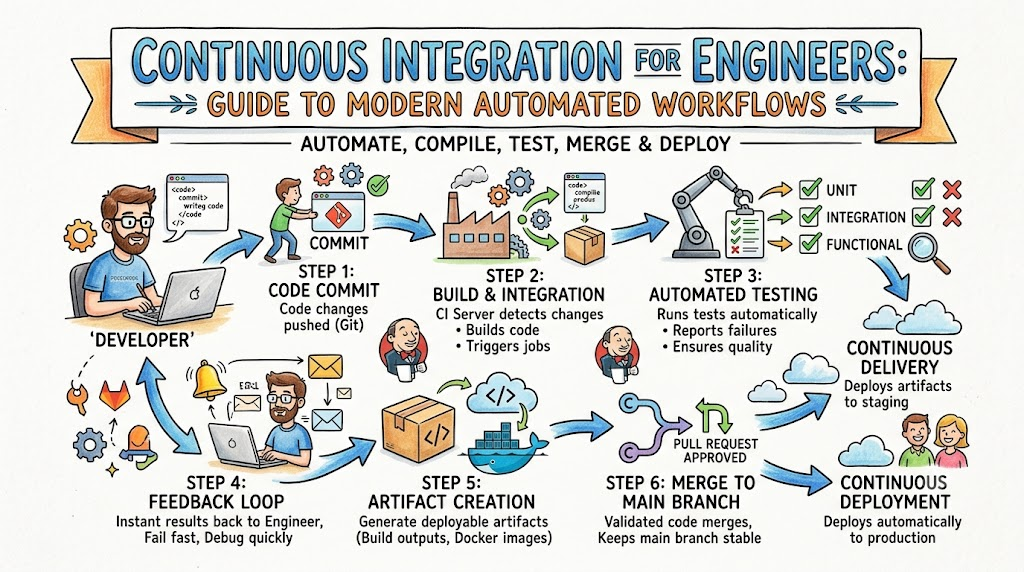
The execution lifecycle of a standard Continuous Integration pipeline follows a deterministic, event-driven sequence designed to validate code quality with minimal human intervention.
[Developer Commit] ──> [Push to Git] ──> [Webhook Trigger] ──> [CI Server Build] ──> [Automated Tests] ──> [Engineer Feedback]
Code language: CSS (css)
1. Developer Commits Code
An engineer completes a local task, such as refactoring an API routing layer or introducing a new data validation schema. The engineer executes a commit locally within their Git workspace, ensuring the code changes are logically grouped and documented.
2. Code Pushed to Git
The engineer pushes the local commit to a remote version control repository hosting service, such as GitHub, GitLab, or Bitbucket. This push action target can be a dedicated feature branch or a structured pull request aimed at the main trunk.
3. CI Server Triggers Pipeline
The remote Git repository processes the push event and fires an asynchronous HTTP POST webhook payload to the centralized CI server. The CI engine parses the metadata, identifies the modified branch, maps it to a defined pipeline blueprint, and provisions an isolated build execution agent.
4. Build Is Executed
The allocated CI build agent pulls the exact commit SHA from the repository. It instantiates a clean runtime environment, installs required compilers, pulls downstream package dependencies from an artifact registry, and executes the compilation scripts to generate binary executables or bytecodes.
5. Automated Tests Run
Once compilation completes successfully, the runner executes the automated testing matrix. This stage runs unit tests to validate granular method logic, integration tests to verify database and API communication boundaries, and security linters to scan for hardcoded secrets or vulnerability patterns.
6. Feedback Returned to Engineers
The CI server compiles the exit codes and logs from every execution step into a structured report. If any stage returns a non-zero exit code, the pipeline fails, and instant alerts are dispatched to the development team via webhooks, messaging channels, or automated emails. If all stages pass, the branch receives a verified status badge, permitting it to be safely merged into the core codebase.
CI Pipeline Architecture for Engineers
┌────────────────────────────────────────────────────────────────────────┐
│                        Central Version Control                         │
│                           (Git Repository)                             │
└──────────────────────────────────┬─────────────────────────────────────┘
                                   │ Webhook Trigger
                                   ▼
┌────────────────────────────────────────────────────────────────────────┐
│                           CI Pipeline Engine                           │
│                     (Orchestration & Coordination)                     │
└──────────────────┬───────────────────────┬─────────────────────────────┘
                   │                       │
                   ▼ Distributed Agents    ▼ Notifications
┌──────────────────────────────────────┐ ┌───────────────────────────────┐
│        Isolated Build Runners        │ │   Alerting Infrastructure     │
│  (Docker Containers / VMs / Pods)   │ │  (Slack, Email, MS Teams)     │
└──────────────────┬───────────────────┘ └───────────────────────────────┘
                   │
                   ▼ Publish Artifacts
┌────────────────────────────────────────────────────────────────────────┐
│                       Secure Artifact Repository                       │
│                     (Nexus, Artifactory, Container)                    │
└────────────────────────────────────────────────────────────────────────┘
A resilient CI architecture relies on decoupled components working in synchronization to process incoming code mutations securely, scalably, and efficiently.
| Component | Engineering Role |
| Source Control (Git) | Acts as the single source of truth for all application logic, configuration scripts, environment variables, and branch topologies. |
| CI Server Engine | Orchestrates pipeline scheduling, manages execution queues, authenticates credentials, and delegates computation tasks to distributed worker agents. |
| Build System / Runners | Ephemeral, isolated compute nodes (Docker containers, Virtual Machines, or Kubernetes pods) responsible for executing resource-intensive compilation and testing scripts. |
| Test Automation Framework | Programmatic test engines (JUnit, PyTest, Mocha) that run validation test suites and output structured execution matrices (JUnit XML, code coverage reports). |
| Artifact Storage Registry | Secure binary repositories (Sonatype Nexus, JFrog Artifactory, Docker Hub) that securely store immutable, verified build outputs like JARs, binaries, or container images. |
| Notifications System | Real-time notification infrastructure that streams pipeline execution health status, log analysis, and system errors directly back to engineering communication spaces. |
Key Stages of a CI Pipeline
Code Commit Stage
The pipeline initiates with the ingestion of source code changes from the developer’s workstation to the remote version control engine. This phase is governed by pre-commit and post-commit hooks that perform lightweight syntactic validations.
The primary engineering goal here is ensuring structural sanity before allocating heavy compute resources to downstream pipeline stages. Linters check for syntax violations, stylistic consistency, formatting compliance, and programmatic anti-patterns within the raw source files.
Build Stage
In the build stage, the isolated pipeline runner transforms human-readable source code into machine-executable formats. The runner pulls precise external libraries and internal module dependencies specified within lockfiles to guarantee reproducible environments.
Compilers validate syntactic correctness, type safety, component interfaces, and memory management layouts. If a developer introduces a typosquatting dependency or breaks an interface contract, the compiler halts execution immediately, outputting comprehensive debugging stacks.
Test Stage
The test stage acts as the primary quality gate of the entire software delivery lifecycle, divided into isolated execution tiers. First, lightweight unit tests run concurrently to validate deterministic, isolated algorithms and state changes without making network calls.
Next, integration tests execute to validate the interaction between internal code layers and external dependencies, such as mock databases, caching layers, and external message queues. High coverage requirements during this stage protect the core software against regression errors.
Validation Stage
Beyond functional testing, the verification phase runs deep architectural analysis using static application security testing (SAST) and code quality scanners. Tools evaluate the code to calculate overall cyclomatic complexity, uncover hidden code duplication, identify technical debt vectors, and scan for exposed API keys or encryption secrets.
Additionally, dependency vulnerability scanners cross-reference application manifest files against global vulnerability databases to block libraries containing known security exposures.
Reporting Stage
The final stage collects log streams, stdout profiles, execution statistics, and binary test reports from all previous execution nodes. The CI orchestration engine packages these insights into accessible, scannable visualizations embedded directly inside the pull request interface.
When a build fails, the system surfaces the exact line of code, stack trace, and test condition that caused the regression. When successful, it signs the resulting binary artifacts with a cryptographically secure hash and uploads them to the centralized artifact storage repository for downstream staging and deployment operations.
Popular CI Tools Used by Engineers
Selecting the appropriate build automation CI engine depends heavily on the organizational architecture, infrastructure strategy, and engineering team size.
| Tool | Use Case |
| Jenkins | Ideal for complex, highly customized enterprise setups requiring extensible plugins and bare-metal infrastructure control. |
| GitHub Actions | Perfect for teams looking for native, cloud-managed repository integration using modern YAML configuration syntax. |
| GitLab CI | Best for organizations seeking an all-in-one DevOps platform that unifies issue tracking, source control, and pipeline runners. |
| CircleCI | Suited for fast-growing startups prioritizing high-speed, managed cloud infrastructure with optimized build caching options. |
| Azure DevOps | Selected by large-scale enterprise environments embedded deeply within the comprehensive Microsoft cloud, hybrid, and software ecosystem. |
Jenkins
Jenkins remains an industry mainstay due to its open-source nature and massive plugin ecosystem. It allows engineers to construct complex pipelines using a Groovy-based Domain Specific Language (DSL), split into Declarative or Scripted formats.
Because it requires manual infrastructure maintenance, patch updates, and security hardening, it is generally favored by large infrastructure teams that require absolute control over their underlying build runner topologies.
GitHub Actions
GitHub Actions offers a modern, fully managed approach where pipelines are declared directly inside a repository using standardized YAML files. It eliminates the operational overhead of maintaining dedicated build servers by leveraging GitHub’s managed runner pools.
Its core strength lies in its extensive marketplace, allowing engineers to share and drop pre-built automation steps directly into their workflows without reinventing complex setup code.
GitLab CI
GitLab CI stands out for its deep integration within the larger GitLab application suite, using a single unified interface to govern the entire development lifecycle. Pipelines are configured through clean, concise text files that support advanced execution modeling, including Directed Acyclic Graphs (DAG).
This allows engineering teams to construct parallelized, multi-stage pipelines that run independent test suites without waiting for unrelated steps to finish, cutting build times down significantly.
Real-World Example: Engineering Team Without CI
To visualize the operational risk that DevOps CI basics fix, let us examine an engineering team building a financial ledger application manually. The team consists of twelve developers working on isolated, long-lived feature branches for three consecutive weeks.
[Dev 1: Feature A] ──┐
[Dev 2: Feature B] ──┼─> (No Automation) ─> [Manual Assembly Day] ─> Severe Conflicts & Outages
[Dev 3: Feature C] ──┘
Code language: CSS (css)
Without an automated pipeline, individual engineers compile the application locally on their respective workstations. One developer builds using Java 17, another uses Java 21, and a third developer relies on custom local environment variables that are entirely undocumented. The code compiles locally on each system, creating a false sense of security across the team.
When release day arrives, the lead engineer attempts to manually pull and merge all twelve feature branches into a shared development branch. Instantly, the terminal outputs hundreds of lines of complex git merge conflicts. Variable declarations overlap, database schemas clash, and internal library functions have been modified in conflicting ways. The team must pause all forward development for two full days to manually trace and resolve the conflicting code lines.
Once the merge conflicts are resolved manually, the lead engineer runs a shell script to build a production deployment package on their machine. The build fails due to a missing dependency configuration that was never added to the main code manifest.
After hacking a quick fix directly into the configuration, the artifact compiles and is pushed live to production. Within minutes, the support desk is flooded with error reports: a critical runtime NullPointerException is crashing the payment page because nobody ran regression tests against the combined codebase.
Real-World Example: Engineering Team Using CI
Now let us examine the exact same financial ledger application built by a development team leveraging a production-grade continuous integration workflow.
[Dev 1 Commit] ─> [Auto Pipeline Runs] ─> [Pass] ─> [Auto-Merged to Main Trunk]
[Dev 2 Commit] ─> [Auto Pipeline Runs] ─> [Fail] ─> [Blocked & Fixed in 5 Mins]
Code language: CSS (css)
Every engineer commits code multiple times a day directly to short-lived feature branches, submitting a Pull Request to the main trunk every time a micro-task is completed. The moment a Pull Request is initialized, the CI server provisions an isolated Docker container configured with the exact production runtime environment.
The automated pipeline compiles the application using the standardized engine settings, completely removed from any local workstation configuration bias. It instantly runs a comprehensive validation suite consisting of hundreds of unit and integration tests.
When a developer introduces a breaking change or an incompatible data model, the CI pipeline fails within four minutes. The system automatically marks the Pull Request with a red warning badge, locks the merge capability, and sends the execution logs directly to the developer’s chat workspace.
The rest of the engineering team continues working completely uninterrupted because the broken code was caught and contained before it could ever touch the main trunk. The developer reviews the clear, descriptive pipeline error log, applies the necessary fix locally, and pushes the correction. The automated pipeline reruns, turns green, passes code quality metrics, and permits the safe, automated merge. The master branch remains stable, verified, and continuously deployable to production at any given hour of the day.
Benefits of Continuous Integration for Engineers
Better Code Quality
Continuous Integration systematically eliminates subjectivity from code quality evaluations. Instead of relying purely on human code reviewers to spot structural flaws, formatting issues, or minor logical errors, automated static analysis gates apply standardized rules across every commit.
This ensures that architectural standards, test coverage levels, and security best practices remain uniform across the entire engineering organization, regardless of developer experience tier.
Faster Development Cycles
By breaking down massive software updates into granular, daily iterations, engineering teams compress the time it takes to move a feature from ideation to production. Developers spend significantly less time managing complex branch patterns and resolving structural merge blockages.
This streamlined workflow allows teams to iterate quickly on customer feedback, patch software vulnerabilities as they emerge, and ship updates smoothly without disrupting ongoing development cycles.
Reduced Debugging Time
When a software defect is introduced into a system lacking automation, finding the source of the bug requires extensive manual exploration through log aggregators and git histories spanning weeks of work.
With an automated validation pipeline, bugs are isolated to the exact commit that introduced them. Because the delta between a passing pipeline and a failing pipeline is often just a handful of lines of code, engineers can pinpoint, reproduce, and resolve errors with minimal troubleshooting.
┌────────────────────────────────────────────────────────────────────────┐
│                        Engineering Collaboration                       │
├──────────────────────────────────┬─────────────────────────────────────┤
│ WITHOUT CI                       │ WITH CI                             │
├──────────────────────────────────┼─────────────────────────────────────┤
│ • Code silos break team trust    │ • Single source of truth (Main)     │
│ • "It works on my machine"       │ • Standardized runtimes for all     │
│ • Finger-pointing over bugs      │ • Objective pipeline validations    │
│ • High stress during releases    │ • Stress-free, continuous merges    │
└──────────────────────────────────┴─────────────────────────────────────┘
Code language: JavaScript (javascript)
Common Engineering Mistakes in CI Implementation
- No Automated Testing Infrastructure: Setting up a continuous integration pipeline that merely compiles code without running comprehensive test suites turns the system into an expensive, low-value notification tool. The pipeline must actively validate code behavior to protect production environments.
- Overcomplex Pipelines with Excessive Stages: Designing massive, single-threaded pipelines that take over an hour to complete destroys developer velocity. Pipelines must be fast, highly parallelized, and optimized to provide feedback within ten minutes of a code push.
- Ignoring or Disabling Broken Build Warnings: Allowing a failing pipeline to sit unaddressed for days normalizes broken builds within a engineering culture. This practice conditions developers to ignore automated alerts, causing critical production defects to slip past unnoticed.
- Poor Branching Strategies and Long-Lived Branches: Keeping feature branches isolated from the main trunk for weeks defeats the core purpose of continuous integration. Teams must practice short-lived branching patterns or feature-flagging models to ensure regular code integration.
- Flaky Tests Managed Ineffectively within Suites: Allowing non-deterministic tests that alternate between passing and failing without code changes to remain in the main pipeline ruins engineering trust in automated feedback. Flaky tests must be immediately quarantined and refactored.
- Hardcoded Credentials and Secrets within Pipelines: Storing clear-text database passwords, SSH keys, or cloud access tokens directly inside configuration scripts introduces massive security risks. Engineering teams must use secure secrets managers integrated into the pipeline environment dynamically.
Best Practices for Engineers Learning CI
Start with Git Fundamentals
Before configuring complex automated infrastructure platforms, an engineer must develop a rock-solid understanding of advanced version control mechanics. Focus on mastering clean branch management strategies, detached HEAD states, interactive rebasing, and commit squashing protocols.
Understanding how Git structures changesets makes designing the logic of an automated build pipeline far more straightforward and intuitive.
Build Simple Pipelines First
Avoid trying to build a complex enterprise-grade architecture right out of the gate. Begin by crafting a lightweight, local, or single-stage pipeline that automates a single basic task, such as checking code formatting or compiling a binary.
Once that foundational workflow operates reliably and deterministically, gradually integrate more complex stages like containerization, static analysis gates, and artifact publishing.
[Basic Lint Check] ──> [Add Compilation Stage] ──> [Integrate Unit Tests] ──> [Add Secure Packaging]
Code language: CSS (css)
Automate Tests Gradually
Do not feel pressured to write a 90% comprehensive test matrix before configuring your first build pipeline. Start by writing two or three basic unit tests that validate the most critical core paths of your application logic.
Configure your automated system to execute these tests on every commit, and steadily expand test coverage as you fix bugs and introduce new feature capabilities over time.
Keep Pipelines Fast and Lean
An automation pipeline that bogs down developer velocity will eventually be circumvented or ignored by engineering teams. Actively optimize pipeline performance by using precise dependency caching strategies, minimizing build container base image sizes, and running independent test suites in parallel.
Aim to get initial feedback to developers within a five-to-ten-minute window from the moment they execute a push command.
Role of DevOpsSchool in Learning CI for Engineers
Developing a practical, industry-aligned understanding of continuous integration systems requires hands-on experience running production-grade workflows. Theoretical knowledge alone cannot prepare an engineer for the realities of debugging a broken cluster orchestration script or resolving deep dependency caching conflicts in a live system. Specialized platforms like DevOpsSchool address this educational gap by offering structured, lab-intensive learning ecosystems designed around modern software engineering challenges.
The learning paths focus on exposing engineers to real-world deployment challenges, mimicking the infrastructure layouts used by enterprise engineering organizations. Students configure live orchestration engines, build multi-tier pipelines using Declarative YAML and Groovy syntaxes, and integrate advanced security and code scanning gates directly into active codebases. This practical exposure teaches engineers to evaluate pipelines based on runtime efficiency, container security metrics, and resource utilization.
Furthermore, the curricula emphasize foundational engineering workflows over mere tool configuration. Aspiring engineers learn how to troubleshoot real pipeline bottlenecks, resolve complex build concurrency deadlocks, and implement resilient trunk-based development frameworks. This comprehensive, mentor-guided structure ensures that learners transition from simply writing isolated scripts to architecting robust, scalable delivery lifecycles that can confidently support high-velocity development engineering teams.
Career Importance of Continuous Integration Skills
In the contemporary technology market, understanding the mechanics of automated software delivery pipelines is a core competency required across nearly every major engineering discipline.
                       ┌─────────────────────────┐
                       │  Modern Systems Engineer │
                       └────────────┬────────────┘
                                    │
         ┌──────────────────────────┼──────────────────────────┐
         ▼                          ▼                          ▼
┌─────────────────┐        ┌─────────────────┐        ┌─────────────────┐
│Software Engineer│        │DevOps / Platform│        │  QA Automation  │
│ Writes code with│        │ Designs stable, │        │ Integrates heavy│
│ CI pipelines in │        │ scalable build  │        │ test suites into│
│ mind constantly │        │ run infrastructures│      │ continuous loops│
└─────────────────┘        └─────────────────┘        └─────────────────┘
Code language: JavaScript (javascript)
Software Engineer
Modern software engineers no longer write application logic in a complete vacuum, isolated from infrastructure considerations. They are expected to understand how their code interacts with compiler runners, package managers, and automated containerization tools. Knowing how to interpret pipeline diagnostics, optimize build footprints, and write testable code allows developers to ship features quickly and operate autonomously within high-velocity teams.
DevOps Engineer
For DevOps specialists, the continuous integration pipeline serves as the central nervous system of their infrastructure strategy. They are responsible for designing, securing, scaling, and maintaining the underlying automated systems that process the collective output of the entire engineering team. Mastering distributed runner orchestration, build node auto-scaling matrices, credential vault integrations, and artifact storage pathways is crucial for maintaining high levels of platform uptime.
QA Automation Engineer
The traditional model of performing manual, post-development quality assurance validation has largely been replaced by automated, inline testing frameworks. QA professionals must know how to embed their regression, end-to-end, and performance test suites directly into continuous delivery loops. This shift requires deep familiarity with headless browser execution configurations, test parallelization strategies, and parsing automated test reports within cloud environments.
SRE / Platform Engineer
Site Reliability Engineers and Platform Engineers treat build automation infrastructure as a fundamental software product. They focus on optimizing pipeline efficiency metrics, ensuring high availability of container execution systems, and protecting artifact storage networks against security exposures. They design shared, reusable pipeline templates that enforce corporate security compliance, resource constraints, and log management policies transparently across thousands of microservices.
Industries Using Continuous Integration
SaaS Companies
Software-as-a-Service organizations operate in highly dynamic, competitive market landscapes that require the continuous rollout of new user experiences and software patches. To maintain high developer velocity without causing user-facing downtime, SaaS providers rely heavily on automated integration architectures.
These automated systems validate hundreds of micro-commits daily, enabling teams to deploy updates continuously while ensuring core application performance remains uncompromised.
Banking & Finance
Financial engineering ecosystems handle massive transaction matrices under strict regulatory frameworks, where a single unhandled runtime bug can result in severe financial and legal liabilities.
As a result, banking institutions utilize highly secure continuous integration networks configured with rigid, mandatory security scanning gates. Every code mutation undergoes automated validation checking for structural flaws, compliance issues, and cryptographic integrity before it can advance toward production environments.
Healthcare Systems
Ecosystems serving the healthcare sector handle highly confidential patient records governed by strict data privacy mandates like HIPAA. Building software within this space requires rigorous validation of security schemas, access controls, and data encryption pathways.
Automated engineering pipelines in healthcare run specialized scanning matrices that check code against compliance frameworks, ensuring that application updates never compromise sensitive data storage systems.
┌────────────────────────────────────────────────────────────────────────┐
│                      Industry CI Pipeline Focus                        │
├────────────────────────────────────────────────────────────────────────┤
│ • SaaS Platforms ────────> High Velocity, Feature Flags, Micro-Updates  │
│ • Banking Systems ───────> Static Analysis, Security Gates, Compliance │
│ • E-Commerce ────────────> Load Testing, Zero-Downtime, Scale Profiles │
└────────────────────────────────────────────────────────────────────────┘
Code language: PHP (php)
E-Commerce Platforms
Digital retail architectures experience massive, highly unpredictable traffic fluctuations driven by promotional events, seasonal sales, and flash marketing campaigns.
To support these dynamic scaling demands, e-commerce engineering groups rely on integration pipelines that incorporate automated performance and load-testing steps. This guarantees that new checkout workflows or payment integrations can gracefully handle real-world load spikes without causing system degradation.
Future of Continuous Integration in Engineering
AI-Assisted CI Pipelines
The integration of specialized artificial intelligence models within software delivery infrastructures is transforming how engineering teams manage build health. Future automation pipelines will look beyond simple log parsing to actively analyze complex, multi-system compilation failures and stack traces.
AI modules will automatically evaluate incoming pull requests to predict regression probabilities, dynamically adjust test runner matrices based on code changes, and generate precise code patches to resolve pipeline errors before humans intercede.
Cloud-Native CI Systems
As organizations move away from traditional virtual machine infrastructure, modern execution pipelines are transitioning toward Kubernetes-native architecture patterns. Traditional, static build servers are being replaced by ephemeral execution nodes that spin up inside container orchestration clusters on a per-commit basis.
This cloud-native methodology optimizes compute costs, enforces absolute system isolation between individual builds, and allows engineering teams to scale runner capacity instantly to handle sudden compilation demands.
[Code Push] ──> [Ephemeral K8s Pod Created] ──> [Executes Build] ──> [Pod Destroyed instantly]
Code language: CSS (css)
Security-Integrated CI (DevSecOps)
The traditional approach of performing security validation checks right before a production release is rapidly giving way to a “shift-left” security methodology. Modern development pipelines treat security validation as an essential step during initial compilation tasks.
Every single commit faces automated verification against secret exposure, container layer vulnerability profiles, license compliance parameters, and software bill of materials (SBOM) anomalies, blocking security flaws during early development stages.
FAQs (15 Questions)
What is Continuous Integration?
Continuous Integration is a development practice where engineers regularly merge their code updates into a central Git repository multiple times a day. Each submission triggers an automated process that compiles the source code, runs security checks, and executes test suites to ensure the changes do not introduce defects or break application stability.
Why do engineers use CI?
Engineers implement continuous integration to achieve rapid feedback on the functional and structural health of their code modifications. This process eliminates complex, manual integration problems, catches software bugs immediately after they are written, reduces debugging times, and maintains the main repository branch in a clean, deployable state.
Is CI hard to learn?
Learning the fundamental principles of continuous integration is highly approachable if you already possess a working knowledge of Git and basic command-line utilities. While mastering complex enterprise pipeline architectures and advanced distributed runner management takes time and practice, establishing a basic automated pipeline can be mastered quickly.
Do engineers need coding skills for CI?
Yes, designing modern automated integration systems requires foundational programming and scripting competencies. Modern pipelines utilize configuration-as-code models defined via YAML or JSON structures, and frequently leverage shell scripts, Python scripts, or Groovy code to orchestrate complex compilation, linting, and testing behaviors.
What tools are used in CI?
The industry utilizes a diverse selection of orchestration platforms depending on specific infrastructure models. Popular solutions include Jenkins for highly customizable bare-metal environments, GitHub Actions and GitLab CI for unified repository ecosystems, and CircleCI or Azure DevOps for managed, enterprise-scale cloud pipelines.
What is a CI pipeline?
A continuous integration pipeline is a structured, automated sequence of step-by-step jobs configured to process code mutations from repository check-in to artifact generation. A standard pipeline includes isolated phases dedicated to source code fetching, dependency installation, code compilation, test suite execution, static quality analysis, and artifact packaging.
How is CI different from CD?
Continuous Integration focuses on the automated compilation, testing, and quality validation of code changes immediately following a repository push. Continuous Delivery (CD) takes over where CI finishes, automating the packaging, configuration management, and deployment of those validated artifacts into various target staging or live production environments.
Can beginners learn CI quickly?
Beginners can quickly grasp basic automation principles by starting with simple workflows, such as configuring a local GitHub Action to lint a Python script or run a basic Node.js test suite. As their confidence grows, they can systematically progress toward advanced multi-stage configurations, containerization steps, and cloud artifact publishing pipelines.
What happens when a CI build fails?
When an automated build fails, the pipeline engine halts execution immediately, locks the associated pull request to prevent merging broken code into the main branch, and dispatches detailed diagnostic alerts to the development team. The engineer can then review the clear log history and stack traces to fix the error.
What is a flaky test and why is it bad?
A flaky test is an unreliable test script that produces alternating pass and fail results across identical code bases without any underlying code modifications. Flaky tests erode engineering team trust in automated testing systems, slow down delivery speeds, and often mask legitimate application regressions.
What is the role of Docker in CI?
Docker provides isolated, immutable, and consistent execution environments for automated runners, ensuring that code compiles and tests run within identical runtime footprints. This eliminates configuration discrepancies between developer laptops and production servers, guaranteeing reproducible build results.
How often should engineers commit code when using CI?
Engineers should aim to commit and push their code modifications multiple times a day, breaking larger tasks down into small, logical increments. High-frequency commits ensure feature branches do not drift significantly from the master branch, making merge conflicts far simpler to resolve.
What are static analysis gates?
Static analysis gates are automated code evaluation steps that scan source text files without actively running the compiled application. These scanners measure code metric attributes such as overall cyclomatic complexity, uncover code duplication patterns, track technical debt indicators, and verify compliance with defined team style guides.
What is an artifact registry?
An artifact registry is a highly secure, centralized storage repository engineered to hold the verified binary outputs produced by successful automation pipelines. Examples include compiled JAR packages, compressed zip archives, or Docker container images, which are versioned and stored for downstream staging deployments.
Can CI be used for non-cloud applications?
Yes, continuous integration practices are valuable for non-cloud applications, including embedded firmware systems, native desktop software applications, mobile apps, and legacy on-premises enterprise systems. No matter the target runtime platform, automating compilation and testing workflows improves software reliability and velocity.
Final Thoughts
Continuous Integration is far more than a buzzword or an isolated toolset managed by an operations team. It represents a fundamental engineering discipline that directly influences how modern software systems are conceptualized, constructed, validated, and maintained.
By removing human error from code verification and packaging cycles, automation changes the software delivery lifecycle from a high-stress, unpredictable event into a routine, deterministic non-event.
Embracing an automated engineering mindset changes how developers write software. It encourages teams to design highly modular code bases, prioritize comprehensive automated test suites, and deliver features in clean, continuous phases.
As software delivery architectures continue to scale in complexity, teams that adopt structured pipeline patterns early will remain highly adaptable, resilient, and equipped to lead modern engineering organizations.

Find Trusted Cardiac Hospitals
Compare heart hospitals by city and services — all in one place.
Explore Hospitals