
Introduction
In the current era of software development, the gap between writing code and delivering that code to end-users has narrowed significantly. Gone are the days when developers would throw their code over a wall to an operations team, hoping it would run without issues. Today, cloud-native applications require a much more integrated approach. This is where the DevOps lifecycle becomes essential.
The DevOps lifecycle is not just a theoretical concept; it is the practical framework that allows engineering teams to ship features faster, maintain high availability, and ensure security without sacrificing speed. By understanding how automation, CI/CD pipelines, and infrastructure management fit together, you can transform how your organization delivers software.
If you are looking to master these concepts and gain practical skills, the DevOpsSchool platform provides structured pathways to help you move from theory to implementation. Learning these workflows is critical for any modern engineer who wants to excel in the world of cloud-native systems. This guide will walk you through the entire lifecycle, helping you understand how to connect development, operations, and testing into one seamless process.
What Is the DevOps Lifecycle?
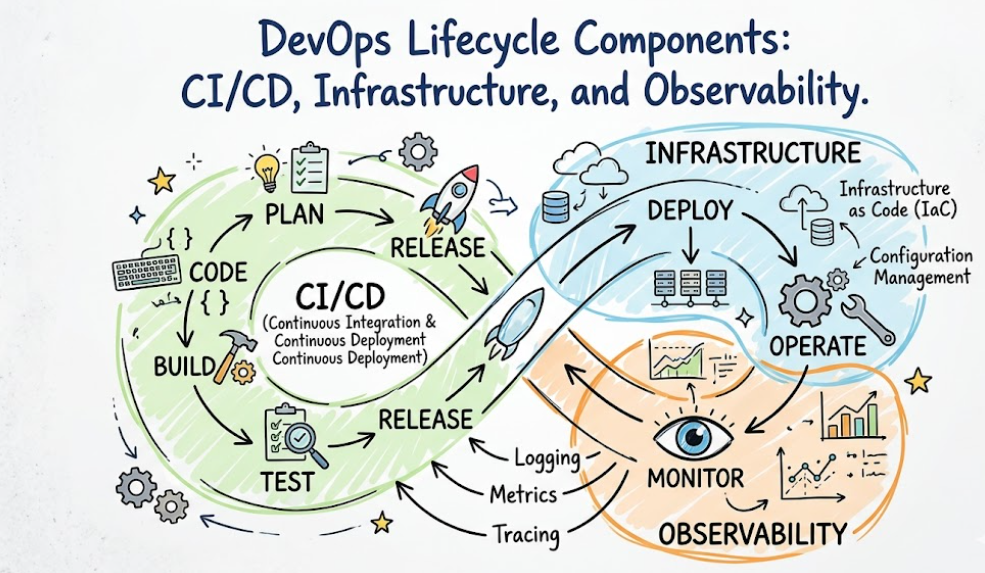
The DevOps lifecycle is the continuous, iterative process of developing, deploying, and managing software. It is a loop rather than a linear path because it emphasizes continuous improvement.
At its core, the lifecycle consists of multiple stages that overlap. Developers write code, which is then built, tested, and deployed automatically. Once in production, the application is monitored, and the feedback gathered from that monitoring is used to plan the next set of improvements. This cycle repeats, allowing teams to deliver updates in small, manageable batches rather than large, risky releases.
By utilizing automation, teams remove manual bottlenecks, reduce human error, and create a shared responsibility model where both developers and operations teams are invested in the success of the software.
Why the DevOps Lifecycle Matters
The primary goal of adopting the DevOps lifecycle is to improve the efficiency and reliability of software delivery.
- Faster Releases: By automating testing and deployment, code changes move from a laptop to a live environment in minutes, not weeks.
- Better Scalability: Modern tools allow infrastructure to scale automatically based on demand, which is critical for cloud-native apps.
- Reduced Downtime: Automated testing catches bugs before they reach production, and deployment strategies like canary releases minimize the impact if something does go wrong.
- Improved Collaboration: When developers and operations use the same tools and workflows, silos break down.
Enterprise organizations that adopt these practices often see a significant decrease in the time it takes to recover from failures and a massive increase in the frequency of deployments.
Evolution of the DevOps Lifecycle
Software delivery was not always this fast. In the traditional Waterfall model, requirements were gathered, code was written, and then the product was handed off to a separate testing team and finally to operations for deployment. This process was slow and prone to errors because the groups rarely talked to each other.
Agile improved communication by focusing on iterative development, but it did not solve the disconnect between development and operations. The DevOps movement emerged to solve this gap. It integrated the operational side into the development process, using automation to ensure that code is always in a deployable state. Today, this has evolved further into cloud-native engineering, where infrastructure is managed as code and deployments are handled by intelligent orchestrators.
Overview of the DevOps Lifecycle Stages
The following table summarizes the stages of the DevOps lifecycle.
| Stage | Purpose | Key Activities | Common Tools |
| Planning | Define work | Requirements, Sprints | Jira, Confluence |
| Development | Write code | Coding, Version Control | Git, GitHub |
| Build | Compile code | Artifact creation | Maven, Gradle |
| CI | Merge code | Automated Testing | Jenkins, GitLab CI |
| Testing | Validate code | Security, Performance | Selenium, SonarQube |
| Release | Approval | Versioning | Artifactory, Nexus |
| Deployment | Ship code | Infrastructure push | Kubernetes, Argo CD |
| Operations | Management | Scaling, maintenance | Ansible, Terraform |
| Monitoring | Visibility | Logging, Alerting | Prometheus, Grafana |
| Feedback | Improve | Incident analysis | PagerDuty, Slack |
Stage 1: Planning
Planning is where the work begins. It is not just about writing tasks; it is about defining the features that provide value to the user. Teams use Agile methodologies to break large projects into small, manageable tasks (user stories).
During this phase, teams use tools like Jira or Trello to track progress. Clear communication here prevents scope creep and ensures that every developer knows what they are building and why.
Stage 2: Development
Development is the act of writing the actual application code. In a DevOps environment, this involves using version control systems (like Git) to manage changes.
The key here is frequent branching and merging. Instead of waiting for a massive feature to be complete, developers merge small chunks of code into the main branch regularly. This makes integration much smoother later on.
Stage 3: Build
Once the code is pushed to the repository, the build stage kicks in. This process converts the source code into a runnable artifact (such as a JAR file, a binary, or a container image).
Tools like Maven or Gradle handle dependencies, ensuring that the code has all the libraries it needs to function. A successful build is the first validation that the code is syntactically correct and can be packaged.
Stage 4: Continuous Integration (CI)
Continuous Integration is the practice of merging code changes into a central repository multiple times a day. Each merge triggers an automated build and test sequence.
If the build or tests fail, the team is notified immediately. This “fail-fast” approach is critical because it forces developers to fix issues while the code is still fresh in their minds, rather than discovering bugs weeks later during a manual release.
Stage 5: Testing
Testing in a DevOps pipeline is automated. It moves beyond simple unit tests to include integration tests, security scanning, and performance benchmarks.
Security testing (often called DevSecOps) is integrated here, ensuring that vulnerabilities are caught before the code ever gets close to a production server. Tools like SonarQube help enforce code quality standards automatically.
Stage 6: Release Management
Once the code has passed testing, it is ready to be released. This stage involves moving the artifact into a repository (like Nexus or Artifactory) where it is versioned and stored.
Change management protocols are often handled here to ensure that the team knows exactly what version of the software is being deployed and that all approvals are in place.
Stage 7: Deployment
Deployment is the process of moving the application into the target environment (staging or production). In modern setups, this is rarely done manually.
Automated pipelines use tools like Kubernetes, Helm, or Argo CD to push the application to the cluster. Strategies like Blue-Green deployment (running two identical environments) or Canary deployment (releasing to a small subset of users first) are used to eliminate downtime.
Stage 8: Operations
Operations focus on keeping the system running. This involves managing the underlying infrastructure, patching servers, and scaling resources to meet traffic demands.
With the rise of cloud-native architectures, operations are often automated through Infrastructure as Code (IaC), where the state of the infrastructure is defined in version-controlled files.
Stage 9: Monitoring & Observability
You cannot manage what you cannot see. Monitoring provides visibility into the health of your application. It tracks metrics (CPU/Memory usage), logs (what happened), and traces (how a request moved through the system).
Tools like Prometheus and Grafana are standard for visualizing this data, allowing teams to spot issues before they impact the end user.
Stage 10: Continuous Feedback
The final stage is feedback. This involves looking at the data from the monitoring stage and user reports to identify where the application needs improvement.
This feedback loop directly informs the next cycle of planning, creating a perpetual motion of improvement.
CI/CD Pipelines in the DevOps Lifecycle
The CI/CD pipeline is the backbone of the DevOps lifecycle. It is the automated assembly line for software.
- Continuous Integration (CI): The practice of automating the building and testing of code every time a developer commits changes.
- Continuous Delivery (CD): The practice of ensuring that the code is always in a deployable state, though the actual deployment to production might be a manual trigger.
- Continuous Deployment: The practice where every change that passes the pipeline is automatically deployed to production without manual intervention.
| Feature | CI | Continuous Delivery | Continuous Deployment |
| Automation | High | High | Very High |
| Manual Approval | None | Yes (for Production) | None |
| Goal | Code Quality | Release Readiness | Speed to Market |
Role of Automation in the DevOps Lifecycle
Automation is not just “nice to have”; it is the foundation of the DevOps lifecycle. Without it, the manual overhead of managing complex cloud environments would be impossible. Automation extends to provisioning servers (Infrastructure as Code), testing (Automated Testing Frameworks), and deployment (Pipeline Orchestration). It removes the human element from repetitive tasks, ensuring that processes are executed consistently every single time.
Infrastructure as Code in the DevOps Lifecycle
Infrastructure as Code (IaC) is the practice of managing hardware and networking configurations through machine-readable definition files. Instead of manually clicking through a cloud console to set up a server, you write a script (using Terraform, Ansible, or CloudFormation) that defines the desired state of your infrastructure.
This approach makes your environment reproducible. If you need a new staging environment, you run the code, and the infrastructure is built exactly like the production one, minimizing “it works on my machine” issues.
Containers and Kubernetes in the DevOps Lifecycle
Containers (like Docker) allow you to package an application with all its dependencies, ensuring it runs reliably on any infrastructure. Kubernetes (K8s) takes this further by orchestrating these containers, handling scaling, load balancing, and self-healing.
In a DevOps lifecycle, Kubernetes acts as the standard operating environment. It provides a consistent way to deploy applications, making the shift from developer laptop to production cloud seamless.
DevSecOps and Security Integration
Security cannot be an afterthought; it must be integrated into every stage of the DevOps lifecycle. This is known as DevSecOps.
By running automated security scans during the CI stage, teams can identify vulnerabilities in code or dependencies before they are built. Secret management tools ensure that passwords and API keys are never hardcoded in source files. Compliance automation checks the infrastructure against security policies, ensuring the system remains hardened as it scales.
Real-World DevOps Lifecycle Workflow Example
Consider a typical update to an e-commerce application:
- Planning: The team identifies a bug in the checkout flow and creates a ticket in Jira.
- Development: A developer writes a fix and pushes the code to a Git repository.
- Build/CI: A CI server detects the change, triggers a build, and runs unit tests.
- Testing: Integration and security tests run automatically.
- Release: The new artifact is pushed to the repository with a version tag.
- Deployment: A CD tool updates the Kubernetes cluster to use the new container image.
- Operations/Monitoring: The monitoring system alerts the team if the checkout error rate increases.
- Feedback: The team confirms the bug is fixed based on logs.
This entire sequence happens without any manual infrastructure provisioning or manual server updates.
Benefits of the DevOps Lifecycle
- Faster Time to Market: Features reach customers faster.
- High Reliability: Automation reduces human error.
- Improved Efficiency: Teams spend less time on manual tasks and more on innovation.
- Better Security: Security is built-in, not bolted on.
- Enhanced Team Morale: Developers and operations work as one unit, reducing friction.
Common Challenges in the DevOps Lifecycle
- Cultural Resistance: Moving to DevOps requires a change in mindset, which can be difficult for organizations used to siloes.
- Tool Sprawl: Having too many tools can create complexity. Focus on the right tools for your needs.
- Legacy Systems: Older systems may not support modern automation easily and require modernization.
- Skill Gaps: DevOps requires a broad range of skills, from coding to systems engineering.
Best Practices for Managing the DevOps Lifecycle
- Start Small: Don’t try to automate everything at once. Focus on one pipeline.
- Embrace Infrastructure as Code: Manual configuration is the enemy of consistency.
- Prioritize Observability: You cannot improve what you cannot measure.
- Automate Tests First: If you don’t trust your tests, you won’t trust your automated deployments.
- Foster Collaboration: Encourage cross-functional teams where Dev and Ops sit together.
DevOps Lifecycle vs Traditional Software Delivery
| Feature | Traditional Delivery | DevOps Lifecycle |
| Deployment Speed | Slow (Weeks/Months) | Fast (Hours/Days) |
| Automation | Low (Manual) | High (Full Automation) |
| Collaboration | Siloed Teams | Integrated/Shared Responsibility |
| Monitoring | Reactive | Proactive/Real-time |
| Reliability | Low (High failure rate) | High (Automated Recovery) |
| Feedback Cycles | Long (End of project) | Continuous |
Popular Tools Used Across the DevOps Lifecycle
| Tool | Lifecycle Stage | Purpose | Difficulty Level |
| Jira | Planning | Task Management | Low |
| Git | Development | Version Control | Low |
| Jenkins | CI | Pipeline Automation | Medium |
| Terraform | Operations | Infrastructure as Code | High |
| Kubernetes | Deployment | Orchestration | High |
| Prometheus | Monitoring | Metric Collection | Medium |
Industries Benefiting from the DevOps Lifecycle
- Banking & Finance: Requires strict compliance and security, which DevSecOps provides.
- Healthcare: Benefits from the high availability and reliability of automated systems.
- E-Commerce: Needs fast updates and the ability to scale during high-traffic events like sales.
- SaaS Platforms: Rely on constant updates to stay competitive.
- Telecom: Manages massive infrastructure that requires automated scaling and healing.
Career Opportunities Related to the DevOps Lifecycle
- DevOps Engineer: Focuses on pipeline automation and integration.
- Cloud Engineer: Focuses on cloud platform management and scaling.
- Platform Engineer: Focuses on building internal tools for other developers to use.
- SRE (Site Reliability Engineer): Focuses on reliability, performance, and incident response.
- DevSecOps Engineer: Focuses on integrating security into every pipeline stage.
The industry demand for these roles is high. Companies are looking for professionals who understand the entire lifecycle, not just one tool. For those starting, the DevOpsSchool ecosystem offers guidance on gaining these specific skills.
Certifications & Learning Paths
To grow in this field, hands-on practice is superior to reading alone.
| Certification | Best For | Skill Level | Focus Area |
| Kubernetes CKA | Cloud Engineers | Advanced | Orchestration |
| Terraform Associate | DevOps Engineers | Intermediate | IaC |
| AWS/Azure Solutions | Cloud Engineers | Intermediate | Cloud Platform |
Common Beginner Mistakes
- Tool Hopping: Trying to learn Jenkins, GitLab, GitHub Actions, and CircleCI at the same time. Pick one and master it.
- Ignoring Linux: Almost all DevOps tools run on Linux. If you don’t understand the command line, you will struggle.
- Skipping Networking Basics: You need to know how IP addresses, DNS, and load balancers work.
- Not Monitoring: Building a pipeline is not enough; you must know how to monitor the application it deploys.
- Relying on Tutorials: You must build your own projects to truly understand the integration.
Future of the DevOps Lifecycle
The future lies in Platform Engineering, where teams provide internal platforms that make it easy for developers to self-serve infrastructure. We are also seeing the rise of AI-assisted operations, where machine learning models analyze logs to predict failures before they happen. GitOps is also gaining traction, where the entire state of the system is managed solely via Git repositories.
FAQs
- What is the DevOps lifecycle?
It is an iterative framework for developing and deploying software, combining development and operations to increase delivery speed and reliability. - Why is the DevOps lifecycle important?
It aligns development and operations, reducing silos, increasing release frequency, and improving overall system stability. - What are the stages of the DevOps lifecycle?
It typically covers planning, development, build, CI, testing, release, deployment, operations, monitoring, and feedback. - Is Kubernetes part of the DevOps lifecycle?
Yes, Kubernetes is a central tool in the deployment and operations stages of the modern cloud-native lifecycle. - What is CI/CD in DevOps?
CI (Continuous Integration) automates code merging/testing, while CD (Continuous Delivery/Deployment) automates the release and deployment to environments. - Why is monitoring important?
Monitoring provides the data necessary for the feedback loop, allowing teams to improve performance and react to incidents quickly. - What tools are used in the DevOps lifecycle?
Tools vary by stage but include Git (Dev), Jenkins (CI), Terraform (IaC), Kubernetes (Deploy), and Prometheus (Monitoring). - Is DevOps a good career path?
Yes, there is high demand for engineers who understand how to automate software delivery and manage cloud-native infrastructure. - What is Infrastructure as Code (IaC)?IaC is the practice of provisioning and managing infrastructure using code files instead of manual configuration.
- Does DevOps replace developers?
No, DevOps improves how developers work by providing them with better tools and automated environments. - What is the difference between DevOps and Agile?
Agile focuses on project management and iterative development; DevOps focuses on the technical integration and automation of the delivery process. - Can DevOps work in a legacy environment?
Yes, but it requires modernization steps, such as wrapping legacy apps in containers or using automation scripts for server management. - Is security included in the DevOps lifecycle?
Yes, through DevSecOps, which embeds automated security testing into the CI/CD pipeline. - How do I start learning the DevOps lifecycle?
Start by learning Linux, Git, and a cloud provider (AWS/Azure/GCP), then explore the DevOpsSchool learning pathways. - What is the “feedback loop” in DevOps?
It is the process of using data from production monitoring and user feedback to inform the planning phase of the next release.
Final Thoughts
Understanding the DevOps lifecycle is about moving away from “working hard” to “working smart.” It is about recognizing that software delivery is a system that can be measured, optimized, and automated.
As a professional, your value is not in knowing every single tool on the market, but in understanding the principles of flow, feedback, and automation. Cloud-native skills are the currency of the modern IT job market. Focus on building projects, automating your own local workflows, and deeply understanding how these stages connect.
There is no shortcut to mastery; it requires consistent practice. Use the DevOpsSchool platform as a resource to guide your learning, but ensure you are always building things with your own hands.

Find Trusted Cardiac Hospitals
Compare heart hospitals by city and services — all in one place.
Explore Hospitals