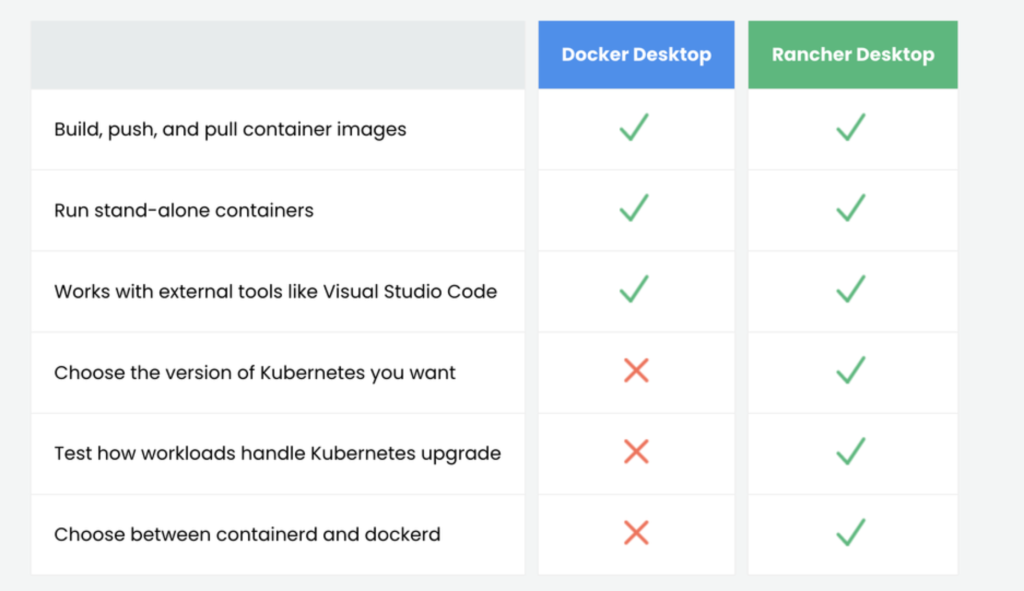
When comparing Docker Desktop vs Rancher Desktop, especially in 2026 with Apple Silicon, open-source trends, and license changes in mind, it’s important to break down all key differences, similarities, and potential alternatives in a clear, structured way.
✅ Docker Desktop vs Rancher Desktop – Comprehensive Comparison (2026 Edition)
| Feature / Area | Docker Desktop | Rancher Desktop |
|---|---|---|
| Developer | Docker Inc. | SUSE (via Rancher team) |
| Purpose | Full Docker experience on macOS/Windows | Kubernetes + containerd/docker on desktop |
| Container Runtime | dockerd | containerd (default) or dockerd |
| Kubernetes Support | ✅ Built-in, optional, managed by Docker | ✅ Built-in, via k3s or k3d |
| VM Usage | ✅ Yes (via HyperKit or Apple Hypervisor) | ✅ Yes (uses lima and container runtime) |
| GUI / Dashboard | ✅ Full-featured GUI (container mgmt, volumes) | ✅ Lightweight GUI (settings, versions) |
| CLI Compatibility | ✅ docker CLI included | ✅ docker + nerdctl CLI support |
| Open Source | ❌ Partially closed source, paid for teams | ✅ Fully open source |
| License / Cost | ❌ Free for personal/small use only (Docker Business license required for teams) | ✅ Free and open-source |
| System Requirements | Slightly heavier, more memory & disk use | Lighter and leaner |
| Apple Silicon Support | ✅ Yes (with emulation if needed) | ✅ Native support, faster startup |
| WSL2 Support (Windows) | ✅ Yes | ✅ Yes |
| File Sharing | ✅ GUI-managed | ✅ Configurable manually |
| Networking | Built-in, consistent | Requires setup (via lima/QEMU) |
| Auto-updates | ✅ Yes (optional) | ✅ Yes (manual or prompt) |
| Learning Curve | Very low – plug and play | Slightly higher (choice of runtime/K8s) |
🧩 Key Similarities
- Both allow you to build, run, and manage containers locally.
- Both support Kubernetes for local cluster testing.
- Both work on macOS (Intel + ARM) and Windows.
- Both support volume mounts, networking, and container image building.
🧠 Main Differences
- Licensing: Docker Desktop has stricter licensing for companies; Rancher Desktop is open-source.
- Runtime Choice: Rancher Desktop allows switching between
containerdanddockerd. - Docker CLI: Docker Desktop includes it natively; Rancher uses
nerdctlbut can install docker CLI if using dockerd. - Target Audience:
- Docker Desktop is more polished and ideal for general Docker users.
- Rancher Desktop is more DevOps/Kubernetes-focused and appeals to open-source developers.
🔄 Best Use Cases
| Tool | Best For |
|---|---|
| Docker Desktop | Beginners, teams focused on Docker containers, simple local development |
| Rancher Desktop | Developers doing Kubernetes development, CI/CD testing, open-source workflows |
🚀 Other Great Alternatives to Docker Desktop (2026)
| Tool | Description | Pros | Best For |
|---|---|---|---|
| Colima | Lightweight VM manager for containers via Lima (Homebrew) | Fast, minimal, CLI-focused, open-source | CLI users, devs who want lightweight |
| Podman Desktop | Open-source Docker alternative with full GUI, rootless containers | Secure, Docker-compatible, active dev | Developers focused on security |
| Minikube | Local Kubernetes cluster using container runtimes or VMs | Great for K8s testing | Kubernetes training/testing |
| Lima | Mac-native VM manager (used by Colima, Rancher, etc.) | Barebones, very flexible | Devs who want to customize fully |
| k3d | Run lightweight k3s clusters in Docker | Kubernetes focus, fast setup | K8s CI/CD environments |
🔚 Conclusion: Which One Should You Choose?
| Scenario | Recommendation |
|---|---|
| You want full Docker features + GUI | ✅ Docker Desktop |
| You want an open-source, flexible stack | ✅ Rancher Desktop or Colima |
| You’re building/test Kubernetes locally | ✅ Rancher Desktop or Minikube |
| You’re security-conscious (rootless) | ✅ Podman Desktop |
| You’re part of a company avoiding Docker licensing fees | ✅ Rancher, Colima, or Podman |

I’m Rajesh Kumar, a DevOps, SRE, DevSecOps, Cloud, and Platform Engineering expert passionate about sharing practical knowledge, real-world experiences, and industry best practices. I have worked at Cotocus and regularly write about technology, travel, investing, health, product reviews, and digital marketing through my various platforms.
I publish technical articles at DevOps School, travel stories at Holiday Landmark, stock market insights at Stocks Mantra, health and fitness guidance at My Medic Plus, product reviews at TrueReviewNow, and SEO and digital marketing strategies at Wizbrand.
Find Trusted Cardiac Hospitals
Compare heart hospitals by city and services — all in one place.
Explore Hospitals