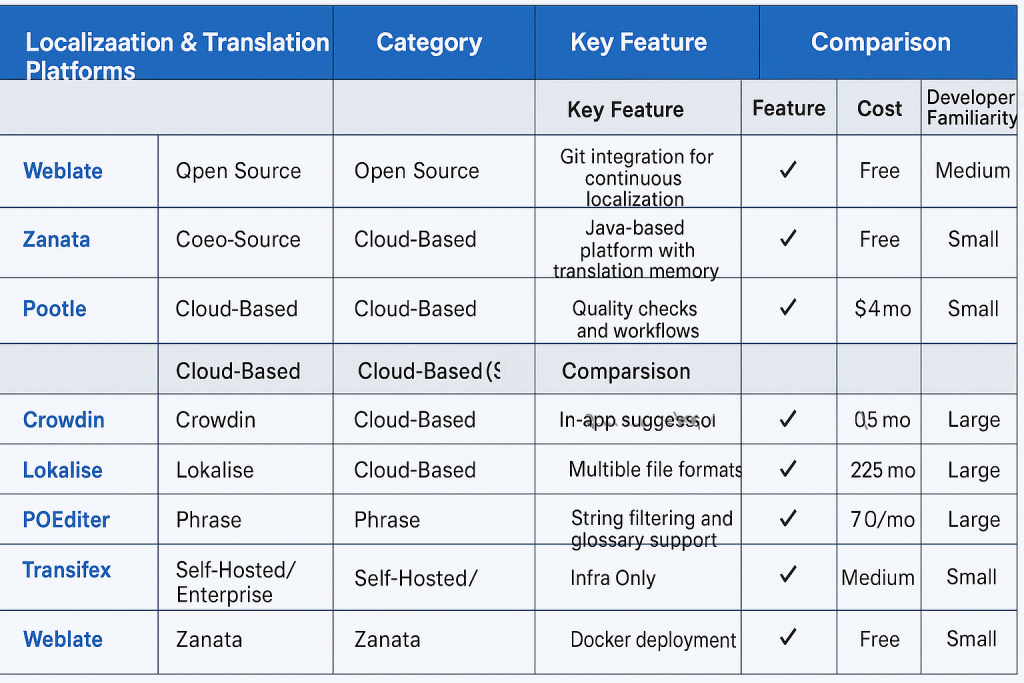
Here’s a comprehensive list of localization and translation platforms categorized into Open Source, Cloud-based (SaaS), and Self-hosted/Enterprise solutions. Each tool includes a key feature, and at the end, you’ll find a detailed comparison table based on features, cost, and developer familiarity.
🌍 Localization & Translation Platforms
✅ Open Source Platforms
Tool
Key Feature
Weblate
Git integration for continuous localization with VCS
Zanata
Java-based platform with rich translation memory
Pootle
Translation management with quality checks and workflows
Tolgee
In-context translation with JS SDK and integration for React, Angular, Vue
Lokalise CLI (OSS Wrapper)
CLI-driven integration with cloud services for automation
☁️ Cloud-Based (SaaS) Platforms
Tool
Key Feature
Crowdin
Developer-friendly API with branch-based workflow
Lokalise
In-app suggestions, context image previews, CLI & API
POEditor
Support for multiple file formats and team collaboration
Phrase (formerly PhraseApp)
Powerful integrations with GitHub, GitLab, Bitbucket, and CI/CD tools
Transifex
Advanced string filtering and glossary support
Smartling
Enterprise-grade workflow management with visual context
🏢 Hosted/Self-Managed Platforms
Tool
Key Feature
Weblate (self-hosted)
Can run fully on-premise with Git hooks
Tolgee Server (Docker)
Easy Docker deployment for self-hosted localization
Zanata (RHEL/OpenShift)
Full control over translation workflows for large orgs
Pootle (Python/Django)
Customizable for enterprise needs
TMS by Phrase (Enterprise)
Hybrid model with API and custom SLA-based hosting
I’m Rajesh Kumar, a DevOps, SRE, DevSecOps, Cloud, and Platform Engineering expert passionate about sharing practical knowledge, real-world experiences, and industry best practices. I have worked at Cotocus and regularly write about technology, travel, investing, health, product reviews, and digital marketing through my various platforms.
I publish technical articles at DevOps School, travel stories at Holiday Landmark, stock market insights at Stocks Mantra, health and fitness guidance at My Medic Plus, product reviews at TrueReviewNow, and SEO and digital marketing strategies at Wizbrand.
Find Trusted Cardiac Hospitals
Compare heart hospitals by city and services — all in one place.
I'm Rajesh Kumar, a DevOps, SRE, DevSecOps, Cloud, and Platform Engineering expert passionate about sharing practical knowledge, real-world experiences, and industry best practices. I have worked at Cotocus and regularly write about technology, travel, investing, health, product reviews, and digital marketing through my various platforms.
I publish technical articles at DevOps School, travel stories at Holiday Landmark, stock market insights at Stocks Mantra, health and fitness guidance at My Medic Plus, product reviews at TrueReviewNow, and SEO and digital marketing strategies at Wizbrand.
here’s a clear, structured breakdown of the Best DevOps Tools (grouped by categories), so you can use it for learning, training, or posts. 🚀 Best DevOps Tools…
Lab Objective In this lab, you will install and use OpenShift Serverless Functions on OpenShift Local. You will create a simple Node.js serverless function, deploy it to…
Lab Objective In this lab, you will deploy a Java Spring Boot application on OpenShift using the OpenShift web console. You will deploy two components: The Java…
Lab Objective In this lab, you will deploy an application on OpenShift from an existing container image. This lab is different from building an application from source…
Option – 1 – REDHAT Websites URL – https://access.redhat.com/downloads/content/290/ver=4.18/rhel—9/4.18.11/x86_64/product-software Option – 2 – OKD Websites The OKD (Origin Community Distribution of Kubernetes for OpenShift) is the open-source…