
Introduction
In the world of modern software engineering, the stability of our systems is the foundation upon which everything else is built. Whether you are managing a Kubernetes cluster, a cloud-native database, or a complex microservices architecture, uptime is not just a metric on a dashboard; it is the currency of user trust. When a system goes down, it is not just the service that suffers; it is the productivity of the engineering team and the loyalty of the customer base.
To manage this, engineering teams rely on reliability metrics. Among these, Mean Time Between Failures (MTBF) stands out as a critical indicator of how well a system performs over time. Understanding this metric allows teams to move from a reactive state of “firefighting” to a proactive state of “engineering.” At DevOpsSchool, we have seen how mastering these fundamental concepts transforms how teams handle outages and operational capacity.
This guide is designed to strip away the jargon and provide a clear, practical, and experience-driven look at MTBF. We will explore what it means, how to calculate it, and why it is a cornerstone of Site Reliability Engineering (SRE) and DevOps practices today.
What Is Mean Time Between Failures (MTBF)?
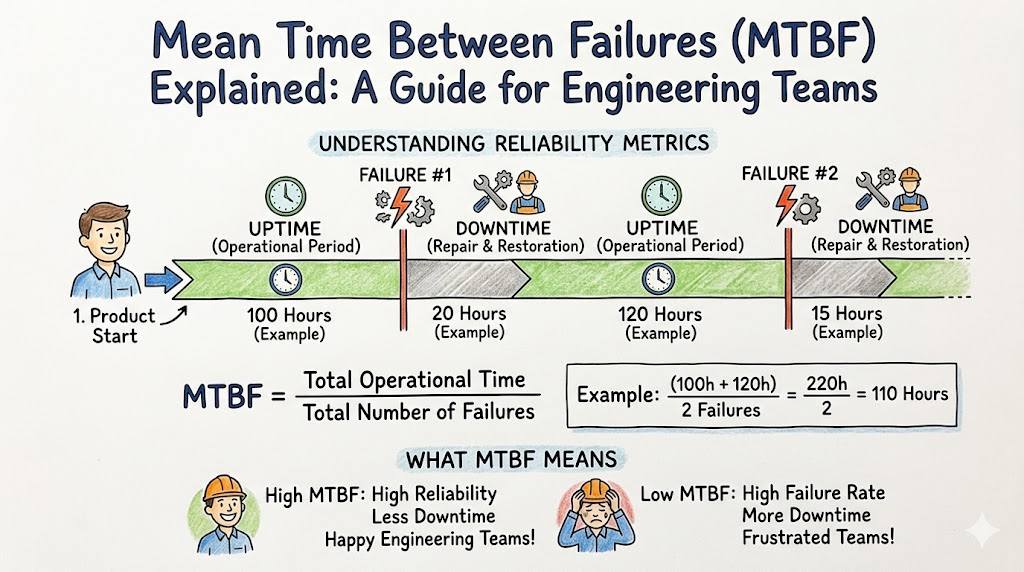
Mean Time Between Failures (MTBF) is a fundamental reliability metric that represents the average elapsed time between inherent failures of a system during normal system operation. It is a measurement of the reliability of hardware, software, or entire infrastructure components.
In simple terms, MTBF tells you how long, on average, a system stays up and running before it hits an issue that causes downtime or a service degradation. It is not a prediction of the future, but rather a statistical analysis of past performance that helps engineers understand the frequency of interruptions.
Organizations use MTBF to quantify reliability because qualitative assessments like “the system feels stable” are insufficient for enterprise operations. You need hard data to justify investment in infrastructure, architectural changes, or training programs.
Why MTBF Matters for Teams
Reliability is rarely accidental; it is engineered. MTBF matters because it provides the data points necessary to drive improvement.
- Reliability Improvement: By tracking MTBF, teams can identify specific components or services that are failing more frequently than expected, allowing for targeted remediation.
- Reduced Downtime: Understanding the frequency of failure helps teams implement better monitoring and preventative maintenance strategies.
- Better Planning: Capacity planning and resource allocation become more accurate when you have a predictable understanding of how often your infrastructure requires intervention.
- Predictable Operations: It moves teams away from guesswork. When you know your MTBF, you can communicate realistic service level objectives (SLOs) to stakeholders and customers.
Consider a database cluster that fails every two weeks. By measuring this, the team realizes they have a low MTBF. This data helps them justify the need to migrate to a managed service or fix the underlying storage configuration, effectively increasing the MTBF and the overall stability of the business.
How MTBF Works
To understand how MTBF works, you have to look at the lifecycle of an application or service. It is not just about the uptime; it is about the interval between consecutive incidents.
The metric relies on two primary variables:
- Total Operating Time: The cumulative amount of time the system was functional.
- Number of Failures: The total count of incidents that caused downtime or service disruption during that specific period.
The math assumes the system is repaired and put back into operation after each failure. It essentially calculates the “rhythm” of your system’s stability. If a system is highly reliable, the time between these failures will be long. If the system is brittle, the time between failures will be short.
MTBF Formula Explained
The formula for MTBF is straightforward and essential for any SRE toolkit.
$$MTBF = \frac{\text{Total Operating Time}}{\text{Number of Failures}}$$
Beginner-Friendly Breakdown
- Total Operating Time: The sum of all time periods where the system was running and serving requests successfully.
- Number of Failures: The total count of documented incidents or outages within the observation window.
Example: Simple Application
If your application was running for 1,000 hours and experienced 2 failures, your MTBF is:
$$1000 \div 2 = 500 \text{ hours}$$
This means that, on average, your system runs for 500 hours before encountering a failure.
Enterprise Example
If a global cloud infrastructure monitors a specific microservice over a month (720 hours) and records 3 significant failures:
$$720 \div 3 = 240 \text{ hours}$$
The team now knows that, on average, they face a disruption every 240 hours. This is the baseline from which they can measure improvement.
MTBF Calculation Examples
To master this, you must look at specific scenarios.
Example 1: Small Application Team
- Observation Period: 30 days (720 hours).
- Events: The server crashed twice due to memory leaks.
- Calculation: 720 hours / 2 failures = 360 hours.
- Takeaway: The team needs to address memory management to increase this duration.
Example 2: Enterprise Cloud Platform
- Observation Period: 1 year (8,760 hours).
- Events: 12 incidents (1 per month on average).
- Calculation: 8,760 / 12 = 730 hours.
- Takeaway: This indicates a highly stable environment where failures are rare but perhaps systemic, requiring deep-dive root cause analysis (RCA).
Example 3: E-Commerce Website
- Observation Period: 1 week (168 hours).
- Events: 8 outages (due to load spikes).
- Calculation: 168 / 8 = 21 hours.
- Takeaway: This is critical. The system is failing almost every day. Immediate infrastructure scaling or load balancing configuration is required.
MTBF vs MTTR vs MTTF
It is easy to confuse these metrics. This table provides the distinction.
| Metric | Full Name | Purpose | Best Used For |
| MTBF | Mean Time Between Failures | Measures system reliability/uptime interval. | Track how often repairs are needed. |
| MTTR | Mean Time To Repair | Measures average time to fix a failure. | Measure incident response efficiency. |
| MTTF | Mean Time To Failure | Measures expected life of non-repairable components. | Hardware or disposable resources. |
- MTBF: Focuses on the “interval.” How long until the next time we have to fix something?
- MTTR: Focuses on the “speed of recovery.” Once we are down, how fast can we get back up?
- MTTF: Focuses on “longevity.” If this component breaks, we replace it; we don’t repair it.
Role of MTBF in DevOps and SRE
In DevOps and Site Reliability Engineering, MTBF is a guiding light for continuous improvement.
- Incident Reduction: When teams track MTBF, they identify patterns. If the MTBF for a specific service drops, it triggers an immediate investigation into code deployments or infrastructure changes.
- Reliability Engineering: It moves the focus from “fixing bugs” to “improving system design.”
- Observability: Without proper monitoring (logs, metrics, traces), you cannot accurately calculate MTBF. Therefore, tracking this metric forces teams to improve their observability stack.
When an SRE team sees the MTBF trending downward, it is a signal that technical debt is accumulating. It allows them to push back on feature requests from product managers in favor of reliability work.
Systems Where MTBF Is Commonly Used
MTBF is applied across various layers of the technology stack:
- Cloud Infrastructure: Used to monitor the stability of virtual machine clusters and availability zones.
- Servers: Essential for tracking hardware failure rates in on-premises data centers.
- Databases: Critical for understanding transaction consistency and failure intervals.
- APIs: Used to measure the reliability of service endpoints.
- Kubernetes Clusters: Tracking the stability of node health and pod scheduling.
- Networking Systems: Monitoring the reliability of load balancers, switches, and firewalls.
Factors That Affect MTBF
Several elements can negatively impact your MTBF:
- Hardware Failures: Physical wear and tear in server components.
- Software Bugs: Memory leaks, race conditions, or unhandled exceptions that crash services.
- Configuration Errors: Incorrect settings that cause service drift or stability issues.
- Human Mistakes: Unintentional misconfigurations during deployment or manual overrides.
- Poor Monitoring: Lack of visibility prevents early detection, leading to longer downtimes and inaccurate failure tracking.
Real-World Example: Low MTBF Scenario
A startup launches a new payment microservice. They do not have robust monitoring. They experience frequent, short-lived outages caused by connection pooling issues.
- The Impact: Customers receive “500 Internal Server Errors” intermittently.
- Operational Stress: The engineers are constantly paged. The MTBF is low, meaning the team is in a constant state of “break-fix.”
- Lessons Learned: The team realizes that ignoring reliability metrics has created a toxic work culture and lost revenue. They pivot to implementing circuit breakers and better connection management.
Real-World Example: High MTBF Scenario
A mature SaaS platform monitors their infrastructure with high-precision tooling.
- The Impact: The system runs for months without significant intervention.
- Customer Experience: High uptime leads to high trust.
- Contrast: Because their MTBF is high, the engineering team has the bandwidth to work on new features, innovation, and long-term architectural improvements rather than patching constant fires.
Common Challenges in Measuring MTBF
Measurement is not always straightforward. Common hurdles include:
- Incorrect Incident Tracking: Not every blip is an incident. Teams struggle to define what constitutes a “failure.”
- Missing Data: If your monitoring system goes down, you lose the ability to calculate accurate uptime.
- Short Observation Periods: Measuring MTBF over a single day is statistically insignificant. You need longer trends.
- Complex Systems: In distributed microservices, determining the “failure” of a single component versus the entire system is difficult.
Solution: Establish clear definitions for “Failure” and “Uptime” in your service level agreements (SLAs) and keep a centralized incident register.
Best Practices to Improve MTBF
Improving MTBF requires a systematic engineering approach:
- Better Monitoring: Use tools to capture every error and downtime event.
- Incident Prevention: Implement automated testing, canary deployments, and chaos engineering.
- Automation: Automate the repair processes so that systems heal themselves (self-healing infrastructure).
- Root Cause Analysis: Every failure must be analyzed. Why did it happen? Why did we not catch it earlier?
- Infrastructure Reliability: Use redundant systems, multi-region deployments, and load balancers to minimize the impact of single points of failure.
Monitoring Tools That Help Track MTBF
To measure MTBF effectively, you need a robust observability stack:
- Prometheus: Excellent for collecting time-series metrics from infrastructure and applications.
- Grafana: The go-to tool for visualizing these metrics into clear dashboards showing uptime and failure intervals.
- Datadog: A comprehensive platform that automates the tracking of service health and incident duration.
- Splunk: Useful for log aggregation and tracing the root causes of failures to calculate accurate MTBF.
Common Beginner Misunderstandings
When starting with reliability metrics, avoid these traps:
- High MTBF means zero failures: False. It only means failures happen less frequently.
- MTBF prevents incidents: False. It measures them; it does not stop them.
- MTBF alone measures reliability: False. You must combine it with MTTR (repair speed) to get the full picture.
- MTBF only matters for SRE teams: False. Developers who write the code and managers who plan the roadmap need to understand these metrics too.
How Teams Use MTBF for Better Decision Making
Reliability metrics are strategic tools.
- Capacity Planning: If you know your MTBF for a storage system, you know when to replace it before it likely fails.
- Infrastructure Upgrades: When MTBF dips, it is a data-driven trigger to perform a hardware refresh or upgrade the software stack.
- Risk Reduction: Teams use MTBF to identify “brittle” parts of the system that represent the highest risk to the business.
- Service Improvement: Product managers can prioritize reliability sprints when they see the hard data on how often systems fail.
Role of DevOpsSchool in Learning Reliability Engineering
Building a reliable system requires a mindset shift. At DevOpsSchool, the focus is on practical, hands-on learning. We do not just teach the definitions; we guide students through the actual practice of setting up monitoring, calculating metrics, and performing incident analysis.
Understanding reliability engineering is about exposure to real-world workflows. Whether you are learning about SRE fundamentals, mastering monitoring tools, or understanding how to manage incident lifecycles, structured training helps you connect theory to the keyboard. Reliability is a skill, and like any engineering skill, it is best learned through mentored practice and exposure to industry-standard tools.
Career Importance of Reliability Metrics
For any engineer in the cloud era, these metrics are vital for career progression.
- SRE Engineer: This is your core business. You live and breathe MTBF and MTTR.
- DevOps Engineer: You are responsible for the CI/CD pipeline, and measuring the reliability of that pipeline is key.
- Cloud Engineer: You manage the resources that live or die by these reliability metrics.
- Platform Engineer: You build the internal tools that other teams use; their reliability depends on your platform’s stability.
Skills Needed: Monitoring, incident management, reliability engineering, automation, and data analysis.
Industries That Depend on MTBF
High-reliability industries rely on these metrics to survive:
- Banking & Finance: One minute of downtime can cost millions.
- Healthcare: Systems must be available for patient safety.
- SaaS Platforms: Trust is the product.
- E-Commerce: Downtime during high-traffic events like sales is catastrophic.
- Telecom: Networks must maintain near-perfect uptime.
- Enterprise IT: Internal stability is required for organizational productivity.
Future of Reliability Metrics
The future of MTBF is predictive, not just reactive.
- AI-Assisted Incident Prevention: AI models will analyze logs to predict a failure before it happens, essentially increasing MTBF artificially by stopping errors in their tracks.
- Predictive Reliability: Moving from “how often did it fail” to “how often is it likely to fail based on current trends.”
- Self-Healing Systems: Systems that recognize a dip in MTBF and automatically trigger infrastructure scaling or redeployment.
FAQs
- What is Mean Time Between Failures (MTBF)?
It is the average time between inherent failures of a system during normal operation. - How is MTBF calculated?
Divide the Total Operating Time by the Number of Failures. - Why is MTBF important?
It quantifies system reliability and helps teams make data-driven decisions for improvements. - What is the difference between MTBF and MTTR?
MTBF measures the time between failures, while MTTR measures the time taken to fix the failure. - Is higher MTBF always better?
Generally, yes, as it implies the system runs longer without interruption. - Can MTBF prevent failures?
No, it measures them, but the data derived from it can help you build preventative measures. - Which tools measure MTBF?
Monitoring and observability platforms like Prometheus, Grafana, Datadog, and Splunk. - Why does MTBF matter in DevOps?
It allows DevOps teams to measure the success of their deployments and infrastructure stability. - What is the difference between MTBF and MTTF?
MTBF applies to repairable systems; MTTF applies to non-repairable components (like hardware parts that are replaced). - How can I improve my team’s MTBF?
Focus on root cause analysis, automated monitoring, and infrastructure redundancy. - Does MTBF include scheduled downtime?
Typically, no. It focuses on failures during active operating time. - Can MTBF be used for software?
Yes, it is widely used to track software stability and service reliability. - Is MTBF a predictor of the future?
It is a statistical expectation based on past performance, not a crystal ball. - What is a “bad” MTBF?
That depends on the system requirements. A critical banking system needs a much higher MTBF than an internal dev environment. - How does observability help with MTBF?
You cannot calculate MTBF without accurate, timestamped data on when systems went down and when they returned.
Final Thoughts
Reliability is not a feature you add at the end of a project; it is a discipline you practice every day. MTBF is a powerful tool because it forces us to face the reality of our system’s behavior. When we measure the time between failures, we stop speculating about stability and start managing it.
As you move forward in your engineering career, remember that metrics like MTBF are meant to guide your decisions, not replace your judgment. Use them to identify weaknesses, justify the resources you need to fix them, and build systems that stand the test of time. Reliability requires constant attention, but the payoff is a system that supports your users and empowers your team.

Find Trusted Cardiac Hospitals
Compare heart hospitals by city and services — all in one place.
Explore Hospitals
A key gap in most MTBF discussions is how the metric behaves in modern cloud-native and CI/CD-driven systems where “failure” is not binary but often partial and transient. In real SRE practice, MTBF can become misleading when systems use auto-scaling, self-healing, and blue-green deployments, because short-lived failures may never be recorded consistently or may be masked by redundancy layers. Another overlooked aspect is the relationship between MTBF and mean time to detect (MTTD) and mean time to restore (MTTR)—focusing on MTBF alone can give a false sense of reliability if detection delays or recovery inefficiencies are high. It would also be useful to connect MTBF with service-level objectives (SLOs) and error budgets, since modern reliability engineering is less about maximizing MTBF and more about balancing reliability with delivery velocity and operational cost.