
Gradle is a build automation tool used mostly for Java, Kotlin and Android projects. Builds are written in a Groovy or Kotlin DSL, organized into tasks and plugins, and Gradle orders the tasks in a directed acyclic graph so each one runs only after its dependencies.
The posts here start with overviews of what Gradle is, how its architecture works and how to install and configure it, then go deeper into tasks, plugins and the task DAG. Reference posts include compatibility tables mapping Gradle releases to supported Java versions, and Android Studio releases to compatible JDK and Gradle versions. Many practical guides deal with Android and Flutter work, such as getting a SHA-1 fingerprint for Firebase with gradlew signingReport or fixing the NDK version mismatch error after an Android Gradle plugin upgrade. There is also a long Develocity tutorial covering Build Scan and Build Cache, and a set of 50 Gradle interview questions.
Build engineers, Android and Flutter developers and DevOps engineers maintaining CI pipelines will find quick fixes here alongside a structured path into Gradle.
Start here
- What is Gradle and How it works? An Overview and Its Use Cases? – Overview of Gradle's architecture, use cases, features and alternatives to get oriented.
- What is Gradle and use cases of Gradle? – Explains Groovy and Kotlin DSL, the build workflow, and step-by-step installation and configuration.
- Gradle Tasks are exaplained in 10 mins! – Quick introduction to tasks and plugins, and how plugins add tasks and conventions.
- What is Gradle DAG (Directed Acyclic Graph)? – Shows how Gradle uses a DAG to order tasks and resolve dependencies.
- Gradle versions, their supported Java versions, and unsupported Java versions – Compatibility table for matching Gradle releases to supported Java versions.
- Android Studio SDK Version Compatibility Table with JDK and Gradle – Matches Android Studio releases with working JDK and Gradle versions, plus upgrade pitfalls.
- Develocity: The Complete Beginner-to-Advanced Tutorial – Self-study course on Develocity covering Build Scan, Build Cache and test optimization.
- Top 50 interview questions and answers of Gradle – 50 interview questions on running builds, Kotlin build logic and plugins.
Latest Gradle articles
Develocity: The Complete Beginner-to-Advanced Tutorial
A practical self-study course covering Developer Productivity Engineering, Build Scan, Build Cache, build acceleration, test optimization, architecture, deployment, integrations, security, and enterprise operations. 28 chapters | Beginner…
Gradle Training Curriculum: Hands-On Learning Path for Build and DevOps Engineers
A revised, practical Gradle training guide based on the original course outline. It maps the agenda to hands-on labs, CI workflow, and team-ready build practices.
Sonatype Nexus Repository Manager: A Practical DevOps Introduction
Sonatype Nexus helps teams centralize dependency downloads and internal artifact publishing. This guide shows how Nexus fits into CI/CD, when to use hosted/proxy/group repos, and how to configure common build clients.
Gradle for DevOps: Core Concepts, Build Workflow, and Practical Examples
Gradle is a flexible build automation tool used to compile, test, package, and publish software in repeatable pipelines. This guide explains how Gradle works, how it compares with Maven and Ant, and how to start with practical commands.
Advanced Features of Smart Build Tools for Faster, Reproducible CI/CD
Smart build tools do much more than compile code: they cache, parallelize, enforce dependency rules, and improve reproducibility. This guide compares common options and shows practical commands you can use in real pipelines.
Gradle Training in Pune: Learn Modern Build and Dependency Management
Introduction Build automation has become a core requirement in modern software development. As applications grow larger and teams work faster, managing builds manually becomes slow, error-prone, and…
Gradle in Pune: Build Faster, Cleaner, and More Reliable Releases
Introduction If you have worked on any Java or Android project, you already know this pain: builds that take too long, dependencies that break at the wrong…
Gradle Training in Bangalore: A Practical, Job-Focused Course Guide
Introduction Modern software teams ship changes every day. But many developers and build engineers still lose hours on builds that are slow, unpredictable, or hard to reproduce….
Master Gradle in Hyderabad: Boost Your DevOps Career
In the fast-paced world of software development, speed, reliability, and automation are no longer luxuries—they are necessities. For developers and DevOps engineers in Hyderabad, a city rapidly…
Master Gradle in Chennai: Boost Your DevOps Career with Expert Training
In the fast-paced world of software development, efficiency, reliability, and speed are non-negotiable. The cornerstone of achieving this lies in robust build automation and dependency management. If…
Master Gradle in Bangalore: Boost Your DevOps Career with Expert Training
In the fast-paced world of modern software development, efficiency, reliability, and speed are non-negotiable. At the heart of achieving these goals lies a critical practice: build automation….
Artifactory: using Gradle and Uploading Artifacts to Artifactory
Step-by-Step Guide: Creating a Java Project with Gradle and Uploading Artifacts to Artifactory 1. Install Prerequisites 2. Create a New Java Project Using Gradle Open your terminal…
Android app build and publishing workflow using GitHub Actions
To fully automate your Android app build and publishing workflow using GitHub Actions, we’ll break it into three main steps: ✅ What This GitHub Action Will Do…
Android Studio SDK Version Compatibility Table with JDK and Gradle
Let’s add the latest Android Studio version for 2024 if available, with its corresponding Gradle and Java compatibility details. Based on typical release patterns, here’s an updated…
Gradle versions, their supported Java versions, and unsupported Java versions
Here’s a table that outlines Gradle versions, their supported Java versions, and unsupported Java versions: Gradle Version Supported Java Versions Not Supported Java Versions Gradle 6.x 8,…
Dependency Management tools in 2024
The world of dependency management tools continues to evolve in 2024, offering increasingly sophisticated solutions for handling the complex web of dependencies in modern software development. Following…
Build tools in 2024
When it comes to build tools in 2024, the landscape continues to evolve with new trends and advancements. Here’s a breakdown of some key points to consider:…
What is Gradle and use cases of Gradle?
What is Gradle? Gradle is an open-source build automation tool that is designed to be flexible, powerful, and highly customizable. It is often used for building, testing,…
Jenkins Pipeline: Code coveragenusing JaCoCo
Rajesh KumarI’m Rajesh Kumar, a DevOps, SRE, DevSecOps, Cloud, and Platform Engineering expert passionate about sharing practical knowledge, real-world experiences, and industry best practices. I have worked…
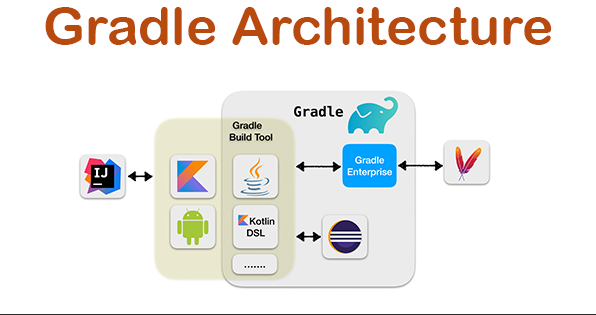
What is Gradle and How it works? An Overview and Its Use Cases?
What is Gradle? Gradle is a popular choice for Java developers who want flexibility and performance in a build automation tool. Gradle is a modern automation tool…
Top 50 interview questions and answers of Gradle
Short description about Gradle Gradle is an open-source build automation tool that is designed to be flexible enough to build almost any type of software. Moving to…
Top Gradle interview questions and answers
What is Gradle build tool? Gradle is a build automation tool based on Groovy and Kotlin. It’s open-source and flexible enough to build almost any type of software….
How to install Gradle?
Step – 1: Install Required version of JAVA Step – 2: Downlod and Extract Step – 3: Set gradle into a path $ export PATH=$PATH:/opt/gradle/gradle-7.1.1/bin$ gradle -version$…
Top 10 Build Management Tools updated 2020
In this blog we are going to discuss about top 10 build management tools which are most popular and utilised by DevOps professionals. While faster software development…
[SOLVED] Flutter: A problem was found with the configuration of task ‘:google_sign_in:compileDebugJavaWithJavac’.
In my flutter project, when i Started Debugging then it returns an Exception message which is FAILURE: Build failed with an exception. See the below output of…
How to Get SHA-1 key in Android Studio for Firebase.
There are two methods of getting SHA-1 key, but First one is not working for Windows user. So, if you are a Windows user then go for…
[SOLVED] Error: Your app isn’t using AndroidX.
I developed an app in flutter with Visual Studio code on Windows. When i ran the project it shows a message, Your app isn’t using AndroidX.To avoid…
[!] The shrinker may have failed to optimize the Java bytecode. Exited (sigterm) in Flutter
If you get such type of error When you run a Project in Flutter App in Android emulator then – After that open your project in editor…
No version of NDK matched the requested version in flutter >> Solved.
Hello Guys i was trying to get The SHA1 key to integrate firebase in my flutter app.After updating to Android Gradle plugin 3.6.0 (released Feb 24, 2020), several project independently…
How to get the SHA-1 fingerprint certificate for firebase in Android Studio for debug mode?
First, open Android Studio in your system and open or create a Flutter project after that open “Android” folder’s “app” folder and open “build.gradle“. When you open…
Gradle: frequently asked questions
What is the difference between Gradle and Maven?
Maven uses XML and a fixed lifecycle, while Gradle uses a Groovy or Kotlin DSL with a flexible task graph. Gradle also supports incremental builds and a build cache, which can make repeated builds faster.
Why use the Gradle Wrapper (gradlew) instead of an installed Gradle?
The wrapper downloads and runs the exact Gradle version defined in the project, so every developer and CI agent builds with the same version. It also removes the need to install Gradle manually.
How do I get the SHA-1 key for Firebase in an Android or Flutter project?
Run ./gradlew signingReport (or gradlew signingReport on Windows) from the Android project folder, which is the android directory in a Flutter project. The output lists the SHA-1 and SHA-256 fingerprints for each build variant; keytool works as an alternative.
Which Java version should I use with Gradle?
Each Gradle release supports a specific range of Java versions, and running an unsupported JDK causes build failures. Check the Gradle compatibility matrix, and for Android projects also check the Android Gradle plugin requirements.