
Introduction
AI lab image analysis tools help research and clinical labs turn raw images into measurable biological or medical insights faster and with less manual work. These tools use artificial intelligence, machine learning, and deep learning to segment cells, classify phenotypes, detect structures, measure morphology, track objects, and analyze large image batches from microscopy, cell assays, pathology, and related imaging workflows. This matters because traditional image analysis often depends on manual thresholds and repeated parameter tuning, which can become slow, inconsistent, and difficult to scale when image quality, contrast, object density, or dimensionality changes. Real world use cases include cell segmentation, nucleus counting, label free viability measurement, 3D organoid analysis, phenotype classification, object tracking, high content screening, and quantitative imaging for clinical trials. Buyers should evaluate these tools based on image type support, model quality, workflow usability, batch processing, reproducibility, integration, transparency, scalability, and how well they perform on the lab’s own images.
These tools are best for life science labs, drug discovery teams, imaging core facilities, biotech companies, and clinical research groups that process moderate to large volumes of images and need repeatable quantitative analysis. They are especially useful when researchers work with low contrast images, crowded fields, 3D samples, multiplexed channels, or time lapse data that rule based methods handle poorly. They are less ideal for very small labs with simple low volume image tasks that can still be handled easily in basic image software.
Why it matters
Lab imaging is central to modern biology, drug discovery, and clinical research, but manual image analysis is slow, subjective, and hard to scale to high content or time lapse experiments. Traditional rule based image analysis requires carefully tuned parameters that often break when lighting, focus, or cell morphology changes, forcing scientists to constantly tweak settings instead of focusing on biology. AI matters because deep learning based segmentation and classification can adapt to complex, low contrast, and noisy images far better than simple thresholding and filtering rules, which improves both accuracy and reproducibility. In high throughput and high content settings, AI tools make it possible to analyze thousands of images or wells consistently, detect subtle phenotypic changes, and remove operator to operator variability that used to limit confidence in quantitative results. This is especially important in areas such as organoid assays, 3D spheroids, stem cell imaging, and radiological trial readouts, where data volume and complexity are both high.
Real world use cases
A core use case is AI based cell and object segmentation, where deep learning models segment cells, nuclei, organoids, spheroids, or colonies in brightfield or fluorescence images, even when there is low contrast, uneven background, or overlapping objects. Platforms like Aivia and IN Carta use deep learning engines and modules such as Segment by Example or SINAP so that scientists can label a few example cells or regions and then apply a trained model across full 2D and 3D datasets, instead of hand tuning segmentation rules for each experiment. Another important use case is phenotypic classification, where tools such as Phenoglyphs take hundreds of descriptors from segmented objects and automatically group them into phenotype classes, which helps researchers compare treatment effects, screen compounds, or infer mechanisms based on image derived features. In clinical and translational settings, tools like AI based image labs for X ray or other medical imaging support clinical trials by extracting quantitative measures from images to support endpoints and reduce subjectivity in radiological assessments. Across these use cases, labs increasingly rely on batch processing, standardized analysis workflows, and AI powered modules that can be retrained or adjusted with relatively little coding effort.
Evaluation criteria for buyers
When buyers evaluate AI lab image analysis tools, the first criterion should be image type and domain fit, including whether the platform is optimized for microscopy, high content screening, pathology, or radiology images, and whether it supports 2D, 3D, time lapse, and multiplexed channels. The second is segmentation and classification quality, including how well the tool handles challenging images such as low contrast brightfield, crowded fields, 3D structures, or variable backgrounds, and how easy it is to train or adapt models with only a small set of labeled examples. Buyers should also look at workflow and usability, such as whether non programmers can design pipelines, run batch analysis, and review results through intuitive interfaces, and how easily they can integrate the tool with existing microscopes, plate readers, or image management systems. Governance and reproducibility are important, so teams should check how the platform records model versions, analysis parameters, and training sets, and whether it supports audit trails and standardized protocols across users and sites. Finally, buyers need to consider performance and scale, including batch throughput, hardware requirements, cloud versus on premises options, error handling, and vendor support, and they should pilot the tool on their own real lab images to ensure that claimed accuracy and efficiency gains hold up under actual experimental conditions
What Is Changing in This Category
- Deep learning segmentation is replacing many manual rule based pipelines.
- More platforms now support no code or low code AI model deployment for scientists.
- 2D and 3D batch analysis are becoming standard expectations in advanced tools.
- Label free analysis is becoming more practical with AI based classification and segmentation.
- High throughput and cloud connected workflows are growing in importance.
- Explainability and transparency matter more as labs want trust in model outputs.
- Phenotypic analysis is moving beyond counting toward richer biological descriptors.
- More vendors are packaging AI into user friendly workflows instead of requiring data science expertise.
- Reproducibility and shareable workflows are becoming key buying criteria.
- AI is expanding from cell biology into clinical trial imaging and quantitative radiology support.
Quick Buyer Checklist
- Check whether the tool supports your exact image type, such as brightfield, fluorescence, pathology, radiology, 2D, 3D, or time lapse.
- Ask how well the tool handles crowded objects, low contrast images, and noisy backgrounds.
- Confirm whether scientists can train or adapt models without coding.
- Review batch processing support for large image sets and repeated experiments.
- Check whether the system records analysis settings and model versions for reproducibility.
- Ask about deployment options such as cloud, workstation, or edge workflows.
- Review integration with microscopes, imaging platforms, and downstream reporting workflows.
- Test segmentation quality on your own images before committing.
- Ask whether the vendor supports 3D, multiplex, and spatial relation measurements if you need them.
- Review usability for biologists, not only imaging specialists.
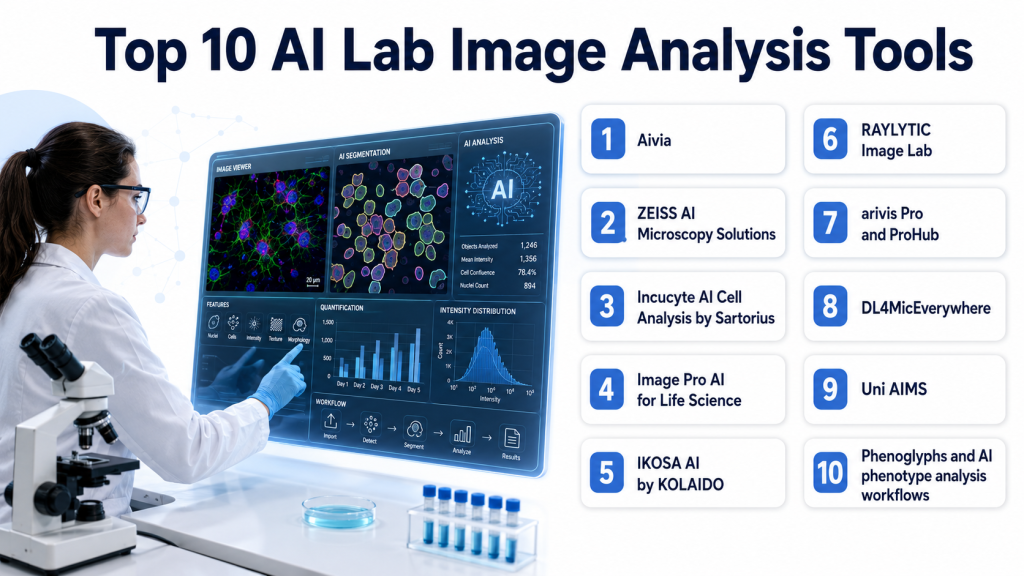
Top 10 AI Lab Image Analysis Tools
1. Aivia
One line verdict: Best for labs wanting easy to use AI microscopy analysis with strong 2D and 3D workflows.
Short description:
Aivia is an AI powered image analysis platform used in microscopy workflows for segmentation, detection, tracking, and batch analysis. It is designed to help scientists start quickly, label only a small number of examples, and scale analysis across 2D and 3D datasets.
Standout Capabilities
- AI powered object detection and segmentation.
- Paint on a few example cells to deploy a generalist deep learning model.
- Supports 2D and 3D cell detection and segmentation.
- Batch processing for segmentation, classification, and spatial relation measurement.
- Pre built workflows for cell detection, tracking, and neuron analysis.
- Strong usability focus for faster analysis setup.
AI Specific Depth
- Model support: Proprietary AI and deep learning workflow, exact model flexibility not publicly stated.
- Knowledge integration: Image analysis workflow support is public, broader external connector detail not publicly stated.
- Evaluation: Public material cites improved 3D detection compared with earlier versions.
- Guardrails: Not publicly stated in detail.
- Observability: Batch workflow and process support are public, deeper model observability not publicly stated.
Pros
- Strong usability for non expert users.
- Good support for 2D and 3D analysis.
- Useful batch processing for scaling experiments.
Cons
- Public security and deployment detail are limited.
- Exact model transparency is limited in reviewed sources.
- Best suited to microscopy focused workflows rather than every imaging domain.
Security and Compliance
Not publicly stated in the reviewed material for this comparison.
Deployment and Platforms
Platform and deployment details are not fully publicly stated in the reviewed material.
Integrations and Ecosystem
Aivia appears strongest as a practical microscopy analysis environment for life science users. Buyers should validate compatibility with their image sources, export needs, and team workflows.
Pricing Model
Best Fit Scenarios
- Microscopy labs with mixed 2D and 3D workloads.
- Biologists needing low friction AI analysis.
- Teams scaling batch imaging workflows.
2. ZEISS AI Microscopy Solutions
One line verdict: Best for biopharma and advanced imaging teams needing scalable AI analysis across complex datasets.
Short description:
ZEISS offers AI driven microscopy image analysis across ZEN, arivis Cloud, arivis Pro, and ProHub. The platform is aimed at users who need segmentation, classification, automation, and deployment across larger, more complex imaging workflows.
Standout Capabilities
- AI driven segmentation and classification.
- Handles low contrast and high density imaging challenges.
- Supports cloud based training data labeling through arivis Cloud.
- Deploys models in ZEN workflows and arivis platforms.
- Scales to large multidimensional data and server based analysis.
- Good fit for pharma and biotech image analysis pipelines.
AI Specific Depth
- Model support: AI, machine learning, and deep learning workflows are publicly stated.
- Knowledge integration: Connects model training with ZEISS software ecosystem and server scale analysis workflows.
- Evaluation: Public material emphasizes robust performance in challenging imagery and large datasets.
- Guardrails: Workflow structure is public, specific AI guardrail detail not publicly stated.
- Observability: Pipeline deployment and scale are public, detailed model observability not publicly stated.
Pros
- Strong enterprise scale and workflow breadth.
- Good performance claims for difficult segmentation problems.
- Strong fit for large and multidimensional datasets.
Cons
- May be more complex than small labs need.
- Public pricing detail is not stated.
- Best value may depend on broader ZEISS ecosystem use.
Security and Compliance
Not publicly stated in detail in the reviewed material for this comparison.
Deployment and Platforms
Cloud based and server based workflow components are publicly stated. Full platform matrix is not publicly stated in reviewed material.
Integrations and Ecosystem
ZEISS is strongest when teams need a larger imaging ecosystem rather than a single point tool. Buyers should review how ZEN, arivis Cloud, arivis Pro, and ProHub fit their infrastructure.
Pricing Model
Best Fit Scenarios
- Biopharma image analysis at scale.
- High density or low contrast imaging.
- Multidimensional and server scale analysis.
3. Incucyte AI Cell Analysis by Sartorius
One line verdict: Best for label free live cell analysis and viability measurement in time based experiments.
Short description:
Sartorius is advancing AI based image analysis for Incucyte workflows with label free live cell analysis and predictive models. It is designed for researchers who want accurate segmentation and viability quantification without requiring data science expertise.
Standout Capabilities
- Label free cell analysis.
- Live cell monitoring over time.
- AI Cell Health uses neural networks to segment cells and classify live or dead cells.
- Focus on cell viability and morphology measurement.
- Designed for non expert users through application based packages.
AI Specific Depth
- Model support: AI, machine learning, predictive models, and neural networks are publicly stated.
- Knowledge integration: Built into Incucyte application workflows.
- Evaluation: Public messaging emphasizes higher accuracy and critical insight into cell behavior.
- Guardrails: User friendly packaging is public, deeper model guardrails are not publicly stated.
- Observability: Not publicly stated in detail.
Pros
- Strong label free analysis value.
- Good fit for live cell imaging over time.
- Accessible for researchers without AI expertise.
Cons
- Best fit may be strongest within the Incucyte ecosystem.
- Public deployment detail is limited.
- Broader general microscopy flexibility is less clear from reviewed material.
Security and Compliance
Not publicly stated in the reviewed material for this comparison.
Deployment and Platforms
Cloud and edge computing based tools are publicly referenced, but detailed platform matrix is not fully publicly stated.
Integrations and Ecosystem
Incucyte AI Cell Analysis appears strongest for labs already using live cell imaging workflows and seeking integrated analysis rather than standalone software.
- Incucyte workflow integration.
- Label free viability analysis.
- Morphology quantification.
- Time based observation support.
Pricing Model
Best Fit Scenarios
- Live cell imaging labs.
- Label free viability analysis.
- Teams wanting easy AI assisted cell health workflows.
4. Image Pro AI for Life Science
One line verdict: Best for scientists needing flexible deep learning segmentation for fast routine microscopy analysis.
Short description:
Image Pro AI for Life Science is a deep learning powered platform designed to simplify life science image analysis. It is aimed at scientists who need efficient segmentation, sizing, and counting without building custom AI pipelines from scratch.
Standout Capabilities
- Deep learning segmentation.
- Fast and reliable life science image analysis.
- Flexible feature segmentation for sizing and counting.
- Built for research microscopy workflows.
- Practical platform orientation for routine lab use.
AI Specific Depth
- Model support: Deep learning segmentation is publicly stated.
- Knowledge integration: Life science image analysis platform support is public, broader connectors not publicly stated.
- Evaluation: Public claims emphasize speed and reliability, benchmark details not publicly stated.
- Guardrails: Not publicly stated.
- Observability: Not publicly stated.
Pros
- Good for everyday research microscopy work.
- Strong fit for sizing and counting tasks.
- Easier path than fully custom pipelines.
Cons
- Public ecosystem detail is limited.
- Advanced 3D or enterprise scale capabilities are less clear in reviewed material.
- Pricing and deployment details are not publicly stated.
Security and Compliance
Not publicly stated in the reviewed material for this comparison.
Deployment and Platforms
Not publicly stated in the reviewed material for this comparison.
Integrations and Ecosystem
Image Pro AI appears strongest for routine lab image analysis rather than ultra large infrastructure driven workflows. Buyers should test it on their own segmentation tasks.
Pricing Model
Best Fit Scenarios
- Routine microscopy quantification.
- Cell and object counting.
- Labs wanting a practical deep learning upgrade.
5. IKOSA AI by KOLAIDO
One line verdict: Best for no code microscopy AI app creation with transparent workflow automation.
Short description:
IKOSA AI is designed for microscopy users who want to build analysis applications without coding. It emphasizes transparent AI automation, an intuitive interface, and accessible model driven microscopy workflows.
Standout Capabilities
- Create microscopy analysis applications without coding.
- Transparent AI automation.
- Rich features and intuitive interface.
- Easy to learn for research teams.
- Built for custom research question support.
AI Specific Depth
- Model support: AI automation is public, exact model flexibility not publicly stated in reviewed material.
- Knowledge integration: Built for microscopy application creation, broader connector detail not publicly stated.
- Evaluation: Not publicly stated in reviewed material.
- Guardrails: Transparency is publicly emphasized.
- Observability: Not publicly stated in detail.
Pros
- Strong no code appeal.
- Good for labs that want custom workflows without developers.
- Transparent automation is a practical trust signal.
Cons
- Public performance benchmarks are limited.
- Security and deployment detail are limited in reviewed sources.
- Broader enterprise scale capability is unclear publicly.
Security and Compliance
Not publicly stated in the reviewed material.
Deployment and Platforms
Not publicly stated in the reviewed material.
Integrations and Ecosystem
IKOSA AI is attractive for research teams that want custom microscopy apps without coding. Buyers should verify interoperability, export options, and support for their image modalities.
- No code app creation.
- Transparent automation.
- Microscopy workflow focus.
- Research customization support.
Pricing Model
Best Fit Scenarios
- No code microscopy analysis.
- Labs asking custom image questions.
- Researchers wanting transparent AI workflows.
6. RAYLYTIC Image Lab
One line verdict: Best for clinical trial teams needing quantitative AI based medical image analysis.
Short description:
RAYLYTIC Image Lab provides AI based medical image analysis for clinical trials and quantitative extraction from imaging data such as X rays. It is suited to teams that need imaging biomarkers and more objective clinical endpoint support.
Standout Capabilities
- AI based medical image analysis for clinical trials.
- Extracts quantitative data from X ray images.
- Supports objective assessment in trial workflows.
- Useful for endpoint related imaging measurements.
- Strong translational and clinical orientation.
AI Specific Depth
- Model support: Proprietary AI workflow, exact model detail not publicly stated.
- Knowledge integration: Clinical trial imaging workflow support is public.
- Evaluation: Public messaging emphasizes quantitative extraction for trial support, benchmark detail not publicly stated.
- Guardrails: Not publicly stated in detail.
- Observability: Not publicly stated.
Pros
- Strong fit for clinical trial imaging.
- Quantitative outputs support objective review.
- Useful beyond pure wet lab microscopy.
Cons
- Narrower scope than general microscopy platforms.
- Public technical transparency is limited.
- Broader deployment detail is not publicly stated.
Security and Compliance
Not publicly stated in the reviewed material for this comparison.
Deployment and Platforms
Not publicly stated in the reviewed material.
Integrations and Ecosystem
RAYLYTIC is best for groups that need image analysis aligned with trial workflows and quantitative radiology style outputs.
Pricing Model
Best Fit Scenarios
- Clinical imaging endpoints.
- Trial based quantitative image review.
- Teams needing more objective radiology support.
7. arivis Pro and ProHub
One line verdict: Best for large multidimensional datasets and server based AI analysis at scale.
Short description:
arivis Pro and ProHub are part of the ZEISS ecosystem and focus on high efficiency image analysis for challenging multidimensional datasets. They are best suited to advanced labs and organizations needing throughput and scale.
Standout Capabilities
- High efficiency analysis for large multidimensional data.
- Server based deployment through ProHub.
- Scalable throughput for larger labs.
- Integrates with AI powered analysis pipelines.
- Good fit for very large image analysis jobs.
AI Specific Depth
- Model support: AI powered analysis pipelines are publicly stated.
- Knowledge integration: Part of ZEISS workflow stack including training and deployment components.
- Evaluation: Public value lies in throughput and scale, detailed model metrics not publicly stated.
- Guardrails: Not publicly stated.
- Observability: Server based scale is public, deeper observability not publicly stated.
Pros
- Strong scale and throughput.
- Good for multidimensional data complexity.
- Useful for advanced enterprise imaging operations.
Cons
- Likely too heavy for small labs.
- Public pricing detail is not stated.
- Best value may depend on broader ZEISS toolchain use.
Security and Compliance
Not publicly stated in the reviewed material.
Deployment and Platforms
Server based deployment is publicly indicated through ProHub.
Integrations and Ecosystem
This is best viewed as the scale up layer for teams already working in the ZEISS imaging ecosystem and needing more throughput.
- ProHub server scaling.
- Multidimensional dataset support.
- AI pipeline deployment.
- ZEISS ecosystem fit.
Pricing Model
Best Fit Scenarios
8. DL4MicEverywhere
One line verdict: Best for open and reproducible microscopy AI workflows across varied compute environments.
Short description:
DL4MicEverywhere is an open source platform built to make deep learning microscopy analysis accessible to life scientists without strong coding backgrounds. It supports model training and deployment across different computing environments and emphasizes shareability and reproducibility.
Standout Capabilities
- Open source accessibility.
- User friendly graphical interface.
- Supports laptops to high performance clusters.
- Uses shareable and reproducible containerized workflows.
- Encourages community contribution and reusable models.
AI Specific Depth
- Model support: Deep learning workflows for microscopy are publicly stated.
- Knowledge integration: Works across multiple compute infrastructures and shareable model workflows.
- Evaluation: Public positioning emphasizes accessibility and reproducibility, detailed benchmark metrics not publicly stated in the reviewed page.
- Guardrails: Reproducible containers and FAIR principles are publicly emphasized.
- Observability: Not publicly stated in detail.
Pros
- Strong open and reproducible workflow story.
- Good for researchers without coding experience.
- Flexible across different compute environments.
Cons
- May require more self support than commercial tools.
- Public enterprise support model is unclear.
- Feature maturity can depend on community adoption.
Security and Compliance
Not publicly stated in the reviewed material.
Deployment and Platforms
Supports laptops, clusters, and containerized deployment across environments.
Integrations and Ecosystem
DL4MicEverywhere is best for research groups that value openness, reproducibility, and the ability to share models and pipelines across teams.
- Graphical interface.
- Containerized workflows.
- FAIR aligned model sharing.
- Multi environment deployment.
Pricing Model
Open source style positioning is public, exact pricing not publicly stated.
Best Fit Scenarios
- Open science microscopy workflows.
- Labs needing reproducible AI pipelines.
- Teams spanning laptops to clusters.
9. Uni AIMS
One line verdict: Best for teams exploring advanced AI microscopy analysis in materials and research imaging.
Short description:
Uni AIMS is a research driven AI microscopy image analysis approach focused on overcoming data scarcity, annotation difficulty, and other challenges in microscopy analysis. It is more innovation oriented than productized compared with mature commercial suites.
Standout Capabilities
- Addresses data scarcity in microscopy AI.
- Focuses on annotation difficulty challenges.
- Research oriented advanced AI approach.
- Useful for innovation heavy image analysis programs.
- Strong relevance for difficult microscopy domains.
AI Specific Depth
- Model support: AI powered research approach, exact deployed model options not publicly stated in reviewed snippet.
- Knowledge integration: Research workflow focus is public, broader connector detail not publicly stated.
- Evaluation: Public snippet emphasizes overcoming key challenges, full benchmark detail not available in the reviewed snippet.
- Guardrails: Not publicly stated.
- Observability: Not publicly stated.
Pros
- Strong innovation potential.
- Good fit for difficult data scenarios.
- Useful for advanced research exploration.
Cons
- Less clearly productized than commercial tools.
- Public operational detail is limited.
- Likely requires more technical expertise.
Security and Compliance
Not publicly stated in the reviewed material.
Deployment and Platforms
Not publicly stated in the reviewed material.
Integrations and Ecosystem
Uni AIMS is best seen as a forward looking research option rather than a turnkey software purchase for every lab.
- Research innovation focus.
- Microscopy challenge solving.
- Data scarcity relevance.
- Annotation support orientation.
Pricing Model
Best Fit Scenarios
- Advanced microscopy research.
- Difficult low data environments.
- Innovation led AI image analysis projects.
10. Phenoglyphs and AI phenotype analysis workflows
One line verdict: Best for labs that need phenotype classification beyond basic segmentation and counting.
Short description:
Molecular Devices highlights AI, machine learning, and deep learning workflows for cell image analysis including Phenoglyphs for phenotype detection. This makes it useful for labs wanting richer biological interpretation from image derived features.
Standout Capabilities
- AI, machine learning, and deep learning for cell image analysis.
- Supports phenotype detection and classification.
- Uses many descriptors to distinguish cellular states.
- Helpful for complex assay interpretation.
- Useful beyond simple segmentation tasks.
AI Specific Depth
- Model support: AI, machine learning, and deep learning are publicly stated.
- Knowledge integration: Cell image analysis and phenotype workflows are public, broader connectors not publicly stated.
- Evaluation: Public messaging emphasizes solving complex bioimage analysis problems, detailed benchmark data not publicly stated.
- Guardrails: Not publicly stated.
- Observability: Not publicly stated.
Pros
- Strong fit for phenotype rich workflows.
- Useful for complex assay interpretation.
- Good when basic object counts are not enough.
Cons
- Public product packaging detail is less clear than some commercial suites.
- Workflow depth may depend on the broader Molecular Devices ecosystem.
- Deployment and pricing details are not publicly stated.
Security and Compliance
Not publicly stated in the reviewed material.
Deployment and Platforms
Not publicly stated in the reviewed material.
Integrations and Ecosystem
This is most valuable for labs focusing on richer phenotype analysis and high content interpretation rather than only segmentation.
- Phenotype detection.
- Descriptor based classification.
- Complex bioimage analysis support.
- Cell assay interpretation.
Pricing Model
Best Fit Scenarios
- High content screening.
- Phenotype classification studies.
- Assays needing richer biological descriptors.
Comparison Table
Scoring and Evaluation
The scores below are comparative and meant to help shortlist tools based on published strengths, workflow fit, and expected value in lab image analysis. Platforms with stronger public evidence for practical usability, imaging breadth, and scalable analysis scored higher, while research oriented or less transparent tools were scored more conservatively. In this category, lower scores often mean less public product detail rather than lower scientific potential.
| Tool | Core | Reliability and Eval | Guardrails | Integrations | Ease | Performance and Cost | Security and Admin | Support | Weighted Total |
|---|---|---|---|---|---|---|---|---|---|
| Aivia | 9 | 8 | 5 | 7 | 9 | 8 | 5 | 7 | 7.65 |
| ZEISS AI Microscopy Solutions | 9 | 8 | 6 | 9 | 7 | 8 | 6 | 8 | 7.95 |
| Incucyte AI Cell Analysis | 8 | 8 | 5 | 8 | 8 | 8 | 5 | 7 | 7.35 |
| Image Pro AI for Life Science | 8 | 7 | 5 | 6 | 8 | 8 | 5 | 6 | 6.90 |
| IKOSA AI | 7 | 6 | 6 | 6 | 9 | 7 | 5 | 6 | 6.75 |
| RAYLYTIC Image Lab | 7 | 7 | 5 | 6 | 7 | 7 | 5 | 6 | 6.45 |
| arivis Pro and ProHub | 8 | 7 | 5 | 8 | 6 | 8 | 6 | 7 | 7.10 |
| DL4MicEverywhere | 8 | 7 | 7 | 7 | 7 | 8 | 5 | 5 | 7.10 |
| Uni AIMS | 7 | 7 | 4 | 5 | 5 | 7 | 4 | 4 | 5.95 |
| Phenoglyphs style workflows | 8 | 7 | 5 | 6 | 7 | 7 | 5 | 6 | 6.65 |
- Top 3 for Enterprise: ZEISS AI Microscopy Solutions, Aivia, arivis Pro and ProHub.
- Top 3 for SMB: Aivia, Image Pro AI for Life Science, IKOSA AI.
- Top 3 for Developers: DL4MicEverywhere, ZEISS AI Microscopy Solutions, Uni AIMS.
Which Tool Is Right for You
Solo and Freelancer
Individual researchers and consultants usually need easy setup, good results on common microscopy problems, and minimal engineering effort. Aivia, Image Pro AI, and IKOSA AI are the most practical starting points for this group.
SMB
Smaller labs and biotech teams should prioritize usability, fast model deployment, and strong routine segmentation support. Aivia, Image Pro AI, and Incucyte AI Cell Analysis are strong options when the goal is reliable day to day image analysis without building internal AI infrastructure.
Mid Market
Mid market organizations need a balance of usability, scalability, and reproducibility. ZEISS AI Microscopy Solutions, Aivia, and DL4MicEverywhere stand out when labs need both workflow discipline and some room to grow.
Enterprise
Large imaging cores, pharma groups, and advanced biotech teams should prioritize ecosystem fit, deployment flexibility, throughput, and standardized workflows. ZEISS AI Microscopy Solutions, arivis Pro and ProHub, and Aivia are the strongest fits where image volume and infrastructure complexity are high.
Regulated Industries
In regulated or quality sensitive workflows, reproducibility, documented analysis settings, and consistent batch processing matter more than flashy AI claims. Buyers should make sure models, parameters, and workflow decisions can be reviewed and repeated across users and studies.
Budget vs Premium
Budget focused buyers should choose tools that solve a specific image analysis bottleneck quickly, such as segmentation or screening. Premium suites make sense when labs need broader image workflow coverage, deeper ecosystem integration, and higher throughput over time.
Build vs Buy
Build when the lab has strong imaging informatics skills, unusual data types, and a need for custom model control or open reproducible pipelines. Buy when speed, support, usability, and validated workflows matter more than total flexibility.
Implementation Playbook
First 30 Days
Pick one real assay or imaging workflow and define success before the pilot starts. Measure segmentation accuracy, analyst time saved, batch stability, error rate, and how much manual correction is still required on representative image sets.
Next 60 Days
Standardize image preparation, labeling, quality review, and result validation across your team. Document model choices, threshold settings, batch workflows, and handoff procedures so the process is reproducible and usable by more than one person.
Next 90 Days
Scale only after the tool proves value on multiple experiments. Expand to larger batches, more users, and additional image types, then review hardware needs, integration paths, and long term governance for model updates and workflow changes.
Common Mistakes and How to Avoid Them
- Choosing a tool before testing it on your own lab images.
- Trusting vendor demos without checking low quality or crowded images.
- Ignoring 3D and time lapse needs until after purchase.
- Using AI output without manual quality review early in deployment.
- Overlooking reproducibility and workflow recording.
- Focusing only on segmentation and ignoring downstream measurement needs.
- Buying enterprise scale software for a small routine use case.
- Choosing a niche tool when a broader workflow platform is needed.
- Ignoring training effort for non imaging specialists.
- Scaling too quickly before validating batch consistency.
FAQs
1. What are AI lab image analysis tools
They are software tools that use AI to segment, classify, count, measure, and track objects in scientific or clinical lab images. They help labs turn complex image data into quantitative results faster.
2. Why are these tools important
Manual image analysis is slow, inconsistent, and hard to scale. AI helps labs analyze more images with better consistency and can handle complex image conditions that traditional methods struggle with.
3. Who should use these tools
They are best for life science labs, biotech teams, imaging cores, drug discovery groups, and clinical imaging teams handling moderate to large image volumes.
4. Are they only for microscopy
No. Many are microscopy focused, but some also support broader clinical or medical image analysis use cases such as trial imaging and radiology style quantification.
5. Can non programmers use them
Yes, many modern platforms are designed so scientists can run AI workflows without coding. Some products especially emphasize no code or simplified user interfaces.
6. Do these tools support 3D image analysis
Some do. Aivia and ZEISS public materials clearly describe support for 3D workflows and multidimensional image analysis.
7. What is label free AI analysis
It means analyzing cells and structures without fluorescent labels or stains by using AI to identify patterns directly from brightfield or other unlabeled images. Sartorius highlights this approach for live cell analysis.
8. What should buyers test first
Buyers should test segmentation quality, batch consistency, usability, and result reproducibility on their own real image sets. Pilot data matters more than general marketing claims.
9. Are public ratings available for these tools
Reliable public ratings were not confidently verified for most tools in this comparison, so the table uses N A instead of guessing.
10. What is the biggest implementation risk
The biggest risk is adopting a tool that works well on clean demo images but fails on the real variability found in your lab. Real world validation is essential before scaling.
11. When should a lab build instead of buy
A lab should build when it has unusual image data, internal AI expertise, and a strong need for custom control. Most labs should buy first to get value faster and reduce operational burden.
12. How should success be measured
Success should be measured by segmentation quality, analyst time saved, batch reliability, measurement reproducibility, and how much better the tool supports experimental decisions.
Conclusion
The best AI lab image analysis tool depends on the type of images you analyze, the complexity of your workflows, the level of throughput you need, and how much flexibility or support your team wants. Some labs need easy and fast segmentation for routine microscopy, some need deep ecosystem support for large multidimensional datasets, and others need open reproducible pipelines or specialized clinical imaging analysis. The most practical path is to shortlist a few realistic tools, pilot them on your actual image sets, compare accuracy and workflow fit carefully, document what makes the process reproducible, and then scale only after the software proves it can improve both analysis quality and lab productivity in real work.

Find Trusted Cardiac Hospitals
Compare heart hospitals by city and services — all in one place.
Explore Hospitals
AI lab image analysis tools are effective, but real accuracy depends on image quality, annotation consistency, and validation against diverse experimental conditions.