What is SELinux and how its SELinux used in Docker?
SELinux, or Security-Enhanced Linux, is a part of the Linux security kernel that acts as a protective agent on servers. In the Linux kernel, SELinux relies on mandatory access controls (MAC) that restrict users to rules and policies set by the system administrator. SELinux acts under the least-privilege model.
There are three popular solutions for implementing access control in Linux:
- SELinux
- AppArmor
- GrSecurity
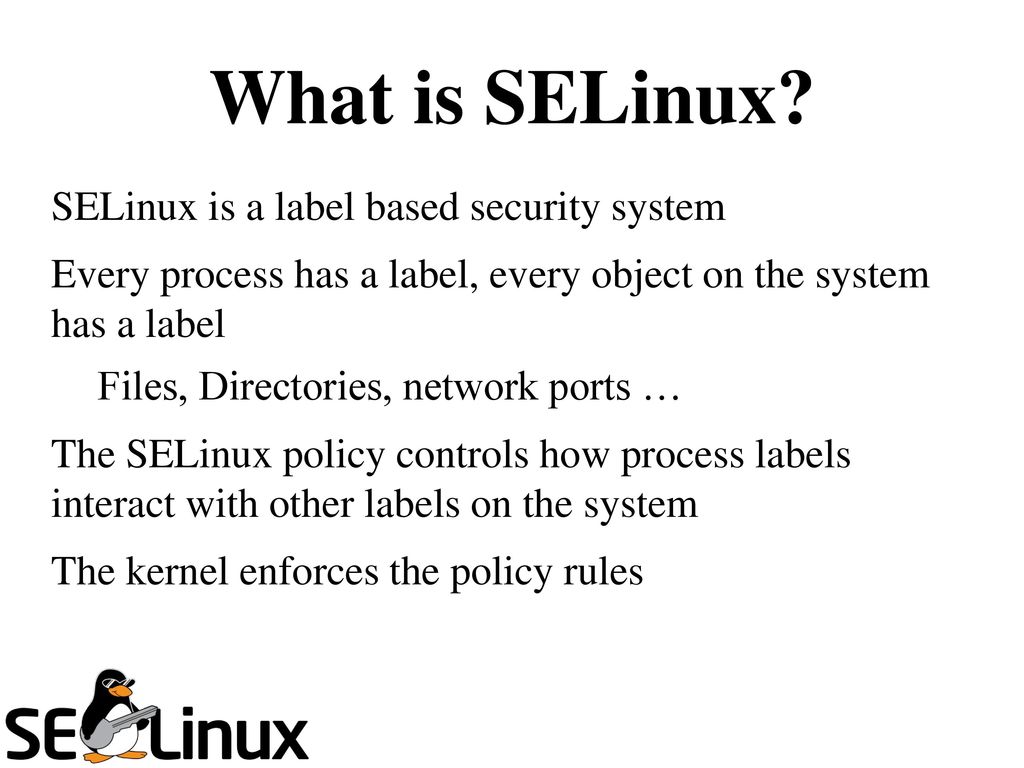
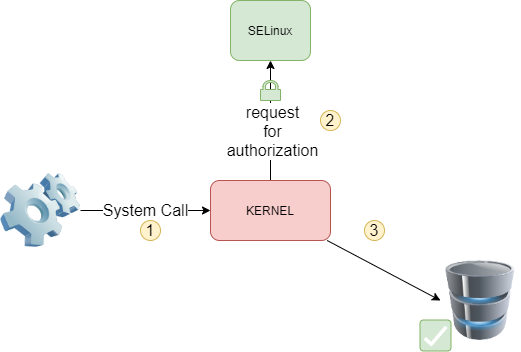
Security-Enhanced Linux (SELinux) is a Linux kernel security module that provides a mechanism for supporting access control security policies. It is a security feature of the Linux kernel. It is designed to protect the server against misconfigurations and/or compromised daemons. It put limits and instructs server daemons or programs what files they can access and what actions they can take by defining a security policy.
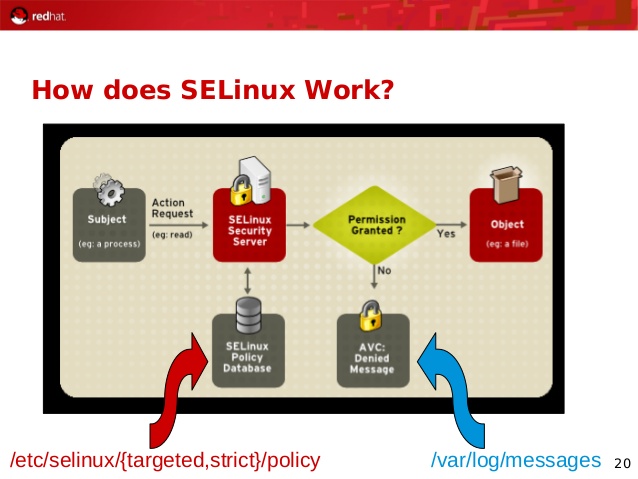
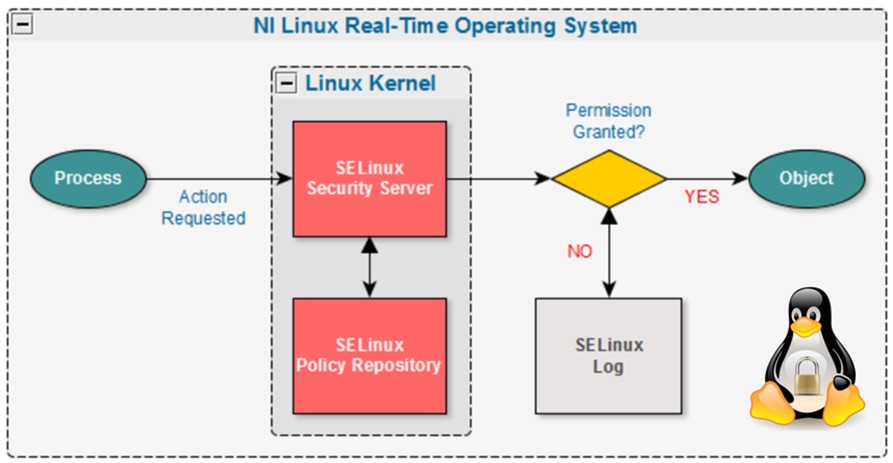
SELinux is an implementation of a MAC security mechanism. MAC is an acronym for Mandatory Access Control (MAC). It is built into the Linux kernel and enabled by default on Fedora, CentOS, RHEL and a few other Linux distributions. SELinux allows server admin to define various permissions for all process. It defines how all processes can interact with other parts of the server such as:
- Pipes
- Files
- Network ports
- Sockets
- Directories
- Other process
SELinux puts restrictions on each of the above object according to a policy. For example, an apache user with full permission can only access /var/www/html directory, but can not touch other parts of the system such as /etc directory without policy modification. If an attacker managed to gain access to sendmail mail or bind dns or apache web server, would only have access to exploited server and the files normally has access as defined in the policy for the server. An attacker can not access the other parts of the system or internal LAN. In other words, damage can be now restricted to the particular server and files. The cracker will not able to get a shell on your server via common daemons such as Apache / BIND / Sendmail as SELinux offers the following security features:
- Protect users’ data from unauthorized access.
- Protect other daemons or programs from unauthorized access.
- Protect network ports / sockets / files from unauthorized access.
- Protect server against exploits.
- Avoid privilege escalation and much more.
Please note that SELinux is not a silver bullet for protecting the server. You must follow other security practices such as
- Implementing firewalls policy.
- Server monitoring.
- Patching the system on time.
- Writing and securing cgi/php/python/perl scripts.
The /etc/selinux/config configuration file controls whether SELinux is enabled or disabled, and if enabled, whether SELinux operates in permissive mode or enforc-ing mode.
SETTING OF SELINUX
SELinux is set in three modes.
- Enforcing – SELinux security policy is enforced. IF this is set SELinux is enabled and will try to enforce the SELinux policies strictly
- Permissive – SELinux prints warnings instead of enforcing. This setting will just give warning when any SELinux policy setting is breached
- Disabled – No SELinux policy is loaded. This will totally disable SELinux policies.
SELinux policies
SELinux allows for multiple policies to be installed on the system, but only one policy may be active at any given time. At present, two kinds of SELinux policy exist:
- Targeted – The targeted policy is designed as a policy where most processes operate without restrictions, and only specific ser-vices are placed into distinct security domains that are confined by the policy.
- Strict – The strict policy is designed as a policy where all processes are partitioned
into fine-grained security domains and confined by policy.
To put SELinux into enforcing mode:
$ sudo setenforce 1To query the SELinux status:
$ getenforceTo see SELinux status in simplified way you can use sestatus
$ sestatusTo get elobrated info on difference status of SELinux on different services use -b option along sestatus
$ sestatus -bHow to disable SElinux?
We can do it in two ways
1) Permanent way : edit /etc/selinux/config
change the status of SELINUX from enforcing to disabled
SELINUX=enforcing
to
SELINUX=disabled
Save the file and exit.
2) Temporary way : Execute below command
echo 0 > /selinux/enforce
or
setenforce 0
How about enabling SELinux?
Permanent way : edit /etc/selinux/config
change the status of SELINUX from disabled to enforcing
SELINUX=disabled
to
SELINUX=enforcing
Save the file and exit.
Temporary way : Execute below command
echo 1 > /selinux/enforce
or
setenforce 1
Now lets understand Docker with SELinux?
The interaction between SELinux policy and Docker is focused on two concerns: protection of the host, and protection of containers from one another.
SELinux labels consist of 4 parts:
User:Role:Type:level.
SELinux controls access to processes by Type and Level. Docker offers two forms of SELinux protection: type enforcement and multi-category security (MCS) separation.
Docker has the –selinux-enabled flag by default in CentOS 7.4.1708. However, in case your image or your configuration management tool is disabling it, as was the case for our puppet module verify this, you verify by running the following comman
$ docker info | grep 'Security Options'

# more /etc/selinux/config

# This file controls the state of SELinux on the system.
# SELINUX= can take one of these three values:
# enforcing - SELinux security policy is enforced.
# permissive - SELinux prints warnings instead of enforcing.
# disabled - No SELinux policy is loaded.
SELINUX=enforcing
# SELINUXTYPE= can take one of three two values:
# targeted - Targeted processes are protected,
# minimum - Modification of targeted policy. Only selected processes are pro
tected.
# mls - Multi Level Security protection.
SELINUXTYPE=targetedCode language: PHP (php)
Refernece
– https://www.cyberciti.biz/faq/what-is-selinux/
– https://en.wikipedia.org/wiki/Security-Enhanced_Linux
– http://jaormx.github.io/2018/selinux-and-docker-notes/

I’m Rajesh Kumar, a DevOps, SRE, DevSecOps, Cloud, and Platform Engineering expert passionate about sharing practical knowledge, real-world experiences, and industry best practices. I have worked at Cotocus and regularly write about technology, travel, investing, health, product reviews, and digital marketing through my various platforms.
I publish technical articles at DevOps School, travel stories at Holiday Landmark, stock market insights at Stocks Mantra, health and fitness guidance at My Medic Plus, product reviews at TrueReviewNow, and SEO and digital marketing strategies at Wizbrand.
Find Trusted Cardiac Hospitals
Compare heart hospitals by city and services — all in one place.
Explore Hospitals