
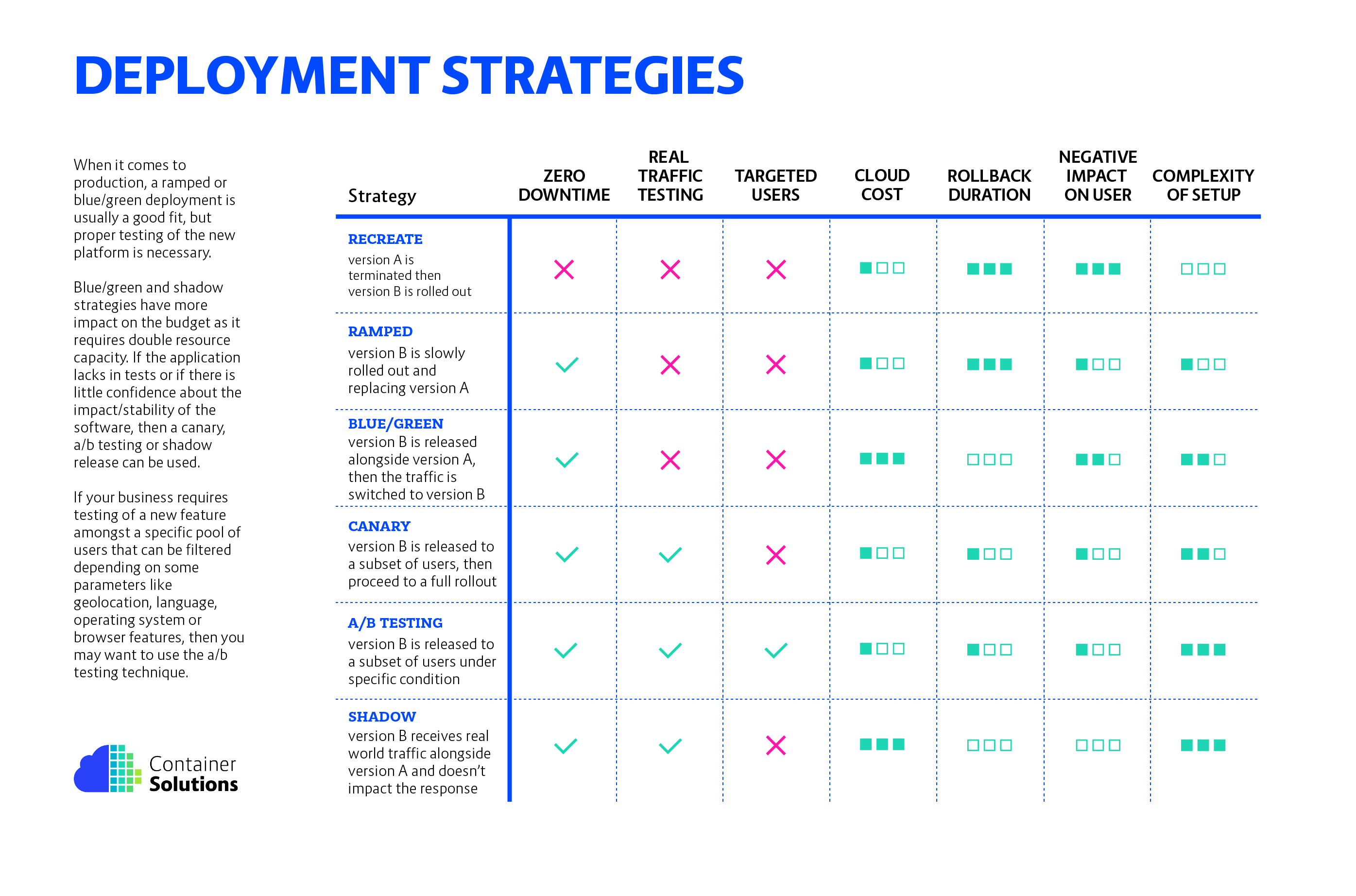
Deployment strategies and patterns are essential concepts in software development and DevOps that help organizations efficiently and reliably release their software applications to various environments. These strategies and patterns ensure that the deployment process is smooth, minimizes downtime, and reduces the risk of errors. Here are some common deployment strategies and patterns:
Some of the most common deployment strategies include:
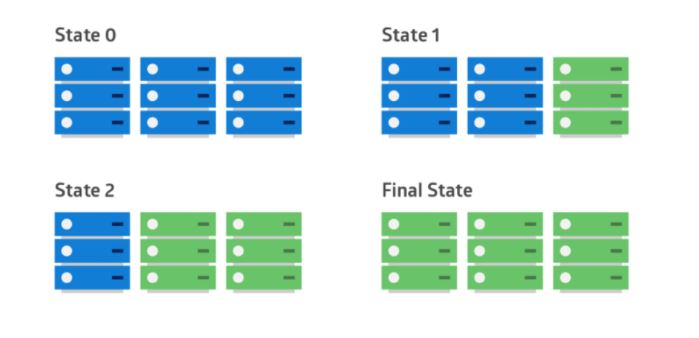
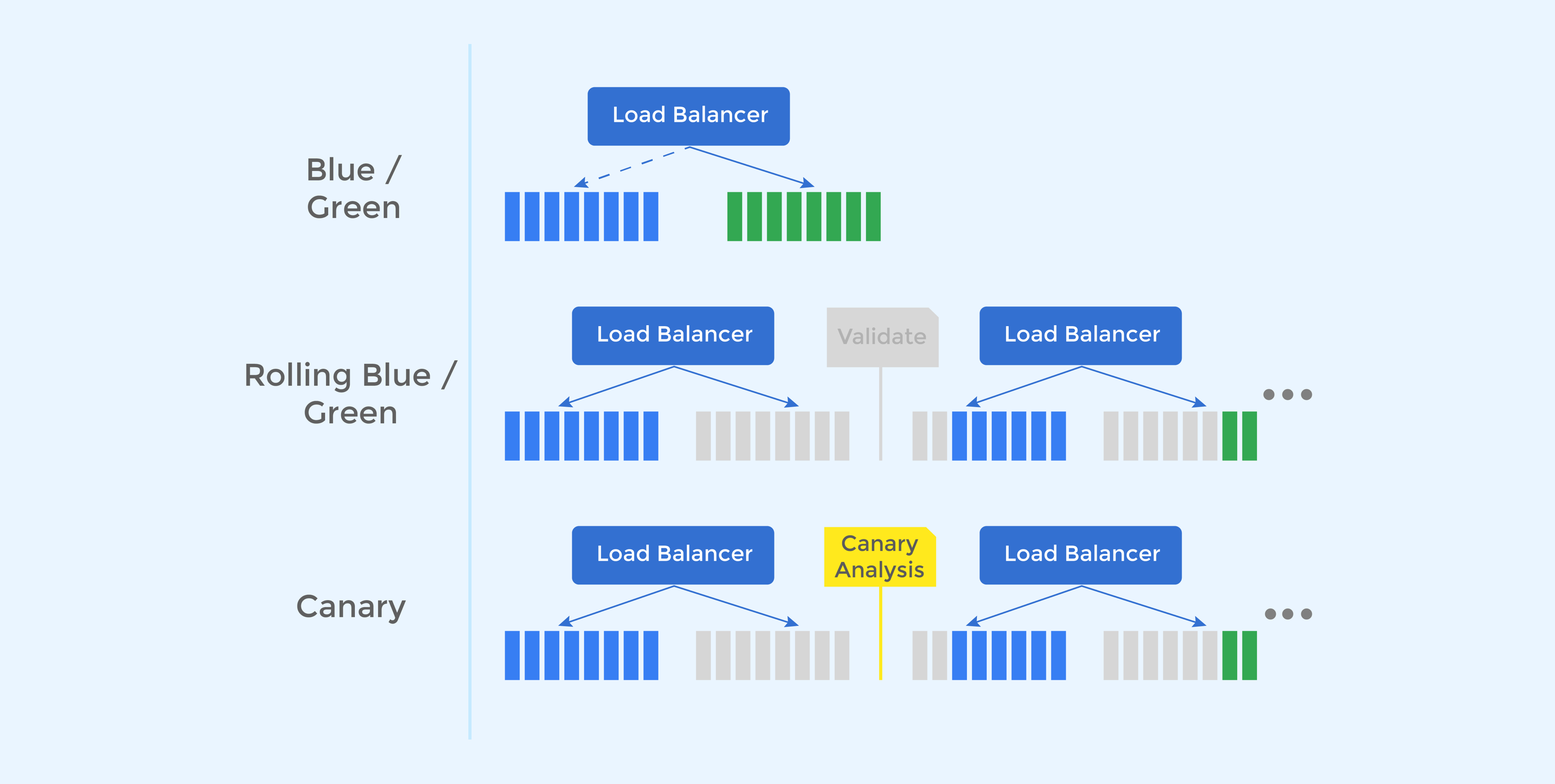
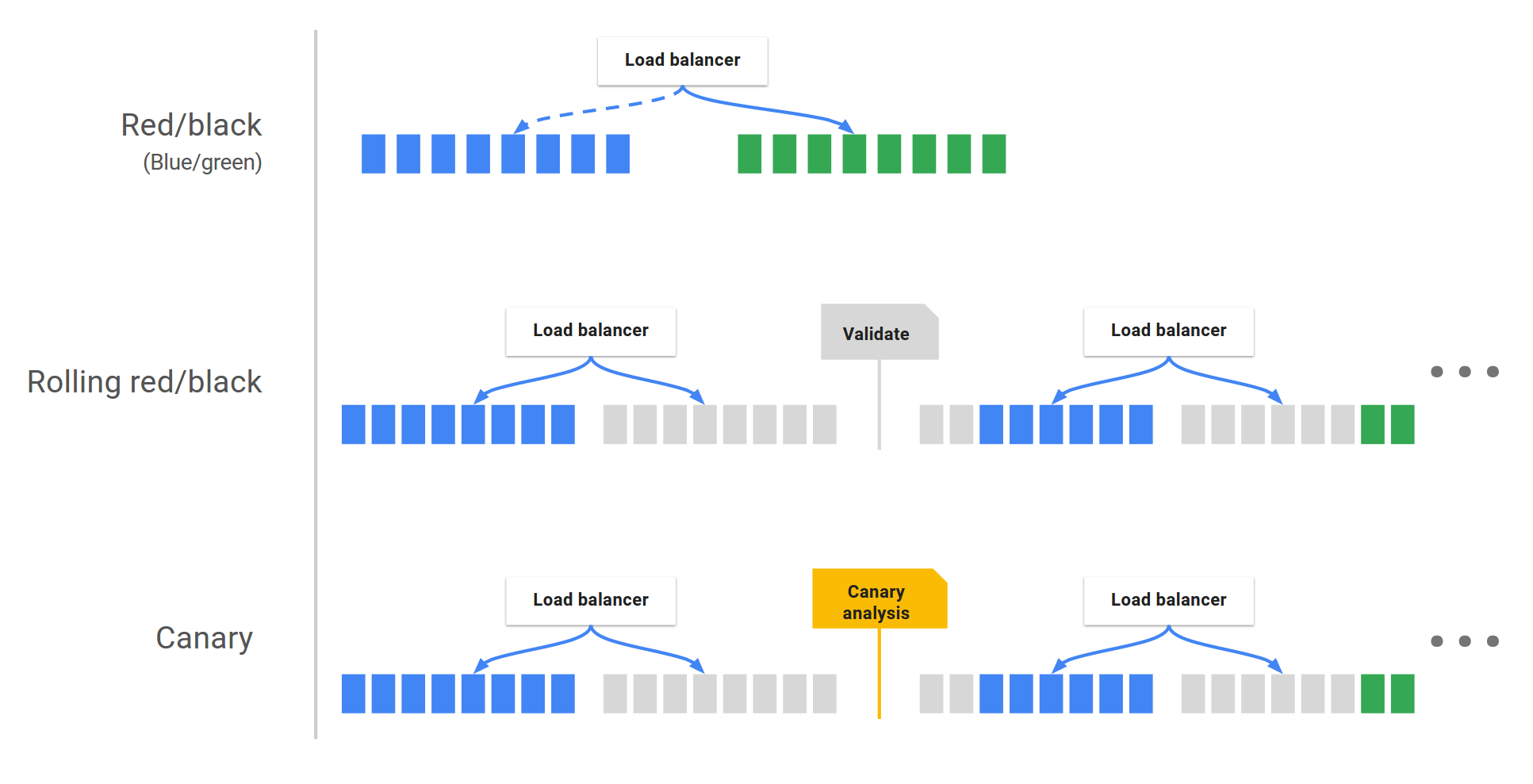
- Rolling deployment: In a rolling deployment, the new version of the software is deployed to a small number of instances at a time, and then gradually rolled out to the rest of the instances. This helps to minimize disruption to users.
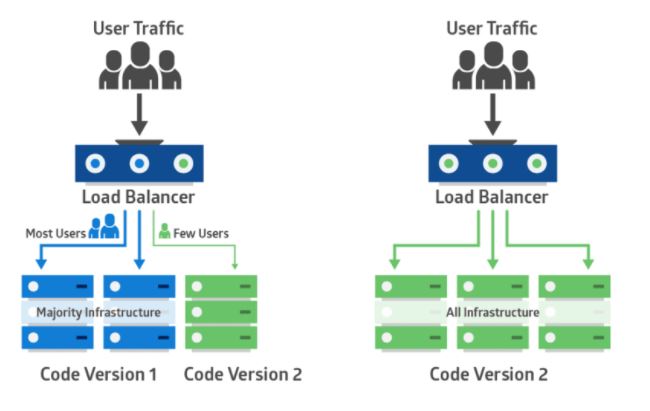
- Canary deployment: In a canary deployment, a small percentage of users are first exposed to the new version of the software. This allows the team to monitor the new version for any problems before it is rolled out to all users.
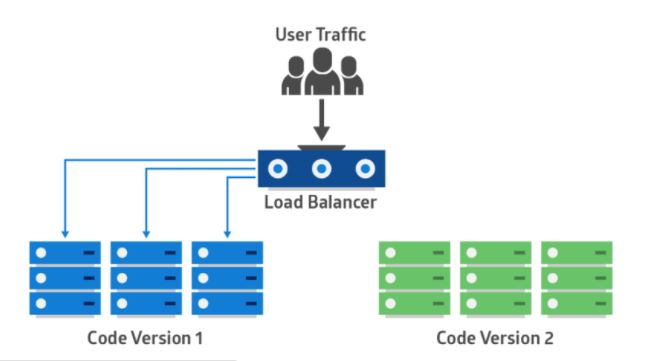
- Blue-green deployment: In a blue-green deployment, two identical environments are created. The new version of the software is deployed to the green environment, while the old version remains in the blue environment. When the new version is ready, the load balancer is switched to the green environment, and the old version is retired.
- A/B testing: In A/B testing, two versions of the software are deployed to different groups of users. The team then monitors the results to see which version performs better.
- Recreate deployment: In a recreate deployment, the new version of the software is deployed by recreating all of the instances. This is the simplest deployment strategy, but it can be disruptive to users.
The choice of deployment strategy will depend on a number of factors, such as:
- The criticality of the application: If the application is mission-critical, then a more conservative deployment strategy, such as a blue-green deployment, should be used.
- The size of the user base: If the user base is large, then a more gradual deployment strategy, such as a rolling deployment, should be used.
- The budget available: Some deployment strategies, such as blue-green deployments, can be more expensive than others.
- The team’s experience: The team should choose a deployment strategy that they are comfortable with and that they have experience with.
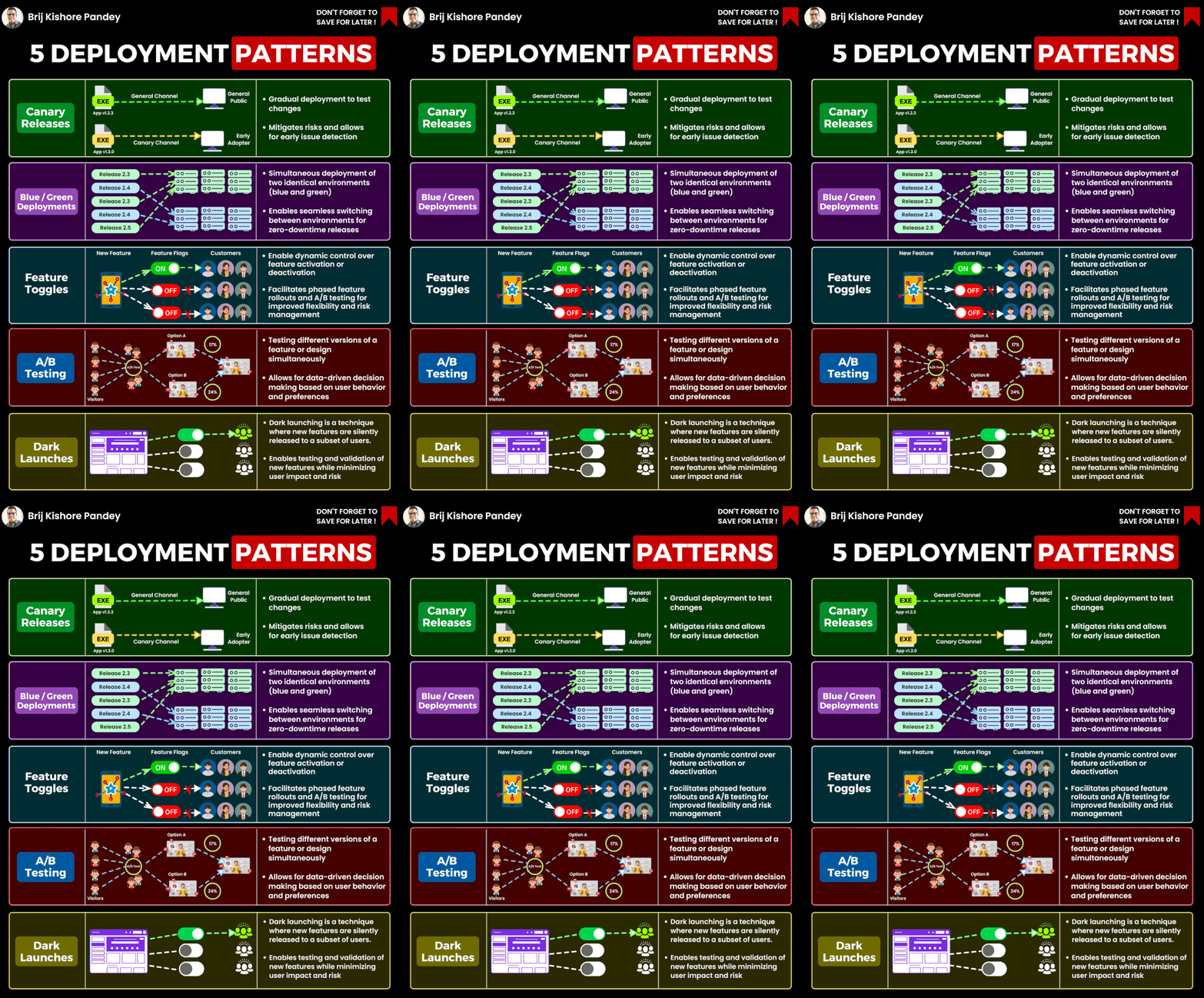
Compare differnet Deployment Strategies & Pattern
Let’s compare some of the different deployment strategies and patterns to understand their strengths, use cases, and considerations.
- Continuous Integration and Continuous Deployment (CI/CD):
- Strengths: Rapid and automated deployments, early detection of integration issues, streamlined collaboration among developers, testers, and operations teams.
- Use Cases: Suitable for projects with frequent code changes, where fast and reliable releases are essential.
- Considerations: Requires strong automated testing and monitoring to ensure that frequent releases don’t introduce bugs or stability issues.
- Blue-Green Deployment:
- Strengths: Minimal downtime during deployments, easy rollback in case of issues, clear separation between old and new versions.
- Use Cases: Ideal for applications that need high availability and minimal disruption, especially when quick rollbacks are crucial.
- Considerations: Requires maintaining two identical environments, which can increase infrastructure costs.
- Canary Deployment:
- Strengths: Gradual exposure to new features, reduced risk through real-world testing, ability to gather user feedback before full rollout.
- Use Cases: Useful for testing the impact of new features on a subset of users, minimizing risks associated with major changes.
- Considerations: Requires careful monitoring and metrics to determine the success or failure of the canary group.
- Feature Toggles (Feature Flags):
- Strengths: Allows decoupling of deployment and release, easy control over enabling or disabling features, flexibility in managing feature availability.
- Use Cases: Suitable for iterative development, A/B testing, and staged feature releases.
- Considerations: Requires proper configuration management and careful handling of toggles to prevent code complexity and maintainability issues.
- Rolling Deployment:
- Strengths: Maintains service availability during deployment, gradual rollout mitigates risks, simpler infrastructure management compared to blue-green deployments.
- Use Cases: Useful when maintaining some level of service availability is critical, or when blue-green deployment is impractical.
- Considerations: Can lead to version compatibility issues if not managed properly.
- Feature Branching:
- Strengths: Isolated development of features, minimal impact on the main codebase until features are ready, ability to maintain stable and development branches.
- Use Cases: Effective for projects with complex or long-running feature development, enabling parallel workstreams.
- Considerations: Frequent merges can lead to integration challenges, and managing long-lived branches can increase technical debt.
- Immutable Infrastructure:
- Strengths: Consistent and reproducible deployments, eliminates configuration drift, simplified rollbacks, and scaling.
- Use Cases: Well-suited for cloud-native and containerized applications, where infrastructure is treated as disposable.
- Considerations: Requires a solid provisioning and orchestration system, may involve longer deployment times due to instance/container creation.
- Serverless Deployment:
- Strengths: Focuses solely on code logic, automatic scaling and management of resources, reduced operational overhead.
- Use Cases: Great for event-driven or microservices architectures, where developers want to abstract away server management.
- Considerations: Limited control over the underlying infrastructure, potential vendor lock-in, and specific architectural considerations.

I’m Rajesh Kumar, a DevOps, SRE, DevSecOps, Cloud, and Platform Engineering expert passionate about sharing practical knowledge, real-world experiences, and industry best practices. I have worked at Cotocus and regularly write about technology, travel, investing, health, product reviews, and digital marketing through my various platforms.
I publish technical articles at DevOps School, travel stories at Holiday Landmark, stock market insights at Stocks Mantra, health and fitness guidance at My Medic Plus, product reviews at TrueReviewNow, and SEO and digital marketing strategies at Wizbrand.
Find Trusted Cardiac Hospitals
Compare heart hospitals by city and services — all in one place.
Explore Hospitals

