
There are 2 default template has been given by Zabbix which can be used to MySQL metrices monitoring
- MySQL by Zabbix agent
- MySQL by Zabbix agent 2
Zabbix Template – MySQL by Zabbix agent
For Zabbix version: 6.0 and higher. The template is developed for monitoring DBMS MySQL and its forks.
This template was tested on:
- MySQL, version 5.7, 8.0
- Percona, version 8.0
- MariaDB, version 10.4
Step 1 – Install MySQL Server or MariaDB
Step 2 – Install Zabbix agent
Step 4 – Work on template_db_mysql.conf
Copy template_db_mysql.conf into the folder with Zabbix agent configuration (/etc/zabbix/zabbix_agentd.d/ by default). Don't forget to restart Zabbix agent.
- https://gist.github.com/devops-school/155ad219966fdca8684e394a6df81681
- https://git.zabbix.com/projects/ZBX/repos/zabbix/browse/templates/db/mysql_agent

OR

# UBUNTU
$ sudo apt install mlocate
$ locate userparam
$ cp /usr/share/doc/zabbix-agent/userparameter_mysql.conf /etc/zabbix/zabbix_agentd.d/template_db_mysql.conf

#Centos/RHEL
$ yum install mlocate
$ updatedb
$ locate userparam
$ cp /usr/share/doc/zabbix-agent-6.0.0/userparameter_mysql.conf /etc/zabbix/zabbix_agentd.d/template_db_mysql.conf


Code language: PHP (php)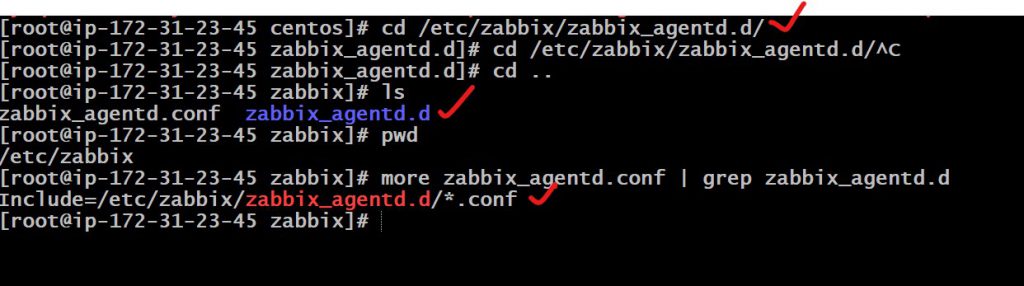
Step 5 – Create a MySQL user for monitoring ( at your discretion):
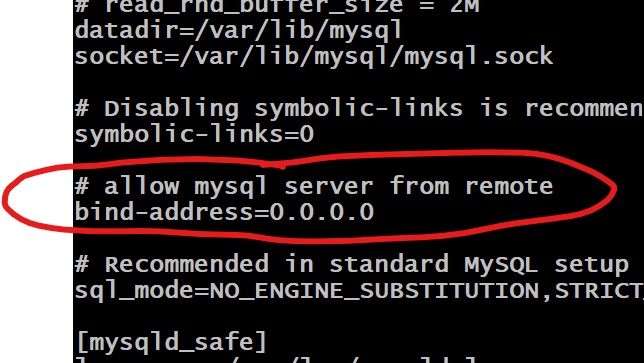
locate my.cnf
vi /etc/my.cnf
$ systemctl stop mysql
$ systemctl start mysql
or
$ service stop mysql
$ service start mysql
$ mysql -u root -p
CREATE USER 'zbx_monitor'@'%' IDENTIFIED BY 'DevOpsSchool$123';
GRANT ALL PRIVILEGES ON *.* TO 'zbx_monitor'@'%' IDENTIFIED BY 'DevOpsSchool$123' WITH GRANT OPTION;
FLUSH PRIVILEGES;
quit;Code language: JavaScript (javascript)Step 6 – Create “.my.cnf” in the home directory of Zabbix agent
$ mkdir /var/lib/zabbix
$ vi /var/lib/zabbix/.my.cnf

Create ".my.cnf" in the home directory of Zabbix agent for Linux (/var/lib/zabbix by default ) or my.cnf in c:\ for Windows. The file must have three strings:

[client]
user='zbx_monitor'
password='DevOpsSchool$123'
Code language: JavaScript (javascript)
Step 7 – Restart Zabbix Agent
$ service zabbix-agent start
$ systemctl enable zabbix-agent
$ service zabbix-agent restart
Step – 8 Add Macros to mysql host
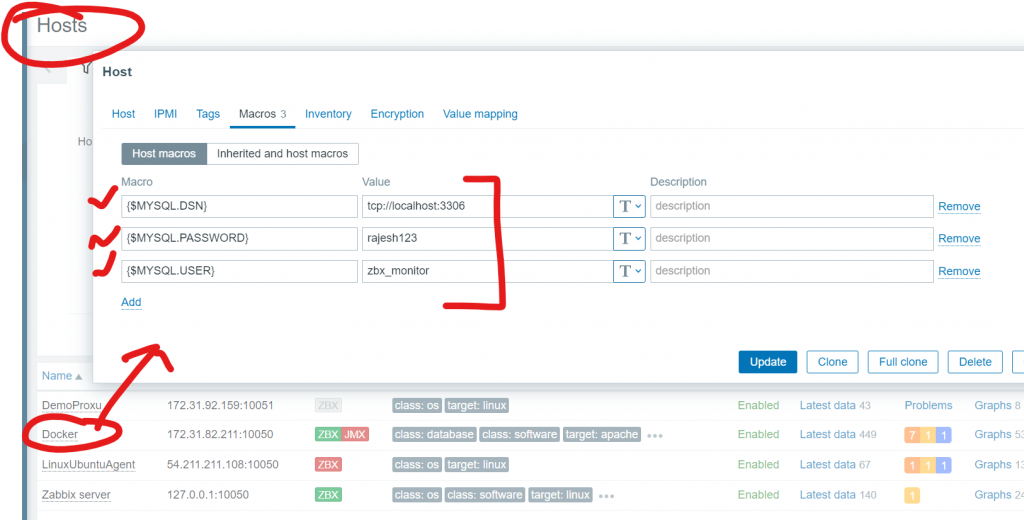
- In the Macros tab, switch to Inherited and host macros, look for the following macros and click on Change next to the macro value to update it:
- {$MYSQL.DSN} – set the data source of the MySQL server (the connection string of a named session from the MySQL Zabbix agent 2 plugin configuration file). This guide uses the default data source “tcp://localhost:3306” for monitoring a MySQL server that is installed on the same machine as Zabbix server and Zabbix agent 2.
- {$MYSQL.PASSWORD} – set the password of the previously created MySQL user “zbx_monitor”.
- {$MYSQL.USER} – set the name of the previously created MySQL user “zbx_monitor”.
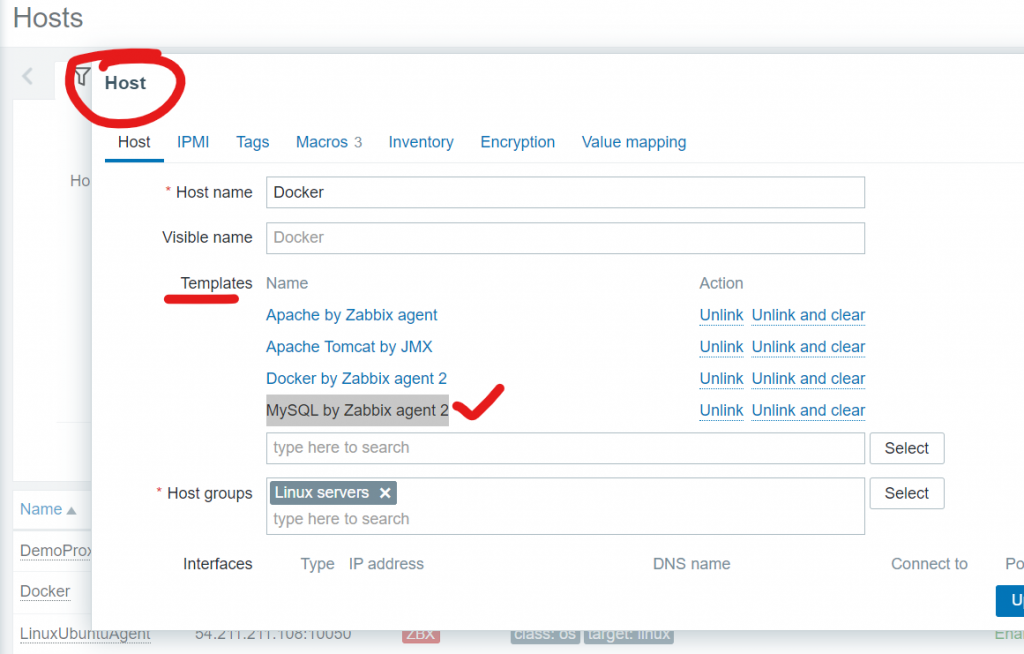
Add MySQL by Zabbix agent 2 to MySql HOST

Step 8 – Validate MySql Data in Zabbix
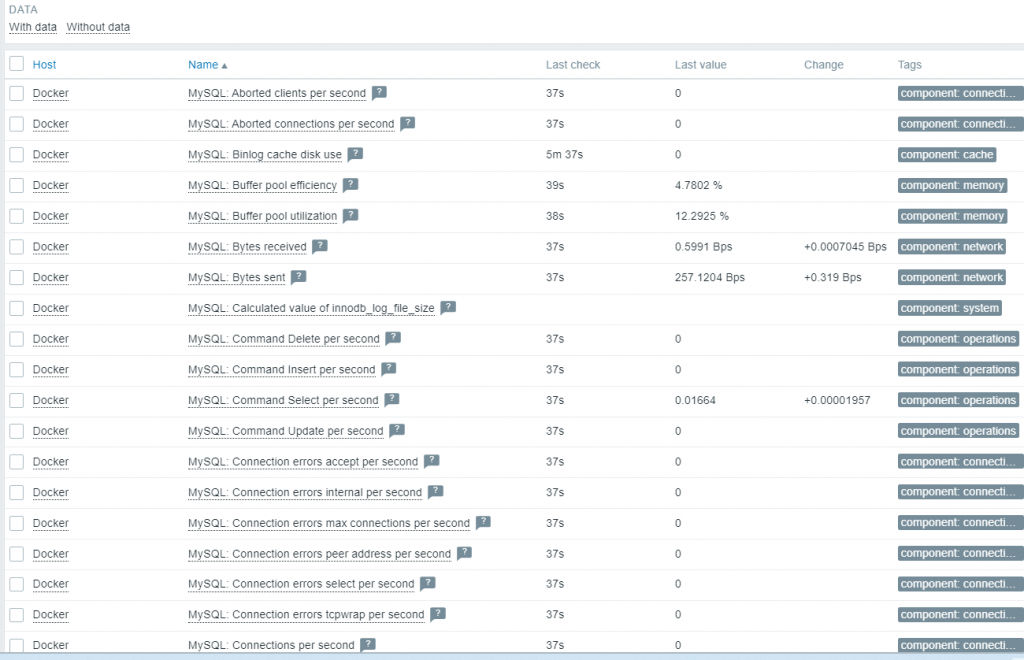
Reference
- https://www.zabbix.com/documentation/current/en/manual/guides/monitor_mysql
- https://git.zabbix.com/projects/ZBX/repos/zabbix/browse/templates/db/mysql_agent?at=release/6.4
- https://git.zabbix.com/projects/ZBX/repos/zabbix/browse/templates/db/mysql_agent2?at=release%2F6.4
- https://git.zabbix.com/projects/ZBX/repos/zabbix/browse/templates/db/mysql_agent2?at=release/6.4
- https://www.zabbix.com/integrations/mysql#mysql_agent2
- https://www.zabbix.com/integrations/mysql#mysql_agent

I’m Rajesh Kumar, a DevOps, SRE, DevSecOps, Cloud, and Platform Engineering expert passionate about sharing practical knowledge, real-world experiences, and industry best practices. I have worked at Cotocus and regularly write about technology, travel, investing, health, product reviews, and digital marketing through my various platforms.
I publish technical articles at DevOps School, travel stories at Holiday Landmark, stock market insights at Stocks Mantra, health and fitness guidance at My Medic Plus, product reviews at TrueReviewNow, and SEO and digital marketing strategies at Wizbrand.
Find Trusted Cardiac Hospitals
Compare heart hospitals by city and services — all in one place.
Explore Hospitals
Giving full access to the zabbix service user seems very insecure, especially as the creds are stored in plaintext ondisk. :/
How can I monitor MySQL databases by SNMP from ZABBIX?
Can you help provide tips or website to do it?