
Introduction
AI UI-to-Code Generators help designers, developers, product teams, and startups convert visual designs, screenshots, wireframes, Figma files, sketches, or natural language prompts into usable frontend code. These tools can generate React components, HTML, CSS, Tailwind layouts, mobile screens, design-system-based components, and sometimes full application frontends.
Modern product teams need to move faster from design to development without losing consistency, responsiveness, accessibility, or maintainability. Manual handoff between design and engineering often creates delays, mismatched UI details, repeated styling work, and inconsistent components. AI UI-to-Code tools reduce this gap by turning interface ideas into structured, editable code that developers can refine and ship.
Why It Matters
UI development is one of the most repetitive parts of product engineering. Teams frequently rebuild similar layouts, forms, dashboards, onboarding flows, pricing pages, admin panels, and landing pages. AI UI-to-Code Generators speed up this process by converting designs into working code faster while allowing developers to focus on logic, performance, accessibility, and product quality.
These tools are especially useful for startups, SaaS teams, frontend developers, UI designers, agencies, product managers, and engineering teams that need fast prototypes or production-ready frontend scaffolding.
Real World Use Cases
- Converting Figma designs into React components
- Turning screenshots into editable frontend code
- Generating landing pages from prompts
- Creating dashboards, forms, tables, and admin panels
- Building responsive mobile and web layouts
- Creating reusable design-system components
- Accelerating design-to-development handoff
- Building MVP interfaces quickly
- Generating Tailwind CSS layouts
- Creating prototypes for product validation
Evaluation Criteria for Buyers
When evaluating AI UI-to-Code Generators, buyers should consider:
- Quality of generated frontend code
- Figma or design file import support
- Framework support such as React, Vue, Angular, or HTML
- Tailwind CSS and design system compatibility
- Responsive design accuracy
- Accessibility support
- Code export and ownership
- Component reusability
- Git and CI/CD workflow support
- Collaboration features for designers and developers
- Security and privacy controls
- Maintainability of generated code
Best for: frontend developers, product designers, SaaS startups, product teams, UI agencies, no-code to code teams, design system teams, and engineering teams building dashboards, portals, apps, and marketing pages.
Not ideal for: teams needing deeply custom application logic, highly regulated interfaces requiring strict manual review, or organizations expecting AI-generated UI code to be production-ready without developer validation.
What’s Changed in AI UI-to-Code Generators
- AI tools now generate cleaner component-based frontend code.
- Figma-to-code workflows are becoming more practical for product teams.
- Screenshot-to-code generation is improving for fast prototyping.
- Tailwind CSS support is becoming common in modern UI generation.
- AI-generated UI now focuses more on responsive layouts.
- Design system mapping is becoming more important for enterprise teams.
- Developers increasingly want exportable code instead of locked-in visual builders.
- AI agents can now iterate on UI based on feedback and screenshots.
- Accessibility and semantic HTML are becoming key evaluation points.
- Multi-platform UI generation is expanding across web and mobile.
- Design-to-code handoff is moving closer to Git-based workflows.
- Teams are prioritizing maintainability over quick but messy generated code.
Quick Buyer Checklist
- Can the tool convert Figma, screenshots, or prompts into code?
- Does it generate clean, readable, maintainable frontend code?
- Does it support React, HTML, CSS, Tailwind, or your preferred framework?
- Can developers export and own the generated code?
- Does it support responsive design across desktop and mobile?
- Can it map outputs to your design system?
- Does it support reusable components?
- Are accessibility patterns included?
- Does it integrate with GitHub or developer workflows?
- Can designers and developers collaborate inside the tool?
- Are privacy and retention policies clear?
- Does pricing scale reasonably with usage and team size?
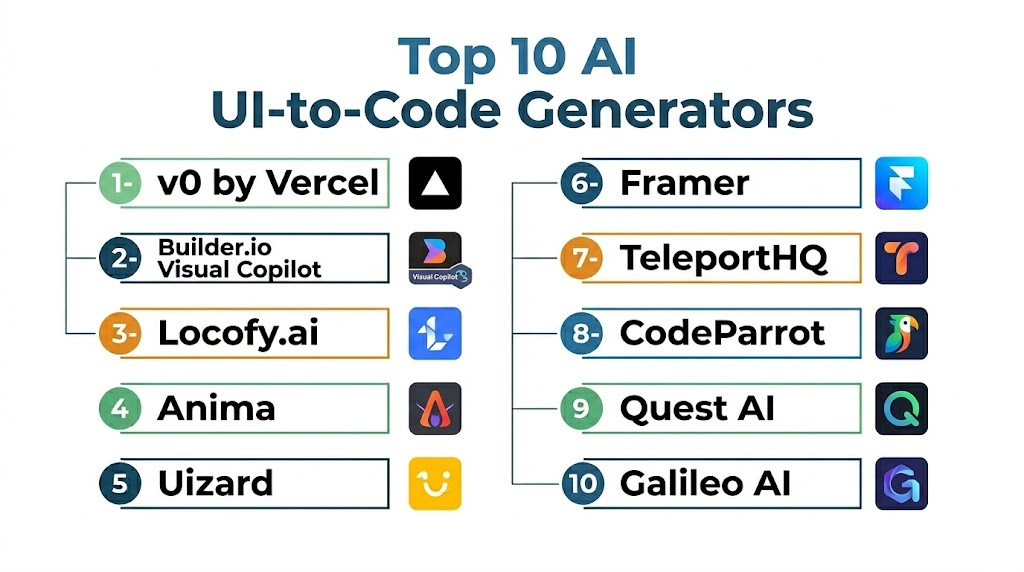
Top 10 AI UI-to-Code Generators
1- Subframe
2- Builder.io Visual Copilot
3- Locofy.ai
4- Anima
5- Uizard
6- Framer
7- TeleportHQ
8- CodeParrot
9- Quest AI
10- Galileo AI
#1 — Subframe
One-line verdict: Best for professional React components and design systems built for code-first workflows.
Short description:
Subframe is an AI-native design tool bridging visual design and frontend code. Teams build production-ready interfaces with clean, exportable React and Tailwind components, avoiding the typical “AI slop” of less structured tools.
Standout Capabilities
- Figma-like tool with direct code-first outputs
- Design system management and component syncing
- Clean, maintainable React and Tailwind CSS export
- AI generation with personalized project context
- Integration with tools like Cursor and Claude via MCP
AI-Specific Depth
- Model support: Personalized AI that learns from your project style
- RAG / knowledge integration: Context-aware AI using your specific components
- Guardrails: Private context; designs are not used for global training
Pros
- High-quality, developer-ready frontend code
- Seamless design system synchronization via CLI
Cons
- Focused primarily on React and Tailwind CSS
- Structure-heavy approach may feel restrictive for sketching
Security & Compliance
Private AI personalized to your project; designs are not used for global training. Version history is available on paid plans.
Deployment & Platforms
- Web-based design environment
- CLI for component-level synchronization
Integrations & Ecosystem
- Subframe Sync for React
- Tailwind CSS, Radix UI, and Cursor
Pricing Model
Free tier available; Pro plan at $29/editor/month; Custom enterprise pricing.
Best-Fit Scenarios
- Building production-ready SaaS dashboards
- Scaling design systems with engineering consistency
#2 — Builder.io
One-line verdict: Best for converting Figma designs into production-oriented frontend code workflows.
Short description:
Builder.io Visual Copilot helps teams convert designs into code and improve design-to-development workflows. It is useful for frontend teams that want to move faster from Figma to reusable UI components.
Standout Capabilities
- Figma-to-code workflows
- Visual development support
- Component generation
- Frontend framework support
- Collaboration between design and engineering
- Design-to-code automation
- Useful for product and marketing teams
AI-Specific Depth
- Model support: Hosted AI capabilities
- RAG / knowledge integration: Design and project context varies
- Evaluation: Preview and developer review workflows
- Guardrails: Enterprise controls vary
- Observability: Workspace analytics vary
Pros
- Strong Figma workflow
- Useful design-to-code automation
- Good for team collaboration
Cons
- Output quality depends on design structure
- Advanced customization may require developers
- Enterprise controls vary by plan
Security & Compliance
Security controls vary by plan. SSO, RBAC, audit logging, encryption, and retention should be verified directly.
Deployment & Platforms
- Web-based
- Cloud-hosted
- Figma integration
- Frontend framework workflows
Integrations & Ecosystem
Builder.io fits product teams that want visual development and frontend automation together.
- Figma
- React
- Next.js
- Design systems
- Visual CMS workflows
- Developer handoff workflows
Pricing Model
Subscription and enterprise pricing may vary.
Best-Fit Scenarios
- Figma-to-code conversion
- Marketing page generation
- Design and engineering collaboration
#3 — Locofy.ai
One-line verdict: Best for converting Figma designs into frontend code across multiple frameworks.
Short description:
Locofy.ai helps teams convert design files into frontend code for web and mobile interfaces. It is useful for product teams that want to reduce manual frontend implementation work from design handoff.
Standout Capabilities
- Figma-to-code generation
- Multi-framework support
- Responsive layout generation
- Component tagging workflows
- Design system support
- Frontend export workflows
- Mobile and web UI support
AI-Specific Depth
- Model support: Hosted AI capabilities
- RAG / knowledge integration: Design context workflows
- Evaluation: Preview and code review workflows
- Guardrails: Governance varies
- Observability: Project visibility varies
Pros
- Good for design-to-code workflows
- Supports multiple frontend outputs
- Useful for teams with structured Figma files
Cons
- Requires clean design structure
- Generated code may need refactoring
- Complex interactions require manual development
Security & Compliance
Security and compliance details vary by plan. Certifications are Not publicly stated unless directly verified.
Deployment & Platforms
- Web-based
- Cloud-hosted
- Figma-based workflows
- Web and mobile frontend outputs
Integrations & Ecosystem
Locofy.ai integrates well into design-led frontend development workflows.
- Figma
- React
- HTML
- CSS
- Mobile UI workflows
- Developer export pipelines
Pricing Model
Tiered subscription or usage-based pricing may vary.
Best-Fit Scenarios
- Figma-to-React workflows
- Mobile screen generation
- Design-led frontend development
#4 — Anima
One-line verdict: Best for design teams turning Figma, Sketch, or Adobe XD designs into frontend code.
Short description:
Anima helps design and product teams convert visual designs into code and interactive prototypes. It supports design-to-code workflows for teams that want faster handoff and working frontend outputs.
Standout Capabilities
- Design-to-code generation
- Figma, Sketch, and Adobe XD workflows
- Responsive layout support
- Interactive prototype support
- React and HTML export options
- Design handoff automation
- Component-oriented workflows
AI-Specific Depth
- Model support: Hosted AI capabilities may vary
- RAG / knowledge integration: Design file context
- Evaluation: Preview and manual review workflows
- Guardrails: Governance varies
- Observability: Project visibility varies
Pros
- Strong design tool coverage
- Useful for prototype-to-code workflows
- Good for design teams
Cons
- Generated code may need cleanup
- Complex business logic is not covered
- Best output requires organized design files
Security & Compliance
Security controls vary by plan. Enterprise access controls and retention policies should be verified.
Deployment & Platforms
- Web-based
- Cloud-hosted
- Figma, Sketch, and Adobe XD workflows
Integrations & Ecosystem
Anima supports design-led workflows and frontend handoff.
- Figma
- Sketch
- Adobe XD
- React
- HTML
- CSS
- Prototype workflows
Pricing Model
Tiered subscription pricing.
Best-Fit Scenarios
- Design-to-code handoff
- Interactive prototype conversion
- Designer-developer collaboration
#5 — Uizard
One-line verdict: Best for non-technical teams creating UI prototypes and early product concepts quickly.
Short description:
Uizard helps users generate UI mockups, wireframes, and prototypes from prompts, screenshots, or design ideas. It is useful for product managers, founders, and teams that need fast visual concepts before development.
Standout Capabilities
- Prompt-to-UI mockups
- Screenshot-to-design workflows
- Wireframe generation
- Rapid prototyping
- Collaboration tools
- Product concept visualization
- Beginner-friendly interface
AI-Specific Depth
- Model support: Hosted AI capabilities
- RAG / knowledge integration: Workspace context varies
- Evaluation: Human review and iteration
- Guardrails: Platform controls vary
- Observability: Workspace visibility varies
Pros
- Very easy to use
- Great for early concepts
- Useful for non-developers
Cons
- Less production-code focused
- Advanced frontend export may be limited
- Developers may need to rebuild final UI
Security & Compliance
Security controls vary by plan. Enterprise governance should be verified directly.
Deployment & Platforms
- Web-based
- Cloud-hosted
- Prototype-focused workflows
Integrations & Ecosystem
Uizard fits early-stage product planning and UI ideation.
- Design workflows
- Product planning
- Team collaboration
- Prototype sharing
- Screenshot-based design
- Wireframe generation
Pricing Model
Tiered subscription with free and paid plans.
Best-Fit Scenarios
- Early UI ideation
- Product concept validation
- Non-technical prototyping
#6 — Framer
One-line verdict: Best for AI-assisted websites, landing pages, and interactive design-to-publish workflows.
Short description:
Framer helps teams design, generate, and publish modern websites with AI-assisted workflows. It is especially useful for marketing pages, product pages, portfolios, and interactive web experiences.
Standout Capabilities
- AI-assisted website generation
- Visual editing experience
- Interactive animations
- Responsive design workflows
- Website publishing
- Design and content workflows
- Fast marketing page creation
AI-Specific Depth
- Model support: Hosted AI capabilities
- RAG / knowledge integration: Workspace and content context varies
- Evaluation: Preview and manual review workflows
- Guardrails: Platform controls vary
- Observability: Site analytics vary
Pros
- Fast website creation
- Strong visual editing
- Good for marketing and product pages
Cons
- Not focused on full application code export
- Complex app logic needs separate development
- Best suited for web publishing workflows
Security & Compliance
Security controls vary by plan. Enterprise features should be verified directly.
Deployment & Platforms
- Web-based
- Cloud-hosted
- Website publishing platform
Integrations & Ecosystem
Framer fits web design, marketing, and product storytelling workflows.
- Design systems
- CMS-style workflows
- Website hosting
- Forms
- Analytics
- Collaboration workflows
Pricing Model
Tiered subscription pricing.
Best-Fit Scenarios
- Marketing websites
- Landing pages
- Interactive product pages
#7 — TeleportHQ
One-line verdict: Best for generating frontend code and static websites from visual builder workflows.
Short description:
TeleportHQ helps teams create frontend interfaces, static sites, and UI code from visual design workflows. It supports designers and developers who want editable code outputs from visual interfaces.
Standout Capabilities
- Visual UI builder
- Frontend code export
- Static website generation
- Component-based workflows
- Responsive layouts
- Collaboration support
- Multi-framework export options may vary
AI-Specific Depth
- Model support: AI capabilities vary
- RAG / knowledge integration: N/A
- Evaluation: Preview and manual review workflows
- Guardrails: Governance varies
- Observability: Workspace visibility varies
Pros
- Useful visual-to-code workflow
- Good for static site generation
- Flexible frontend outputs
Cons
- AI depth may vary
- Complex application logic requires developers
- Output quality depends on design structure
Security & Compliance
Security capabilities vary by plan and deployment.
Deployment & Platforms
- Web-based
- Cloud-hosted
- Frontend export workflows
Integrations & Ecosystem
TeleportHQ fits teams creating frontend pages and structured web interfaces.
- Static site workflows
- Frontend frameworks
- Visual editing
- Export pipelines
- Design workflows
- Collaboration tools
Pricing Model
Tiered pricing varies.
Best-Fit Scenarios
- Static site generation
- Visual frontend building
- Responsive page creation
#8 — CodeParrot
One-line verdict: Best for generating frontend code from screenshots and UI references.
Short description:
CodeParrot helps developers generate frontend code from UI screenshots, references, and design inputs. It is useful when teams need to recreate interfaces quickly or turn visual references into code.
Standout Capabilities
- Screenshot-to-code generation
- Frontend component creation
- UI reference interpretation
- Rapid prototyping support
- Developer-friendly workflows
- Modern frontend output
- Useful for recreating layouts
AI-Specific Depth
- Model support: Hosted AI capabilities
- RAG / knowledge integration: Visual input context
- Evaluation: Human preview and code review
- Guardrails: Governance varies
- Observability: Usage visibility varies
Pros
- Useful screenshot-to-code workflow
- Fast UI recreation
- Good for frontend prototypes
Cons
- Complex interactions require manual work
- Pixel-perfect accuracy varies
- Generated code needs review
Security & Compliance
Security and data retention controls vary by plan. Sensitive screenshots should be handled carefully.
Deployment & Platforms
- Web-based
- Cloud-hosted
- Frontend generation workflows
Integrations & Ecosystem
CodeParrot fits frontend teams that want fast conversion from visual input to editable code.
- Screenshot workflows
- React workflows
- HTML and CSS workflows
- UI references
- Developer previews
- Frontend prototyping
Pricing Model
Pricing varies / N/A.
Best-Fit Scenarios
- Screenshot-to-code conversion
- UI recreation
- Fast frontend prototyping
#9 — Quest AI
One-line verdict: Best for product teams converting designs into React components with design system alignment.
Short description:
Quest AI helps teams convert designs into frontend components and product-ready UI code. It is useful for teams that want generated code aligned with modern frontend and design system workflows.
Standout Capabilities
- Design-to-React workflows
- Component generation
- Design system support
- Responsive UI generation
- Frontend code export
- Product team collaboration
- UI automation workflows
AI-Specific Depth
- Model support: Hosted AI capabilities
- RAG / knowledge integration: Design and component context varies
- Evaluation: Preview and developer review workflows
- Guardrails: Governance varies
- Observability: Project visibility varies
Pros
- Good for React component generation
- Useful design system alignment
- Helpful for product teams
Cons
- Output quality depends on design consistency
- Complex state logic needs manual development
- Enterprise maturity varies
Security & Compliance
Security controls vary by plan. Enterprise requirements should be verified directly.
Deployment & Platforms
- Web-based
- Cloud-hosted
- React-focused workflows
Integrations & Ecosystem
Quest AI fits teams with product design and frontend engineering collaboration.
- Figma workflows
- React components
- Design systems
- Frontend exports
- Team collaboration
- Product UI workflows
Pricing Model
Commercial pricing varies.
Best-Fit Scenarios
- Design-to-React conversion
- Product UI generation
- Design system-based development
#10 — Galileo AI
One-line verdict: Best for generating polished UI concepts and product screens from text prompts.
Short description:
Galileo AI helps teams generate user interface concepts, product screens, and visual designs from natural language prompts. It is useful for ideation, product design, and early visual exploration.
Standout Capabilities
- Prompt-to-UI generation
- Product screen creation
- Visual concept generation
- Fast ideation workflows
- Design inspiration
- Product mockups
- Collaboration support varies
AI-Specific Depth
- Model support: Hosted AI capabilities
- RAG / knowledge integration: N/A
- Evaluation: Human review and iteration
- Guardrails: Platform controls vary
- Observability: Workspace visibility varies
Pros
- Excellent for quick UI concepts
- Useful for product ideation
- Fast visual exploration
Cons
- Less focused on production code
- Developers may need to rebuild outputs
- Enterprise workflows may vary
Security & Compliance
Security and privacy controls vary by plan.
Deployment & Platforms
- Web-based
- Cloud-hosted
- UI concept generation workflows
Integrations & Ecosystem
Galileo AI supports early-stage design and product ideation.
- Prompt-based design
- UI mockups
- Product planning
- Visual exploration
- Design workflows
- Team feedback loops
Pricing Model
Commercial pricing varies.
Best-Fit Scenarios
- UI concept generation
- Product design exploration
- Early-stage app ideation
Comparison Table
| Tool Name | Best For | Deployment | Model Flexibility | Strength | Watch-Out | Public Rating |
|---|---|---|---|---|---|---|
| v0 by Vercel | React UI generation | Cloud | Hosted | Modern components | Logic needs manual work | N/A |
| Builder.io Visual Copilot | Figma-to-code | Cloud | Hosted | Design-to-code workflow | Requires clean designs | N/A |
| Locofy.ai | Multi-framework design-to-code | Cloud | Hosted | Figma conversion | Code may need cleanup | N/A |
| Anima | Design handoff | Cloud | Hosted / Varies | Design tool coverage | Complex logic not covered | N/A |
| Uizard | UI prototyping | Cloud | Hosted | Easy ideation | Less production-code focused | N/A |
| Framer | AI websites | Cloud | Hosted | Fast publishing | Not full app code-focused | N/A |
| TeleportHQ | Visual frontend building | Cloud | Varies / N/A | Code export | AI depth varies | N/A |
| CodeParrot | Screenshot-to-code | Cloud | Hosted | Visual input conversion | Accuracy varies | N/A |
| Quest AI | React components | Cloud | Hosted | Design system alignment | Enterprise maturity varies | N/A |
| Galileo AI | UI concept generation | Cloud | Hosted | Fast visual concepts | Production code limited | N/A |
Scoring & Evaluation
The following scores are comparative rather than absolute rankings. Each platform was evaluated based on UI generation quality, code maintainability, design import support, framework compatibility, developer workflow fit, AI-assisted productivity, governance readiness, and collaboration value. The best choice depends on whether your team needs production frontend code, fast prototypes, design handoff, screenshot conversion, or visual concept generation.
| Tool | Core | Reliability/Eval | Guardrails | Integrations | Ease | Perf/Cost | Security/Admin | Support | Weighted Total |
|---|---|---|---|---|---|---|---|---|---|
| v0 by Vercel | 9.1 | 8.5 | 7.2 | 8.7 | 9.0 | 8.5 | 7.8 | 8.3 | 8.5 |
| Builder.io Visual Copilot | 8.8 | 8.2 | 7.5 | 8.8 | 8.5 | 8.0 | 8.0 | 8.2 | 8.3 |
| Locofy.ai | 8.6 | 8.0 | 7.2 | 8.5 | 8.3 | 8.2 | 7.6 | 8.0 | 8.1 |
| Anima | 8.3 | 7.8 | 7.0 | 8.4 | 8.5 | 8.0 | 7.5 | 8.0 | 8.0 |
| Uizard | 7.8 | 7.4 | 6.8 | 7.8 | 9.2 | 8.3 | 7.2 | 7.8 | 7.8 |
| Framer | 8.4 | 8.0 | 7.2 | 8.3 | 9.0 | 8.2 | 7.8 | 8.2 | 8.2 |
| TeleportHQ | 8.0 | 7.6 | 6.8 | 8.0 | 8.3 | 8.4 | 7.2 | 7.8 | 7.8 |
| CodeParrot | 8.0 | 7.5 | 6.8 | 7.8 | 8.5 | 8.2 | 7.0 | 7.5 | 7.7 |
| Quest AI | 8.2 | 7.8 | 7.0 | 8.1 | 8.3 | 8.0 | 7.3 | 7.8 | 7.9 |
| Galileo AI | 7.8 | 7.3 | 6.8 | 7.5 | 9.0 | 8.0 | 7.0 | 7.5 | 7.6 |
Top 3 for Enterprise
1- Builder.io Visual Copilot
2- Locofy.ai
3- v0 by Vercel
Top 3 for SMB
1- v0 by Vercel
2- Framer
3- Anima
Top 3 for Developers
1- v0 by Vercel
2- Locofy.ai
3- CodeParrot
Which AI UI-to-Code Generator Is Right for You
Solo / Freelancer
Solo developers and freelancers should choose tools that generate usable code quickly and require minimal setup. v0 by Vercel is strong for React and Tailwind components, while Framer is excellent for fast website creation. CodeParrot is useful when recreating UI from screenshots or references.
SMB
SMBs should prioritize speed, maintainability, and collaboration. Locofy.ai, Anima, Builder.io Visual Copilot, and Framer are practical options depending on whether the team starts from Figma, screenshots, or prompts. The goal should be faster handoff without creating messy code.
Mid-Market
Mid-market product teams should focus on design system support, Git workflows, reusable components, and responsive design quality. Builder.io Visual Copilot, Locofy.ai, Quest AI, and v0 by Vercel are strong choices for structured frontend development workflows.
Enterprise
Enterprises should prioritize privacy, role-based access, design system governance, code ownership, versioning, auditability, and maintainability. Builder.io Visual Copilot, Locofy.ai, Anima, and v0 by Vercel are worth evaluating based on internal frontend standards.
Regulated Industries
Finance, healthcare, insurance, and public sector teams should review data retention, access controls, IP ownership, generated code quality, and approval workflows before uploading proprietary designs or sensitive screenshots. AI-generated UI should always be reviewed for accessibility, security, and compliance.
Budget vs Premium
Budget-focused users can start with simpler prompt-based or prototype-focused tools. Premium tools become valuable when teams need production-grade code export, Figma workflows, design system alignment, collaboration, and governance.
Build vs Buy
Build your own UI-to-code workflow only if your team has strong design system infrastructure, frontend platform expertise, and enough engineering capacity to maintain conversion logic. Buy when you need speed, collaboration, export workflows, AI iteration, and support for multiple designers and developers.
Implementation Playbook 30 / 60 / 90 Days
First 30 Days
- Select one UI workflow such as landing page, dashboard, or form generation
- Choose pilot designers and frontend developers
- Define quality standards for generated code
- Test design-to-code and prompt-to-code workflows
- Review generated layouts for responsiveness
- Validate accessibility basics
- Compare generated code against existing coding standards
- Identify sensitive design assets that should not be uploaded
- Establish human review requirements
- Track time saved during handoff
Days 30–60
- Add design system mapping rules
- Create reusable prompt templates
- Standardize component naming conventions
- Integrate generated code into Git workflows
- Add frontend linting and formatting checks
- Review CSS and responsive behavior consistently
- Train designers on preparing clean design files
- Train developers on reviewing generated code
- Document approval workflows
- Expand pilots to more UI patterns
Days 60–90
- Scale tool usage across product teams
- Create reusable component libraries
- Add accessibility testing into CI workflows
- Track code quality, rework rate, and delivery speed
- Review vendor lock-in and export options
- Audit privacy and retention policies
- Optimize team workflows between design and engineering
- Standardize UI generation guidelines
- Retire low-quality generated patterns
- Expand usage to more product surfaces
Common Mistakes & How to Avoid Them
- Treating generated UI code as production-ready without review
- Uploading sensitive designs without checking privacy controls
- Ignoring accessibility and semantic HTML
- Using messy Figma files and expecting clean code
- Generating one-off components that do not match the design system
- Overlooking responsive behavior on mobile and tablet
- Accepting bloated CSS or duplicated components
- Ignoring state management and business logic needs
- Choosing prototype tools when production code export is required
- Not involving frontend developers early
- Forgetting version control for generated code
- Creating vendor lock-in through non-exportable workflows
- Ignoring performance and bundle size
- Failing to define quality standards before adoption
FAQs
1. What are AI UI-to-Code Generators?
AI UI-to-Code Generators convert prompts, screenshots, wireframes, or design files into frontend code. They help teams create UI components, pages, prototypes, and responsive layouts faster.
2. Can these tools generate production-ready code?
Some tools generate strong starting points, but production readiness depends on review, accessibility, performance, design system fit, and application logic. Developers should always validate generated code.
3. Which tool is best for React code generation?
v0 by Vercel, Locofy.ai, Builder.io Visual Copilot, and Quest AI are strong options for React-focused workflows.
4. Can AI convert Figma designs into code?
Yes. Tools like Builder.io Visual Copilot, Locofy.ai, and Anima are commonly used for Figma-to-code workflows.
5. Can AI generate UI from screenshots?
Yes. Some tools can interpret screenshots or visual references and generate frontend code or editable designs. Accuracy depends on screenshot quality and layout complexity.
6. Are these tools useful for designers?
Yes. Designers can use them to create prototypes, test product ideas, and improve handoff to developers. However, developer review is still needed for production workflows.
7. Do these tools support Tailwind CSS?
Many modern UI-to-code tools support Tailwind-style outputs or utility-first CSS workflows. Teams should verify exact framework support before adoption.
8. Are AI-generated layouts accessible?
Not always. Teams should test keyboard navigation, semantic HTML, contrast, labels, focus states, and screen reader behavior before shipping.
9. Can these tools replace frontend developers?
No. They reduce repetitive UI work but do not replace frontend engineering skills around architecture, state management, performance, accessibility, and maintainability.
10. What is the biggest risk?
The biggest risk is accepting visually good but technically weak code. Generated UI can look polished while still having poor structure, accessibility gaps, or maintainability issues.
11. Are these tools good for startups?
Yes. Startups can use them to build MVP screens, landing pages, dashboards, and product prototypes faster while reducing design-to-development delays.
12. How should teams start?
Start with one UI use case, compare generated code quality against internal standards, review outputs manually, and gradually expand usage once the workflow is reliable.
Conclusion
AI UI-to-Code Generators are becoming important tools for modern product teams that want to move faster from idea to interface. They reduce repetitive frontend work, improve design-to-development handoff, support rapid prototyping, and help teams create responsive layouts more efficiently. However, the best results come when AI-generated code is treated as a strong starting point rather than a final production artifact.v0 by Vercel is excellent for React and Tailwind component generation, while Builder.io Visual Copilot, Locofy.ai, and Anima are strong for Figma-to-code workflows. Framer is useful for AI-assisted websites, Uizard and Galileo AI support fast product ideation, and CodeParrot helps with screenshot-to-code workflows. Quest AI and TeleportHQ add useful options for teams focused on component generation and frontend export.The right tool depends on your team’s workflow, design system maturity, frontend framework, governance needs, and code quality expectations. Start by shortlisting tools based on your design inputs, run a small pilot with real UI screens, verify generated code for accessibility and maintainability, and then scale the workflow carefully across design and engineering teams.

Find Trusted Cardiac Hospitals
Compare heart hospitals by city and services — all in one place.
Explore Hospitals
A well-written comparison that highlights how AI UI-to-code generators can help developers and designers speed up the app development process with greater efficiency.