
Below is the 100% correct and updated step-by-step guide to install and configure OpenShift Local (aka CRC) on Windows 10/11 laptops or desktops using the correct crc commands.
✅ Overview: What You’re Installing
| Component | Description |
|---|---|
| OpenShift Local | Official local dev tool to run OpenShift 4.x |
| CRC CLI Tool | Still named crc.exe (not openshift-local) |
| Runs | A single-node OpenShift cluster using Hyper-V |
🧩 Prerequisites
| Requirement | Value / Notes |
|---|---|
| OS | Windows 10/11 (64-bit) |
| RAM | Min 9 GB (Recommended: 16 GB) |
| CPU | Min 4 cores |
| Disk | At least 35 GB free |
| Virtualization | Must be enabled in BIOS |
| Hypervisor | Hyper-V (enabled) |
🛠️ Step-by-Step Guide
🔹 Step 1: Enable Hyper-V & Virtualization
Open PowerShell as Administrator and run:
dism.exe /Online /Enable-Feature:Microsoft-Hyper-V /All /NoRestart
Then restart your system.
🔹 Step 2: Download OpenShift Local & Pull Secret
- Visit: https://console.redhat.com/openshift/create/local
- Log in or create a free Red Hat account.
- Download the Windows installer (e.g.,
crc-windows-installer.exe). - Also download your Pull Secret and save it as
pull-secret.txt.
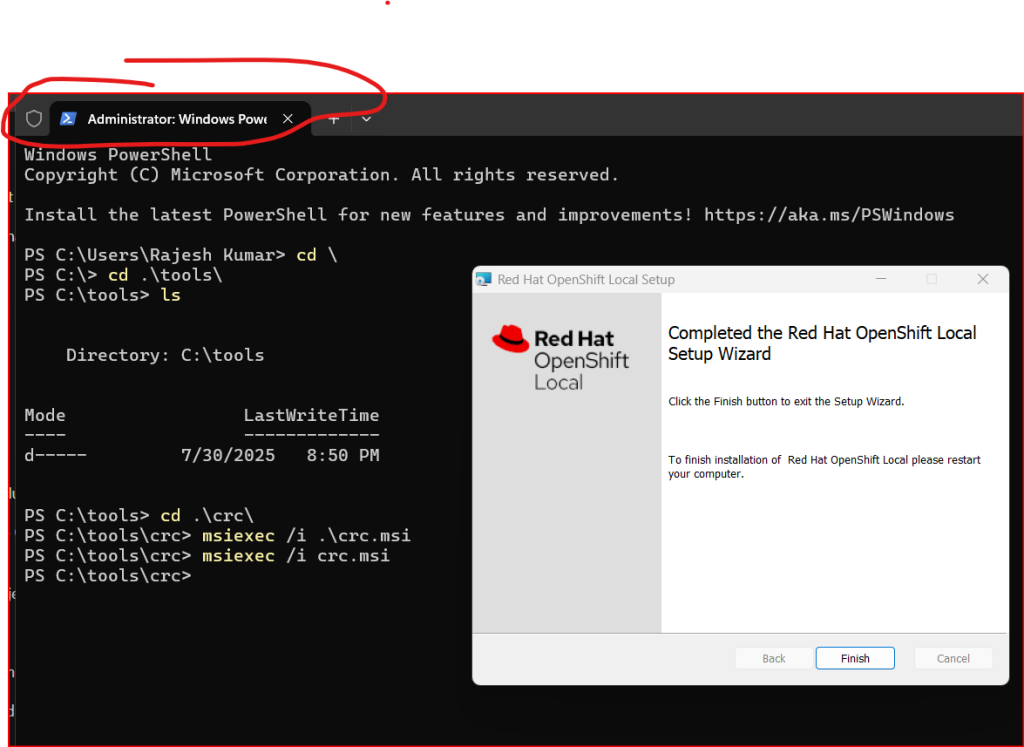
🔹 Step 3: Install OpenShift Local (CRC)
- Run the downloaded
.exefile (e.g.,crc-windows-installer.exe). - It installs the
crcCLI and adds it to your system PATH. - Open Command Prompt or PowerShell, and verify:
crc version
🔹 Step 4: Setup the Cluster
In PowerShell or Command Prompt, run:
crc setup --pull-secret C:pathtopull-secret.txt
Code language: CSS (css)
Replace the path with the full path to your
pull-secret.txtfile.
🔹 Step 5: Start the Cluster
crc start
- This will launch a single-node OpenShift 4 cluster inside a Hyper-V VM.
- It may take 5–10 minutes to complete.
🔹 Step 6: Access OpenShift Web Console
After the cluster starts, you’ll see output like:
Started the OpenShift cluster.

Console URL: https://console-openshift-console.apps-crc.testing
Code language: JavaScript (javascript)
Login Credentials:
| Role | Username | Password |
|---|---|---|
| Admin | kubeadmin | (shown in terminal) |
| Developer | developer | developer |
Open the web console in your browser and use these credentials.
🔹 Step 7: Access via CLI (Optional)
To set up oc (OpenShift CLI), run:
crc oc-env
Then copy and paste the output into your shell to make oc available.
Log in:
oc login -u developer -p developer https://api.crc.testing:6443
Code language: JavaScript (javascript)
🔁 Optional Cluster Management
| Action | Command |
|---|---|
| Stop cluster | crc stop |
| Delete cluster | crc delete |
| Status check | crc status |
🧹 Uninstall (if needed)
To uninstall CRC:
- Go to Control Panel → Programs → Uninstall a Program → Remove CodeReady Containers.
⚠️ Common Issues
| Problem | Solution |
|---|---|
| Hyper-V not found | Ensure virtualization is enabled in BIOS |
| CRC command not found | Reboot or check if the PATH was updated after install |
| Slow startup | Close heavy apps, ensure enough RAM/CPU are free |
| DNS resolution fails | Disable VPNs; CRC uses crc.testing local domain |

I’m Rajesh Kumar, a DevOps, SRE, DevSecOps, Cloud, and Platform Engineering expert passionate about sharing practical knowledge, real-world experiences, and industry best practices. I have worked at Cotocus and regularly write about technology, travel, investing, health, product reviews, and digital marketing through my various platforms.
I publish technical articles at DevOps School, travel stories at Holiday Landmark, stock market insights at Stocks Mantra, health and fitness guidance at My Medic Plus, product reviews at TrueReviewNow, and SEO and digital marketing strategies at Wizbrand.
Find Trusted Cardiac Hospitals
Compare heart hospitals by city and services — all in one place.
Explore Hospitals