
Introduction
AI self-service help portals are customer or employee support hubs that use artificial intelligence to help users find answers, solve issues, submit requests, and complete simple workflows without waiting for a human agent. These portals combine knowledge bases, search, AI chat, article recommendations, guided troubleshooting, ticket forms, workflow automation, and analytics into one self-service experience.
Why it matters: customers and employees increasingly expect fast answers at any time, across any device, and in their preferred language. Support teams also need to reduce repetitive tickets, improve first-contact resolution, and keep service costs under control. AI self-service portals help organizations provide accurate answers, route complex issues, recommend relevant content, collect better request details, and improve the quality of support handoffs when human help is needed.
Real-world use cases include customer help centers, ecommerce returns support, SaaS onboarding portals, IT help desk self-service, HR policy support, billing FAQs, troubleshooting guides, product documentation, chatbot-assisted search, employee service portals, knowledge base deflection, and guided request submission.
Evaluation criteria for buyers should include AI search quality, article recommendations, chatbot integration, workflow automation, multilingual support, portal customization, ticket deflection analytics, data privacy, role-based access, approval workflows, reporting, mobile experience, integration depth, knowledge governance, and ease of content maintenance.
Best for: SaaS companies, ecommerce brands, IT teams, HR service teams, customer support teams, BPOs, managed service providers, product documentation teams, and enterprises that want to reduce repetitive tickets while improving customer or employee experience. Not ideal for: teams with very low support volume, businesses without repeatable support questions, or organizations that lack approved knowledge content and internal ownership for portal maintenance.
What’s Changed in AI Self-Service Help Portals
- AI self-service portals are moving beyond static help centers into intelligent support hubs that recommend answers, trigger workflows, and guide users step by step.
- AI search is becoming more important than simple keyword search because users ask questions naturally rather than typing exact article titles.
- Portals are increasingly connected to ticketing, CRM, ITSM, HR, billing, identity, and product systems.
- AI chatbots are now embedded directly into help portals to answer questions using approved knowledge content.
- Knowledge freshness is becoming a major buying factor because outdated articles reduce trust and increase escalation.
- Guided troubleshooting workflows are becoming popular for technical support, device support, SaaS onboarding, and IT help desk requests.
- Personalization is improving, allowing portals to show content based on customer tier, product plan, employee role, region, or language.
- Analytics now focus on failed searches, deflection rate, article usefulness, portal engagement, and unresolved intent.
- Security and permissions matter more because self-service portals often expose internal policies, employee data, or customer account details.
- Buyers increasingly expect AI-generated article suggestions, content gap detection, and knowledge base improvement workflows.
- Multilingual self-service is becoming essential for global companies with distributed customers and employees.
- Human handoff is now expected to include portal context, searched articles, attempted steps, and user-provided details.
Quick Buyer Checklist
Use this checklist to shortlist AI self-service help portals quickly:
- Confirm whether the portal supports public customer self-service, private employee self-service, or both.
- Test AI search using real customer or employee questions.
- Check whether the portal recommends relevant articles based on user intent.
- Confirm whether AI chatbot answers are grounded in approved knowledge content.
- Review ticket deflection analytics and failed-search reporting.
- Check whether the portal supports guided troubleshooting and request workflows.
- Confirm integration with help desk, CRM, ITSM, HR, billing, product, and identity systems.
- Review user permissions, private content access, role-based controls, and audit logs.
- Confirm whether admins can customize branding, categories, forms, and workflows.
- Check multilingual content support and localization workflows.
- Test mobile and desktop usability.
- Review knowledge governance, ownership, approvals, and version history.
- Confirm data retention, encryption, and security controls.
- Evaluate pricing by seats, users, portal visitors, AI usage, articles, and automation volume.
- Confirm export options to reduce vendor lock-in.
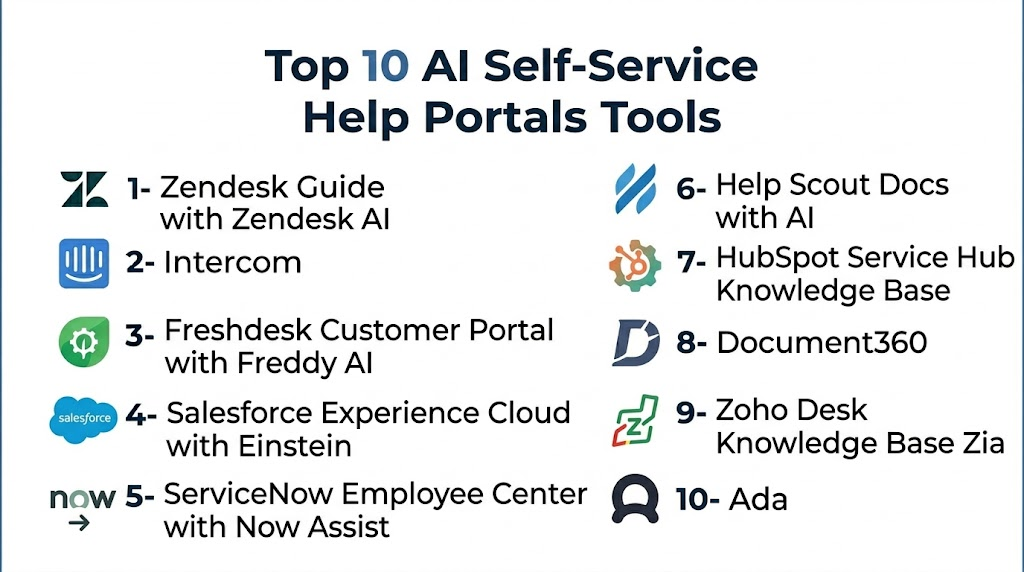
Top 10 AI Self-Service Help Portals Tools
1- Zendesk Guide with Zendesk AI
One-line verdict: Best for customer support teams needing AI-powered self-service connected to mature ticketing workflows.
Short description:
Zendesk Guide with Zendesk AI helps companies build help centers, serve recommended articles, power self-service search, and connect users to support teams when needed. It is strongest for organizations already using Zendesk for ticketing, customer service, and omnichannel support.
Standout Capabilities
- AI-powered help center and support content recommendations
- Native integration with Zendesk ticketing and messaging
- Customer-facing knowledge base portal
- Article suggestions and support workflow alignment
- AI-assisted agent and customer support experiences
- Reporting for help center and ticket deflection
- Workflow automation for escalation and routing
- Large marketplace and integration ecosystem
AI-Specific Depth
- Model support: Hosted AI model approach
- RAG / knowledge integration: Native help center and support content integration
- Evaluation: Help center analytics, ticket reporting, and support performance review
- Guardrails: Admin permissions, escalation rules, role controls, and support workflows
- Observability: Dashboards for searches, tickets, article usage, automation, and customer service trends
Pros
- Strong fit for existing Zendesk users
- Mature help center and ticketing ecosystem
- Good reporting for support operations
Cons
- Advanced AI features may depend on plan and configuration
- Best value is usually inside Zendesk ecosystem
- Large implementations may require careful administration
Security & Compliance
Zendesk provides enterprise security controls such as SSO, role permissions, encryption, audit capabilities, and admin settings depending on plan. Buyers should verify data retention, regional hosting, audit logs, and compliance requirements directly. Unknown certifications should be treated as Not publicly stated.
Deployment & Platforms
- Web-based platform
- Cloud deployment
- Customer-facing portal
- Mobile-friendly support experience
- Self-hosted deployment: N/A
Integrations & Ecosystem
Zendesk Guide works well when a self-service portal needs to connect with ticketing, live chat, messaging, CRM, and customer support operations.
- Zendesk ticketing
- Zendesk messaging
- CRM integrations
- Ecommerce systems
- Collaboration tools
- APIs and webhooks
- Marketplace apps
Pricing Model
Zendesk generally uses seat-based SaaS pricing with AI and advanced self-service capabilities depending on plan and add-ons.
Best-Fit Scenarios
- Customer help centers
- Ticket deflection programs
- Omnichannel support self-service
2- Intercom
One-line verdict: Best for SaaS teams wanting AI self-service, help center content, and customer messaging in one platform.
Short description:
Intercom combines help center content, AI support automation, customer messaging, and support inbox workflows. It helps users find answers through articles, AI chat, and guided support experiences before escalating to human agents.
Standout Capabilities
- AI-powered customer support automation
- Help center and customer messaging in one platform
- Article recommendations inside conversations
- AI chatbot answers grounded in help content
- Human handoff with full context
- Workflow automation for routing and escalation
- Conversation summaries and agent assistance
- Modern user experience for SaaS support
AI-Specific Depth
- Model support: Hosted AI model approach
- RAG / knowledge integration: Native help center and support content integration
- Evaluation: Conversation analytics, resolution tracking, and self-service reporting
- Guardrails: Answer grounding, escalation controls, and admin settings
- Observability: Resolution metrics, conversation reporting, help center usage, and support analytics
Pros
- Strong for product-led and SaaS support teams
- Excellent customer messaging experience
- Good connection between AI chatbot and knowledge base
Cons
- Costs can increase with scale and AI usage
- Best value appears for teams using Intercom broadly
- Less suited for traditional IT service portals
Security & Compliance
Intercom provides security capabilities such as encryption, access controls, SSO options, and admin permissions depending on plan. Buyers should verify audit logs, data retention, residency, and compliance requirements directly.
Deployment & Platforms
- Web-based platform
- Cloud deployment
- Customer help center and messaging channels
- Mobile apps available
- Self-hosted deployment: N/A
Integrations & Ecosystem
Intercom is a strong fit when self-service must connect with live customer conversations, product-led support, and SaaS onboarding workflows.
- Help center
- CRM integrations
- Slack
- Billing tools
- Product analytics tools
- APIs and webhooks
- Customer messaging channels
Pricing Model
Intercom generally uses SaaS subscription pricing with AI usage and support automation features depending on plan.
Best-Fit Scenarios
- SaaS customer self-service
- AI chatbot help center support
- Product-led customer support workflows
3- Freshdesk Customer Portal with Freddy AI
One-line verdict: Best for SMB and mid-market teams needing an affordable AI-enabled support portal.
Short description:
Freshdesk Customer Portal with Freddy AI helps teams offer searchable help articles, ticket submission, AI-assisted support, and customer self-service through a cloud-based help desk environment. It is practical for teams that want self-service without heavy enterprise complexity.
Standout Capabilities
- Customer portal for help articles and ticket submission
- AI-powered ticket assistance and support automation
- Knowledge base integration
- Automated suggestions and support workflows
- SLA and escalation support
- Omnichannel help desk connection
- Reporting for support performance
- Easy setup for growing teams
AI-Specific Depth
- Model support: Hosted AI model approach
- RAG / knowledge integration: Native knowledge base and support content integration
- Evaluation: Ticket analytics, portal reporting, and support workflow review
- Guardrails: Workflow rules, admin controls, and escalation logic
- Observability: Dashboards for ticket volume, portal usage, support trends, and automation
Pros
- Easy to adopt for SMB and mid-market teams
- Good balance of portal, ticketing, and AI assistance
- Strong value for growing support teams
Cons
- Enterprise customization may be limited compared with larger suites
- AI feature depth can vary by plan
- Complex portal workflows may require additional configuration
Security & Compliance
Freshdesk provides security and admin controls such as encryption, user roles, access management, and account controls depending on plan. Buyers should verify SSO, audit logs, retention, residency, and compliance details directly.
Deployment & Platforms
- Web-based platform
- Cloud deployment
- Customer portal and help desk workflows
- Mobile apps available
- Self-hosted deployment: N/A
Integrations & Ecosystem
Freshdesk works well for teams that need customer self-service connected to help desk operations and business systems.
- CRM integrations
- Ecommerce systems
- Collaboration tools
- Jira and project tools
- Knowledge base workflows
- APIs and marketplace apps
- Omnichannel support tools
Pricing Model
Freshdesk generally uses tiered SaaS pricing with AI and automation features depending on edition and add-ons.
Best-Fit Scenarios
- SMB customer help portals
- Ticket deflection with knowledge base support
- Growing service teams needing easy setup
4- Salesforce Experience Cloud with Einstein
One-line verdict: Best for enterprises needing personalized self-service portals connected to CRM data.
Short description:
Salesforce Experience Cloud with Einstein helps organizations build customer, partner, and employee portals connected to Salesforce CRM and service workflows. It is useful when self-service depends on customer history, account data, cases, knowledge, and enterprise workflows.
Standout Capabilities
- CRM-connected customer and partner portals
- AI-assisted service experiences through Salesforce ecosystem
- Knowledge base and case management integration
- Personalized content based on customer context
- Workflow automation across service processes
- Strong permissions and role controls
- Enterprise customization options
- Analytics for portal and service engagement
AI-Specific Depth
- Model support: Hosted AI and configurable enterprise AI ecosystem options
- RAG / knowledge integration: Salesforce knowledge, CRM records, and data platform context
- Evaluation: Service analytics, portal engagement reporting, and case review workflows
- Guardrails: Permission controls, workflow policies, approval processes, and governance settings
- Observability: CRM dashboards, portal analytics, service trends, and customer engagement reporting
Pros
- Strong for CRM-driven service portals
- Highly customizable for enterprise workflows
- Excellent customer data context
Cons
- Requires Salesforce expertise
- Can be costly and complex for smaller teams
- Best value depends on Salesforce adoption
Security & Compliance
Salesforce provides enterprise security capabilities such as SSO, RBAC, encryption, audit logging, permissions, and governance controls depending on configuration. Buyers should verify compliance, data retention, and regional requirements directly.
Deployment & Platforms
- Web-based platform
- Cloud deployment
- Customer, partner, and employee portals
- Mobile-friendly experiences
- Self-hosted deployment: N/A
Integrations & Ecosystem
Salesforce Experience Cloud is strongest when self-service needs CRM records, service cases, account context, workflow automation, and enterprise permissions.
- Salesforce Service Cloud
- Salesforce Data Cloud
- Salesforce Knowledge
- Slack
- MuleSoft
- App marketplace ecosystem
- APIs and automation tools
Pricing Model
Salesforce uses enterprise subscription pricing with portal, service, AI, and data usage elements depending on plan and configuration.
Best-Fit Scenarios
- CRM-connected customer portals
- Partner self-service communities
- Enterprise case and knowledge self-service
5- ServiceNow Employee Center with Now Assist
One-line verdict: Best for enterprises building AI-powered employee self-service across IT, HR, and workplace services.
Short description:
ServiceNow Employee Center with Now Assist helps enterprises provide a unified employee service portal for IT, HR, facilities, finance, and internal operations. It is designed for organizations that need governed self-service, workflow automation, and enterprise request routing.
Standout Capabilities
- Unified employee self-service portal
- AI-powered service assistance through Now Assist
- IT, HR, and workplace service workflows
- Knowledge base and service catalog integration
- Request forms and approval workflows
- Enterprise workflow orchestration
- SLA and case management support
- Strong governance for large organizations
AI-Specific Depth
- Model support: Hosted enterprise AI capabilities and configurable platform options
- RAG / knowledge integration: ServiceNow knowledge, service catalog, and enterprise workflow context
- Evaluation: Service analytics, request tracking, and workflow performance reporting
- Guardrails: Enterprise permissions, workflow controls, approval rules, and admin governance
- Observability: Service dashboards, request metrics, SLA trends, and employee experience analytics
Pros
- Excellent for enterprise employee self-service
- Strong workflow and approval depth
- Useful across IT, HR, and shared services
Cons
- Implementation can be complex
- Requires ServiceNow expertise
- Not ideal for small teams
Security & Compliance
ServiceNow provides enterprise security and governance features such as role controls, identity integrations, audit capabilities, encryption, and platform administration depending on configuration. Buyers should verify compliance, retention, and data residency requirements directly.
Deployment & Platforms
- Web-based enterprise platform
- Cloud deployment
- Employee portal and service catalog
- Mobile access available
- Self-hosted deployment: Varies / N/A
Integrations & Ecosystem
ServiceNow Employee Center is strongest when self-service spans multiple departments, approval flows, assets, services, and enterprise records.
- ITSM workflows
- HR service delivery
- Service catalog
- Asset and CMDB systems
- Identity tools
- Integration hub
- Enterprise applications
Pricing Model
ServiceNow pricing is typically enterprise subscription based and varies by modules, users, workflows, and AI capabilities.
Best-Fit Scenarios
- Employee service portals
- IT and HR self-service
- Enterprise shared service automation
6- Help Scout Docs with AI
One-line verdict: Best for small support teams wanting simple, human-friendly self-service and AI-assisted support.
Short description:
Help Scout Docs with AI helps teams create customer-facing knowledge bases, organize help content, and support users through a clean self-service experience. It is a strong fit for teams that value simplicity, clarity, and human-centered support.
Standout Capabilities
- Simple customer-facing knowledge base
- AI-assisted support workflows
- Clean article editor and documentation structure
- Customer support inbox connection
- Searchable help content
- Team collaboration around support answers
- Reporting for customer support performance
- Lightweight and easy to manage
AI-Specific Depth
- Model support: Hosted AI model approach
- RAG / knowledge integration: Help content and support conversation context depending on setup
- Evaluation: Human review, support reporting, and manual content validation
- Guardrails: Workspace permissions, support workflows, and human review
- Observability: Reporting for conversations, help content, response time, and team performance
Pros
- Easy for small teams to manage
- Clean and simple customer experience
- Good for human-led support with self-service support
Cons
- Less advanced enterprise workflow depth
- Limited ITSM or complex portal use cases
- Advanced AI governance may be limited
Security & Compliance
Help Scout provides business security and admin controls depending on plan. Buyers should verify SSO, RBAC, retention, audit logs, encryption, and compliance requirements directly.
Deployment & Platforms
- Web-based platform
- Cloud deployment
- Public knowledge base
- Customer support inbox integration
- Self-hosted deployment: N/A
Integrations & Ecosystem
Help Scout works best for customer support teams that want a simple help portal connected to shared inbox and support workflows.
- Help Scout inbox
- CRM integrations
- Ecommerce tools
- Collaboration tools
- APIs
- Reporting tools
- Support workflow integrations
Pricing Model
Help Scout generally uses SaaS pricing based on users, support features, and plan level. AI capabilities may vary by package.
Best-Fit Scenarios
- Small customer help portals
- Lightweight support knowledge bases
- Human-led support with AI assistance
7- HubSpot Service Hub Knowledge Base
One-line verdict: Best for growing businesses needing a CRM-connected self-service portal and support knowledge base.
Short description:
HubSpot Service Hub Knowledge Base helps teams create self-service content, support customer requests, and connect service activity with CRM data. With AI capabilities in the HubSpot ecosystem, teams can draft, improve, and manage support content more efficiently.
Standout Capabilities
- CRM-connected knowledge base
- AI-assisted content creation and support workflows
- Customer self-service article portal
- Integration with tickets and service tools
- Support analytics and reporting
- Easy setup for growing teams
- Customer context from HubSpot CRM
- Good fit for sales, service, and marketing alignment
AI-Specific Depth
- Model support: Hosted AI model approach
- RAG / knowledge integration: HubSpot knowledge base and CRM context integration
- Evaluation: Content review, support analytics, and service reporting
- Guardrails: Workspace permissions, admin controls, and human editing workflows
- Observability: Service dashboards, article performance, ticket trends, and CRM reporting
Pros
- Strong fit for HubSpot-centered teams
- Easy to connect service and CRM data
- Good for SMB and mid-market self-service
Cons
- Best value depends on HubSpot adoption
- Less flexible for teams outside HubSpot ecosystem
- Advanced enterprise governance may vary by plan
Security & Compliance
HubSpot provides business security and admin controls depending on plan and configuration. Buyers should verify SSO, RBAC, audit logs, encryption, retention, and compliance requirements directly.
Deployment & Platforms
- Web-based platform
- Cloud deployment
- Customer knowledge base
- CRM and service hub environment
- Self-hosted deployment: N/A
Integrations & Ecosystem
HubSpot Service Hub Knowledge Base works best when self-service is connected to CRM, service tickets, customer journeys, and marketing workflows.
- HubSpot CRM
- Service Hub
- Marketing tools
- Sales tools
- Email workflows
- App marketplace integrations
- Reporting dashboards
Pricing Model
HubSpot uses subscription-based SaaS pricing with features depending on plan, product edition, and platform access.
Best-Fit Scenarios
- CRM-connected customer help centers
- SMB and mid-market service portals
- Support teams already using HubSpot
8- Document360
One-line verdict: Best for product and support teams needing a dedicated AI-ready knowledge base portal.
Short description:
Document360 is a dedicated knowledge base platform for customer help centers, product documentation, internal knowledge, and self-service content. Its AI capabilities support article creation, search, content improvement, and knowledge management workflows.
Standout Capabilities
- Dedicated public and private knowledge base portals
- AI-assisted article writing and improvement
- Strong documentation structure and categories
- Version history and content organization
- AI search and self-service support
- Article analytics and feedback
- Review and publishing workflows
- Good fit for product documentation teams
AI-Specific Depth
- Model support: Hosted AI model approach
- RAG / knowledge integration: Native knowledge base and documentation structure
- Evaluation: Article review, feedback analytics, and usage reporting
- Guardrails: Permissions, publishing controls, versioning, and role-based access
- Observability: Search analytics, article analytics, reader feedback, and documentation performance metrics
Pros
- Strong dedicated knowledge base experience
- Useful for structured product documentation
- Good governance for article lifecycle management
Cons
- Not a full help desk by itself
- May require integrations with ticketing tools
- Migration from existing help centers can take planning
Security & Compliance
Document360 provides business and enterprise controls depending on plan. Buyers should verify SSO, RBAC, audit logs, encryption, retention, and compliance requirements directly.
Deployment & Platforms
- Web-based platform
- Cloud deployment
- Public and private knowledge base portals
- Self-hosted deployment: Varies / N/A
Integrations & Ecosystem
Document360 is a strong fit when the portal itself is the center of knowledge operations and needs to connect with support tools.
- Help desk integrations
- Chat tools
- Analytics tools
- API access
- Import and export workflows
- Team collaboration tools
- Search and feedback systems
Pricing Model
Document360 generally uses tiered SaaS pricing based on workspaces, users, projects, and advanced features. AI capabilities may vary by plan.
Best-Fit Scenarios
- Product documentation portals
- Customer self-service knowledge bases
- Internal and external help content management
9- Zoho Desk Knowledge Base with Zia
One-line verdict: Best for Zoho ecosystem users needing affordable AI-assisted self-service and help desk workflows.
Short description:
Zoho Desk Knowledge Base with Zia helps teams create support portals, publish help articles, assist agents, and improve customer service workflows inside the Zoho ecosystem. It is useful for teams that want an affordable help desk and self-service portal connected to broader business apps.
Standout Capabilities
- Customer self-service knowledge base
- AI assistance through Zia
- Ticketing and support workflow integration
- Article suggestions and support automation
- Customer portal customization
- SLA and escalation support
- Reporting for support performance
- Strong fit with Zoho business applications
AI-Specific Depth
- Model support: Hosted AI model approach
- RAG / knowledge integration: Zoho knowledge base and support content integration
- Evaluation: Ticket analytics, support reporting, and content review workflows
- Guardrails: Admin settings, workflow rules, and escalation paths
- Observability: Ticket dashboards, portal usage, support analytics, and automation reporting
Pros
- Good value for Zoho users
- Combines help desk and self-service portal
- Practical for SMB and mid-market support teams
Cons
- Best value is inside Zoho ecosystem
- Advanced AI depth should be tested by use case
- Enterprise customization may be limited compared with larger suites
Security & Compliance
Zoho Desk provides business security and admin controls depending on plan. Buyers should verify SSO, RBAC, audit logs, encryption, data retention, and compliance requirements directly.
Deployment & Platforms
- Web-based platform
- Cloud deployment
- Customer portal and help desk workflows
- Mobile apps available
- Self-hosted deployment: N/A
Integrations & Ecosystem
Zoho Desk works well for teams that already use Zoho CRM, Zoho apps, or want a connected business platform.
- Zoho CRM
- Zoho business apps
- Email and support channels
- APIs
- Marketplace extensions
- Customer portal workflows
- Reporting tools
Pricing Model
Zoho Desk generally uses tiered SaaS pricing based on users, features, and support needs. AI capabilities may vary by plan.
Best-Fit Scenarios
- Zoho-based customer support
- Affordable help desk self-service
- SMB support portals with AI assistance
10- Ada
One-line verdict: Best for AI-first customer self-service where chatbot automation leads the portal experience.
Short description:
Ada is an AI customer service automation platform that helps businesses deliver self-service through conversational AI, knowledge integration, and workflow automation. It is strongest when the self-service experience is chatbot-led rather than only article-led.
Standout Capabilities
- AI-powered customer self-service automation
- No-code conversational workflow builder
- Knowledge base and support content integration
- Multilingual customer support
- Human handoff and escalation routing
- Personalized customer journeys
- Analytics for automation performance
- Omnichannel customer engagement
AI-Specific Depth
- Model support: Hosted AI model approach
- RAG / knowledge integration: Knowledge base and support content integrations
- Evaluation: Conversation analytics and automation performance review
- Guardrails: Admin-defined workflows, escalation paths, and response controls
- Observability: Automation dashboards, resolution metrics, conversation trends, and customer support analytics
Pros
- Strong AI-first self-service experience
- Good for multilingual support automation
- Business-user-friendly workflow management
Cons
- Less focused on traditional article portal management
- Advanced custom workflows may need setup support
- Best for teams ready to invest in automation design
Security & Compliance
Ada provides enterprise security and governance features depending on plan and configuration. Buyers should verify SSO, RBAC, audit logs, encryption, retention, residency, and compliance needs directly.
Deployment & Platforms
- Web-based platform
- Cloud deployment
- Chatbot-led self-service channels
- Customer messaging integrations
- Self-hosted deployment: Varies / N/A
Integrations & Ecosystem
Ada fits organizations that want AI-led self-service connected to customer systems, support workflows, and messaging channels.
- CRM integrations
- Help desk integrations
- Ecommerce systems
- Messaging channels
- APIs
- Knowledge base integrations
- Analytics tools
Pricing Model
Ada generally follows enterprise SaaS pricing based on usage, channels, automation volume, and support requirements.
Best-Fit Scenarios
- AI chatbot self-service portals
- Multilingual customer support automation
- High-volume customer service deflection
Comparison Table
| Tool Name | Best For | Deployment | Model Flexibility | Strength | Watch-Out | Public Rating |
|---|---|---|---|---|---|---|
| Zendesk Guide with Zendesk AI | Customer help centers | Cloud | Hosted | Ticketing and portal alignment | Best inside Zendesk | N/A |
| Intercom | SaaS self-service | Cloud | Hosted | Messaging plus help center | Costs can scale | N/A |
| Freshdesk Customer Portal with Freddy AI | SMB support portals | Cloud | Hosted | Easy help desk self-service | AI depth varies by plan | N/A |
| Salesforce Experience Cloud with Einstein | CRM-connected portals | Cloud | Hosted and configurable | Customer data context | Requires Salesforce expertise | N/A |
| ServiceNow Employee Center with Now Assist | Employee self-service | Cloud | Hosted and configurable | Enterprise workflow depth | Complex implementation | N/A |
| Help Scout Docs with AI | Small support teams | Cloud | Hosted | Simple human-friendly portal | Limited enterprise depth | N/A |
| HubSpot Service Hub Knowledge Base | CRM-connected SMB support | Cloud | Hosted | HubSpot ecosystem fit | Less flexible outside HubSpot | N/A |
| Document360 | Product documentation portals | Cloud | Hosted | Dedicated knowledge base | Not a full help desk | N/A |
| Zoho Desk Knowledge Base with Zia | Zoho ecosystem users | Cloud | Hosted | Affordable self-service | Best inside Zoho | N/A |
| Ada | AI-first self-service | Cloud | Hosted | Chatbot-led automation | Less traditional portal focus | N/A |
Scoring & Evaluation
This scoring is comparative, not absolute. It reflects portal capability, AI search and automation depth, knowledge integration, workflow flexibility, ease of use, governance, security readiness, and practical buyer value. Scores should be used for shortlisting only. Buyers should test each tool with real customer questions, employee requests, support articles, ticket workflows, role permissions, and escalation scenarios before making a final decision.
| Tool | Core | Reliability and Eval | Guardrails | Integrations | Ease | Perf and Cost | Security and Admin | Support | Weighted Total |
|---|---|---|---|---|---|---|---|---|---|
| Zendesk Guide with Zendesk AI | 9 | 8 | 8 | 10 | 8 | 7 | 9 | 9 | 8.6 |
| Intercom | 8 | 8 | 8 | 9 | 9 | 7 | 8 | 8 | 8.3 |
| Freshdesk Customer Portal with Freddy AI | 8 | 7 | 7 | 8 | 9 | 9 | 7 | 8 | 8.0 |
| Salesforce Experience Cloud with Einstein | 10 | 9 | 9 | 10 | 6 | 7 | 10 | 9 | 8.9 |
| ServiceNow Employee Center with Now Assist | 10 | 9 | 9 | 10 | 6 | 7 | 10 | 9 | 8.9 |
| Help Scout Docs with AI | 7 | 7 | 7 | 7 | 9 | 9 | 7 | 8 | 7.5 |
| HubSpot Service Hub Knowledge Base | 8 | 7 | 7 | 8 | 9 | 8 | 8 | 8 | 7.9 |
| Document360 | 9 | 8 | 8 | 8 | 8 | 8 | 8 | 8 | 8.2 |
| Zoho Desk Knowledge Base with Zia | 8 | 7 | 7 | 8 | 8 | 9 | 7 | 8 | 7.8 |
| Ada | 8 | 8 | 8 | 8 | 8 | 7 | 8 | 8 | 8.0 |
Top 3 for Enterprise
- Salesforce Experience Cloud with Einstein
- ServiceNow Employee Center with Now Assist
- Zendesk Guide with Zendesk AI
Top 3 for SMB
- Freshdesk Customer Portal with Freddy AI
- Help Scout Docs with AI
- HubSpot Service Hub Knowledge Base
Top 3 for Developers
- Document360
- Salesforce Experience Cloud with Einstein
- ServiceNow Employee Center with Now Assist
Which AI Self-Service Help Portal Is Right for You
Solo / Freelancer
Solo users usually need a simple help center, FAQ page, or lightweight customer support portal. Help Scout Docs with AI, HubSpot Service Hub Knowledge Base, or Zoho Desk Knowledge Base with Zia can be practical depending on the existing business stack. If the portal only needs a few articles, a simple documentation tool may be enough before investing in AI-heavy automation.
SMB
Small and growing businesses should prioritize ease of setup, clean article publishing, affordable pricing, simple ticket submission, and basic AI assistance. Freshdesk Customer Portal with Freddy AI, Help Scout Docs with AI, HubSpot Service Hub Knowledge Base, Zoho Desk Knowledge Base with Zia, and Intercom are strong options. SMBs should focus on organizing the top repeated questions before building complex portal workflows.
Mid-Market
Mid-market teams usually need better analytics, workflow automation, ticket deflection, chatbot support, and integrations with CRM or help desk systems. Zendesk Guide with Zendesk AI, Intercom, Freshdesk Customer Portal with Freddy AI, Document360, and Ada are worth evaluating. These teams should test search quality, chatbot accuracy, human handoff, and article usefulness before rollout.
Enterprise
Enterprises should prioritize governance, permissions, audit logs, personalization, integration depth, workflow automation, and regional data requirements. Salesforce Experience Cloud with Einstein is strong for CRM-connected customer and partner portals. ServiceNow Employee Center with Now Assist is strong for employee self-service. Zendesk Guide with Zendesk AI is strong for customer support portals connected to ticketing operations.
Regulated industries
Finance, healthcare, insurance, public sector, and legal teams should focus on data privacy, role-based access, audit logs, approval workflows, retention rules, and secure content publishing. Salesforce Experience Cloud with Einstein, ServiceNow Employee Center with Now Assist, Zendesk Guide with Zendesk AI, and Document360 are strong candidates for regulated evaluations. Buyers should verify every security and compliance requirement directly before deployment.
Budget vs premium
Budget-focused teams should start with Freshdesk Customer Portal with Freddy AI, Help Scout Docs with AI, HubSpot Service Hub Knowledge Base, or Zoho Desk Knowledge Base with Zia. Premium buyers should evaluate Salesforce Experience Cloud with Einstein, ServiceNow Employee Center with Now Assist, Zendesk Guide with Zendesk AI, Intercom, or Ada when they need advanced automation, personalization, analytics, and governance.
Build vs buy
Building a self-service help portal may make sense if your organization has strong engineering resources, strict custom UX needs, internal identity requirements, and unique workflows. Most teams should buy because article management, search, permissions, analytics, ticketing integration, chatbot support, and governance take significant effort to build well. A hybrid approach can work if teams buy a portal platform and build custom integrations for product, billing, or internal workflow data.
Implementation Playbook 30 / 60 / 90 Days
First 30 Days
- Define the main portal goal such as ticket deflection, employee self-service, onboarding, product support, or guided troubleshooting.
- Audit existing tickets, search logs, articles, macros, and support conversations.
- Identify the top repeated questions that should be answered in the portal.
- Create a clear content structure with categories, article owners, and review responsibilities.
- Build or update essential articles before launching AI search or chatbot support.
- Test search quality using real customer or employee questions.
- Configure branding, navigation, ticket forms, permissions, and escalation paths.
- Define success metrics such as deflection rate, search success, article feedback, ticket volume, and time to resolution.
- Start with a controlled pilot for one product, team, region, or service area.
- Review privacy, access, and retention settings before publishing sensitive content.
Days 31 to 60
- Expand content based on failed searches and repeated tickets.
- Add guided workflows for common issues such as returns, password resets, onboarding, device troubleshooting, and access requests.
- Connect the portal with help desk, CRM, ITSM, HR, billing, or product systems.
- Add AI chatbot support only after the knowledge base is accurate and reviewed.
- Set up article feedback, search analytics, and ticket deflection reporting.
- Train support agents to suggest portal articles and flag content gaps.
- Add multilingual content if users come from multiple regions.
- Define approval workflows for policy, legal, financial, technical, or regulated content.
- Review human handoff quality from portal to agent.
- Start measuring whether portal use reduces repetitive tickets.
Days 61 to 90
- Scale the portal across more products, departments, regions, or customer segments.
- Use AI analytics to identify missing articles and outdated content.
- Optimize content for both human readers and AI retrieval.
- Add personalization based on customer plan, employee role, product area, or service category.
- Review escalation rules for low-confidence answers and high-risk issues.
- Build executive reporting for self-service usage, deflection, support savings, and customer satisfaction.
- Monitor content freshness and assign recurring review cycles.
- Review security permissions, audit logs, and data export options.
- Optimize portal navigation, article templates, and search filters.
- Establish continuous collaboration between support, product, IT, HR, customer success, and documentation teams.
Common Mistakes and How to Avoid Them
- Launching a portal with outdated or incomplete knowledge content.
- Adding an AI chatbot before improving the help articles it depends on.
- Treating the portal as a static FAQ page instead of a living support system.
- Ignoring failed searches and customer feedback.
- Creating too many categories that confuse users.
- Not assigning owners for article review and updates.
- Publishing sensitive content without permissions or approval workflows.
- Measuring page views but not ticket deflection or resolution impact.
- Forgetting mobile usability for customers and employees.
- Not connecting portal activity with tickets, CRM, or service records.
- Allowing AI to answer policy-sensitive questions without guardrails.
- Using generic AI-generated content that does not match product reality.
- Over-customizing the portal before validating user needs.
- Failing to plan for multilingual content and regional differences.
FAQs
1. What is an AI self-service help portal?
An AI self-service help portal is a support website or service hub that uses AI search, article recommendations, chatbot assistance, and workflow automation to help users solve issues without waiting for a human agent.
2. How is an AI help portal different from a normal knowledge base?
A normal knowledge base mainly stores articles. An AI help portal can understand user intent, suggest relevant answers, guide users through steps, collect ticket details, and escalate with context when human help is needed.
3. Can AI self-service portals reduce support tickets?
Yes, they can reduce repetitive tickets when the knowledge base is accurate, search works well, and users can easily find answers. The impact depends on content quality, portal design, and user adoption.
4. What content should be included in a self-service portal?
Useful content includes FAQs, troubleshooting guides, onboarding steps, billing guidance, account management help, policies, product documentation, request forms, and escalation instructions.
5. Are AI help portals useful for employees?
Yes, employee self-service portals are useful for IT, HR, finance, facilities, and workplace requests. They help employees find policies, submit requests, reset access, and track service progress.
6. Can AI self-service portals integrate with ticketing systems?
Most leading platforms integrate with help desk, CRM, ITSM, or service management systems. This allows users to create tickets, track requests, and transfer portal context to support agents.
7. How do AI portals handle sensitive content?
Sensitive content should be controlled through role permissions, private articles, approval workflows, audit logs, and escalation rules. Regulated teams should verify security settings before launch.
8. Do AI self-service portals support multiple languages?
Many platforms support multilingual articles or AI-assisted localization, but quality varies. Teams should review translated content and test search quality in each target language.
9. What metrics should teams track?
Important metrics include deflection rate, search success, failed searches, article feedback, chatbot resolution rate, portal visits, ticket creation rate, time to resolution, and customer satisfaction.
10. Should a portal include an AI chatbot?
An AI chatbot can improve self-service if the knowledge base is accurate and well-structured. If content is outdated or incomplete, the chatbot may give poor answers and reduce trust.
11. How often should help portal content be updated?
Content should be reviewed whenever products, policies, prices, workflows, or support processes change. High-traffic and low-rated articles should be reviewed more frequently.
12. Should companies build or buy a self-service help portal?
Most teams should buy because search, publishing, permissions, analytics, ticketing, chatbot integration, and governance are complex to build. Building may make sense for organizations with highly customized workflows and strong engineering teams.
Conclusion
AI self-service help portals help organizations deliver faster answers, reduce repetitive tickets, improve customer and employee experience, and make support operations more scalable. The best platform depends on whether your priority is customer support, employee service, product documentation, CRM-connected workflows, or AI chatbot-led automation. Zendesk Guide with Zendesk AI and Intercom are strong for customer support teams, Freshdesk and Help Scout are practical for SMBs, Salesforce Experience Cloud and ServiceNow Employee Center are strong for enterprises, Document360 is excellent for dedicated documentation portals, and Ada is powerful for AI-first self-service. The smartest path is to shortlist tools based on your support model, pilot with real user questions and real knowledge content, verify security and escalation controls, then scale gradually with strong ownership, analytics, and continuous content improvement.

Find Trusted Cardiac Hospitals
Compare heart hospitals by city and services — all in one place.
Explore Hospitals
The article is useful for comparing AI self-service help portals, but in real-world deployments the main challenge isn’t building the portal—it’s keeping the knowledge base accurate and ensuring users actually find the right answers without escalating unnecessarily. Many systems fail when documentation drifts from product updates or when search relevance is weak, leading to frustrated users and higher support load. A more practical approach is to tightly couple self-service content with product release cycles, add continuous feedback loops from failed searches, and monitor deflection rates to ensure the portal genuinely reduces support effort.