
Introduction
AI Accessibility Services (Speech/Caption) Platforms are technologies that convert spoken language into text, generate real-time captions, enable transcription, and improve digital accessibility across video, audio, and live communication environments. In simple terms, they make spoken content readable and searchable, while also ensuring inclusivity for users who are deaf, hard of hearing, or prefer reading over listening.
In 2026 and beyond, these platforms have become mission-critical infrastructure for enterprises, education, media, and government. The shift toward hybrid work, global video communication, and AI-powered meetings has pushed accessibility from a compliance requirement to a core product capability. Modern systems now combine speech recognition, translation, speaker identification, and even semantic summarization into unified accessibility pipelines.
Common real-world use cases include live meeting captions, lecture transcription, media subtitle generation, call center analytics, multilingual event streaming, compliance recording for regulated industries, and accessibility enhancement for public digital services.
When evaluating these platforms, buyers should focus on:
- Speech recognition accuracy across accents and environments
- Real-time latency for live captioning
- Multilingual transcription and translation support
- AI model flexibility and customization
- Integration with conferencing and video tools
- Data privacy, retention, and compliance controls
- Evaluation accuracy and error correction workflows
- Scalability for enterprise workloads
- Cost efficiency per audio hour or seat
- Accessibility standards compliance support
Best for: Enterprises, educational institutions, media companies, SaaS platforms, government services, and customer support operations that require scalable speech-to-text and captioning solutions.
Not ideal for: Users needing only occasional manual transcription or offline note-taking where lightweight tools or device-native captions are sufficient.
What’s Changed in AI Accessibility Services (Speech/Caption) Platforms in 2026+
- Shift from simple transcription tools to real-time multimodal accessibility engines
- Increased use of agentic AI for live correction and summarization of captions
- Growing adoption of multi-model speech pipelines (ASR + LLM + translation layers)
- Strong focus on low-latency streaming transcription for live events
- Improved handling of accent diversity, noise environments, and domain-specific jargon
- Integration of AI evaluation layers to measure caption accuracy continuously
- Expansion of on-device speech processing for privacy-sensitive environments
- More enterprise demand for data residency and retention control
- Emergence of AI-driven subtitle localization at scale
- Increased adoption of prompt-injection-resistant transcription pipelines in enterprise workflows
- Built-in observability dashboards for transcription quality and cost tracking
- Growing ecosystem of API-first accessibility platforms for developers
Quick Buyer Checklist (Scan-Friendly)
Before selecting an AI accessibility platform, evaluate:
- Data privacy & retention policies
- On-device vs cloud processing options
- Model flexibility (single model vs multi-model routing)
- Real-time streaming latency performance
- Accuracy across accents, dialects, and noisy environments
- Support for multilingual captions and translation
- Evaluation tools for transcription quality monitoring
- Guardrails for sensitive content handling
- API and SDK availability for integration
- Vendor lock-in risk and export options
- Cost per audio minute or per seat
- Compliance readiness (accessibility standards support)
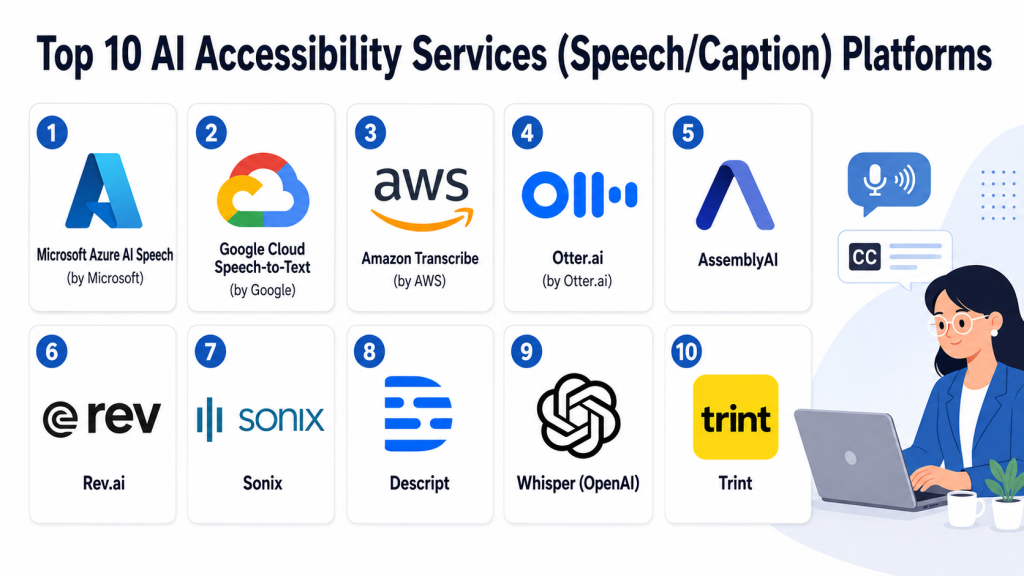
Top 10 AI Accessibility Services (Speech/Caption) Platforms
#1 — Microsoft Azure AI Speech (by Microsoft)
One-line verdict: Best for enterprises needing scalable, secure, real-time speech and caption infrastructure.
Short description (2–3 lines):
Microsoft Azure AI Speech provides speech-to-text, text-to-speech, and real-time captioning capabilities for enterprise applications. It is widely used in meetings, customer service, and accessibility systems across large organizations.
Standout Capabilities
- Real-time speech-to-text streaming at scale
- Custom speech model training for domain vocabulary
- Speaker diarization for multi-speaker environments
- Neural voice synthesis for accessibility tools
- Deep integration with enterprise communication systems
- Multi-language transcription and translation pipelines
AI-Specific Depth
- Model support: Proprietary + customizable speech models
- RAG / knowledge integration: N/A
- Evaluation: Limited built-in metrics; external evaluation required
- Guardrails: Content filtering available via Azure ecosystem tools
- Observability: Basic performance and latency monitoring dashboards
Pros
- Highly scalable enterprise infrastructure
- Strong accuracy across diverse environments
- Deep integration with Microsoft ecosystem
Cons
- Complex setup for smaller teams
- Limited transparency in model internals
Security & Compliance
- Enterprise-grade encryption supported
- SSO/SAML and RBAC available
- Data retention controls supported
- Certifications: Not publicly stated in full detail for all modules
Deployment & Platforms
- Cloud-based (Azure)
- APIs and SDKs for multiple languages
Integrations & Ecosystem
- Microsoft Teams
- Azure Cognitive Services ecosystem
- Power Platform
- Custom enterprise applications
Pricing Model
Usage-based (audio processing per hour/second); enterprise contracts vary
Best-Fit Scenarios
- Large enterprises
- Government accessibility programs
- Enterprise meeting transcription systems
#2 — Google Cloud Speech-to-Text (by Google)
One-line verdict: Best for multilingual, scalable transcription with strong global infrastructure.
Short description:
Google Cloud Speech-to-Text delivers highly scalable speech recognition APIs optimized for real-time and batch transcription. It is widely used in media, apps, and global accessibility workflows.
Standout Capabilities
- Streaming and batch transcription
- Automatic punctuation and formatting
- Language detection and switching
- Custom vocabulary boosting
- High scalability via cloud infrastructure
- Integration with translation pipelines
AI-Specific Depth
- Model support: Proprietary multi-language ASR models
- RAG / knowledge integration: N/A
- Evaluation: Basic confidence scoring available
- Guardrails: Limited; handled via surrounding GCP services
- Observability: API-level logs and latency metrics
Pros
- Excellent multilingual coverage
- Strong cloud scalability
- Reliable real-time performance
Cons
- Limited customization compared to enterprise tools
- Requires engineering effort for full workflows
Security & Compliance
- Enterprise security via Google Cloud
- RBAC and IAM controls available
- Data retention configurable
Deployment & Platforms
- Cloud API service
Integrations & Ecosystem
- Google Meet ecosystem
- Vertex AI pipelines
- Third-party media apps
Pricing Model
Usage-based per audio second
Best-Fit Scenarios
- Media platforms
- Global SaaS applications
- Multilingual accessibility systems
#3 — Amazon Transcribe (by AWS)
One-line verdict: Best for AWS-native organizations building scalable speech pipelines.
Short description:
Amazon Transcribe is AWS’s speech recognition service designed for real-time transcription, call analytics, and accessibility use cases.
Standout Capabilities
- Real-time streaming transcription
- Call analytics for contact centers
- Custom vocabulary and language models
- Speaker identification
- Medical and domain-specific variants
- Batch transcription workflows
AI-Specific Depth
- Model support: Proprietary AWS ASR models
- RAG / knowledge integration: N/A
- Evaluation: Basic confidence scoring
- Guardrails: AWS ecosystem-based filtering options
- Observability: CloudWatch metrics support
Pros
- Strong AWS ecosystem integration
- Scalable and reliable infrastructure
- Good enterprise adoption
Cons
- Less user-friendly for non-AWS teams
- Limited built-in AI evaluation tools
Security & Compliance
- AWS IAM, encryption, audit logs
- Compliance features depend on AWS setup
Deployment & Platforms
- Cloud-native (AWS)
Integrations & Ecosystem
- AWS Lambda
- Amazon Connect
- S3 data pipelines
Pricing Model
Pay-as-you-go per audio second
Best-Fit Scenarios
- Contact centers
- AWS-based SaaS platforms
- Enterprise transcription pipelines
#4 — Otter.ai (by Otter.ai)
One-line verdict: Best for real-time meeting transcription and productivity-focused captioning.
Short description:
Otter.ai provides AI-powered meeting notes, transcription, and collaboration features designed for teams and individuals.
Standout Capabilities
- Live meeting transcription
- Speaker identification
- AI-generated summaries
- Searchable transcript archives
- Collaboration notes and highlights
- Mobile and web apps
AI-Specific Depth
- Model support: Proprietary ASR + summarization models
- RAG / knowledge integration: Limited workspace memory features
- Evaluation: N/A
- Guardrails: Basic content controls
- Observability: Limited analytics
Pros
- Extremely easy to use
- Great for meetings and education
- Strong productivity features
Cons
- Not enterprise-grade for large deployments
- Limited customization
Security & Compliance
- Standard encryption
- Enterprise features available (details vary)
Deployment & Platforms
- Web, iOS, Android
Integrations & Ecosystem
- Zoom, Google Meet, Microsoft Teams
- Calendar integrations
- Export to documents
Pricing Model
Freemium + subscription tiers
Best-Fit Scenarios
- Teams and startups
- Education lectures
- Personal productivity workflows
#5 — AssemblyAI
One-line verdict: Best developer-first API for speech intelligence and captioning pipelines.
Short description:
AssemblyAI provides API-first speech recognition with advanced features like summarization, sentiment detection, and topic extraction.
Standout Capabilities
- High-quality speech-to-text API
- AI summarization of transcripts
- Sentiment and entity detection
- Real-time streaming transcription
- Topic segmentation
- Audio intelligence features
AI-Specific Depth
- Model support: Proprietary API models
- RAG / knowledge integration: API-based enrichment workflows
- Evaluation: Transcript confidence scoring
- Guardrails: Content moderation options available
- Observability: API usage analytics
Pros
- Excellent developer experience
- Advanced audio intelligence features
- Easy API integration
Cons
- Not a full end-user application
- Requires engineering effort
Security & Compliance
- Encryption in transit and at rest
- Enterprise controls available
Deployment & Platforms
- Cloud API
Integrations & Ecosystem
- SDKs for multiple languages
- Video/audio pipelines
- SaaS integrations
Pricing Model
Usage-based API pricing
Best-Fit Scenarios
- Developers building transcription apps
- AI SaaS platforms
- Analytics pipelines
#6 — Rev.ai
One-line verdict: Best for high-accuracy transcription with hybrid AI + human workflows.
Short description:
Rev.ai combines AI transcription with optional human review services for higher accuracy accessibility workflows.
Standout Capabilities
- AI transcription API
- Human-reviewed transcription option
- Speaker labeling
- Timestamped captions
- Fast turnaround workflows
AI-Specific Depth
- Model support: Proprietary ASR models
- RAG / knowledge integration: N/A
- Evaluation: Human-in-the-loop correction system
- Guardrails: Moderation via human review
- Observability: Basic reporting tools
Pros
- High accuracy option via hybrid model
- Good for professional content
- Flexible workflows
Cons
- Human transcription increases cost/time
- Limited AI customization
Security & Compliance
- Enterprise security controls available
- Not fully publicly detailed
Deployment & Platforms
- Cloud API + web tools
Integrations & Ecosystem
- Media workflows
- Video platforms
- API-based systems
Pricing Model
Per-minute usage + optional human review
Best-Fit Scenarios
- Media production
- Legal and compliance transcription
- High-accuracy captioning needs
#7 — Sonix
One-line verdict: Best for fast, automated subtitle generation and media localization.
Short description:
Sonix provides automated transcription, subtitle generation, and translation tools for media and content teams.
Standout Capabilities
- Automated subtitle generation
- Multi-language transcription
- Translation workflows
- Browser-based editing tools
- Timestamp alignment
AI-Specific Depth
- Model support: Proprietary ASR models
- RAG / knowledge integration: N/A
- Evaluation: Basic accuracy feedback
- Guardrails: N/A
- Observability: Limited
Pros
- Easy UI for content teams
- Fast subtitle generation
- Good multilingual support
Cons
- Limited enterprise customization
- Not developer-focused
Security & Compliance
- Standard encryption
- Enterprise details vary
Deployment & Platforms
- Web-based
Integrations & Ecosystem
- Video editing tools
- Export to media formats
Pricing Model
Subscription-based
Best-Fit Scenarios
- Content creators
- Media teams
- Localization workflows
#8 — Descript
One-line verdict: Best for audio/video editing combined with AI transcription and captioning.
Short description:
Descript is an AI-powered editing platform that turns speech into editable text with captioning and media production tools.
Standout Capabilities
- Text-based video/audio editing
- AI transcription and captions
- Overdub voice cloning
- Screen recording and publishing tools
- Podcast production workflows
AI-Specific Depth
- Model support: Proprietary transcription + voice AI
- RAG / knowledge integration: N/A
- Evaluation: N/A
- Guardrails: Limited voice safety controls
- Observability: Basic usage tracking
Pros
- Unified editing + transcription workflow
- Great for creators
- Strong UX
Cons
- Not enterprise-focused
- Limited scalability for large systems
Security & Compliance
- Standard protections
- Enterprise details vary
Deployment & Platforms
- Desktop + web
Integrations & Ecosystem
- Podcast tools
- Video publishing platforms
Pricing Model
Subscription tiers
Best-Fit Scenarios
- Creators
- Podcasters
- Small media teams
#9 — Whisper (OpenAI)
One-line verdict: Best open-source speech model for flexible, offline transcription systems.
Short description:
Whisper is an open-source speech recognition model used for transcription, captioning, and multilingual audio processing.
Standout Capabilities
- High-accuracy multilingual transcription
- Offline deployment capability
- Robust noise handling
- Open-source flexibility
- Developer extensibility
AI-Specific Depth
- Model support: Open-source ASR models
- RAG / knowledge integration: N/A
- Evaluation: Requires external tooling
- Guardrails: N/A
- Observability: Developer-defined
Pros
- Free and open-source
- Highly flexible
- Strong research adoption
Cons
- Requires infrastructure setup
- No native enterprise tooling
Security & Compliance
- Depends on deployment environment
Deployment & Platforms
- Local / cloud / hybrid
Integrations & Ecosystem
- Python SDKs
- AI pipelines
- Custom apps
Pricing Model
Free (self-hosted cost only)
Best-Fit Scenarios
- Developers
- Research teams
- Custom accessibility systems
#10 — Trint
One-line verdict: Best for journalism and content teams needing fast transcription and collaboration.
Short description:
Trint provides AI transcription and editing tools designed for storytelling, journalism, and media workflows.
Standout Capabilities
- Automated transcription
- Collaborative editing
- Multilingual captions
- Media asset organization
- Export to publishing formats
AI-Specific Depth
- Model support: Proprietary ASR models
- RAG / knowledge integration: N/A
- Evaluation: N/A
- Guardrails: Limited
- Observability: Basic analytics
Pros
- Strong editorial workflows
- Easy collaboration
- Good media focus
Cons
- Not developer-centric
- Limited AI transparency
Security & Compliance
- Standard enterprise security features
- Details vary
Deployment & Platforms
- Web-based
Integrations & Ecosystem
- Media production tools
- CMS export workflows
Pricing Model
Subscription-based
Best-Fit Scenarios
- Newsrooms
- Content agencies
- Media production teams
Comparison Table
| Tool Name | Best For | Deployment | Model Flexibility | Strength | Watch-Out | Public Rating |
|---|---|---|---|---|---|---|
| Azure AI Speech | Enterprise scale accessibility | Cloud | Proprietary + custom | Enterprise integration | Complex setup | N/A |
| Google Speech-to-Text | Multilingual transcription | Cloud | Proprietary | Global language support | Limited customization | N/A |
| Amazon Transcribe | AWS-native pipelines | Cloud | Proprietary | AWS integration | AWS dependency | N/A |
| Otter.ai | Meeting transcription | Cloud | Proprietary | Ease of use | Limited enterprise depth | N/A |
| AssemblyAI | Developer APIs | Cloud API | Proprietary | Audio intelligence | Not end-user tool | N/A |
| Rev.ai | Hybrid accuracy workflows | Cloud + human | Hybrid | High accuracy option | Cost with human review | N/A |
| Sonix | Subtitle generation | Cloud | Proprietary | Fast media captions | Limited dev tools | N/A |
| Descript | Creator editing workflows | Desktop + cloud | Proprietary | Editing + transcription | Not enterprise scale | N/A |
| Whisper | Open-source transcription | Self-host/cloud | Open-source | Flexibility | Requires setup | N/A |
| Trint | Journalism workflows | Cloud | Proprietary | Collaboration tools | Limited extensibility | N/A |
Scoring & Evaluation (Transparent Rubric)
Scoring below is comparative and based on general capabilities across accessibility, AI maturity, and ecosystem readiness. It is not absolute and may vary by implementation.
| Tool | Core | Reliability/Eval | Guardrails | Integrations | Ease | Perf/Cost | Security/Admin | Support | Weighted Total |
|---|---|---|---|---|---|---|---|---|---|
| Azure AI Speech | 9 | 8 | 7 | 9 | 7 | 8 | 9 | 8 | 8.2 |
| Google Speech-to-Text | 9 | 8 | 7 | 9 | 8 | 8 | 8 | 8 | 8.1 |
| Amazon Transcribe | 8 | 8 | 7 | 9 | 7 | 8 | 9 | 8 | 8.0 |
| Otter.ai | 8 | 7 | 6 | 8 | 9 | 8 | 7 | 8 | 7.7 |
| AssemblyAI | 8 | 8 | 7 | 8 | 9 | 8 | 7 | 7 | 7.9 |
| Rev.ai | 9 | 8 | 7 | 7 | 8 | 7 | 8 | 8 | 8.0 |
| Sonix | 8 | 7 | 6 | 7 | 9 | 8 | 7 | 7 | 7.5 |
| Descript | 8 | 7 | 6 | 7 | 9 | 8 | 7 | 8 | 7.6 |
| Whisper | 9 | 7 | 6 | 7 | 6 | 9 | 6 | 7 | 7.3 |
| Trint | 8 | 7 | 6 | 7 | 8 | 8 | 7 | 7 | 7.5 |
Top 3 for Enterprise
- Azure AI Speech
- Google Speech-to-Text
- Amazon Transcribe
Top 3 for SMB
- Otter.ai
- Sonix
- Trint
Top 3 for Developers
- AssemblyAI
- Whisper
- Google Speech-to-Text
Which AI Accessibility Services (Speech/Caption) Platform Is Right for You?
Solo / Freelancer
Best fit: Otter.ai, Descript, Sonix
Focus on simplicity, quick transcription, and editing convenience.
SMB
Best fit: Otter.ai, Sonix, AssemblyAI
Focus on cost efficiency and scalable workflows.
Mid-Market
Best fit: AssemblyAI, Rev.ai, Google Speech-to-Text
Focus on API flexibility and accuracy.
Enterprise
Best fit: Microsoft Azure AI Speech, AWS Transcribe, Google Speech-to-Text
Focus on scale, compliance, and integration depth.
Regulated industries (finance/healthcare/public sector)
Best fit: Azure AI Speech, AWS Transcribe, Rev.ai
Focus on auditability, control, and hybrid workflows.
Budget vs premium
- Budget: Whisper, Sonix
- Premium: Azure AI Speech, Rev.ai (with human review)
Build vs buy (when to DIY)
- Build: Whisper, AssemblyAI APIs
- Buy: Azure, Google, AWS enterprise services
DIY makes sense when customization or offline deployment is required; otherwise managed services reduce operational overhead.
Implementation Playbook (30 / 60 / 90 Days)
30 Days: Pilot Phase
- Select 1–2 tools for benchmarking
- Run transcription accuracy tests across accents and noise levels
- Define success metrics: WER (Word Error Rate), latency, usability
- Build small evaluation dataset
60 Days: Hardening Phase
- Introduce security controls and data retention policies
- Set up evaluation pipelines for transcription accuracy
- Test real-time streaming performance under load
- Add red-teaming for prompt injection in AI-assisted caption summaries
90 Days: Scale Phase
- Optimize cost per audio hour
- Introduce model routing or fallback systems
- Deploy observability dashboards for quality tracking
- Standardize governance and compliance reporting
- Expand integration across communication systems
Common Mistakes & How to Avoid Them
- Ignoring transcription accuracy differences across accents
- Not evaluating latency for real-time captions
- Failing to implement quality measurement pipelines
- Over-relying on a single speech model without fallback
- Not accounting for noisy environments in testing
- Poor handling of multilingual workflows
- No human-in-the-loop correction for critical workflows
- Underestimating storage and retention costs
- Vendor lock-in without abstraction layer
- Lack of accessibility compliance validation
- No monitoring of drift in transcription accuracy
- Overengineering early-stage implementations
- Ignoring domain-specific vocabulary tuning
- Not testing integration with conferencing platforms
FAQs
What are AI Accessibility Services (Speech/Caption) Platforms?
They are AI systems that convert spoken audio into text, captions, and subtitles in real time or batch mode. They improve accessibility and enable searchable audio content.
How accurate are modern speech-to-text systems?
Accuracy varies depending on environment, accents, and domain vocabulary. In controlled environments, they perform highly well, but noisy conditions reduce performance.
Can these platforms handle multiple languages?
Yes, most modern platforms support multilingual transcription and real-time translation, though quality differs by language.
Do these systems store user audio data?
It depends on vendor policies. Some store temporarily for processing, while others allow configurable retention controls.
Can I use my own AI model?
Some platforms support BYO (Bring Your Own Model) or custom speech models, especially enterprise-grade services.
What is real-time captioning?
It is live transcription of speech into text as it happens, commonly used in meetings, events, and broadcasts.
Are open-source solutions viable?
Yes, tools like Whisper enable high-quality offline transcription but require infrastructure setup.
What industries use these platforms most?
Education, media, enterprise communication, healthcare, government, and customer support.
How do I evaluate accuracy?
Common metrics include Word Error Rate (WER), latency, speaker detection accuracy, and domain-specific tests.
Do these tools support accessibility compliance?
Many support captions for compliance, but certification details vary and are often not publicly stated.
What is the biggest cost factor?
Audio processing volume (minutes/hours) and real-time streaming usage are primary cost drivers.
Can these tools replace human transcription?
They can automate most workflows, but human review is still preferred for legal, medical, and high-precision use cases.
Conclusion
AI Accessibility Services (Speech/Caption) Platforms have evolved into essential infrastructure for modern digital communication. They now go far beyond simple transcription, enabling real-time multilingual understanding, accessibility compliance, and intelligent media workflows.The right choice depends on your context: enterprises need scalable and secure ecosystems, developers need flexible APIs, and creators need simplicity and speed.

Find Trusted Cardiac Hospitals
Compare heart hospitals by city and services — all in one place.
Explore Hospitals