
Many teams now call a language model from CI to explain a failed build, summarize a pull request or label an incident. The model call is an extra network dependency inside a pipeline that should turn green or red for reasons the model does not control. This article shows a small Python script and a GitHub Actions workflow that explain a failed job, retry on temporary errors, switch to a cheaper model when the first one is unavailable and write the cost of every call to a log.
We ran the script on 7 October 2026 against a local mock of the chat completions endpoint that returns scripted status codes. We did not send real requests to a model, so this article contains no measured latency and no comparison of answer quality. Prices come from the model pages of AI/ML API checked on the same date, and the error codes come from the AI/ML API documentation.
Quick answer
| Problem | What the script does |
| Temporary error such as 429, 500, 502, 503, 504 or a timeout | Retries the same model once more after a short pause, then moves to the next model in the chain |
| Error that another model cannot fix, such as 400, 401 or 403 | Stops at once, prints the message and exits with code 0 |
| The helper step itself breaks | The workflow marks the step continue-on-error, so the build result does not change |
| Spend | Computes the cost from the token counts in the response, writes one line per call and refuses to start a call after a per run cap |
Why a CI step needs a fallback
The AI/ML API documentation lists the errors a client should expect. A 429 means a rate or concurrency limit was exceeded, and the documentation advises lowering the request frequency or adding backoff. The server side codes are 500 for a generic error, 502 for a gateway problem, 503 when the server is temporarily unavailable and 504 for a gateway timeout. A 403 means the account has run out of credits or reached a plan limit. A 401 means the API key is missing or invalid, and a 400 means the request body failed validation.
These errors fall into two groups. Temporary errors are worth another attempt, and a second model may succeed when the first one is overloaded. Permanent errors are not. The credits and the key belong to the account and not to a model, so a second model would fail in the same way and the script would only spend more time. The script therefore retries on 408, 429 and the four server codes, and stops on everything else.
The error body also carries a requestId field. The script prints the start of the body when it stops, so the id stays in the CI log and can be given to support.
The use case
A test step fails. The job sends the last 12,000 characters of the log to a model and asks for the root cause, the step or file to check and one fix, in five lines or less. The tail is enough because build tools print the failure at the end, and a short input keeps both the cost and the waiting time low. The answer goes to the job summary in GitHub Actions, where the author of the pull request sees it next to the failed step.
The two models in the chain
We used two models from the same family so the request format, the context size and the parameters stay the same when the script switches. DeepSeek V4 Pro API is the first model and DeepSeek V4 Flash is the second. Both appear in the AI/ML API catalog with the following data.
| DeepSeek V4 Pro | DeepSeek V4 Flash | |
| API model ID | deepseek/deepseek-v4-pro | deepseek/deepseek-v4-flash |
| Input price per 1M tokens | $1.17 | $0.39 |
| Output price per 1M tokens | $3.51 | $1.56 |
| Cached input price per 1M tokens | $0.039 | $0.0078 |
| Context window | 1,000,000 tokens | 1,000,000 tokens |
| Maximum output | 384,000 tokens | 384,000 tokens |
| Release date | 24 April 2026 | 24 April 2026 |
| Listed features | Tools, parallel tool calls, reasoning, streaming, structured output, web search | Tools, parallel tool calls, reasoning, streaming, structured output, web search |
The difference that matters for a CI helper is the price. Flash costs one third of Pro for input and a little less than half for output, since 1.56 divided by 3.51 is 0.44. The context window and the output limit are identical, so the same prompt fits both. We did not test whether Pro writes better explanations than Flash on build logs, so the order of the chain is a decision about price and not a proven decision about quality. The decision table near the end covers both orders.
The script, part 1, configuration
The script uses the requests library and reads everything that changes from environment variables. The key is never written in the file. The base URL has a default and can be replaced, which is how we pointed the script at a local mock in the tests. The script keeps its own price table because it calculates the cost from the token counts in the response. Update the table when prices change. Every model in the chain must have an entry in the table, otherwise the script raises a KeyError after a successful call.
Configuration. All limits can be changed with environment variables.
Part 2, one call with retries
The function makes up to MAX_TRIES attempts against one model. A timeout or a connection error is treated like a temporary status code. A status code outside the retry set raises Fatal, which ends the whole chain. When all attempts fail, the function raises Retryable, and the caller moves to the next model. The pause grows with the attempt number, and the request timeout is 60 seconds, so with the default settings a model whose requests all time out can hold the job for 126 seconds, which is two timeouts plus pauses of 2 and 4 seconds. A chain of two such models can hold it for 252 seconds. Lower MAX_TRIES or the timeout for jobs where a long wait is not acceptable.
The retry loop and the two exception types.
Part 3, the chain and the cost record
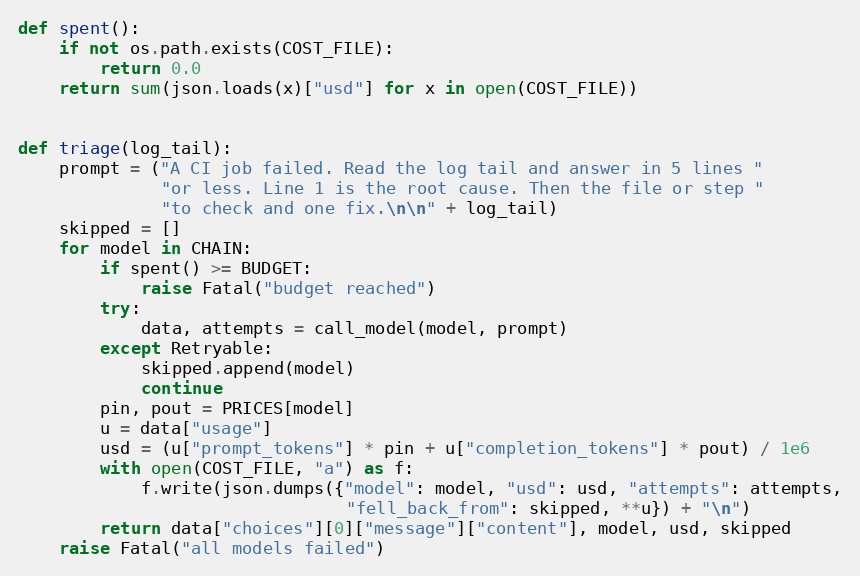
The function triage walks through the chain. Before every call it adds up the cost file and stops when the total has reached the cap. After a successful call it reads prompt_tokens and completion_tokens from the usage field and multiplies them by the prices of that model. The result is written as one JSON line that also holds the number of attempts and the list of models that the script had to skip. That list is what makes a silent fallback visible later.
The chain, the cost formula and the record written for every call.
Part 4, the entry point
The entry point reads the log tail and calls triage. When triage raises Fatal, the script prints one line and exits with code 0. This is deliberate. A helper that explains failures must never turn a passing build into a failing one or hide the original failure behind its own. On success the script prints the answer and appends it to the file that GitHub names in GITHUB_STEP_SUMMARY, together with the model name, the cost and the models that were skipped.
The entry point never fails the pipeline.
The workflow
The workflow has three steps after checkout. The test step pipes its output to tee so the log is saved in build.log. It sets shell to bash because GitHub then runs the command with pipefail, and without pipefail the pipe would return the exit code of tee and the test step would never fail. The explain step runs only when an earlier step failed, and it has continue-on-error set, so even a crash of the script cannot change the result. The last step uploads the cost file as an artifact whether the job passed or not, and it does not complain when the file does not exist.
The GitHub Actions workflow.
Two details need attention in real use. GitHub does not pass repository secrets to workflows triggered by pull requests from forks, so the explain step has no key there. We expect the API to answer with a 401, which the script treats as permanent and skips with exit code 0, but we did not test this case. Each job also runs on a fresh runner, so the cost file covers a single run. That is why the cap is per run. For a monthly total, collect the artifacts or send each line to the metrics system that the team already uses.
What we tested
The test file starts a local HTTP server that answers with scripted status codes and runs the real script against it in a separate process. Every case checks the list of models that were called, the exit code and the contents of the cost file. The mock returns a fixed usage of 6,000 input tokens and 500 output tokens, which are assumed values and not measurements.
| Case | Mock behavior | Result |
| Normal run | 200 from Pro | One call to Pro. Cost $0.008775 |
| Short overload | 429 once, then 200 from Pro | Two calls to Pro, no fallback, attempts recorded as 2 |
| Pro unavailable | 503 on every Pro call, 200 from Flash | Two calls to Pro, then one call to Flash. Cost $0.00312. The summary names Pro as skipped |
| Out of credits | 403 from Pro | One call, chain stopped, exit code 0, no cost line written |
| Both unavailable | 500 from Pro, 502 from Flash | Four calls, exit code 0, message that all models failed |
| Cap reached | Cost file already at $0.02 with a cap of $0.01 | No call, message that the budget was reached |
All six cases passed. They show that the control flow and the cost arithmetic behave as designed. They say nothing about how a real model behaves.
What a failed build costs
Assume a failed run sends 6,000 input tokens and receives 500 output tokens. Pro costs 6,000 times 1.17 plus 500 times 3.51, divided by one million, which is $0.008775. Flash costs 6,000 times 0.39 plus 500 times 1.56, divided by one million, which is $0.00312.
| Failed builds per month | Pro | Flash |
| 100 | $0.88 | $0.31 |
| 1,000 | $8.78 | $3.12 |
These numbers depend on the assumed token counts. Reasoning models can return more output tokens than the visible answer contains, so compare the usage field of the first real runs with this estimate and adjust the cap. The cached input price in the table applies only when the same prefix is sent again, which build logs rarely do, so the script does not use it.
What we did not test
We did not measure latency, so we cannot say how long a real call takes or how often a real Pro request fails with a 503. We did not compare the answers of the two models. We did not check how reasoning mode changes the token counts. We did not run the workflow on GitHub, only the Python script and its tests. We did not test the fork case. These points need real runs before the chain is trusted in production.
Which chain order to use
| Need | Chain | Note |
| Lowest cost per failed build | Flash first, Pro second | Answer quality was not compared |
| Best explanation, cost second | Pro first, Flash second | This is the order in the script |
| Strict budget | One model and a low MAX_USD_PER_RUN | The script skips the helper when the cap is reached |
| Many jobs at the same time | Add a third model and lower MAX_TRIES | A 429 means a rate or concurrency limit |
Before you ship it
The log tail leaves your infrastructure, so check that logs in your pipeline do not contain customer data and that your policy allows sending them to an outside service. GitHub masks registered secrets in logs, but a token printed in another form is not masked. Keep the cap low at the start and raise it after you have seen a week of real cost lines.
How to try it
Both models are listed in the AI/ML API model catalog, together with more than a thousand others. One key reaches all of them, so a third model in the chain means a new name in LLM_CHAIN and a new line in the price table. The DeepSeek V4 Pro API page shows the current price and the supported parameters, and it is the page to check again before you rely on the numbers in this article.
Frequently asked questions
Should the build fail when the model call fails?
No. The model call explains a failure and does not decide the result. The script exits with code 0 on its own errors and the step has continue-on-error set.
Why does the script not try another model after a 403?
A 403 means the account is out of credits or at a plan limit. The account is shared by all models, so the next model would return the same error.
How much does one failed build cost?
With the assumed 6,000 input and 500 output tokens it is $0.008775 on Pro and $0.00312 on Flash, based on the prices on the model pages on 7 October 2026. Real token counts will differ.
Why send only the end of the log?
The failure is printed at the end in most tools, and a shorter input costs less. The script takes the last 12,000 characters. Raise the number if your logs put the cause earlier.
How do I track the monthly spend?
Each run writes llm_cost.jsonl and uploads it as an artifact. Sum the usd field across artifacts, or send each line to your metrics system.
Does this work outside GitHub Actions?
The script itself does not depend on GitHub. Only the summary file is specific to it. In GitLab CI or Jenkins you would print the answer to the job log and keep the cost file as a job artifact.

Find Trusted Cardiac Hospitals
Compare heart hospitals by city and services — all in one place.
Explore Hospitals