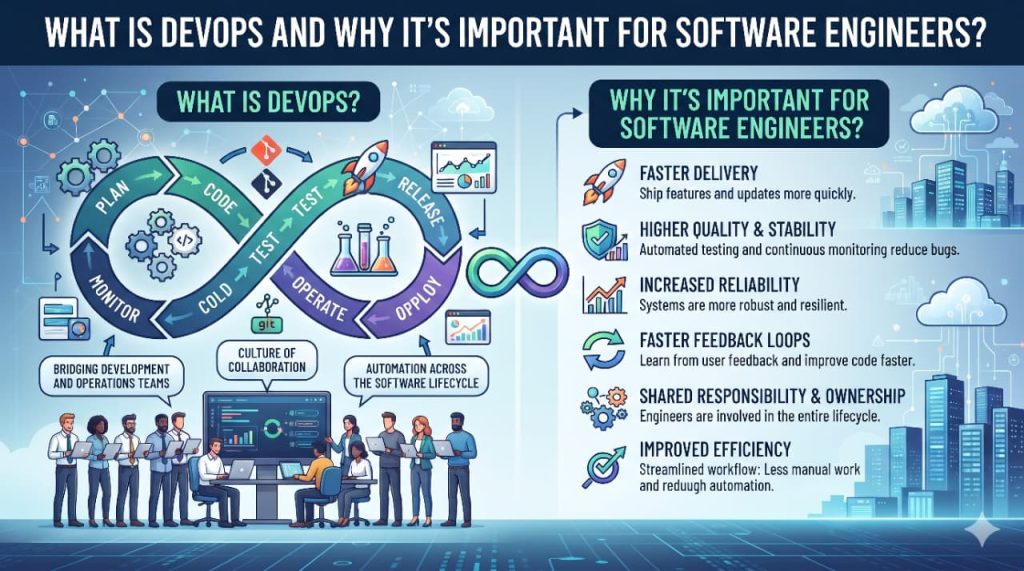
A CI/CD pipeline for an MVP is the smallest automated path from a merged commit to a running staging environment: build, test, deploy, and a way to roll back. An engineer who has done it before can set one up in a day or two. It pays for itself the first time a demo breaks before a customer call.
Early teams tend to fall into one of two traps. Some skip automation because the product might pivot next month, then lose a day each week to manual deploys and bugs that only appear on one laptop. Others copy the setup of a company fifty times their size and spend the first sprint writing Kubernetes manifests instead of features.
The useful middle is narrow. An MVP pipeline should be fast enough that nobody tries to bypass it and strict enough that broken code cannot reach staging. It should also be simple enough for one engineer to explain on a whiteboard in five minutes.
What the pipeline needs on day one
Day one needs four pieces: a main branch that is always deployable, an automated build, a test stage that blocks merges when it fails, and a deploy to staging on every merge. Everything else in this article is optional for the first version and becomes worth the effort once real users depend on the product.
Trunk-based development fits an MVP better than long-lived feature branches. With three or four engineers, branches that live for a week drift apart, and the merge at the end costs more than the feature did. Short branches, merged daily through a pull request, keep the main branch close to what is running in staging.
The test stage does not need high coverage at this point. It needs the tests that catch the expensive failures, such as the signup flow, the core transaction and the API contract the frontend depends on. A dozen focused tests that finish in three minutes do more for a young product than four hundred slow ones that engineers learn to skip.
Staging should match production in shape rather than size. That means the same container image, the same environment variable names and the same database engine and major version. A staging database on PostgreSQL 16 with production still on 15 is how a migration passes every check and then fails on launch day.
A reference workflow in GitHub Actions
GitHub Actions is a sensible default for an MVP when the code already lives on GitHub, because the workflow files sit in the same repository as the application. The example below runs lint and tests on every pull request and deploys to staging whenever a change lands on the main branch.
name: ci
on:
pull_request:
push:
branches: [main]
jobs:
test:
runs-on: ubuntu-latest
steps:
– uses: actions/checkout@v4
– uses: actions/setup-node@v4
with:
node-version: 22
cache: npm
– run: npm ci
– run: npm run lint
– run: npm test
deploy-staging:
needs: test
if: github.ref == ‘refs/heads/main’
runs-on: ubuntu-latest
environment: staging
steps:
– uses: actions/checkout@v4
– run: ./scripts/deploy.sh staging
env:
DEPLOY_TOKEN: ${{ secrets.STAGING_DEPLOY_TOKEN }}
Two lines in that file matter more than they look. The needs: test line means a failed test stops the deploy, so staging never runs code that failed its own checks. The environment: staging line ties the job to a GitHub environment, which keeps its secrets separate and lets protection rules be added later without rewriting the workflow.
Production gets its own job, triggered manually or by a version tag, with a required reviewer on the production environment. At MVP stage, one click from a named person is enough control. A longer approval chain can come later, when there is a compliance reason for it or a team large enough to need it.
What can wait until there are users
Much of the infrastructure that large engineering organizations run exists to solve problems an MVP does not have yet, such as traffic spikes, many teams deploying at once and strict uptime commitments. Each item below has a clear trigger. Until that trigger appears, the work spends launch time on a problem nobody has.
| Component | Add it when | Why it can wait |
| Kubernetes | Several services need independent scaling, or a managed platform’s limits start costing money | A managed container platform runs one or two services with far less operational work |
| Canary or blue-green releases | Users notice downtime during deploys | At low traffic, a rolling deploy plus a fast rollback covers the same risk |
| Multi-region setup | A contract or a user base requires it | It multiplies cost and failure modes before there is traffic to justify them |
| Full observability stack | Error logs no longer explain incidents | Error tracking and uptime checks catch most MVP problems |
| Preview environment per pull request | The team grows past five or six engineers | One shared staging environment is easier to keep realistic |
The one exception is the database migration path. Schema changes should run through the pipeline from the first week, as versioned migration files applied automatically on deploy. Teams that change the schema by hand in staging and production end up with two databases that disagree, and they usually find out during an incident.
Security checks that take minutes
Three security controls cost almost nothing at MVP stage and are painful to retrofit later. Secrets stay out of the repository, dependencies get scanned automatically, and the main branch is protected so nothing reaches it without a passing build. Each of them takes less than an hour to switch on in GitHub.
Secrets belong in the platform’s secret store, never in a committed .env file, even in a private repository. Where the cloud provider supports it, GitHub’s OpenID Connect integration lets the workflow request short-lived credentials at deploy time. There is then no long-lived cloud key sitting anywhere to leak.
Dependabot opens pull requests when a dependency has a known vulnerability, and those pull requests run through the same tests as any other change. Branch protection then requires the test job to pass before anything merges. Between them, they close two of the most avoidable ways an early product gets compromised: a leaked key and an outdated package.
Why coding agents make the pipeline more important
Many early teams now use coding agents for a large part of their code, and the agents write it faster than a person can review line by line. That moves the pipeline’s job from catching the occasional human slip to checking, on every change, that generated code still matches what the product is supposed to do.
A spec-first build of a live-lesson platform for a university department shows the risk. The specification, written with GitHub Spec Kit, held 66 requirements, 12 user stories and over 100 tasks, and coding agents executed it. Two requirements were reasonable on their own and incoherent together, and the agents implemented the second one without flagging the conflict. The fix went into the specification first and the code second.
That experience is the reason to write tests from requirements rather than from the code an agent produced. A test generated from the same code it checks will agree with that code, mistakes included. A test written from the requirement fails when the implementation drifts, which is exactly the moment a person needs to look.
When to bring in outside engineers
A founding team with one experienced backend engineer can set up everything above in about a week. The harder case is a team of product people and junior developers, where nobody has run a deploy pipeline before and every hour spent on YAML is an hour not spent with users.
In that case, an experienced MVP development company can set up the pipeline, the staging environment and the migration path while building the first features. The part to check before signing is the handover, because it decides who controls the product afterward.
The pipeline should live in your repository and under your cloud accounts, documented well enough that your own engineers can change it without calling anyone. A vendor who keeps the deploy keys keeps the product.
The first thing to check
Before writing any workflow file, time how long it takes today to get one small change from a laptop to staging, and count the manual steps in between. If the answer is more than fifteen minutes or more than one manual step, the pipeline is the next thing to build, ahead of the next feature.
Frequently asked questions
How long does it take to set up CI/CD for an MVP?
One to two days for an engineer who has done it before, using a hosted CI service and a managed deploy target. Most of that time goes into the staging environment and secrets rather than the workflow file itself.
Does an MVP need Kubernetes?
Rarely. A managed container or app platform runs one or two services with far less operational work, and moving to Kubernetes later is a contained project once there is a real scaling reason.
How many tests does an MVP need before launch?
Enough to cover the paths that would cost users or money if they broke, usually signup, the core transaction and the main API contract. Test speed matters more than coverage percentage at this stage, because slow tests get skipped.

Find Trusted Cardiac Hospitals
Compare heart hospitals by city and services — all in one place.
Explore Hospitals