
When the same variable is defined in more than one place, Ansible uses a fixed precedence order and the source listed last wins. Extra vars passed with -e always win and role defaults are almost always overridden. Below is the complete order, how Ansible Tower/AWX adds its own layers on top, a small example you can run, and how to check which value Ansible actually used.
Ansible & Ansible Tower Variable Precedence Hierarchy (last listed wins)
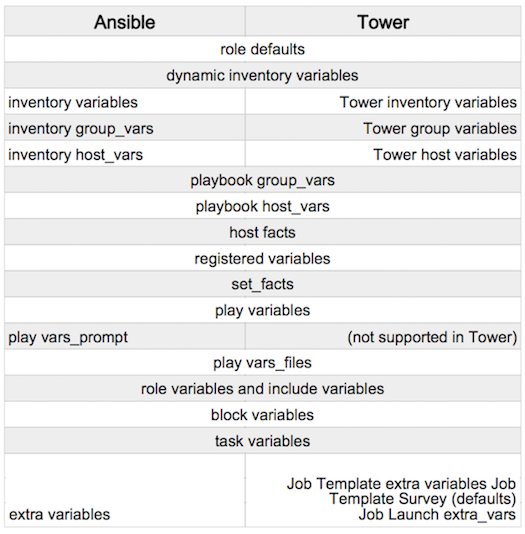
Ansible variable precedence (lowest to highest)
This is the order used by current ansible-core releases. A variable defined at a higher number overrides the same variable defined at a lower number:
- command line values such as
-u my_user(these are not variables) - role defaults (
roles/x/defaults/main.yml) - inventory file or script group vars
- inventory
group_vars/all - playbook
group_vars/all - inventory
group_vars/* - playbook
group_vars/* - inventory file or script host vars
- inventory
host_vars/* - playbook
host_vars/* - host facts and cached
set_fact - play
vars - play
vars_prompt - play
vars_files - role vars (
roles/x/vars/main.yml) - block vars (only for tasks in the block)
- task vars (only for that task)
include_varsset_factand registered vars- role and
include_roleparams - include params
- extra vars,
-e "user=my_user"(always win)
How Ansible Tower / AWX fits into this order
Tower (now Red Hat Ansible Automation Platform) and AWX run ansible-playbook for you, so all of the levels above still apply. On top of them they add their own sources:
- Inventory, group and host variables entered in the Tower inventory behave like inventory variables, so they sit low in the order and are overridden by play, role and task variables.
- Job template extra variables, survey answers and prompt-on-launch values are passed to Ansible as extra vars, so they override everything defined in playbooks, roles and inventories.
- Among those Tower-level extra vars, values supplied when the job is launched override the extra vars saved on the job template, and extra vars set on a workflow override those of the job templates inside it.
This is why a value typed into a survey wins even if the playbook sets the same variable in vars:.
Example: see precedence in action
# inventory
[webservers]
web1 ansible_host=192.168.1.10

# roles/web/defaults/main.yml
http_port: 80

# group_vars/webservers.yml
http_port: 8080

# site.yml
- hosts: webservers
  roles:
    - web
  tasks:
    - name: Show which value won
      ansible.builtin.debug:
        var: http_portCode language: PHP (php)
$ ansible-playbook -i inventory site.yml
ok: [web1] => { "http_port": 8080 } # group_vars beats role defaults
$ ansible-playbook -i inventory site.yml -e http_port=9090
ok: [web1] => { "http_port": "9090" } # extra vars beat everythingCode language: PHP (php)Note that -e key=value passes values as strings. Pass JSON, for example -e '{"http_port": 9090}', if you need a number, list or boolean.
How to find out which value Ansible is using
- Print the variable in a task:
ansible.builtin.debug: var=http_port. - Check a single host without a playbook:
ansible -i inventory web1 -m ansible.builtin.debug -a "var=http_port". - See all inventory variables for a host:
ansible-inventory -i inventory --host web1(shows inventory sources only, not play or role vars). - Run with
-vvvto see which files Ansible loads.
Common mistakes
- Putting overridable values in
roles/x/vars/main.yml. Role vars (level 15) beat inventorygroup_varsandhost_vars, so users cannot override them from the inventory. Put values you expect people to change indefaults/main.yml. - Expecting group_vars to beat host_vars. Host variables always override group variables.
- Two groups at the same level setting the same variable. Ansible merges sibling groups alphabetically, so the last group name wins. Set
ansible_group_priorityon a group to control this. - Expecting dictionaries to merge. By default a dictionary defined at a higher level replaces the whole dictionary, it does not merge keys.
- Trying to override extra vars with set_fact. Nothing overrides extra vars, not even
set_fact.
Rules of thumb
- Role defaults for values users may change; role vars for internal constants.
- Inventory
group_varsfor environment differences (dev, staging, prod). - Prefix role variables with the role name (
web_http_port) to avoid accidental clashes. - Use
-eor Tower surveys only for deliberate one-off overrides.
Frequently asked questions
Which variable has the highest precedence in Ansible?
Extra vars passed with -e (or from Tower job templates, surveys and launch prompts). They override every other source.
Which has the lowest precedence?
Role defaults. Command line options such as -u are listed below them, but they are connection settings rather than variables.
Can I change the precedence order?
No. You can only control which group wins between groups at the same level with ansible_group_priority.
Do Tower survey answers override playbook vars?
Yes. Survey answers are passed as extra vars, so they override vars: in the playbook, role vars and inventory variables.
Related tutorials
- Ansible: All Ways to Define Variables in Inventory/Hosts
- Ansible Variables in Playbook
- How to pass variables to an Ansible playbook on the command line
- All Ansible tutorials

I’m Rajesh Kumar, a DevOps, SRE, DevSecOps, Cloud, and Platform Engineering expert passionate about sharing practical knowledge, real-world experiences, and industry best practices. I have worked at Cotocus and regularly write about technology, travel, investing, health, product reviews, and digital marketing through my various platforms.
I publish technical articles at DevOps School, travel stories at Holiday Landmark, stock market insights at Stocks Mantra, health and fitness guidance at My Medic Plus, product reviews at TrueReviewNow, and SEO and digital marketing strategies at Wizbrand.
Find Trusted Cardiac Hospitals
Compare heart hospitals by city and services — all in one place.
Explore Hospitals