
Introduction
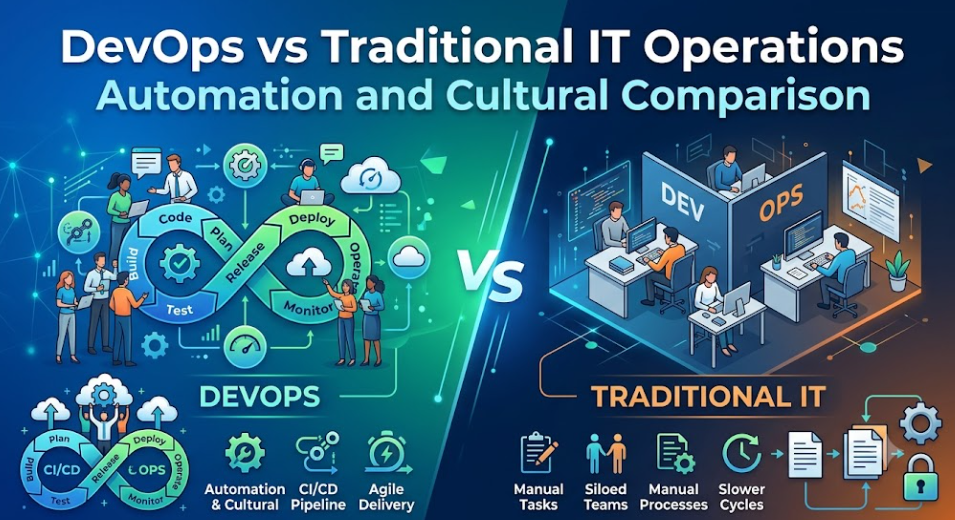
The architecture of enterprise technology operations has undergone its most significant evolution since the dawn of commercial computing, shifting from a traditional model of siloed departments—where software developers wrote code and separate operations teams manually managed infrastructure—to an agile, unified framework driven by modern automation. For decades, this separation of duties minimized risk within static on-premises environments, but today’s fast-paced digital market demands a rate of continuous software delivery that ticket-based workflows and manual approval gates simply cannot support. This structural friction often leads to delayed releases, configuration drift, and operational bottlenecks, prompting forward-thinking organizations to adopt a collaborative DevOps culture that breaks down functional silos and treats infrastructure management as a predictable, automated asset. For professionals and enterprises looking to navigate this transition and build modern engineering skills, structured learning platforms like DevOpsSchool provide the comprehensive training, cloud-native certifications, and practical tool frameworks necessary to successfully bridge the gap between legacy systems administration and high-speed, scalable platform engineering.
What Are Traditional IT Operations?
Traditional IT operations refer to the structured management of technology infrastructure, software development, and deployment through specialized, siloed departments. This model is built on clear divisions of labor, formalized workflows, and strict change management policies designed to protect production environments from unexpected failures.
Historical Background
This operational approach grew out of the mainframe and early client-server eras, when hardware was expensive, physically located on-site, and difficult to modify. Because setting up physical servers required long lead times for procurement and installation, operations teams focused primarily on maintaining uptime and avoiding changes that could cause system instability.
Organizational Structure
The traditional model divides IT departments into specific functional teams, including:
- System Administration: Focuses on server operating systems, patching, and hardware health.
- Network Operations: Manages switches, routers, firewalls, and connectivity.
- Database Administration (DBAs): Oversees database performance, schemas, and backups.
- Storage Teams: Manages physical SAN/NAS hardware and disk space allocation.
- Help Desk / Support: Handles user tickets and initial incident triage.
Common Responsibilities
Traditional IT operations teams manage physical data centers, run manual software deployments during scheduled maintenance windows, monitor system health using basic ping-and-threshold alerts, and enforce security policies through end-of-cycle audits.
Strengths and Limitations
- Strengths: Clear accountability within teams, highly predictable workflows, strong compliance governance, and a deep focus on specialized technical disciplines.
- Limitations: Slow response times due to ticket-based requests, communication silos between departments, a high risk of configuration drift across servers, and manual deployment processes that are prone to human error.
What Is DevOps?
DevOps is an operational philosophy that combines software development (Dev) and IT operations (Ops) into a shared, collaborative framework. Rather than treating development and infrastructure management as separate stages, DevOps treats them as a single, continuous lifecycle focused on delivery speed, quality, and system reliability.
Core Principles
The DevOps framework is built on four core pillars:
- Culture: Teams share responsibility for development, deployment, and system availability.
- Automation: Manual tasks are replaced by software-defined processes across testing, infrastructure, and delivery.
- Measurement: Operations are driven by data, using continuous monitoring and log analysis to guide decisions.
- Sharing: Open communication and documentation help teams learn from systemic failures and post-mortems.
Collaboration Model
In a DevOps environment, engineers from development, quality assurance, security, and operations work together in cross-functional teams. Instead of passing code over a wall to a separate team for deployment, the entire group is responsible for a service from its initial design through to production support.
Automation Focus
DevOps relies heavily on automation to handle repetitive tasks. Infrastructure is provisioned using software code, application testing runs automatically on every code commit, and deployment pipelines move changes to production without requiring manual intervention.
Continuous Improvement Mindset
A core part of DevOps culture is the belief that systems and workflows should constantly evolve. Teams regularly evaluate their delivery pipelines to find bottlenecks, reduce technical debt, and optimize resource usage, treating operational failures as learning opportunities to make the system more resilient.
Why Organizations Compare DevOps and Traditional IT Operations
The comparison between DevOps and traditional IT operations is not just a theoretical debate; it is a practical business choice driven by shifts in the global technology market. Organizations look at both models to help guide their digital transformation strategies.
Digital Transformation Initiatives
Modern businesses are moving away from supporting technologies toward building software-driven services. Whether it is an enterprise banking application or a retail supply chain platform, software performance directly impacts revenue. Companies evaluate DevOps to see if their existing operational models can support the rapid changes required by digital products.
Faster Delivery Expectations
Consumers and enterprise users expect bugs to be fixed quickly and new features to be rolled out without long service outages. Traditional development cycles that take months struggle to keep pace with these expectations. Organizations look to DevOps to shorten their release timelines from quarters to days or even hours.
Cloud Adoption
The rise of cloud providers like AWS, Microsoft Azure, and Google Cloud Platform has changed how infrastructure works. Physical hardware procurement is no longer a limiting factor. Because cloud resources can be provisioned in seconds using software APIs, organizations realize they need an operational model like DevOps to manage these dynamic environments efficiently, rather than relying on manual, ticket-based approvals.
Customer Demands and Competitive Pressures
In highly competitive industries, the company that delivers a stable, feature-rich product first usually wins the market. If an organization takes weeks to approve a firewall change or deploy an update that a competitor can release in minutes, it risks losing customers. Comparing these operational models helps leadership identify where manual handoffs are slowing down business growth.
High-Level Comparison Overview
The table below breaks down the foundational differences between traditional IT operations and DevOps across key operational categories.
| Functional Area | Traditional IT Operations | DevOps |
| Team Structure | Siloed, specialized departments (SysAdmins, DBAs, QA). | Cross-functional, integrated teams sharing product ownership. |
| Communication | Ticket-driven, formal, escalation-based workflows. | Continuous, direct, integrated into daily development tools. |
| Deployment Frequency | Scheduled intervals (monthly, quarterly, or bi-annually). | Frequent updates (multiple times per day or week). |
| Automation | Ad-hoc scripting for specific, localized administrative tasks. | Automation-first approach covering pipelines and platforms. |
| Monitoring | Reactive, threshold-based alerts (CPU high, ping down). | Proactive observability using metrics, logs, and traces. |
| Scalability | Manual or scripted intervention requiring vertical upgrades. | Automated elastic scaling based on real-time traffic demand. |
| Security | Perimeter-focused audits performed at the end of development. | Shift-left security integrated directly into build pipelines. |
| Reliability | Maintained by restricting changes to production environments. | Built through resilient architecture and automated recovery. |
Team Structure and Collaboration
The way teams are organized significantly impacts an IT department’s efficiency and speed. Traditional IT operations and DevOps structure their staff, communication channels, and ownership models in fundamentally different ways.
Traditional IT Teams: Department Silos
In a traditional IT model, teams are grouped by technical specialty. The system administration team, network team, database team, and development team all operate in separate departments. Each group has its own management structure, priorities, and internal key performance indicators (KPIs).
Communication between these groups relies on formal ticketing systems. For example, if a developer needs a database schema update and a firewall port opened, they must submit separate tickets to the database and network teams. This escalation-based workflow often causes delays, as tickets sit in queues waiting for review. Because no single team owns the entire delivery process, troubleshooting complex issues across multiple systems can lead to finger-pointing and longer resolution times.
DevOps Teams: Cross-Functional Collaboration
DevOps removes these departmental walls by building cross-functional teams. A single DevOps product team typically includes software developers, QA engineers, operations specialists, and security experts working together on a specific business service.
Traditional:  [Dev Team] --(Ticket)--> [QA Team] --(Ticket)--> [Ops Team] --> Production
DevOps:       [ Dev + QA + Security + Ops (Shared Product Team) ] -----------> Production
Code language: CSS (css)
Ownership is shared across the entire team. The engineers who design the application also help write the deployment scripts and monitor the system in production. This shared responsibility improves communication, as team members collaborate daily through shared chat channels, code repositories, and stand-up meetings. Instead of waiting on a ticket approval, operational requirements are handled directly during the early design stages of the software.
Software Development Lifecycle Approach
The Software Development Lifecycle (SDLC) defines how an organization plans, builds, tests, and delivers software. The operational model a company chooses determines how smoothly code moves through these stages.
Traditional IT Model: Sequential Workflows
Traditional IT environments typically use sequential delivery models, such as the Waterfall framework. Work moves through long, distinct phases: planning, design, coding, testing, and implementation. Each phase must be fully completed and approved before the next one begins.
[ Plan ] ➔ [ Design ] ➔ [ Code ] ➔ [ Test ] ➔ [ Deploy ] (Months per cycle)
Code language: CSS (css)
Because software changes build up over months, release packages become large and complex. Deploying these massive updates requires strict, manual approval gates from Change Advisory Boards (CAB). These releases are often scheduled late at night or over weekends to minimize user disruption, turning deployments into high-risk events where a single error can require rolling back months of work.
DevOps Model: Continuous Engineering
DevOps uses an agile approach centered on Continuous Integration (CI) and Continuous Delivery (CD). Instead of bundling months of work together, developers commit small code changes to a shared repository multiple times a day.
   ┌─── [ Code & Build ] ───┐
   │                        ▼
[ Plan ]                [ Test ]
   ▲                        │
   └─── [ Monitor ] ◄───────┘
Code language: CSS (css)
Every code commit triggers an automated build and test pipeline that validates the changes immediately. If the tests pass, the code is automatically prepared for deployment. This continuous pipeline breaks releases down into small, low-risk updates, allowing organizations to deploy new features and bug fixes frequently during normal business hours without disrupting users.
Automation: The Biggest Difference
Automation determines how well an IT department can scale its operations. It is the primary factor that allows modern tech teams to outpace traditional infrastructure management.
Manual Processes in Traditional IT
Traditional IT operations rely heavily on human intervention for day-to-day management. When a new application environment is needed, a system administrator manually logs into a hypervisor or cloud console to build the virtual machines. They then install the operating system, configure network settings by hand, manually run installation wizards for required runtime environments, and apply security patches step-by-step.
While this approach gives administrators precise control over individual systems, it is difficult to scale. Manual configurations often introduce slight differences between servers, known as configuration drift, which can cause intermittent application errors that are hard to diagnose.
Automation-First Philosophy in DevOps
DevOps treats automation as a core requirement for all infrastructure and deployment tasks. If a task has to be performed more than once, it should be automated through software code.
[Code Commit] ➔ Automated Build ➔ Automated Security Scan ➔ Automated Testing ➔ Automated Target Deployment
Code language: CSS (css)- Infrastructure Automation: Tools like Terraform and OpenTofu allow engineers to define entire networks, servers, and storage architectures using text configuration files.
- Testing Automation: Unit tests, integration suites, and security scans run automatically within build pipelines, ensuring code changes are validated before they reach production.
- Deployment Automation: CD engines move verified code artifacts through testing, staging, and production environments without manual data entry or ad-hoc scripting.
| Operational Task | Traditional IT Approach | DevOps Approach |
| Server Provisioning | Manual setup via UI, checklists, and golden images. | Declarative text files managed in version control. |
| Software Installation | Interactive installation wizards and custom scripts. | Automated configuration management tools. |
| Code Testing | Manual execution by QA testers based on documentation. | Automated regression and unit test suites in pipelines. |
| Artifact Delivery | Manual file transfers (SFTP) and manual service restarts. | Zero-downtime rolling updates managed by orchestrators. |
Infrastructure Management
How an organization manages its hardware, virtual machines, and networking components directly impacts its operational agility and long-term costs.
Traditional Infrastructure Management
Traditional infrastructure management relies heavily on manual intervention and ticket-driven workflows. When a development team needs a new environment for testing, they must submit formal requests to various specialized departments.
[Dev Request] ➔ [SysAdmin Allocation] ➔ [Network Port Mapping] ➔ [DB Storage Provision] (Days/Weeks)
This manual process often leads to utilization challenges. Because environments take a long time to provision, teams tend to leave testing and staging servers running continuously, even when they are idle, leading to unnecessary infrastructure costs. Additionally, because servers are modified over time with manual patches and quick fixes, they become unique configurations that are difficult to reproduce if a system failure occurs.
DevOps Infrastructure Management
DevOps shifts the operational focus toward Infrastructure as Code (IaC). Instead of manually configuring servers, engineers write declarative code that specifies exactly how an environment should look. This code is stored in version control systems like Git, providing a clear history of all infrastructure changes.
[Git Commit: IaC File] ➔ [Automated CI Validation] ➔ [Engineers Execute Code] ➔ [Target Cloud Architecture Updated]
Code language: CSS (css)
This approach enables self-service infrastructure, allowing development teams to spin up complete, isolated environments automatically through their build pipelines. When testing is finished, the pipeline automatically tears down the resources, helping optimize infrastructure costs. Because environments are built directly from code templates, every server remains identical, eliminating configuration drift and making production systems highly reproducible.
Deployment and Release Management
Moving software changes from a developer’s computer to a live production environment requires careful coordination to avoid unexpected service disruptions.
Traditional Release Cycles
Traditional IT operations use a scheduled release model. Updates are bundled into large enterprise deployment packages that are released on fixed schedules, such as once a quarter.
Because these updates include hundreds of changes across multiple systems, the risk of a deployment failure is relatively high. If an issue occurs after launch, troubleshooting is difficult because engineers have to sort through thousands of lines of new code and configuration updates to find the root cause. Rolling back a failed release often requires restoring entire systems from backups, which can lead to extended downtime.
DevOps Deployment Strategies
DevOps minimizes deployment risk by breaking releases down into smaller, more frequent updates managed by continuous integration and continuous delivery (CI/CD) pipelines.
Continuous Integration (CI):     [Code] ➔ [Build] ➔ [Test] ➔ [Artifact Created]
Continuous Deployment (CD):    [Artifact] ➔ [Staging Validate] ➔ [Production Rollout]
Code language: CSS (css)
DevOps teams use advanced deployment strategies to keep services available during updates:
- Blue-Green Deployments: Two identical production environments run side-by-side. The “Blue” environment runs live production traffic, while the new update is deployed to “Green.” Once verified, traffic is switched over instantly at the router level.
- Canary Deployments: A new update is rolled out to a small percentage of users first. The system monitors error rates and performance metrics; if everything remains stable, the update is gradually deployed to the rest of the infrastructure.
- Automated Rollbacks: If monitoring tools detect an spike in errors or a drop in performance during a deployment, the pipeline automatically reverts the system to the last known stable state.
| Release Attribute | Traditional IT Operations | DevOps |
| Release Unit Size | Large monolithic bundles containing months of updates. | Small, decoupled feature sets or single bug fixes. |
| Schedule Type | Fixed calendar maintenance windows (off-peak hours). | On-demand, continuous rollout during regular hours. |
| Rollback Method | Manual database restores and server re-imaging. | Automated traffic rerouting or rapid code roll-forwards. |
| Human Validation | Sign-offs from managers and change control boards. | Automated checks and metrics-driven pipeline gates. |
Monitoring and Incident Management
When production systems fail or slow down, operations teams need to identify the issue quickly to minimize the impact on users.
Traditional Monitoring: Reactive Approach
Traditional monitoring focuses mostly on basic infrastructure metrics using fixed thresholds. Systems check whether a server answers a ping, whether disk space usage has crossed 90%, or if CPU usage is sustained at a high level.
This approach is inherently reactive. The operations team often learns about a system failure only after a service has stopped working and users begin filing support tickets. When an incident occurs, administrators must manually log into individual servers, look through separate application log files, and try to piece together the timeline of events to find the root cause.
DevOps Monitoring: Proactive Observability
DevOps uses a comprehensive approach called observability, which focuses on gathering real-time data across three core pillars: metrics, distributed log collections, and application traces.
[Infrastructure Layer] + [Application Code] + [Network Delivery] ➔ Central Aggregator ➔ Live Dashboards + Alerts
Code language: CSS (css)
Instead of simply checking if a server is running, DevOps monitoring tracks end-user experience metrics, such as application response latency, error rates, and saturation levels. Centralized log systems collect data from every microservice into a single searchable dashboard.
When system anomalies occur, automated alerting systems notify the on-call engineering team via integrated communication channels, often providing the exact line of code or database query causing the slowdown before it impacts the broader user base.
Security Approach
Securing enterprise applications requires continuous validation to protect sensitive customer data and maintain regulatory compliance.
Traditional Security Model: Perimeter Gatekeeping
In traditional IT operations, security is managed as a distinct phase at the very end of the software development lifecycle. The software development and operations teams build and prepare the infrastructure, and then hand it over to an independent information security team for review before launch.
This model can create an operational bottleneck. If the security team discovers a vulnerability or a compliance issue right before release, the software must be sent back to the developers, causing significant launch delays. As a result, security is sometimes seen as a barrier to delivery speed rather than an integrated part of the development process.
DevSecOps Approach: Shift-Left Security
DevOps integrates security directly into every stage of the development lifecycle, a practice known as DevSecOps or “shift-left” security.
Traditional:  [ Plan ] ➔ [ Code ] ➔ [ Deploy ] ➔ [ Security Review Gates ]
DevSecOps:    [ Plan + Security ] ➔ [ Code + Static Scans ] ➔ [ Build + Dependency Scans ] ➔ [ Continuous Compliance ]
Code language: CSS (css)
Security validations are built directly into the automated CI/CD pipelines:
- Static Application Security Testing (SAST): Automated code scanners check developer commits for security vulnerabilities or hardcoded credentials before the code is built.
- Dependency Analysis: Automated tools check open-source code libraries against vulnerability databases to ensure out-of-date or insecure components are not introduced.
- Container Auditing: Container images are automatically scanned for operating system vulnerabilities before being pushed to production registries.
| Security Element | Traditional Security | DevSecOps |
| Process Placement | Final phase before production deployment. | Integrated into every phase of the delivery lifecycle. |
| Execution Method | Manual penetration testing and manual security reviews. | Automated validation within the build and deploy pipeline. |
| Vulnerability Fixes | Patched post-deployment via scheduled hotfixes. | Fixed during the development phase before release. |
| Compliance Audits | Periodic reviews based on manual documentation. | Automated configuration checks and continuous compliance audits. |
Scalability and Cloud Readiness
As businesses grow, their technology infrastructure must scale efficiently to handle increasing workloads and user traffic.
Challenges with Traditional Models
Traditional IT environments are typically built on fixed-capacity hardware housed in on-premises data centers. Scaling this architecture requires vertical expansion, such as purchasing and installing more RAM, faster CPUs, or additional storage arrays into existing physical servers.
If a business experiences a sudden spike in user traffic—such as an e-commerce platform during a holiday sale—the traditional model cannot scale quickly enough to handle the load. The organization must purchase enough hardware to handle peak traffic periods, which often leaves expensive computing resources underutilized during normal business hours.
Cloud-Native DevOps Environments
DevOps is designed to take advantage of cloud infrastructure and cloud-native architectures. By building applications using microservices and containerization tools like Docker and Kubernetes, services are broken down into small, independent units.
[Inbound Traffic Surge] ➔ [Cloud Load Balancer Monitor] ➔ [Kubernetes Engine Instantly Spawns New App Containers]
Code language: CSS (css)
When monitoring tools detect an increase in user traffic, horizontal autoscaling systems automatically launch additional application containers across cloud environments to distribute the load. Once traffic drops, the system automatically turns off the extra resources to reduce costs. This automated, elastic scaling allows modern systems to handle fluctuating workloads efficiently without requiring constant manual oversight from system administrators.
Cost Efficiency Comparison
Managing technology budgets requires a clear understanding of capital expenditures, day-to-day operational costs, and the financial impact of system downtime.
Traditional IT Cost Structures
Traditional IT operations are capital-expenditure-heavy (CapEx). Organizations must invest upfront in physical data center space, server hardware, networking gear, and long-term software licensing agreements.
Beyond hardware costs, maintaining these environments requires a significant amount of manual operational effort, which can drive up labor costs for routine tasks like patching and system configuration. Additionally, because manual deployments carry a higher risk of error, the potential cost of unplanned downtime during a failed release can impact business revenue and engineering productivity.
DevOps Financial Outcomes
DevOps shifts technology spending toward an operational-expenditure model (OpEx), relying on cloud infrastructure where companies pay only for the resources they use. While building automated pipelines requires an initial investment in engineering time and training, the long-term operational efficiency can be significant.
Automating routine deployment and testing tasks reduces manual labor costs and allows engineering teams to focus on building new product features. Furthermore, frequent, low-risk deployments and automated rollback mechanisms lower the risk and financial impact of application downtime.
| Cost Category | Traditional IT Approach | DevOps Approach |
| Infrastructure Spending | High upfront capital investments in physical hardware. | Pay-as-you-go operational expenses based on usage. |
| Operational Maintenance | High labor costs for manual infrastructure configuration. | Upfront engineering investment in reusable automation code. |
| Downtime Impact | Long resolution times requiring manual investigation. | Short recovery times driven by automated rollbacks. |
| Resource Optimization | Low utilization due to static, always-on server staging. | High efficiency through automated autoscaling. |
Reliability and Availability
Maintaining high availability for business-critical applications requires building infrastructure that can tolerate component failures without disrupting end users.
Downtime Reduction Strategies
In traditional IT infrastructure, reliability is maintained by strictly controlling changes to production environments. Once a system is stable, administrators avoid making updates unless absolutely necessary, using long testing cycles and change freezes to minimize risk.
However, if a hardware component fails or a critical service crashes, recovery often requires manual intervention. An administrator must respond to the alert, log into the infrastructure, identify the failed component, and manually restore service from a backup or switch traffic to a backup server.
Site Reliability Engineering (SRE) and DevOps
DevOps focuses on building reliability directly into the application architecture and infrastructure design. This approach is closely aligned with Site Reliability Engineering (SRE) principles, which apply software engineering practices directly to operations challenges.
[Component Instance Fails] ➔ [Automated Health Check Fails] ➔ [Orchestrator Replaces Bad Container Automatically]
Code language: CSS (css)
Applications are built to be fault-tolerant, running across multiple cloud availability zones behind automated load balancers. If a single server or software container crashes, container orchestrators like Kubernetes detect the failure through automated health checks, terminate the unhealthy instance, and launch a replacement automatically without manual intervention. Reliability is achieved by designing systems that can safely adapt to failures, rather than trying to prevent change.
Change Management Comparison
Change management is the governance framework organizations use to review, approve, and deploy updates to production environments without introducing new risks.
Traditional Governance: Structural Control
Traditional IT operations rely on structured control processes to manage risk. Any proposed modification to a production system—such as an application update, a database schema change, or a firewall adjustment—must be documented in a detailed change request ticket.
These requests are periodically reviewed by a Change Advisory Board (CAB), a panel of technology managers and stakeholders who evaluate the potential impact on business operations. While this review process provides clear oversight and compliance tracking, it can slow down delivery, often adding days or weeks of delay before a validated technical change can be deployed to production.
DevOps Governance: Automated Validation
DevOps replaces manual, meeting-driven approval gates with automated compliance validation and continuous delivery practices.
[Developer Git Push] ➔ [Automated Testing Passes] ➔ [Security Scans Approved] ➔ [Audit Log Updated] ➔ [Production Deploy]
Code language: CSS (css)
The validation rules that a Change Advisory Board would look for—such as test coverage, security scans, and code reviews—are built directly into the CI/CD pipeline configuration. When a developer pushes code, the pipeline automatically runs these validations and creates an immutable audit trail in the version control system. If all automated checks pass, the change is considered approved and can be deployed automatically, maintaining compliance and safety without slowing down the release process.
Skills Required in Both Models
The shift from traditional IT operations to a DevOps framework changes the day-to-day responsibilities and technical skills required of technology professionals.
| Technical Domain | Traditional IT Professional | DevOps Engineer |
| Operating Systems | Manual system administration, patching, and OS configuration. | Automated configuration using tools like Ansible, Chef, or Puppet. |
| Networking | Physical routing, hardware switches, and manual firewalls. | Software-Defined Networking (SDN) and cloud VPC configurations. |
| Infrastructure | Hypervisor administration and physical server deployment. | Declarative Infrastructure as Code (IaC) using Terraform. |
| Application Delivery | Manual file deployment and interactive service configuration. | Building and maintaining automated CI/CD deployment pipelines. |
| Container Technology | Managing static virtual machines and bare-metal systems. | Containerization (Docker) and orchestration (Kubernetes). |
| Monitoring | Threshold alerting and manual analysis of local log files. | Setting up distributed logging and system observability frameworks. |
Real-World Example: Traditional IT vs DevOps Deployment
To understand how these models differ in practice, consider how each approach handles a routine software update request, such as updating a customer portal application.
Scenario A: The Traditional IT Workflow
- Request Phase: The development team completes the update and opens a deployment ticket, attaching an operations document that details the installation steps.
- Review Phase: The ticket waits five days for the next weekly Change Advisory Board meeting, where it is reviewed and scheduled for the next weekend maintenance window.
- Preparation Phase: A system administrator manually reviews the target servers, notices a missing software dependency, and manually installs it on the production machines.
- Execution Phase: During Saturday night maintenance, the administrator manually copies the application files via SFTP and restarts the services.
- Incident Phase: On Monday morning, users encounter errors because one of the production web servers was missed during the manual dependency installation. The team spends two hours reviewing local log files to find and fix the misconfigured machine.
Total Timeline: 7 to 10 Days from completion to stable production availability.
Scenario B: The DevOps Workflow
- Commit Phase: A developer pushes the updated code to the project’s Git repository.
- Pipeline Execution: The Git commit automatically starts the CI/CD pipeline. The code is built into a container image, verified by automated unit tests, and scanned for security vulnerabilities.
- Validation Phase: The pipeline deploys the new container image to an isolated staging environment, where automated testing suites validate application performance and database connectivity.
- Deployment Phase: The pipeline uses a canary deployment strategy to roll out the update to production during regular business hours, sending 10% of user traffic to the new version.
- Observability Phase: Automated monitoring tools track error rates and latency on the new instances. Because all performance metrics remain normal, the pipeline automatically routes the remaining production traffic to the new version and turns off the old containers.
Total Timeline: 15 to 30 Minutes with zero user disruption or manual intervention.
Benefits of Traditional IT Operations
While many industries are adopting DevOps practices, the traditional IT operations model offers distinct benefits that make it suitable for specific business use cases.
- High Operational Stability: By strictly limiting the frequency of changes to core systems, traditional environments minimize the risk of unexpected software bugs or runtime issues affecting production stability.
- Predictable Delivery Workflows: Structured hierarchies and clear divisions of labor ensure that every team member understands their specific technical role and lines of accountability during incidents.
- Strong Compliance Control: Manual sign-offs, formal documentation, and regular Change Advisory Board reviews provide an easy-to-follow paper trail for industries with strict regulatory requirements.
- Structured Enterprise Governance: This model works well for managing legacy, on-premises corporate infrastructure where the underlying physical systems change infrequently.
Organizations like government agencies, defense contractors, and core banking institutions often maintain traditional IT structures for their main transactional systems because they prioritize risk avoidance and regulatory compliance over delivery speed.
Benefits of DevOps
Adopting a DevOps culture backed by modern automation provides clear operational advantages for companies looking to build scalable digital services.
- Faster Time to Market: Automated build and deployment pipelines significantly shorten release timelines, allowing teams to deliver new software features and bug fixes to users quickly.
- Better Team Collaboration: Breaking down organizational silos and sharing ownership of services improves communication between development and operations teams, leading to faster issue resolution.
- Greater Operational Efficiency: Automating repetitive infrastructure provisioning, application testing, and deployment tasks reduces manual labor and lowers the risk of human error.
- Improved Customer Experience: Frequent, incremental updates and zero-downtime deployment strategies allow businesses to respond to customer feedback without interrupting service availability.
- Continuous Innovation: Spending less time on manual system maintenance frees up engineering teams to focus on experimenting with new features and improving core product value.
Common Challenges in DevOps Adoption
Moving from traditional IT operations to a DevOps model involves overcoming several organizational and technical hurdles.
- Cultural Resistance to Change: Team members accustomed to clear divisions of labor may hesitate to adopt a shared-responsibility model. Developers might resist taking on operational duties, while administrators may worry about losing control over infrastructure safety.
- Technical Skill Gaps: Legacy operations staff often need training in software development concepts, cloud architecture, and automation tools like Git, CI/CD engines, and Infrastructure as Code.
- Tooling and Platform Complexity: Managing modern cloud-native ecosystems—including container orchestrators, service meshes, and distributed monitoring platforms—requires ongoing technical expertise.
- Legacy Technical Debt: Monolithic software systems designed for on-premises servers can be difficult to refactor into automated pipelines or containerized environments.
- Organizational Misalignment: Leadership must update performance metrics and KPIs to reward cross-functional team success rather than focusing solely on individual department output.
Practical Solutions
Organizations can address these challenges by starting with a small pilot project rather than attempting an immediate, company-wide transition. Providing structured learning paths through training platforms like DevOpsSchool can help team members build confidence with automation tools and cloud architecture before scaling DevOps practices across the enterprise.
Traditional IT Operations vs DevOps for Different Organizations
The suitability of each operational model depends on an organization’s size, industry regulations, and business goals.
| Organization Type | Traditional IT Suitability | DevOps Suitability |
| Startups | Low. High hardware costs and slow manual processes can hinder early-stage product growth. | High. Fast deployment and cloud scaling are essential for finding product-market fit. |
| Small and Medium Businesses (SMBs) | Moderate. May work for stable, low-change systems, but manual overhead can drain small teams. | High. Automation helps small engineering teams manage complex applications efficiently. |
| Large Enterprises | High for legacy mainframes and ERP systems that require strict risk management. | High for modern customer-facing apps and digital services that scale globally. |
| Government Agencies | High. Strict procurement rules and fixed compliance gates fit traditional structures. | Moderate. Teams are adopting DevSecOps to securely automate public-facing services. |
| Financial Institutions | High for core transaction engines where stability and compliance are the top priorities. | High for mobile applications and digital payment platforms that require frequent updates. |
How Organizations Transition from Traditional IT to DevOps
Transitioning to a DevOps model requires a step-by-step approach that combines cultural changes with technical upgrades.
1. Assess Current Operations
Start by analyzing your existing software delivery workflows. Document where tickets pile up, identify manual handoffs between departments, and measure the average time it takes for a code change to move from development to production.
2. Introduce Version Control and Core Automation
Move all infrastructure configurations, deployment scripts, and application code into a centralized version control system like Git. Begin replacing manual server setups by writing basic Infrastructure as Code (IaC) templates to ensure environments can be reproduced reliably.
3. Build Centralized CI/CD Pipelines
Set up continuous integration servers to automatically build code and run basic testing suites whenever a developer commits changes. Once testing is reliable, automate delivery to staging and testing environments to eliminate manual file transfers.
4. Adopt Containerization and Cloud-Native Practices
Package applications into lightweight software containers using tools like Docker. This decouples the application from the underlying operating system, ensuring consistent performance across development, staging, and production environments.
5. Shift to Shared-Ownership Teams
Reorganize engineering departments into cross-functional teams centered around specific business products. Include developers, QA engineers, and operations specialists in daily planning meetings to encourage shared responsibility for application performance and uptime.
6. Measure and Optimize Performance
Track key operational metrics, such as deployment frequency, change failure rates, and mean time to recovery (MTTR). Use this data during regular team reviews to identify remaining bottlenecks and continuously improve delivery pipelines.
Future of IT Operations
The technology landscape continues to evolve, bringing new methodologies that build on foundational DevOps principles to manage large-scale systems.
Platform Engineering
As cloud environments grow more complex, many enterprises are adopting platform engineering teams. These groups build Internal Developer Platforms (IDPs) that package complex infrastructure, CI/CD pipelines, and security compliance tools into self-service portals. This allows developers to provision resources independently without needing to master every underlying cloud tool.
AI-Assisted Operations (AIOps)
Artificial intelligence and machine learning are being integrated into enterprise monitoring and logging systems. AIOps platforms analyze large volumes of telemetry data to identify system anomalies, predict potential hardware failures, and automatically triage routine operational alerts before they cause service degradation.
GitOps
GitOps extends Infrastructure as Code by treating Git repositories as the single source of truth for an entire system’s state. Automated software agents continuously compare live cluster configurations—such as Kubernetes deployments—with the definitions stored in Git, automatically correcting any configuration drift to ensure production environments remain synchronized.
Certifications & Learning Paths
Building a career in modern technology operations requires continuous learning and validating your technical skills through recognized professional certifications.
Comprehensive educational networks like DevOpsSchool offer structured learning paths, practical labs, and mentorship programs designed to help system administrators, QA engineers, and developers transition into DevOps roles.
| Certification Name | Target Audience | Skill Level | Core Technical Focus Area |
| AWS Certified DevOps Engineer | Cloud Engineers, SysAdmins | Professional | Cloud automation, provisioning, and identity management on AWS. |
| Certified Kubernetes Administrator (CKA) | Systems Architects, DevOps Specialists | Intermediate | Container orchestration, cluster architecture, and troubleshooting. |
| HashiCorp Certified: Terraform Associate | Infrastructure Engineers | Beginner | Infrastructure as Code, modular infrastructure design, and cloud states. |
| Microsoft Certified: DevOps Engineer Expert | Enterprise Administrators | Professional | Designing CI/CD pipelines, security compliance, and instrumentation. |
Common Beginner Mistakes
When transitioning to a DevOps model, individuals and organizations often encounter predictable missteps that can slow down their transformation goals.
- Assuming DevOps Is Just a Collection of Tools: Installing Jenkins, Docker, or Terraform does not mean you have adopted DevOps. If your teams still work in isolated silos and communicate only through tickets, your operational speed will remain limited. Culture change must come first.
- Neglecting Foundational Linux and Networking Skills: Writing automation code requires a solid understanding of the underlying systems. Aspiring engineers should learn operating system fundamentals, file permissions, process management, and networking basics before jumping into advanced orchestration tools.
- Attempting to Automate Complex Workflows All at Once: Trying to automate an entire legacy application lifecycle in a single project can overwhelm a team. Start by automating small, high-value tasks—such as a single build step or a staging setup—and expand from there.
- Misunderstanding CI/CD as Merely Scheduled Scripts: Continuous Integration requires developers to commit small changes to a shared branch frequently. Using a CI tool to run automated tasks once a week on a massive batch of code misses the goal of catching errors early.
- Ignoring Observability and Logging Until Systems Fail: Building deployment pipelines without setting up central monitoring leaves teams blind when production issues occur. Observability should be integrated into the application design phase, not added as an afterthought after an outage.
FAQs (15 Questions)
1. What is the main difference between DevOps and traditional IT operations?
Traditional IT operations rely on siloed, specialized departments that manage infrastructure manually and use ticket-driven workflows to protect system stability. DevOps integrates development and operations into cross-functional teams that use automation, continuous integration, and infrastructure as code to deliver software updates quickly and reliably.
2. Why are companies moving away from traditional IT models to DevOps?
Organizations are adopting DevOps to keep pace with digital transformation demands, shorten software release cycles, optimize cloud infrastructure costs, and eliminate communication bottlenecks that slow down feature delivery and incident resolution.
3. Does DevOps completely replace traditional IT operations?
DevOps does not eliminate the need for operational expertise; instead, it evolves the role. Traditional tasks like server provisioning, networking, and security management are transformed into software-defined, automated processes, allowing operations professionals to focus on scaling infrastructure platforms.
4. Is implementing a DevOps model more expensive than traditional IT?
While building automated pipelines, refactoring legacy applications, and training staff requires an initial upfront investment, DevOps typically lowers long-term operational costs by reducing manual labor, improving resource utilization through cloud scaling, and minimizing the financial impact of production downtime.
5. How does DevOps improve software deployment speed?
DevOps improves speed by breaking down large monolithic updates into small, frequent code changes. These changes are validated automatically through continuous integration and testing pipelines, allowing software to be safely deployed to production without waiting for manual reviews.
6. Is full automation mandatory for an organization to practice DevOps?
Automation is a core pillar of DevOps, but the transformation begins with culture and collaboration. Organizations can start by improving communication between teams and gradually automating their most manual tasks, such as build steps or infrastructure setups.
7. What role does cloud computing play in a DevOps transition?
Cloud computing provides the flexible, programmable infrastructure that allows DevOps practices to scale. Cloud APIs allow automation tools to provision, scale, and tear down networks and servers automatically, matching the speed of modern deployment pipelines.
8. Can large enterprises with legacy systems adopt DevOps practices?
Yes. Large enterprises can adopt DevOps by using a hybrid model. While legacy core systems may change slowly using traditional governance, modern customer-facing applications can be moved to cross-functional teams and automated pipelines to drive innovation.
9. How do security practices change when moving from traditional IT to DevOps?
In traditional IT, security is managed as a separate review gate right before release. In DevOps (DevSecOps), security is integrated directly into the automated build pipelines through automated code scanning, dependency tracking, and container compliance audits, catching vulnerabilities early in development.
10. What is Infrastructure as Code (IaC) and why is it important in DevOps?
Infrastructure as Code is the practice of managing networks, virtual machines, and storage architectures using text-based configuration files rather than manual setups. It is important because it ensures environment consistency, eliminates configuration drift, and allows infrastructure to be version-controlled and tested like software code.
11. How does change management work in a DevOps environment compared to a CAB?
Traditional change management relies on manual ticket reviews by a Change Advisory Board (CAB), which can slow down releases. DevOps automates this process by embedding compliance and quality checks directly into the CI/CD pipeline, creating a reliable audit trail automatically as long as all tests pass.
12. What does “Shift-Left” mean in the context of DevOps?
“Shift-Left” means moving operational considerations—such as testing, security validation, and performance monitoring—earlier into the software development lifecycle, rather than addressing them right before or after a production launch.
13. What is the difference between Continuous Integration (CI) and Continuous Delivery (CD)?
Continuous Integration is the practice of automatically building and testing code changes whenever a developer commits them to a shared repository. Continuous Delivery extends this by automatically deploying those validated artifacts to staging or production environments, ensuring code is always in a deployable state.
14. What are the most common technical tools used by DevOps teams?
Common tools include Git for version control, Jenkins, GitHub Actions, or GitLab CI for continuous integration, Docker and Kubernetes for containerization and orchestration, Terraform for Infrastructure as Code, and Prometheus, Grafana, or the ELK stack for system observability.
15. How should a system administrator trained in traditional IT start learning DevOps?
A traditional administrator should start by learning a scripting language like Python or advanced Bash, mastering Git version control fundamentals, and understanding how to use an Infrastructure as Code tool like Terraform alongside basic containerization with Docker.
Final Thoughts
The choice between traditional IT operations and DevOps is not about finding a single, perfect model for every scenario; it is about aligning your operational approach with your business goals. Traditional IT operations provide strong stability, clear administrative boundaries, and structured governance control, making them a common choice for legacy systems where mitigating risk is the primary priority. However, as digital transformation drives the demand for faster software delivery and highly scalable cloud architectures, the traditional siloed model can introduce operational bottlenecks. DevOps addresses these challenges by combining development and operations into a shared-responsibility model supported by automated testing, continuous integration pipelines, and infrastructure as code. Transitioning to a DevOps framework requires a sustained investment in team culture, technical training, and modern automation tools. By breaking down departmental walls and treating infrastructure as software, organizations can balance system reliability with the agility needed to deliver modern digital services.

Find Trusted Cardiac Hospitals
Compare heart hospitals by city and services — all in one place.
Explore Hospitals
A different way to view this comparison is through the lens of organizational behavior rather than just tooling and process differences. The real shift from traditional IT operations to DevOps happens when teams move away from isolated responsibilities and start treating system reliability and delivery speed as a shared outcome. Even with strong automation in place, legacy mindset patterns like handoffs, approval bottlenecks, and limited cross-team visibility can slow down delivery. Sustainable DevOps adoption depends on how effectively organizations reshape collaboration models, feedback loops, and accountability structures—not just the technologies they implement.