
Introduction to GitOps
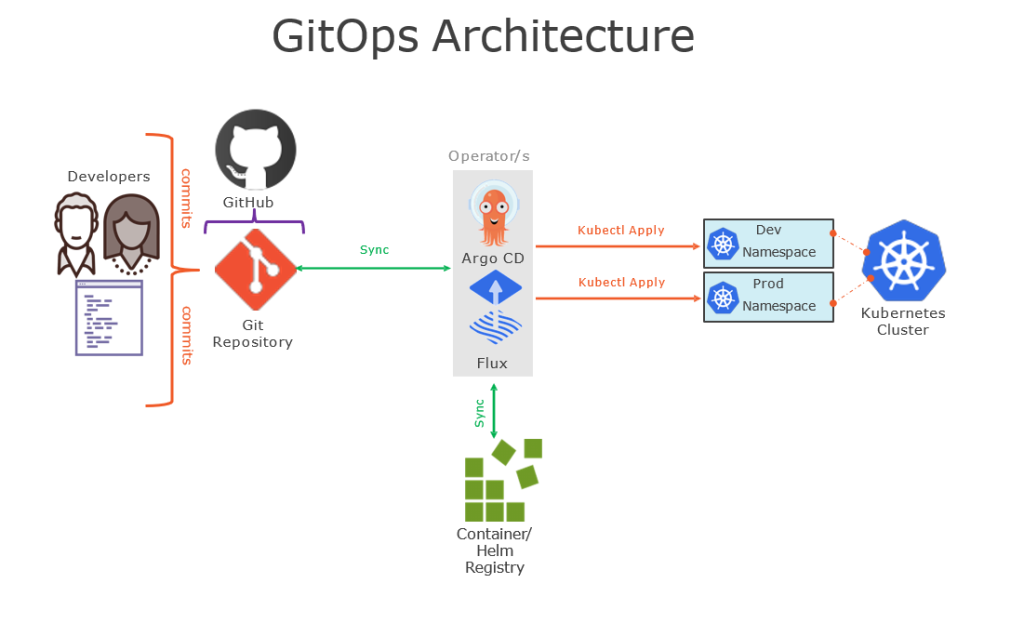
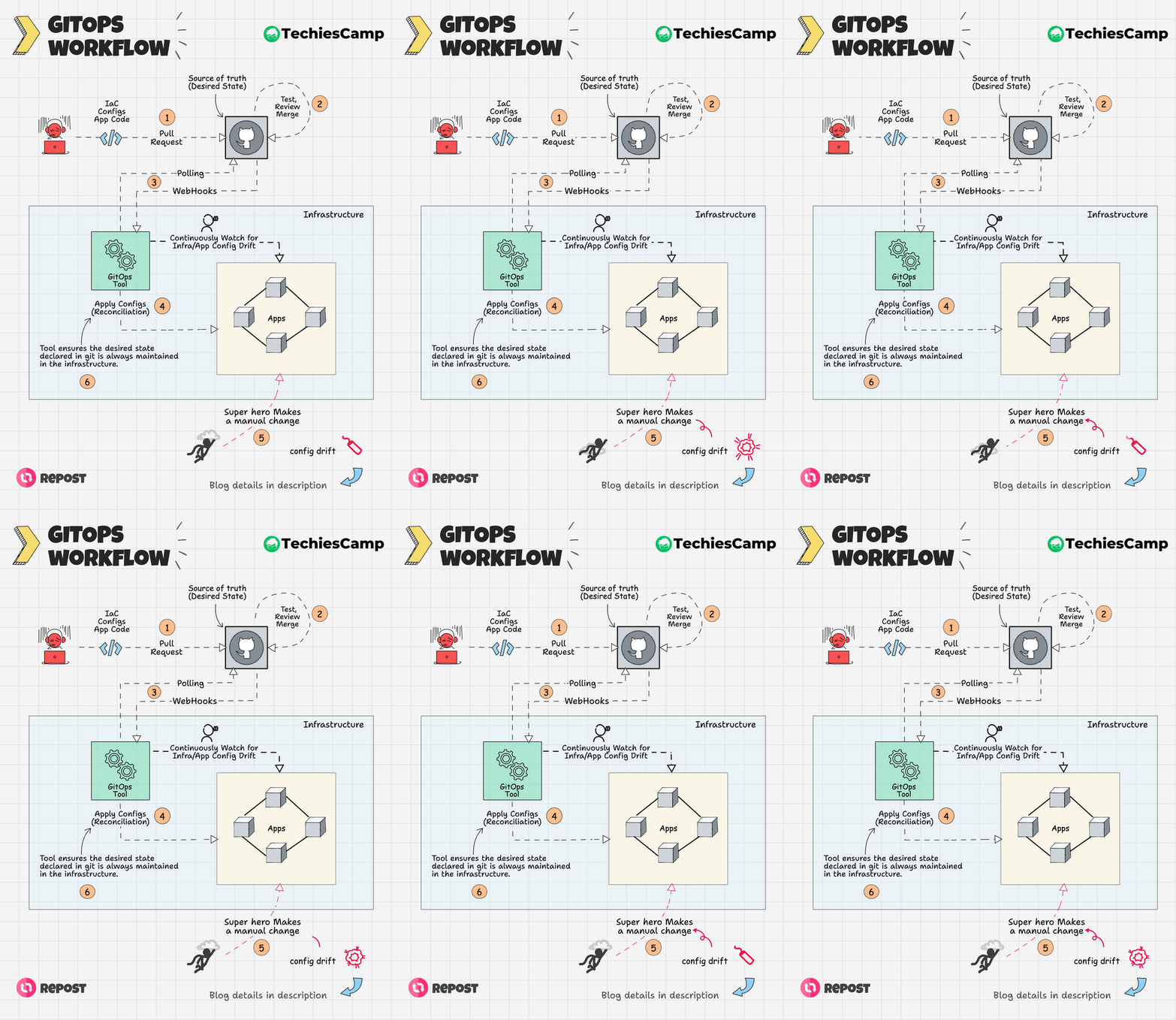
GitOps is a modern approach to managing infrastructure and application deployments using Git as the single source of truth. It leverages Git repositories to store declarative infrastructure and application code, which is then automatically applied to the desired environments by continuous delivery (CD) systems.
Benefits of GitOps
- Version Control: All changes are versioned and auditable.
- Collaboration: Facilitates collaboration among team members.
- Automation: Reduces manual intervention through automation.
- Consistency: Ensures consistent deployments across environments.
- Rollback: Easy rollback to previous stable states.
Core Concepts of GitOps
- Declarative Infrastructure: Describing the desired state of your system using declarative code.
- Continuous Deployment: Automated processes to apply changes to the system.
- Git as the Source of Truth: Using Git repositories to manage the desired state and changes.
Prerequisites
- Basic knowledge of Git and version control.
- Familiarity with Kubernetes and container orchestration.
- Understanding of Infrastructure as Code (IaC) tools like Terraform or Ansible.
Setting Up a GitOps Environment
Tools Required
- Git Repository: GitHub, GitLab, Bitbucket, etc.
- Kubernetes Cluster: Minikube, EKS, GKE, AKS, etc.
- GitOps Operator: Flux, Argo CD, etc.
- CI/CD Pipeline: Jenkins, GitHub Actions, GitLab CI, etc.
Step-by-Step Guide
Step 1: Setting Up Your Git Repository
Create a Git Repository: Set up a new repository on your preferred Git hosting service.

git init my-gitops-repo
cd my-gitops-repo
Create Directory Structure:


mkdir -p k8s/{base,overlays}
Add Sample Kubernetes Manifests:

k8s/base/deployment.yaml:


apiVersion: apps/v1
kind: Deployment
metadata:
  name: my-app
  namespace: default
spec:
  replicas: 2
  selector:
    matchLabels:
      app: my-app
  template:
    metadata:
      labels:
        app: my-app
    spec:
      containers:
        - name: my-app
          image: my-app-image:latest
          ports:
            - containerPort: 80
k8s/base/service.yaml:


apiVersion: v1
kind: Service
metadata:
  name: my-app
  namespace: default
spec:
  selector:
    app: my-app
  ports:
    - protocol: TCP
      port: 80
      targetPort: 80
  type: LoadBalancer
Commit and Push Changes:


git add .
git commit -m "Initial commit with Kubernetes manifests"
git push origin main
Step 2: Setting Up the Kubernetes Cluster
Install Minikube (local environment):


minikube start
Configure kubectl:


kubectl config use-context minikube
Step 3: Installing GitOps Operator
Using Flux
Install Flux CLI:


curl -s https://fluxcd.io/install.sh | sudo bash
Bootstrap Flux:


flux bootstrap github \
  --owner=your-github-username \
  --repository=my-gitops-repo \
  --branch=main \
  --path=./k8s \
  --personal
Using Argo CD
Install Argo CD:


kubectl create namespace argocd
kubectl apply -n argocd -f https://raw.githubusercontent.com/argoproj/argo-cd/stable/manifests/install.yaml
Access Argo CD UI:


kubectl port-forward svc/argocd-server -n argocd 8080:443
Login to Argo CD:

bash
Copy code
argocd login localhost:8080
Register the Git Repository:


argocd repo add https://github.com/your-github-username/my-gitops-repo.git
Create an Application in Argo CD:


argocd app create my-app \
  --repo https://github.com/your-github-username/my-gitops-repo.git \
  --path k8s/base \
  --dest-server https://kubernetes.default.svc \
  --dest-namespace default
Sync the Application:


argocd app sync my-app
Step 4: Automating CI/CD Pipeline
Set Up GitHub Actions (example):

.github/workflows/deploy.yml:


name: Deploy to Kubernetes

on:
  push:
    branches:
      - main

jobs:
  build:
    runs-on: ubuntu-latest

    steps:
      - name: Checkout code
        uses: actions/checkout@v2

      - name: Set up Kubernetes
        uses: azure/setup-kubectl@v1
        with:
          version: 'latest'

      - name: Deploy to Kubernetes
        run: |
          kubectl apply -f k8s/base
Commit and Push the Workflow:


git add .github/workflows/deploy.yml
git commit -m "Add GitHub Actions workflow for deployment"
git push origin main

Code language: JavaScript (javascript)
Conclusion
GitOps provides a robust and scalable way to manage infrastructure and application deployments. By using Git as the single source of truth and leveraging continuous delivery tools, you can achieve reliable and automated deployments. Follow this comprehensive guide to set up your GitOps environment and reap the benefits of this modern approach to DevOps.
For further reading and advanced topics, consider exploring:
- Advanced GitOps patterns and practices.
- Integrating Helm with GitOps.
- Managing multi-cluster environments with GitOps.
References

I’m Rajesh Kumar, a DevOps, SRE, DevSecOps, Cloud, and Platform Engineering expert passionate about sharing practical knowledge, real-world experiences, and industry best practices. I have worked at Cotocus and regularly write about technology, travel, investing, health, product reviews, and digital marketing through my various platforms.
I publish technical articles at DevOps School, travel stories at Holiday Landmark, stock market insights at Stocks Mantra, health and fitness guidance at My Medic Plus, product reviews at TrueReviewNow, and SEO and digital marketing strategies at Wizbrand.
Find Trusted Cardiac Hospitals
Compare heart hospitals by city and services — all in one place.
Explore Hospitals
A valuable perspective to include is the operational discipline required to sustain GitOps over the long term. As the number of applications and environments grows, managing configuration drift, secret handling, and change approvals becomes increasingly complex. Organizations should focus on implementing automated compliance checks, standardized repository structures, and continuous reconciliation processes to ensure deployments remain consistent and auditable. These practices help maintain reliability while allowing teams to scale GitOps without introducing unnecessary operational overhead.