
The issue you’re experiencing is common with Laravel applications when deployed in a subdirectory. By default, Laravel’s entry point is the public directory, which means you need to point your web server’s document root to the public directory of your Laravel application for it to work correctly. However, in a shared hosting environment or when working within a subdirectory, you may not have the flexibility to change the server configuration easily. Here are a couple of solutions to make your Laravel application
Option 1: Modify the .htaccess File
You can use an .htaccess file to rewrite URLs so that requests to https://www.bangaloreorbit.com/events/ are served by the public directory of your Laravel project. If you don’t already have an .htaccess file in your events directory, create one. Then, add the following rules:
<IfModule mod_rewrite.c>
    RewriteEngine On

    # Redirect Trailing Slashes If Not A Folder...
    RewriteCond %{REQUEST_FILENAME} !-d
    RewriteCond %{REQUEST_URI} (.+)/$
    RewriteRule ^ %1 [L,R=301]

    # Handle Front Controller...
    RewriteCond %{REQUEST_URI} !^/public/
    RewriteRule ^(.*)$ public/$1 [L,QSA]

    # Handle Authorization Header
    RewriteCond %{HTTP:Authorization} .
    RewriteRule .* - [E=HTTP_AUTHORIZATION:%{HTTP:Authorization}]
</IfModule>
Code language: PHP (php)
Option 2: Change Document Root (If Possible)
If you have access to modify the document root setting for your domain or subdomain (this is possible in some hosting environments), change the document root to point directly to the public directory of your Laravel application:
- From:
/home/professnow/public_html/orbit/bangaloreorbit.com/events - To:
/home/professnow/public_html/orbit/bangaloreorbit.com/events/public
This change ensures that the web server serves the Laravel application directly from the correct entry point.
Option 3: Move Laravel Public Directory Content
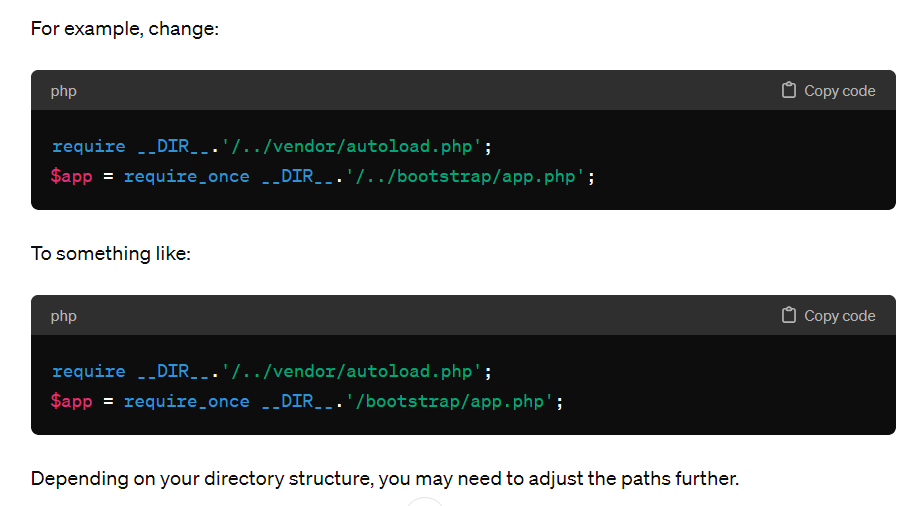
If you cannot change the document root, another approach is to move the contents of the public directory to the root of your events directory and update paths accordingly. This method requires adjusting the index.php file in your new public location to correctly point to the autoload.php and app.php files.
- Move all files from
publicto theeventsroot directory. - Open
index.phpin the new location and update the paths toautoload.phpandapp.phpto reflect their new paths.
For example, change:

I’m Rajesh Kumar, a DevOps, SRE, DevSecOps, Cloud, and Platform Engineering expert passionate about sharing practical knowledge, real-world experiences, and industry best practices. I have worked at Cotocus and regularly write about technology, travel, investing, health, product reviews, and digital marketing through my various platforms.
I publish technical articles at DevOps School, travel stories at Holiday Landmark, stock market insights at Stocks Mantra, health and fitness guidance at My Medic Plus, product reviews at TrueReviewNow, and SEO and digital marketing strategies at Wizbrand.
Find Trusted Cardiac Hospitals
Compare heart hospitals by city and services — all in one place.
Explore Hospitals
