
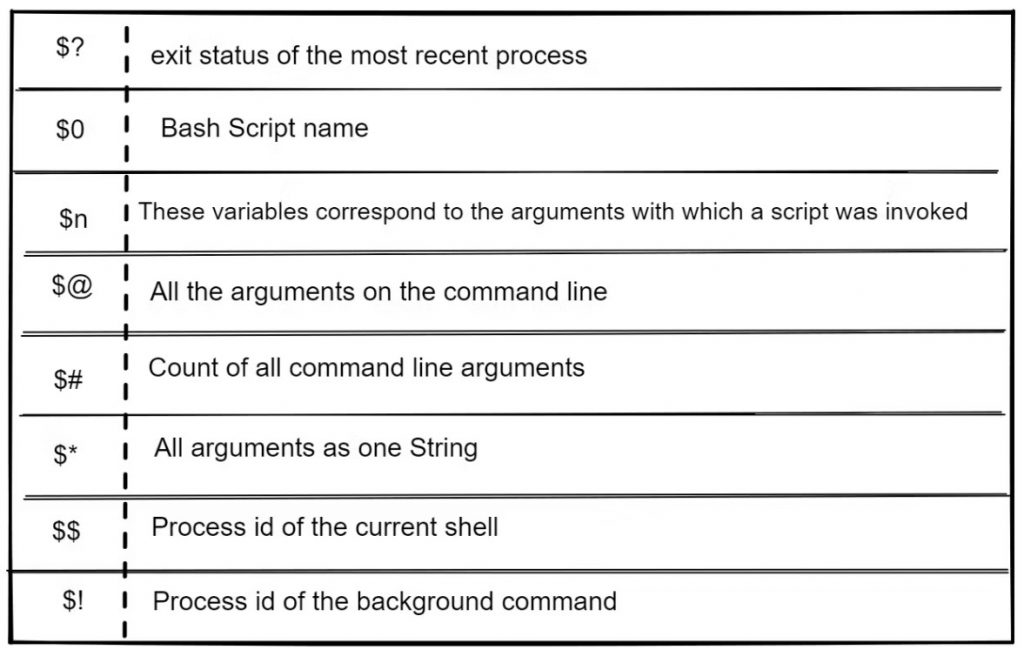
#!/bin/sh

echo "File Name: $0"
echo "First Parameter : $1"
echo "Second Parameter : $2"
echo "Quoted Values: $@"
echo "Quoted Values: $*"
echo "Total Number of Parameters : $#"
Here is a sample run for the above script −

$./test.sh Zara Ali
File Name : ./test.sh
First Parameter : Zara
Second Parameter : Ali
Quoted Values: Zara Ali
Quoted Values: Zara Ali
Total Number of Parameters : 2Code language: PHP (php)
I’m Rajesh Kumar, a DevOps, SRE, DevSecOps, Cloud, and Platform Engineering expert passionate about sharing practical knowledge, real-world experiences, and industry best practices. I have worked at Cotocus and regularly write about technology, travel, investing, health, product reviews, and digital marketing through my various platforms.
I publish technical articles at DevOps School, travel stories at Holiday Landmark, stock market insights at Stocks Mantra, health and fitness guidance at My Medic Plus, product reviews at TrueReviewNow, and SEO and digital marketing strategies at Wizbrand.
Find Trusted Cardiac Hospitals
Compare heart hospitals by city and services — all in one place.
Explore Hospitals
One practical aspect that is often underexplored in shell scripting “special variables” discussions is how heavily they influence real production-grade automation reliability, especially in CI/CD and DevOps pipelines. While variables like
$?,$0,$1,$$, and$@may look basic in tutorials, in real-world scripts they become critical for error handling, traceability, and safe execution flow control. For example, relying only on$?without structured error trapping can lead to silent failures in long-running deployment scripts, especially when multiple commands are chained. Similarly, improper handling of$@vs$*often causes subtle bugs when scripts are used in pipeline parameter passing or when dealing with inputs containing spaces or special characters. Another commonly missed area is how$LINENOand$BASH_SOURCEcan significantly improve debugging and observability in large automation scripts, particularly when scripts are modularized across multiple files. In production environments, these variables are not just syntactic features but building blocks for implementing safer CI/CD pipelines, improving log traceability, and reducing operational risk during deployments and system automation.thanks for sharing blogs and resources, keep writing blogs that helps no of software developer
thanks for sharing blogs and resources, keep writing blogs that helps no of software developer