
CSS (Cascading Style Sheets) is the language that controls how HTML looks in the browser: layout, colors, fonts, spacing and how pages adapt to different screen sizes. Every front-end developer uses it, whether they write plain stylesheets or work through frameworks and utility libraries.
The posts here start with introductions to CSS syntax, the difference between inline, internal and external stylesheets, and how CSS works with HTML and the DOM. From there they cover responsive design with fluid grids, flexible images and media queries, HTML5 page layouts, frontend frameworks like Bootstrap, Foundation and Semantic UI, and a full Astro stack that uses Tailwind CSS. Practical pieces include styling dynamic forms in PHP and an overview of Apache Cordova for hybrid apps.
For job seekers there is a set of 50 CSS interview questions and answers, along with career guides for Design Systems Engineer, Senior Design Systems Engineer and Principal Frontend Engineer roles. The collection suits beginners learning to style their first pages and front-end engineers getting ready for interviews or a senior role within Web Development.
Start here
- What is CSS and How does CSS works? – Covers CSS syntax and when to use inline, internal or external stylesheets.
- What Is CSS and its Importance in Web Development ? – Explains how CSS works with HTML and the DOM, plus its benefits and limits.
- How Responsive Design Drives Mobile Conversions – Covers fluid grids, flexible images, breakpoints and tools for testing responsive layouts.
- Frontend Development Frameworks – Compares Bootstrap, Foundation and Semantic UI and shows how to get started.
- The Ultimate Tech Stack Blueprint for Building Large-Scale Static Websites with Astro – Shows a modern static-site stack built on Astro, Tailwind CSS v4 and daisyUI.
- Top 50 interview questions and answers for CSS – Fifty CSS interview questions on selectors, layout and styling to prepare for interviews.
- Design Systems Engineer: Role Blueprint, Responsibilities, Skills, KPIs, and Career Path – Shows where CSS skills lead: components, design tokens and accessibility work.
Latest CSS articles
WordPress Typography Patterns: Styled Lists, Notice Boxes, and Code Blocks with Reusable CSS
This guide modernizes a legacy WordPress typography post into practical, reusable patterns for custom list markers, callout boxes, and code styling. It focuses on maintainable CSS and editor-friendly markup you can reuse across posts and documentation pages.
What to choose: front-end or backend development?
Regarding web development, two main areas play a crucial role in creating a functional and visually appealing website: frontend and backend development. Frontend development focuses on the…
The Ultimate Tech Stack Blueprint for Building Large-Scale Static Websites with Astro
Final recommended stack That is the stack I would choose over the Bootstrap variants unless your existing HTML is already heavily Bootstrap-based. Your best stack should be:…
Building the Virtual Classroom: An Introduction to HTML5 Layouts for Online School Portals
To build a virtual classroom, you need to grasp HTML5 layouts. Use semantic elements like <header>, <nav>, <section>, and <footer> for better accessibility and SEO. Make certain…
Principal Frontend Engineer: Role Blueprint, Responsibilities, Skills, KPIs, and Career Path
The **Principal Frontend Engineer** is the senior-most frontend-focused individual contributor (IC) who shapes the organization’s frontend architecture, engineering standards, and delivery practices across multiple teams and product areas. This role designs scalable, secure, accessible, and high-performance user experiences while enabling other engineers to ship reliably through platform patterns, shared components, and governance.
Senior Design Systems Engineer: Role Blueprint, Responsibilities, Skills, KPIs, and Career Path
A **Senior Design Systems Engineer** is a senior individual contributor who designs, builds, and operates the technical foundation of a company’s design system—typically including UI component libraries, design tokens, documentation, tooling, and integration patterns—so product teams can ship consistent, accessible, high-quality user experiences at speed. The role sits at the intersection of design and engineering and focuses on creating scalable UI primitives and developer experience (DX) that enable many teams to deliver cohesive interfaces across products and platforms.
Design Systems Engineer: Role Blueprint, Responsibilities, Skills, KPIs, and Career Path
A **Design Systems Engineer** builds and maintains the shared UI foundation that enables product teams to ship consistent, accessible, high-quality user experiences at scale. The role combines frontend engineering, systems thinking, and close partnership with design to create reusable components, patterns, tokens, and documentation that accelerate delivery across multiple products and teams.
What is Apache Cordova and use cases of Apache Cordova?
What is Apache Cordova? Apache Cordova, formerly known as PhoneGap, is an open-source mobile development framework that allows developers to build mobile applications using web technologies such…
How Responsive Design Drives Mobile Conversions
Responsive design adapts a site’s layout to any screen size. Today, more people browse on phones than desktops. Yet mobile users often abandon slow, cramped pages. That…
How to Implement Accessibility in Web Development: Practical Steps and Tools
Making your website accessible to everyone, including people with disabilities, is crucial. Accessibility in web development means ensuring that colors, text, and navigation support all users. Web…
How to become a Full stack Web developer & App developer?
Platform Dev Tools Web Server Framework Concept Programming & Scripting Languages Becoming a full-stack web developer and app developer requires a comprehensive understanding of both front-end and…
What is CSS and use cases of CSS?
What is CSS? CSS stands for Cascading Style Sheets. It is a style sheet language used to define the presentation and layout of HTML documents. CSS allows…
Frontend Development Frameworks
Are you a frontend developer looking for a way to streamline your workflow and create stunning websites faster and more efficiently? Look no further than frontend development…
What is Bootstrap & How it works? An Overview and Its Use Cases!!!
https://www.devopsschool.com/blog/what-is-bootstrap-how-it-works-an-overview-and-its-use-cases/(opens in a new tab) What is Bootstrap? Bootstrap is the most popular HTML, CSS and JavaScript framework for developing a responsive and mobile friendly website. It…
What Is CSS and its Importance in Web Development ?
What Is CSS? A Cascading Style Sheet commonly known as CSS is a layer of design over HTML elements. It is a general idea that HTML is…
Top 50 interview questions and answers for CSS
CSS stands for cascading styles sheets. In short, CSS may be a style language that creates an internet site look a lot of appealing than simply plain…
Front End Developer Interview Questions
CSS Interview Questions What is CSS selector specificity and how does it work? What’s the difference between “resetting” and “normalizing” CSS? Which would you choose, and why?…
What is CSS and How does CSS works?
Introduction To CSS CSS (Cascading Style Sheets) is used to style and layout web pages – for example, to change the font, color, size, and spacing of…
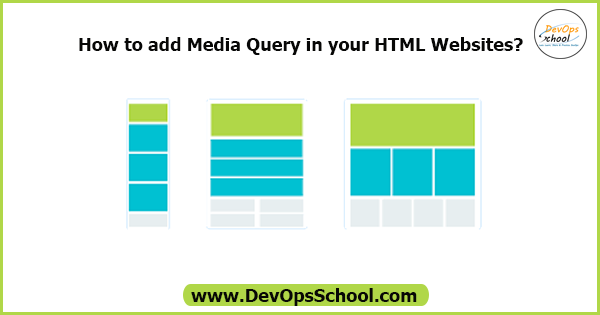
How to add Media Query in your HTML Websites?
Media Query: A media query is a CSS technique introduced in CSS. A media query consists of the optional media type and zero or more expressions that…
How to Create & Display dynamic HTML content using CSS challenge in PHP?
In this blog, I am going to explain How to Generate dynamic HTML content using CSS challenge in PHP. So, before you create a page which extension…
How to create alternating row colors challenge in PHP?
In this blog, I am going to explain how to recreate alternating rows colors challenge in PHP. So, before creating a .php file in XAMPP/htdocs file and…
How to create a WordPress custom theme? Part-4
How to create a WordPress custom theme? It’s looking improper yet, therefore we have to set the path of CSS and JavaScript to make it on proper…
How to create a WordPress custom theme? Part-2
How to create a WordPress custom theme? What is the WordPress theme? The WordPress Themes are files that work together to create the design and functionality of…
[SOLVED] Error: Access CSS/js file in Local and Laravel-development Server both.
In Laravel, our all assets are in the public directory, But it gives error while we run Same code in Laravel development server and Local Server. See…
CSS Tutorial for beginners (Step by Step) with Examples(Part3).
i. Universal Style Class It is a type of style class which is used by any element of the HTML document. Universal Style Class Starts with a…
CSS Tutorial for beginners (Step by Step) with Examples(Part2).
What is Internal Style Sheet? An internal style sheet is a set of style that is created as a part of an HTML document. An internal style…
CSS Tutorial for beginners (Step by Step) with Examples(Part1).
Introduction to CSS? CSS stands for Cascading Style Sheet. It is a style sheet language which is used to describe the presentation of a document. We can…
CSS Tutorial-Part 2
List=> List property is used to create a list. There are two types of lists: . Unordered lists- An unordered list uses bulleted as the list item…
CSS Tutorial-Part 1
Cascading Style Sheet (CSS) CSS is a simple mechanism of describing common presentation semantics for every page is a website. It can control the layout of the…
Bootstrap Tutorial
What is Bootstrap? Bootstrap is a open-source framework for building websites and web applications. That means the bootstrap is fully responsive framework and support any devices which…
CSS: frequently asked questions
What are the three ways to add CSS to a page?
Inline CSS uses the style attribute on a single element. Internal CSS goes in a <style> block in the page head. External CSS lives in a separate .css file linked with a <link> tag, which is the usual choice for styles shared across many pages.
What is the difference between HTML and CSS?
HTML defines the structure and content of a page, such as headings, paragraphs and forms. CSS defines how that content is presented, including layout, colors and typography.
How does CSS make a website responsive?
Responsive CSS combines fluid layouts with relative units, flexible images and media queries. Media queries apply different rules at set breakpoints so the same page works on phones, tablets and desktops.
Should I learn plain CSS before using a framework like Bootstrap or Tailwind?
Yes. Frameworks generate or wrap ordinary CSS, so knowing selectors, the box model, Flexbox and Grid makes it much easier to customize them and debug layout problems.