
MYHOSPITALNOW.COM

Find Trusted Doctors & Hospitals

Discover healthcare providers, compare hospitals, and explore treatment options worldwide.

Free Treatment Quotes • Doctor Search • Hospital Comparison

Find Healthcare Options

www.myhospitalnow.com

How to Make Navigation from One Screen to Other in Flutter.

Navigation from One Screen to Other is pretty Easier, Just Follow the Below Steps :-

Step 1 :- First of all, make two new files named home.dart and about.dart .

Step 2 :- Now in main.dart, import material.dart package library as well as home.dart. See the below image.

Main.dart code importing package:flutter/material.dart and home.dart

Step 3 :- Now we call main() in which we call runApp(), in which we call MaterialApp() widget.
Now we call Scaffold in home widget in which we call appBar. In appBar, we call Title as Text Widget in which we pass our App Title. After appBar we use Body Widget in which we pass our Own Widget Home().

See the Below code of main.dart :-

import 'package:flutter/material.dart';
import 'home.dart';

void main() {
  runApp(MaterialApp(
    home: Scaffold(
      appBar: AppBar(
        title: Text("Naviagtion App"),
      ),
      body: Home(),
    ),
  ));
}
Code language: JavaScript (javascript)

Step 4 :- Now in home.dart, import material.dart package library as well as about.dart. See the below image.

Home.dart code importing package:flutter/material.dart and about.dart

Step 5 :- After importing, we will make a Stateful Widget with name Home and return container, in which Child widget is called. In child widget, we call column , in which we call Children Widget. Now in Children Widget, call RaisedButton() which onPressed call navigation push and return our Own made Widget About(). After onPressed() widget, we call a Text widget named Child in which we write “Go to About Screen“.

See the Below code of home.dart :-

Step 6 :- Now Moving on about.dart, first import material.dart package library.

Step 7 :- After that, make a Stateless Widget and return scaffold(). In scaffold, make appBar Widget in which pass Title widget and write title of the new screen. After appBar widget, make a body widget which is in Centre and passing Text widget as Child in which we pass a text “This is About Screen”.

See the Below code of about.dart :-

Now We are Ready to Run our Project.

See Output Below
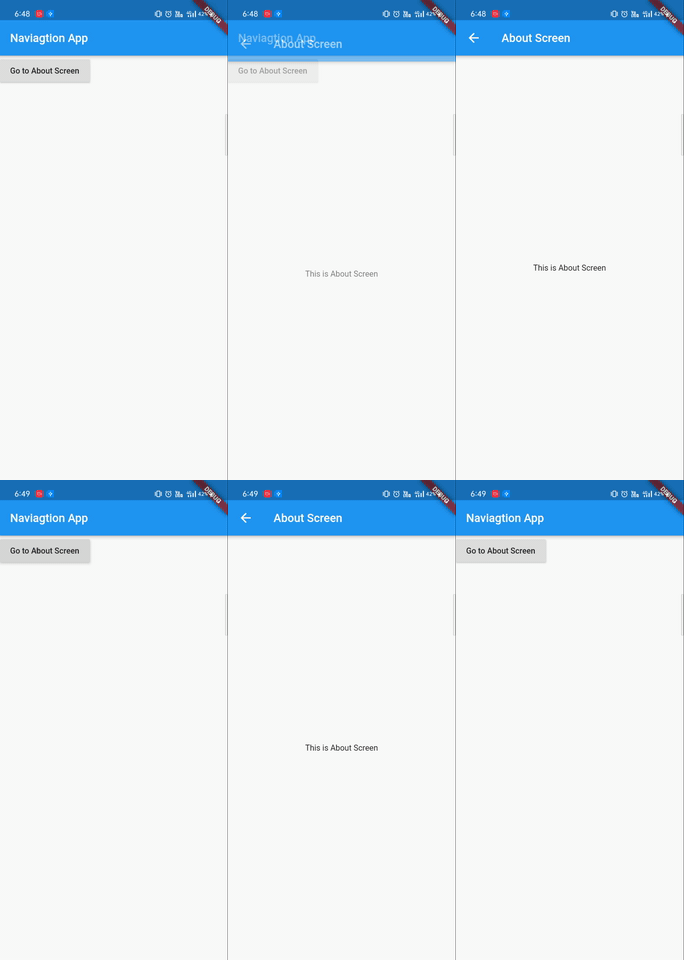
Animated Flutter Navigation App tapping Go to About Screen to open the About screen

Find Trusted Cardiac Hospitals

Compare heart hospitals by city and services — all in one place.

Explore Hospitals
With MotoShare.in, you can book a bike instantly, enjoy doorstep delivery, and ride without worries. Perfect for travelers, professionals, and adventure enthusiasts looking for a seamless mobility solution.

Related Posts

What is Flutter and use cases of Flutter?

What is Flutter? Flutter is an open-source UI software development toolkit developed by Google. It is applied for building natively compiled applications for mobile, web, and desktop…

Read More

[Solved] Flutter : Error: The getter ‘subhead’ isn’t defined for the class ‘TextTheme’ from package:flutter/src/material/text_theme.dart’ – searchable_dropdown

ERROR SOLUTION There are Two Solutions for this error Use Alternative Package Do some changes in .pub-cache Use Alternative Package I switched from searchable_dropdown to search_choices and…

Read More

[SOLVED] Flutter Error: The getter ‘body1’ isn’t defined for the class ‘TextTheme’ – place_picker.

Error SOLUTION Here is what I found on StackOverflow Source (Stackoverflow):- https://stackoverflow.com/questions/69312392/how-to-resolve-error-the-getter-body1-isnt-defined-for-the-class-texttheme To fix this issue you have to make some changes to Two files C:/src/flutter/.pub-cache/hosted/pub.dartlang.org/place_picker-0.9.19-nullsafety/lib/widgets/rich_suggestion.dart 2….

Read More

[SOLVED] Flutter : NoSuchMethodError: The getter ‘isEmpty’ was called on null.

Problem I’m Calling An API and getting response in Variable Data ($data). When data is coming then there is no Error but when I’m getting null as…

Read More

[SOLVED] Flutter : Cannot run with sound null safety, because the following dependencies don’t support null safety

Problem I’m using flutter_recaptcha_v2: ^0.1.0. Now, I am trying to run it using flutter run, however, it will not start because of the following error: Solution If you want…

Read More

How to Check if an application is on its first run or One time Intro Screen with Flutter.

If you wish to show the intro screen only for the first time, you will need to save locally that this user has already seen intro. For…

Read More