HTML Introduction
HTML is a markup language that is used to make attractive web pages with the help of styling, which looks like a good format on the web browser. An HTML document is made up of several HTML tags and each HTML tag has a different content.
What is HTML?
The full name of HTML is a hypertext markup language. This is one way to display web pages with text, images, and multimedia content. It is considered the easiest language, people can easily learn it. HTML is not a programming language, but it is a markup language. The HTML file is a markup tag that tells the web browser how to show on a page in Mozilla Firefox or Google Chrome. We can write html file as htm or html.
Most used tags in HTML
<html> – The HTML element is the root element of an HTML page.
<head> – Element in HTML is used to define the head portion of an HTML document that contains the document related information.
<title> – The element specifies a title for the HTML page that is displayed in the title bar of the browser.
<body> – The element defined the document body and is the container for all visible contents such as paragraphs, tables, hyperlinks, tables, lists, etc.
Underline – Use the underline tag to – you guessed it – underline text: <u>Underlined text</u>
Underlining the text of a page can be useful for emphasis, but underlining on the web is often used to indicate a link.
Headings:
Use the h1, h2, h3, h4, h5, and h6 tags to include titles. Headings typically have rules in your WordPress theme stylesheet that determine how titles are displayed for your site.
The heading above is a Level 3 Heading:
<h1>Level 1 Heading</h1>
<h2>Level 2 Heading</h2>
<h3>Level 3 Heading</h3>
<h4>Level 4 Heading</h4>
<h5>Level 5 Heading</h5>
<h6>Level 6 Heading</h6>Code language: HTML, XML (xml)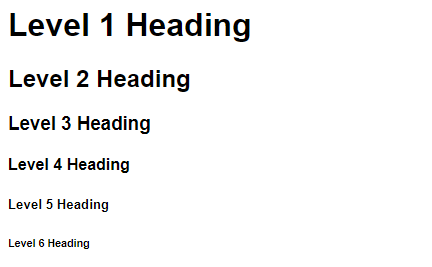
Paragraph:-
Text between
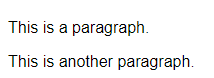
<p> – text between <p> tag describes the paragraph of the webpage.
<p>This is a paragraph.</p>
<p>This is another paragraph.</p>
Bold Tags:
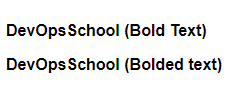
Bold: Regularly Use the tag and to bold text in HTML. Ex:
<b>DevOpsSchool(Bold Text)</b>
<strong>Bolded text(Bolded Text)</strong>
Italics:
Regularly Use the tag and to italicise text in HTML.
<i>Italic Text</i>
<em>Italicised text</em>
Bullets and Numbered Lists
Bulleted = unordered list
Numbered = ordered list
To create a list directly using HTML, you need to know that each type of list uses ul or ol tags.
Then, each line item in the list uses the Lee tag.
Here is a list of two bulleted items:
First item
Second item
Here is the HTML to create this bulleted list.
<ul>
<li>First item</li>
<li>Second item</li>
</ul>Code language: HTML, XML (xml)
To change the bullets to numbers, just use the ol tag instead of the ul tag:
First item
Second item
<ol>
<li>First item</li>
<li>Second item</li>
</ol>Code language: HTML, XML (xml)
HTML Links
HTML links defined <a> Tags
Examples:
<a herf="https://www.devopsschool.com"> is a link </a>Code language: HTML, XML (xml)The destination of the link is specified in the href attribute
Attributes are used to provide additional information about HTML elements.
HTML Images Tag
HTML images are defined with the <img> tag.
The source file (src), providing optional text (height), width, and height as a feature:
<img scr="google.jpg" alt="google.com" width="100" height="140">Code language: HTML, XML (xml)Tables Tag
<table> – Let’s use the table tag to create a table in HTML.
<th> – <th> tag is used to create columns in the table.
<tr> – <tr> tags are used to create a row in the table.
<td> – The <td> tag is used to insert data into columns in the table.
<table border=1>
	<th>Name</th>
	<th>Roll</th>
	<th>Result</th>
    <tr>
        <td>Day</td>
        <td>Mission</td>
	<td>1</td>
    </tr>
    <tr>
        <td>Saturday</td>
        <td>Walk Dog</td>
	<td>2</td>
    </tr>
    <tr>
        <td>Sunday</td>
        <td>Walk Cat</td>
	<td>3</td>
    </tr>
</table>Code language: HTML, XML (xml)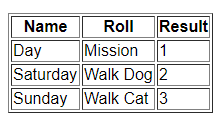
Where you can use HTML:
Would you like to use images as buttons to link to other pages? Include tables on your website? HTML lets you do these things.
In any languages PHP, laravel, python, angular js… etc the most common places you might want to use HTML tags for frontend:
In posts and pages
In sidebar text widgets
In paragraph
In Table
In Popup…etc
<script src="https://gist.github.com/ajcotocus/47129f5e77691a599db948645b00576b.js"></script>Code language: HTML, XML (xml)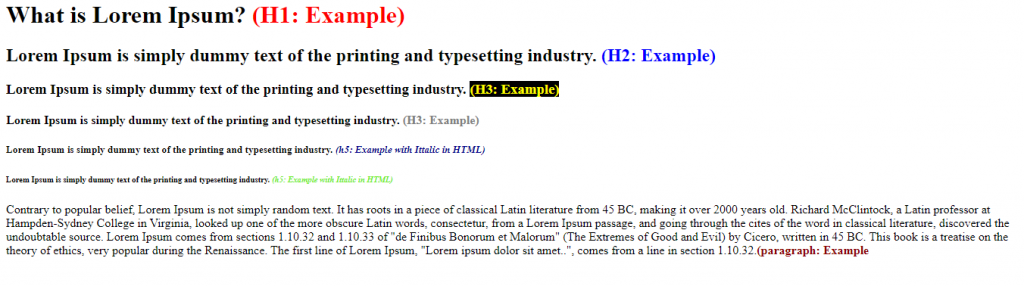

I’m Rajesh Kumar, a DevOps, SRE, DevSecOps, Cloud, and Platform Engineering expert passionate about sharing practical knowledge, real-world experiences, and industry best practices. I have worked at Cotocus and regularly write about technology, travel, investing, health, product reviews, and digital marketing through my various platforms.
I publish technical articles at DevOps School, travel stories at Holiday Landmark, stock market insights at Stocks Mantra, health and fitness guidance at My Medic Plus, product reviews at TrueReviewNow, and SEO and digital marketing strategies at Wizbrand.
Find Trusted Cardiac Hospitals
Compare heart hospitals by city and services — all in one place.
Explore Hospitals