Are you tired of manually managing your infrastructure? Do you want to automate the process and improve your team’s productivity? If so, GitOps using Terraform might be the solution you’re looking for. In this article, we’ll explore what GitOps is, how it works, and how to implement it using Terraform.
What is GitOps?
GitOps is a modern approach to managing infrastructure that emphasizes automation, collaboration, and continuous delivery. It’s based on the idea of using Git as the single source of truth for configuration and code. With GitOps, all changes to infrastructure are made through pull requests, which are reviewed and approved by other team members before being merged into the main branch.
How Does GitOps Work?
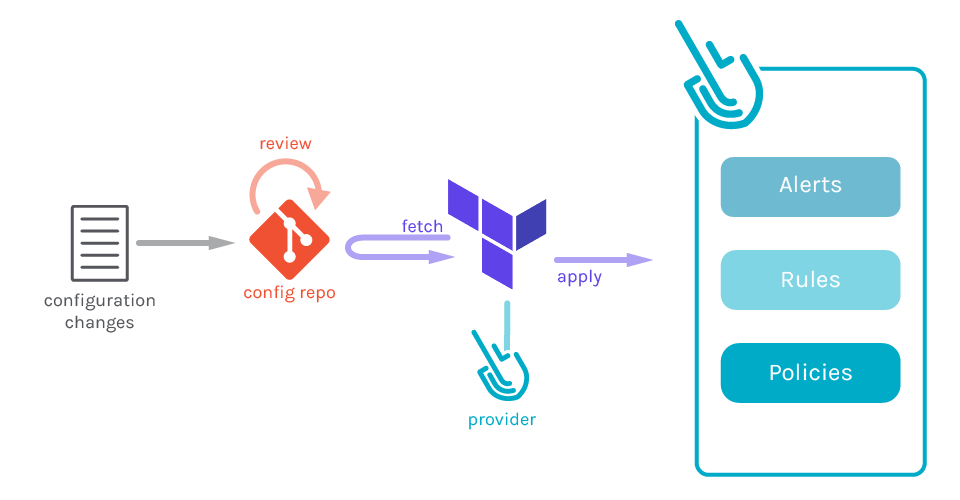
GitOps works by using a combination of Git, automation tools, and best practices to manage infrastructure. Here’s how it works:
- Infrastructure code is stored in a Git repository.
- Changes to infrastructure are made through pull requests.
- Pull requests trigger automated testing and deployment.
- Changes are merged into the main branch and deployed to production.
This approach ensures that all changes are tracked, reviewed, and tested before being deployed. It also enables teams to collaborate more effectively by using Git as the central repository for code and configuration.
Why Use Terraform for GitOps?
Terraform is a popular infrastructure as code tool that can be used to manage resources across multiple cloud providers. It’s designed to be declarative, meaning that you describe the desired state of your infrastructure in code, and Terraform takes care of the rest.
When combined with GitOps, Terraform can help you automate your infrastructure changes and ensure that they’re tracked and reviewed through pull requests. It also provides a consistent and repeatable way to manage your infrastructure, which can improve your team’s productivity and reduce the risk of errors.
How to Implement GitOps Using Terraform
Implementing GitOps using Terraform involves a few steps:
- Set up a Git repository to store your Terraform code.
- Configure your infrastructure using Terraform code.
- Create a pipeline that uses Terraform to apply changes to your infrastructure.
- Use pull requests to manage changes to your infrastructure.
Let’s explore each of these steps in more detail.
Step 1: Set Up a Git Repository to Store Your Terraform Code
The first step in implementing GitOps using Terraform is to set up a Git repository to store your Terraform code. This repository will serve as the single source of truth for your infrastructure configuration. You can use any Git hosting provider, such as GitHub or GitLab, to host your repository.
Once you’ve set up your repository, you can start creating Terraform modules and configurations to define your infrastructure.
Step 2: Configure Your Infrastructure Using Terraform Code
The next step is to configure your infrastructure using Terraform code. Terraform uses a declarative syntax to define resources and their dependencies. Here’s an example of Terraform code that creates an AWS EC2 instance:
resource "aws_instance" "example" {
  ami           = "ami-0c55b159cbfafe1f0"
  instance_type = "t2.micro"
}Code language: JavaScript (javascript)
This code creates an EC2 instance using the specified AMI and instance type. You can define more complex configurations by using modules and variables.
Step 3: Create a Pipeline That Uses Terraform to Apply Changes to Your Infrastructure
The next step is to create a pipeline that uses Terraform to apply changes to your infrastructure. This pipeline should trigger automatically when changes are made to your Git repository.
Here’s an example of a pipeline that uses Terraform to apply changes to an AWS environment:
name: apply-terraform

on:
  pull_request:
    branches:
      - main

jobs:
  apply:
    runs-on: ubuntu-latest

    steps:
    - name: checkout
      uses: actions/checkout@v2

    - name: setup-terraform
      uses: hashicorp/setup-terraform@v1

    - name: terraform-init
      run: terraform init

    - name: terraform-plan
      run: terraform plan -out=tfplan

    - name: terraform-apply
      run: terraform apply tfplanCode language: HTTP (http)
This pipeline uses the official Terraform setup action to install Terraform and then runs the terraform init, terraform plan, and terraform apply commands.
Step 4: Use Pull Requests to Manage Changes to Your Infrastructure
The final step is to use pull requests to manage changes to your infrastructure. Whenever someone wants to make a change to the infrastructure, they should create a pull request with their proposed changes. Other team members can review the changes and provide feedback before approving the pull request.
Once the pull request is approved and merged into the main branch, the pipeline will automatically apply the changes to the infrastructure.
Conclusion
Implementing GitOps using Terraform is a powerful way to automate your infrastructure management and improve your team’s productivity. By using Git as the single source of truth for configuration and code, you can ensure that all changes are tracked, reviewed, and tested before being deployed to production. And by using Terraform to manage your infrastructure, you can provide a consistent and repeatable way to manage your resources across multiple cloud providers.

👤 About the Author
Ashwani is passionate about DevOps, DevSecOps, SRE, MLOps, and AiOps, with a strong drive to simplify and scale modern IT operations. Through continuous learning and sharing, Ashwani helps organizations and engineers adopt best practices for automation, security, reliability, and AI-driven operations.
🌐 Connect & Follow:
Website: WizBrand.com
Facebook: facebook.com/DevOpsSchool
X (Twitter): x.com/DevOpsSchools
LinkedIn: linkedin.com/company/devopsschool
YouTube: youtube.com/@TheDevOpsSchool
Instagram: instagram.com/devopsschool
Quora: devopsschool.quora.com
Email– contact@devopsschool.com
Find Trusted Cardiac Hospitals
Compare heart hospitals by city and services — all in one place.
Explore Hospitals