
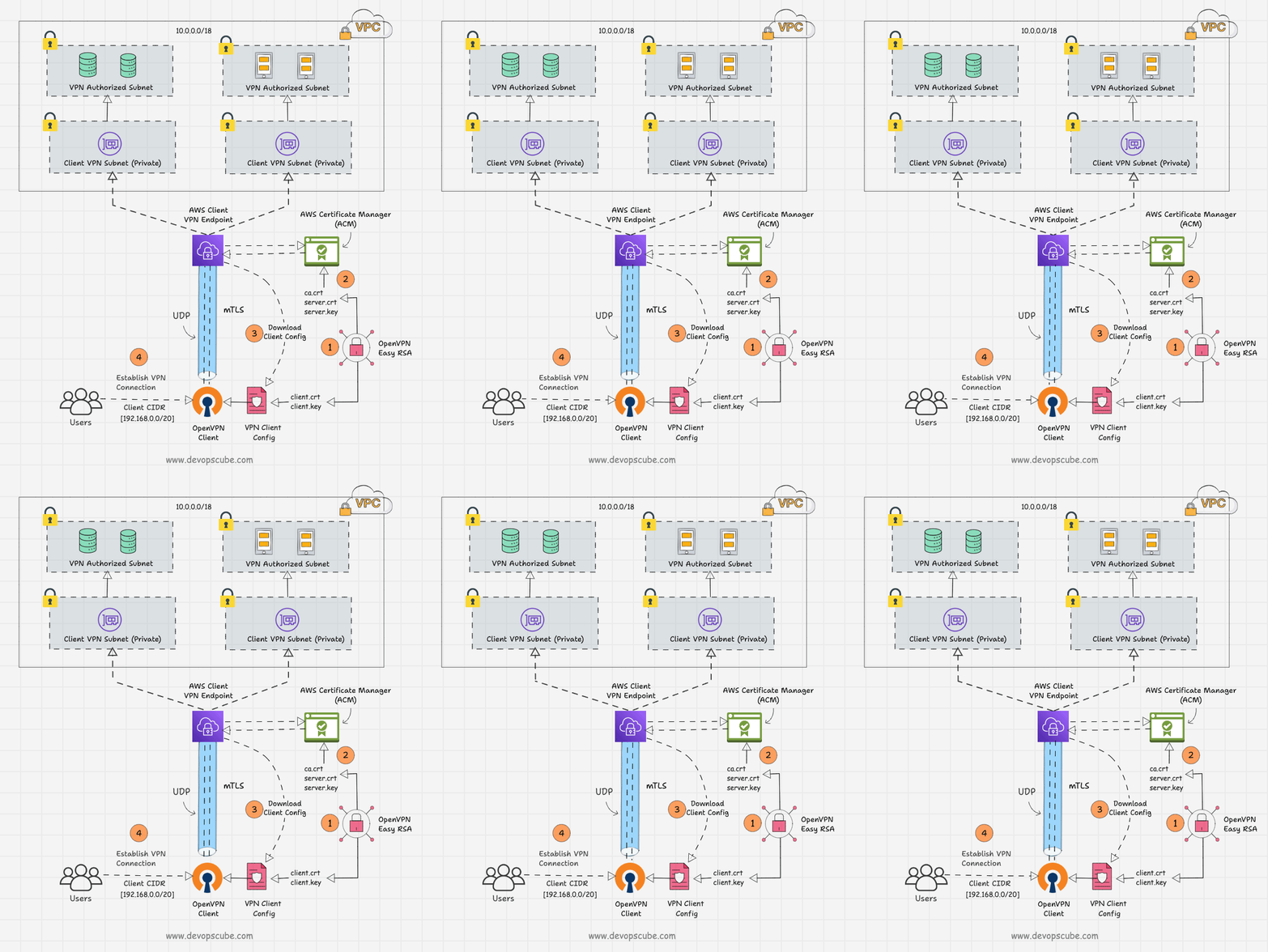
Here’s a complete guide for AWS VPC VPN — ideal for tutorials, study, and implementation. This tutorial will help you understand Virtual Private Network (VPN) connections within Amazon VPC, covering both Site-to-Site VPN and Client VPN.
🔹 What is AWS VPC VPN?
AWS Virtual Private Network (VPN) enables you to securely connect your on-premises network or client devices to an Amazon Virtual Private Cloud (VPC) over an encrypted connection.
There are two types of VPN in AWS:
- Site-to-Site VPN – Connects your on-premises network or another cloud network to your AWS VPC.
- Client VPN – Allows remote clients to securely access AWS resources.
🔹 Key Components
| Component | Description |
|---|---|
| Customer Gateway (CGW) | Represents your on-premises device or software application. |
| Virtual Private Gateway (VGW) | VPN concentrator on the AWS side attached to your VPC. |
| VPN Connection | The actual connection between CGW and VGW. |
| Transit Gateway | (Optional) Connects multiple VPCs and on-prem networks. |
| Client VPN Endpoint | Used for AWS Client VPN connections. |
🔹 Site-to-Site VPN Setup Guide
✅ Step 1: Create a Virtual Private Gateway (VGW)
- Go to VPC Dashboard → Virtual Private Gateways
- Click Create Virtual Private Gateway
- Attach it to your desired VPC
✅ Step 2: Create a Customer Gateway (CGW)
- Go to VPC → Customer Gateways
- Choose:
- IP Address (your on-prem router/public IP)
- Routing: Static or Dynamic (BGP)
- Device: Optional name
✅ Step 3: Create a VPN Connection
- Go to VPN Connections → Create
- Select Virtual Private Gateway and Customer Gateway
- Choose Routing Options (BGP or static routes)
- Download configuration for your on-prem device (supports Cisco, Juniper, etc.)
✅ Step 4: Update Route Tables
- Add routes pointing to on-prem CIDR via VGW
- Update Security Groups and Network ACLs accordingly
🔹 AWS Client VPN Setup Guide
✅ Step 1: Create a Client VPN Endpoint
- Go to VPC → Client VPN Endpoints
- Provide:
- Server certificate (from ACM)
- Client CIDR range
- Authentication method (Active Directory, mutual auth, etc.)
- Enable split-tunnel or full-tunnel access
✅ Step 2: Associate Subnets
- Associate endpoint with one or more subnets in your VPC (must be in same region)
✅ Step 3: Authorization Rules
- Define rules to allow access to certain CIDRs for VPN clients
✅ Step 4: Download Client Configuration
- Share
.ovpnfile with clients - Use AWS VPN Client or OpenVPN to connect
🔹 Security Best Practices
- Use strong authentication (IAM, Active Directory)
- Enable logging with Amazon CloudWatch
- Use network segmentation (NACLs, SGs)
- Rotate keys/certs periodically
- Enable split-tunneling only if needed
🔹 Use Cases
| Use Case | Description |
|---|---|
| 🌐 Hybrid Cloud | Connect on-prem data center to AWS |
| 💻 Remote Access | Allow employees to access AWS securely from anywhere |
| 🔄 Inter-region VPC Communication | Use VPN between VPCs in different regions |
🔹 Pricing Summary
| Feature | Cost |
|---|---|
| Site-to-Site VPN | $0.05/hour + data transfer |
| Client VPN Endpoint | $0.10/hour + $0.05 per connection/hour |
🔹 Troubleshooting Tips
- ✅ Check route tables and NACLs
- ✅ Verify Security Groups for access
- ✅ Use
ping,traceroute, andtelnetto verify connectivity - ✅ Use CloudWatch logs and VPN metrics for debugging
🔹 Useful AWS CLI Commands
aws ec2 create-vpn-connection ...
aws ec2 describe-vpn-connections
aws ec2 delete-vpn-connection --vpn-connection-id vpn-xyz
Code language: JavaScript (javascript)
🔹 Diagram – AWS Site-to-Site VPN
  +----------------+          Encrypted IPsec         +----------------------+
  | On-Prem Router | <------------------------------> | Virtual Private Gateway |
  +----------------+                                  +----------------------+
                                                           |
               --------------------------------------------+
                                AWS VPC
Code language: HTML, XML (xml)
🔹 References

I’m Rajesh Kumar, a DevOps, SRE, DevSecOps, Cloud, and Platform Engineering expert passionate about sharing practical knowledge, real-world experiences, and industry best practices. I have worked at Cotocus and regularly write about technology, travel, investing, health, product reviews, and digital marketing through my various platforms.
I publish technical articles at DevOps School, travel stories at Holiday Landmark, stock market insights at Stocks Mantra, health and fitness guidance at My Medic Plus, product reviews at TrueReviewNow, and SEO and digital marketing strategies at Wizbrand.
Find Trusted Cardiac Hospitals
Compare heart hospitals by city and services — all in one place.
Explore Hospitals