
Introduction
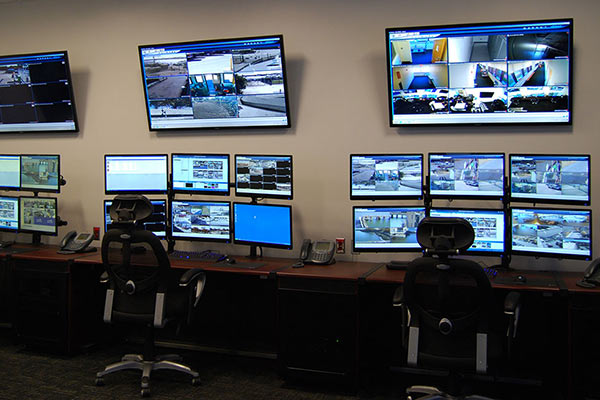
CCTV Monitoring Software is the digital backbone of modern video surveillance systems. While cameras capture video, it is the software that manages, records, analyzes, and makes sense of that footage. From small retail stores to airports, hospitals, factories, and smart cities, CCTV monitoring software plays a critical role in protecting people, assets, and operations.
In today’s environment, surveillance is no longer just about watching live video. Modern CCTV software offers AI-powered analytics, motion detection, facial recognition, remote access, cloud storage, alerts, and compliance-ready audit trails. These tools help organizations prevent incidents, investigate events faster, and maintain accountability.
When choosing CCTV monitoring software, buyers should evaluate camera compatibility, scalability, ease of use, analytics capabilities, security standards, storage options, integration support, and total cost of ownership. The right software should match both current needs and future growth without adding unnecessary complexity.
Best for:
CCTV Monitoring Software is best suited for security teams, facility managers, IT administrators, retail chains, logistics hubs, healthcare facilities, educational institutions, manufacturing plants, and enterprises managing multiple locations.
Not ideal for:
It may not be ideal for individual home users with a single camera, very small setups requiring only basic live viewing, or users looking for simple consumer-grade mobile apps without professional features.
Top 10 CCTV Monitoring Software Tools
1 — Milestone XProtect
Short description:
Milestone XProtect is a professional-grade video management system widely used in large-scale and mission-critical surveillance environments.
Key features
- Centralized video management across locations
- Advanced video analytics support
- Wide third-party camera compatibility
- Role-based access control
- High-performance video recording and playback
- Scalable architecture for enterprise use
Pros
- Extremely stable and reliable
- Strong ecosystem of integrations
Cons
- Steep learning curve for beginners
- Higher cost for advanced editions
Security & compliance
Supports encryption, role-based access, audit logs, and enterprise security standards. Compliance varies by deployment.
Support & community
Extensive documentation, certified partners, enterprise-grade support, and a strong professional user community.
2 — Genetec Security Center
Short description:
Genetec Security Center is a unified security platform combining video surveillance, access control, and analytics.
Key features
- Unified video and access control management
- AI-powered analytics and event detection
- Centralized monitoring dashboard
- Scalable multi-site deployment
- Advanced forensic search capabilities
Pros
- All-in-one security platform
- Excellent analytics and reporting
Cons
- Premium pricing
- Requires skilled implementation
Security & compliance
Strong encryption, audit logs, compliance-ready architecture, GDPR-friendly design.
Support & community
Enterprise-focused support, training programs, and global partner network.
3 — Avigilon Control Center
Short description:
Avigilon Control Center focuses on high-definition video and AI-driven analytics for proactive security.
Key features
- AI-based object and facial recognition
- High-resolution video handling
- Smart search and alerts
- Seamless camera integration
- Real-time monitoring tools
Pros
- Industry-leading analytics accuracy
- Intuitive interface for operators
Cons
- Works best with Avigilon hardware
- Higher infrastructure requirements
Security & compliance
Supports encryption, access control, audit logs, and regional compliance standards.
Support & community
Strong enterprise support and certified integrators.
4 — HikCentral Professional
Short description:
HikCentral Professional is a centralized CCTV monitoring platform designed for large commercial and industrial deployments.
Key features
- Centralized video and alarm management
- Large-scale camera support
- Event-driven alerts
- User permission management
- Video wall support
Pros
- Cost-effective for large deployments
- Feature-rich for enterprise environments
Cons
- UI can feel complex
- Limited third-party ecosystem
Security & compliance
Encryption and access controls available; compliance varies by region and configuration.
Support & community
Strong vendor support and extensive documentation.
5— Axis Camera Station
Short description:
Axis Camera Station is a reliable video management solution optimized for Axis network cameras.
Key features
- Optimized performance with Axis cameras
- Easy installation and setup
- Secure video recording
- User-friendly interface
- Scalable storage options
Pros
- Excellent stability
- Simple for IT teams to manage
Cons
- Limited camera brand compatibility
- Fewer advanced analytics
Security & compliance
Strong encryption, secure boot, and enterprise-grade security practices.
Support & community
High-quality documentation and responsive enterprise support.
6 — Blue Iris
Short description:
Blue Iris is a popular CCTV monitoring software for small businesses and advanced users seeking flexibility.
Key features
- Supports a wide range of IP cameras
- Motion detection and alerts
- Mobile app access
- Custom recording rules
- Local storage control
Pros
- Affordable pricing
- Highly customizable
Cons
- Windows-only
- Interface feels dated
Security & compliance
Basic encryption support; compliance largely depends on user configuration.
Support & community
Active user forums, guides, and responsive developer support.
7 — iSpy / Agent DVR
Short description:
iSpy (Agent DVR) is an open-source-friendly CCTV monitoring solution with cloud and local options.
Key features
- Supports thousands of camera models
- AI motion and object detection
- Browser-based access
- Cloud and local recording
- Multi-device monitoring
Pros
- Flexible and customizable
- Strong community-driven development
Cons
- Advanced features require paid plans
- Requires technical setup knowledge
Security & compliance
Varies by deployment; encryption available.
Support & community
Large open-source community and documentation.
8 — Zoneminder
Short description:
Zoneminder is an open-source CCTV monitoring platform popular among Linux-based environments.
Key features
- Open-source and self-hosted
- Motion detection and alerts
- Web-based interface
- Camera recording and playback
- Customizable workflows
Pros
- No licensing cost
- Full control over data
Cons
- Steep learning curve
- UI feels outdated
Security & compliance
Depends on system hardening and configuration.
Support & community
Strong open-source community, forums, and documentation.
9 — Nx Witness
Short description:
Nx Witness is a modern video management system focusing on simplicity and performance.
Key features
- Clean, intuitive interface
- Fast video search
- Cross-platform support
- Scalable architecture
- Easy camera discovery
Pros
- Very easy to use
- High performance
Cons
- Fewer advanced analytics
- Licensing cost increases with scale
Security & compliance
Encryption and role-based access supported.
Support & community
Good documentation and professional support options.
10 — OpenEye Web Services
Short description:
OpenEye Web Services combines cloud-based CCTV monitoring with professional-grade analytics.
Key features
- Cloud-managed video surveillance
- Remote access and monitoring
- AI-powered alerts
- Automatic updates
- Scalable storage
Pros
- Low maintenance
- Strong cloud reliability
Cons
- Ongoing subscription cost
- Cloud dependency
Security & compliance
Strong encryption, audit logs, and compliance-ready cloud infrastructure.
Support & community
Enterprise-grade support and onboarding assistance.
Comparison Table
| Tool Name | Best For | Platform(s) Supported | Standout Feature | Rating |
|---|---|---|---|---|
| Milestone XProtect | Large enterprises | Windows, Server | Massive scalability | N/A |
| Genetec Security Center | Unified security | Windows, Server | All-in-one platform | N/A |
| Avigilon Control Center | AI-driven surveillance | Windows | Facial recognition | N/A |
| HikCentral Professional | Commercial deployments | Windows, Server | Cost-effective scale | N/A |
| Axis Camera Station | Axis camera users | Windows | Stability | N/A |
| Blue Iris | SMBs, power users | Windows | Affordability | N/A |
| iSpy / Agent DVR | Custom setups | Cross-platform | Flexibility | N/A |
| Zoneminder | Linux users | Linux | Open-source control | N/A |
| Nx Witness | Ease of use | Windows, macOS, Linux | Fast search | N/A |
| OpenEye Web Services | Cloud-first teams | Web, Windows | Cloud management | N/A |
Evaluation & Scoring of CCTV Monitoring Software
| Criteria | Weight | Average Score |
|---|---|---|
| Core features | 25% | High |
| Ease of use | 15% | Medium–High |
| Integrations & ecosystem | 15% | Medium |
| Security & compliance | 10% | High |
| Performance & reliability | 10% | High |
| Support & community | 10% | Medium–High |
| Price / value | 15% | Medium |
Which CCTV Monitoring Software Tool Is Right for You?
- Solo users / small offices: Blue Iris, iSpy
- SMBs: Nx Witness, Axis Camera Station
- Mid-market: HikCentral, OpenEye
- Enterprise: Milestone XProtect, Genetec, Avigilon
Budget-conscious users should focus on open-source or low-license options, while premium buyers benefit from AI analytics and unified platforms. If ease of use is critical, choose modern interfaces. If deep analytics and compliance matter, enterprise platforms are better suited.
Frequently Asked Questions (FAQs)
1. What is CCTV monitoring software?
It is software that manages, records, analyzes, and monitors video from surveillance cameras.
2. Is CCTV software hardware-dependent?
Some tools work best with specific cameras, while others support multiple brands.
3. Can CCTV monitoring be done remotely?
Yes, most modern tools support remote and mobile access.
4. Is cloud-based CCTV secure?
When properly encrypted and configured, cloud CCTV can be highly secure.
5. Do I need AI features?
AI is useful for large systems but not mandatory for basic monitoring.
6. Is open-source CCTV software reliable?
Yes, but it requires technical expertise to manage securely.
7. How scalable are these tools?
Most professional platforms scale from a few cameras to thousands.
8. What storage options are available?
Local servers, network storage, cloud, or hybrid models.
9. Are CCTV systems compliant with privacy laws?
Compliance depends on configuration, data handling, and regional laws.
10. What is the most common mistake buyers make?
Choosing software without considering future scalability and support needs.
Conclusion
CCTV Monitoring Software has evolved into a powerful security and operational intelligence tool. From basic live viewing to advanced AI analytics and cloud-managed platforms, today’s solutions offer a wide range of capabilities.
The most important factors when choosing a solution are scalability, reliability, security, ease of use, and long-term value. There is no single “best” tool for everyone. The right choice depends on your organization’s size, technical capacity, compliance needs, and budget.
By clearly defining your requirements and understanding the strengths and limitations of each option, you can select a CCTV monitoring solution that delivers real, long-term security value rather than just video footage.

Find Trusted Cardiac Hospitals
Compare heart hospitals by city and services — all in one place.
Explore Hospitals
This article is a very useful guide for anyone looking to compare CCTV monitoring software. The detailed breakdown of features, pros, and cons helps readers understand what to look for in terms of real‑time monitoring, alerts, storage options, and ease of use. Presenting the tools side by side makes it much easier to evaluate which solution best fits specific security needs, whether for home use, business, or larger facilities.