
Virtual machines remain a practical building block for development, testing, staging, production services, and infrastructure automation. The challenge is not simply choosing the largest instance available. It is selecting a VM that matches the workload without paying for resources that remain idle.
A useful VM decision considers vCPU, memory, storage, network capacity, operating system requirements, isolation, scalability, and cost together. The right balance differs between a short-lived development environment and a production service that must remain responsive under load.
Start With the Workload, Not the VM Plan
VM sizing should begin with what the application actually does. A development server used by one engineer has very different requirements from a production API serving thousands of requests. Likewise, a build server can be CPU-heavy for short periods, while a database may care more about memory and storage latency.
Before comparing plans, identify the workload’s expected concurrency, memory footprint, storage growth, disk activity, network traffic, operating system, and availability requirements. This prevents a common mistake: buying a VM based on an attractive specification without knowing which resources the application will actually use.
- Development: prioritize flexibility and reasonable cost; occasional resizing is usually acceptable.
- Testing and staging: keep the environment similar enough to production to expose configuration and performance issues.
- Production: prioritize predictable resources, monitoring, backups, security, and a clear scaling path.
Understand What a Virtual Machine Provides
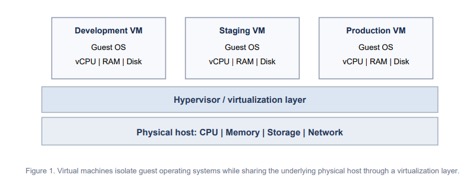
A VM is an isolated software-defined computer with its own operating system and assigned compute, memory, storage, and networking resources. A hypervisor manages access to the underlying hardware and allows multiple VMs to run on the same physical system.
That isolation is one reason VMs remain useful for development and production. Teams can run different operating systems, separate applications, reproduce environments, and limit the effect one workload has on another.
DevOpsSchool’s overview of virtual machines and containers provides additional context on how VMs use virtual hardware and how their isolation model differs from containers.
Choose vCPU Based on the Type of Work
vCPU requirements depend on how much processing the workload performs and how parallel the work can be. Web servers, application runtimes, compilers, data processing jobs, encryption, compression, and database operations can all consume CPU differently.
A small development environment may perform well with a modest vCPU allocation. Build pipelines, busy application servers, and compute-heavy services may need more cores or stronger per-core performance.
Do not assume that doubling vCPU automatically doubles application performance. Software architecture, thread limits, database bottlenecks, disk I/O, and shared-host behavior can prevent linear gains. Measure CPU utilization and application response time before and after resizing.
Give Memory Enough Headroom
Insufficient RAM can make an otherwise capable VM feel slow. The operating system, application processes, database services, caches, monitoring agents, and background tasks all compete for memory.
When physical memory becomes tight, the operating system may reclaim caches or rely more heavily on swap. Heavy swapping can sharply increase response times because storage is much slower than RAM.
For production workloads, leave enough headroom for traffic spikes and background activity. A VM that sits near its memory limit during normal operation has little room for unexpected demand.
Match Storage to the Application
Storage decisions involve both capacity and performance. A VM may need space for the operating system, application files, databases, logs, package caches, temporary files, backups, and future growth.
SSD-backed storage is common for general-purpose workloads. NVMe-based storage can offer lower latency and higher throughput, which may matter for databases, indexing, build systems, and applications that perform frequent disk operations.
For data-heavy workloads, look beyond the advertised number of gigabytes. IOPS, throughput, latency, persistence, snapshot support, and backup options can matter more than raw capacity.
Do Not Ignore Network Limits
VM plans can differ in port speed, transfer allowance, traffic policies, and network quality. These differences matter for APIs, media delivery, backups, package mirrors, remote development, and services that exchange large amounts of data.
Consider where users and dependent services are located. Network latency between the VM, database, object storage, third-party APIs, and end users can affect application response times even when CPU and RAM are adequate.
For distributed systems, placing tightly coupled components in suitable regions or availability zones can reduce unnecessary network delay and transfer costs.
Operating System and Administration Matter
Linux is widely used for development and production servers because of its tooling, automation support, and broad software ecosystem. Windows VMs remain important for workloads that depend on Windows Server, .NET components, Microsoft-specific services, or other Windows-only software.
The operating system also affects administration. Teams should account for patching, user access, SSH or RDP configuration, firewall rules, package management, monitoring, and hardening.
For a deeper technical reference on Linux virtualization, Red Hat’s virtualization documentation covers KVM-based virtual machines, management, storage, networking, and related administration tasks.
Plan for Development and Production Differently
Development environments
Development VMs are often temporary or lightly used. Cost efficiency and flexibility usually matter more than maximum uptime. Teams may stop instances when they are not needed, use smaller resource allocations, or rebuild environments from automation.
Production environments
Production workloads need a different standard. Resource sizing should include normal demand, peak demand, failure scenarios, monitoring, backup requirements, and recovery procedures.
A production VM should also have a clear upgrade or migration path. If the workload grows, the team should know whether it can resize the instance, add more VMs behind a load balancer, separate the database, or move specific services to other infrastructure.
Balance VM Cost Against Usable Resources
The lowest monthly price is not always the lowest operating cost. A VM that frequently runs out of memory, has slow storage, or includes too little data transfer can create performance problems and force an early upgrade.
At the same time, development teams do not need to overprovision every environment. When comparing cost-effective virtual machine hosting options, compare the resources that affect the workload directly: vCPU, RAM, storage type and capacity, bandwidth, location, operating system support, backups, and the ability to resize.
This makes price a useful part of the decision without treating it as the only criterion. A smaller VM that closely matches the workload can be more efficient than a larger instance with unused resources.
Use Monitoring to Correct the Initial Estimate
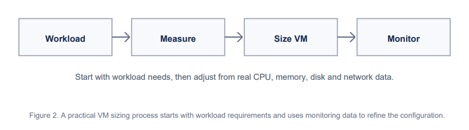
VM sizing is rarely perfect on the first attempt. Monitoring turns the initial estimate into an evidence-based configuration.
Track CPU utilization, memory usage, disk space, disk latency, network throughput, error rates, and application response times. The exact metrics depend on the service, but infrastructure data should always be connected to application behavior.
For example, high CPU usage is not automatically a problem if response times remain stable and the workload is completing successfully. Conversely, moderate CPU usage does not prove the VM is healthy if requests are waiting on slow storage or an overloaded database.
Think About Scaling Before You Need It
Vertical scaling adds resources to an existing VM. Horizontal scaling adds more instances. Both approaches can be useful, but the application architecture determines which is practical.
A simple application may initially scale by moving to a larger VM. As demand grows, multiple application instances behind a load balancer can provide more capacity and reduce dependence on one server.
Teams using infrastructure as code can also make VM creation more repeatable. Templates can define instance size, networking, security rules, disks, and software configuration so that development, staging, and production environments are easier to reproduce.
A Practical VM Selection Checklist
- Workload: What will the VM run, and how variable is the demand?
- vCPU: Is the application CPU-bound, bursty, or highly parallel?
- RAM: Is there enough memory for the OS, application, database, caches, and spikes?
- Storage: Are capacity, latency, throughput, persistence, and backup options appropriate?
- Network: Are bandwidth, transfer allowance, latency, and location suitable?
- Operating system: Does the VM support the required Linux or Windows environment?
- Administration: Who handles updates, security, monitoring, and recovery?
- Scalability: Can the VM be resized or the workload distributed across more instances?
- Cost: Are you paying for resources the workload will actually use?
Conclusion
Choosing a virtual machine for development or production is a resource-matching exercise. The goal is not to find the VM with the largest specification or the lowest advertised price. It is to select an environment that gives the workload enough compute, memory, storage, and network capacity while remaining manageable and cost-efficient.
Development environments can usually prioritize flexibility and lower cost. Production workloads need more attention to headroom, monitoring, backups, security, and scaling.
Start with a reasonable estimate, measure the workload after deployment, and adjust from real usage data. That approach produces a VM configuration that is easier to operate, easier to scale, and less likely to waste infrastructure budget.

I’m Rajesh Kumar, a DevOps, SRE, DevSecOps, Cloud, and Platform Engineering expert passionate about sharing practical knowledge, real-world experiences, and industry best practices. I have worked at Cotocus and regularly write about technology, travel, investing, health, product reviews, and digital marketing through my various platforms.
I publish technical articles at DevOps School, travel stories at Holiday Landmark, stock market insights at Stocks Mantra, health and fitness guidance at My Medic Plus, product reviews at TrueReviewNow, and SEO and digital marketing strategies at Wizbrand.
Find Trusted Cardiac Hospitals
Compare heart hospitals by city and services — all in one place.
Explore Hospitals