
What the Heck is the Metaverse and How Can You Access It?
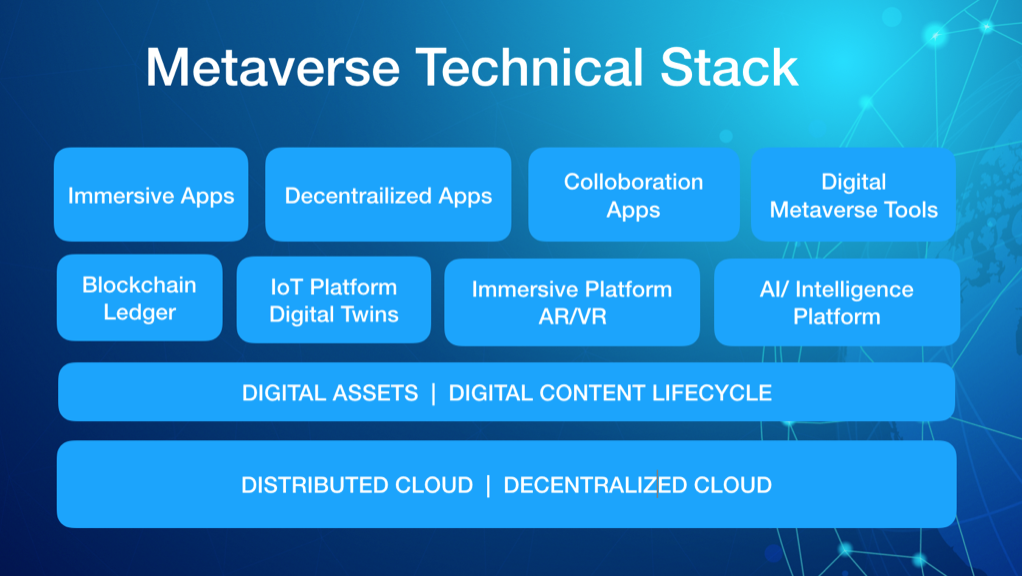
Are you ready to enter a new reality? A world beyond our own where anything is possible and the only limit is your imagination? Welcome to the Metaverse! A digital universe where users can fully immerse themselves in a virtual world and interact with others in real-time.
But before you can dive into this new world, you need to know what technical requirements you need to meet to access it. In this article, we’ll explore everything you need to know about the Metaverse and how to access it.
The Basics of the Metaverse
First things first, what is the Metaverse? It’s a term used to describe a collective virtual shared space, created by the convergence of virtual reality, augmented reality, and other technologies. The Metaverse is essentially a massive multiplayer online game where users can create their own avatars, interact with other users, and explore an infinite number of virtual worlds.
The concept of the Metaverse was first popularized in Neal Stephenson’s 1992 novel, Snow Crash. Since then, the idea has gained traction, and many tech companies are now investing in creating their own versions of the Metaverse.
Technical Requirements for Accessing the Metaverse
Now that you have a basic understanding of what the Metaverse is, let’s dive into the technical requirements you need to meet to access it.
Hardware Requirements
The first thing you need to access the Metaverse is a capable computer or mobile device. Your device needs to be powerful enough to handle the graphics and processing requirements of the virtual world. Ideally, you’ll want a device with a high-resolution display, a powerful graphics card, and a fast processor.
If you’re planning on using a virtual reality headset to access the Metaverse, then you’ll need a headset that’s compatible with the platform you’re using. Oculus Rift and HTC Vive are popular choices for accessing the Metaverse.
Software Requirements
To access the Metaverse, you’ll need to download the necessary software. This can vary depending on the platform you’re using, but most platforms will require you to download a client program or app.
Some platforms, like Second Life and Minecraft, allow you to access the Metaverse through your web browser, but for a more immersive experience, you’ll want to download the necessary software.
Internet Connection
A stable internet connection is crucial for accessing the Metaverse. You’ll need a fast and reliable connection to ensure smooth gameplay and interaction with other users. A wired connection is preferred over wifi, as it provides a more stable connection.
Compatible Platform
Finally, you’ll need to choose a Metaverse platform to access. There are several platforms available, each with its own unique features and requirements. Some popular platforms include Second Life, VRChat, and Decentraland.
Conclusion
The Metaverse is a fascinating new world, and accessing it requires a few technical requirements. You’ll need a capable device, the necessary software, a stable internet connection, and a compatible platform. Once you have all these in place, you’ll be ready to enter a new reality and explore the infinite possibilities of the Metaverse. So what are you waiting for? Take the plunge and experience the future of gaming and social interaction!

👤 About the Author
Ashwani is passionate about DevOps, DevSecOps, SRE, MLOps, and AiOps, with a strong drive to simplify and scale modern IT operations. Through continuous learning and sharing, Ashwani helps organizations and engineers adopt best practices for automation, security, reliability, and AI-driven operations.
🌐 Connect & Follow:
Website: WizBrand.com
Facebook: facebook.com/DevOpsSchool
X (Twitter): x.com/DevOpsSchools
LinkedIn: linkedin.com/company/devopsschool
YouTube: youtube.com/@TheDevOpsSchool
Instagram: instagram.com/devopsschool
Quora: devopsschool.quora.com
Email– contact@devopsschool.com
Find Trusted Cardiac Hospitals
Compare heart hospitals by city and services — all in one place.
Explore Hospitals