MYHOSPITALNOW.COM

Find Trusted Doctors & Hospitals

Discover healthcare providers, compare hospitals, and explore treatment options worldwide.

Free Treatment Quotes • Doctor Search • Hospital Comparison

Find Healthcare Options

www.myhospitalnow.com

Keyboard Shortcuts for Adobe Premiere Pro ( Video Editing Software ) ( Part 3 )

Adobe Premiere Pro is a timeline based video editing software. Premiere Pro supports video-editing with up to 1920 resolution by 1080 in both RGB and YUV, with up to 32-bit color. With the knowledge of keyboard shortcuts given in Part 1 and Part 2, you can slowly edit with the help of Adobe Premiere keyboard keyboard shortcuts. In this session, you will get information in the shortcuts of the keyboard related to audio and video.

  • Keyboard Keys
  • Audio Mixer Panel Menu Shortcut Keys
  • Capture Panel Shortcut Keys
  • Effect Controls Panel Menu Keys
  • Premiere Pro History Panel Keys

Keyboard Keys
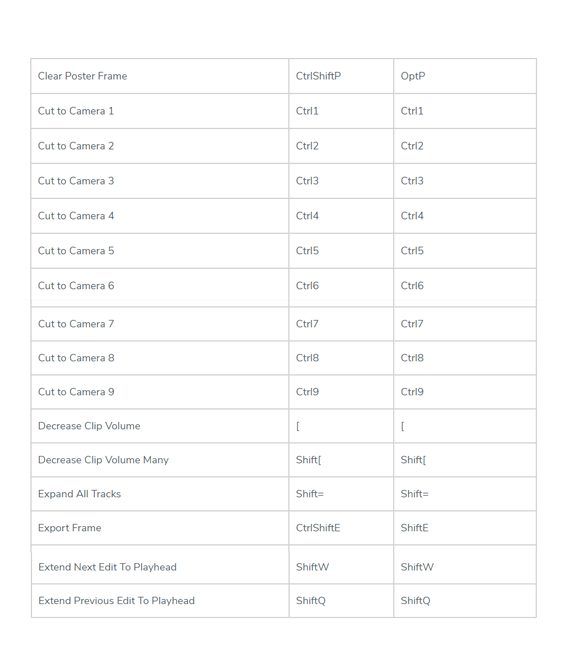
Premiere Pro keyboard shortcuts table including Cut to Camera 1 to 9, Export Frame and clip volume keys

Audio Mixer Panel Menu Shortcut Keys
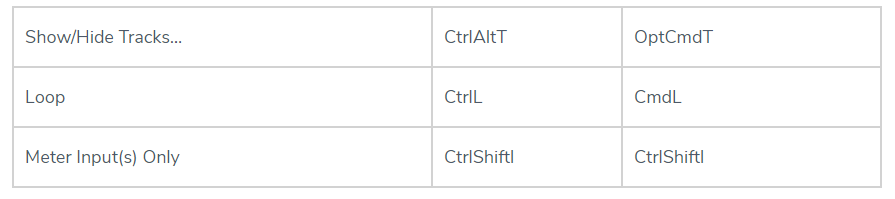
Premiere Pro Audio Mixer shortcuts: Show/Hide Tracks Ctrl+Alt+T, Loop Ctrl+L, Meter Inputs Only Ctrl+Shift+I

Capture Panel Shortcut Keys

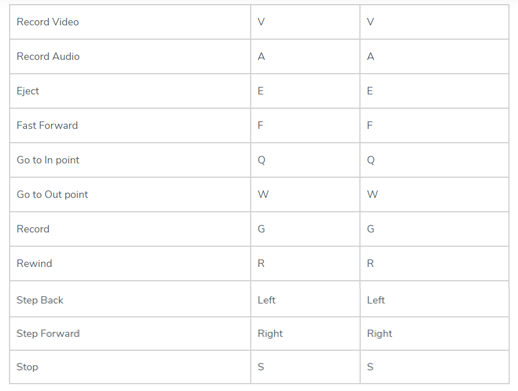
Premiere Pro Capture panel shortcuts table, e.g. V record video, A record audio, G record, S stop

Effect Controls Panel Menu Keys

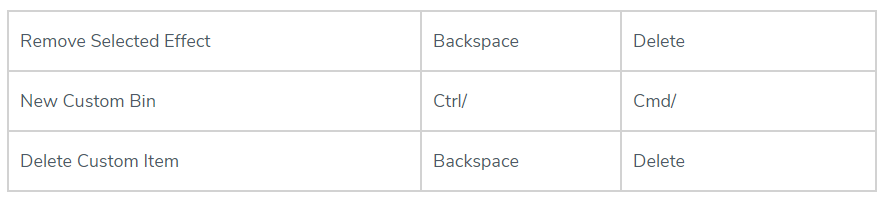
Effect Controls shortcuts: Backspace removes effect or custom item, Ctrl+/ creates a new custom bin

Premiere Pro History Panel Keys

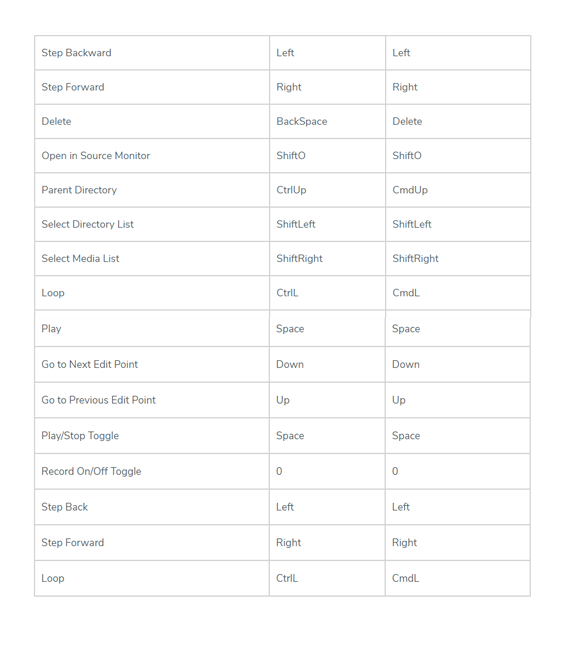
Premiere Pro History panel shortcuts table, including Space to play, Ctrl+L loop and Shift+O open in Source Monitor

From where to Download Adobe Premiere?

Link:-  https://getintopc.com/softwares/video-editing/adobe-premiere-pro-cc-2020-free-download/https://getintopc.com/softwares/video-editing/adobe-premiere-pro-cc-2020-free-download/

How to Create Custom Keyboard Shortcuts in Adobe Premiere Pro

Find Trusted Cardiac Hospitals

Compare heart hospitals by city and services — all in one place.

Explore Hospitals
I'm Rajesh Kumar, a DevOps, SRE, DevSecOps, Cloud, and Platform Engineering expert passionate about sharing practical knowledge, real-world experiences, and industry best practices. I have worked at Cotocus and regularly write about technology, travel, investing, health, product reviews, and digital marketing through my various platforms. I publish technical articles at DevOps School, travel stories at Holiday Landmark, stock market insights at Stocks Mantra, health and fitness guidance at My Medic Plus, product reviews at TrueReviewNow, and SEO and digital marketing strategies at Wizbrand.

Related Posts

Top 10 Video Editing Software: Features, Pros, Cons & Comparison

Introduction Video Editing Software refers to digital tools that allow users to cut, arrange, enhance, and finalize video content for different purposes such as marketing, education, entertainment,…

Read More

Top 10 Video Editing Software Tools in 2026: Features, Pros, Cons & Comparison

Introduction Video content has become an essential medium for communication, marketing, entertainment, and education. In 2026, the demand for high-quality, engaging videos is higher than ever, making…

Read More

What is the title in adobe premiere?

The title of special features for the editor has been given in Adobe Premiere. Titles are used to write any text in any footage. Premiere Pro has…

Read More

What is Safe Zone in Source Monitor?

Safe Zone primarily works with source monitors. In this way, you can use the video or image as per your convenience. Safe zones or safe margins are…

Read More

What is the use of Adobe Premiere source monitor?

The main purpose of the source monitor in Adobe Premiere allows you to view your clips at full resolution and to set in and out points. Its…

Read More

What are the sequence settings in adobe premiere?

Create a custom sequence preset in Adobe Premiere Choose File > New > Sequence>Sequence project elect the preset that matches the requirements of your video clip in…

Read More