
What MySQL integration collects and sends?
NewRelic MySQL integration collects and sends inventory and metrics from your MySQL database to our platform, where you can see the health of your database server and analyze metric data so that you can easily find the source of any problems.
Compatibility and requirements
- MySQL version 5.6 or higher.
- Install the infrastructure agent
- Install infrastructure on-host integrations
Our MySQL integration uses the New Relic Infrastructure agent to collect and send performance metrics from your MySQL database to our platform. You can see your database server’s health and analyze metric data so that you can easily find the source of any problems
Install and Configure Mysql Server in Centos
- CENTOS – How to Install MySQL on CentOS 7
- UBUNTU with Xampp – Alternate – You may use XAMPP as well. How to install and Configure XAMPP on Ubuntu?
- MySql with XAMPP – How to Install & configure Xampp with mysql in Linux?
- Ubuntu – How To Install MySQL server and client on Ubuntu?
What is “infrastructure on-host integrations”?
New Relic’s on-host integrations are a type of infrastructure integration that collect data from core services running on your hosts, such as MySQL, Apache, or Redis, among others.
To collect data from on-host services, all you need are two things: the infrastructure agent, and the on-host integrations. All on-host integrations require that our infrastructure agent is installed on the host. Besides collecting system’s data, the agent acts as a forwarder for integrations’s data, and can forward logs.
Centos / RHEL – Install infrastructure on-host integrations for mysql in linux?
$ sudo yum -q makecache -y --disablerepo='*' --enablerepo='newrelic-infra'
$ sudo yum install nri-mysql
$ sudo systemctl restart newrelic-infra

# From the command line, create a user newrelic@localhost with a specific password by running:
$ sudo mysql -e "CREATE USER 'newrelic'@'localhost' IDENTIFIED BY $YOUR_PASSWORD WITH MAX_USER_CONNECTIONS 5;"

# Grant replication privileges to newrelic@localhost, with a maximum of 5 connections, by running:
$ sudo mysql -e "GRANT REPLICATION CLIENT ON *.* TO 'newrelic'@'localhost' WITH MAX_USER_CONNECTIONS 5;"

# Grant privileges to newrelic@localhost, with a maximum of 5 connections, by running:
$ sudo mysql -e "GRANT SELECT ON *.* TO 'newrelic'@'localhost' WITH MAX_USER_CONNECTIONS 5;"

# Change the directory to the integration's folder.

$ cd /etc/newrelic-infra/integrations.d
$ sudo cp mysql-config.yml.sample mysql-config.yml

# Edit the configuration file mysql-config.yml as explained in the next section.

$ vi mysql-config.yml

$ Restart the infrastructure agent.
Code language: PHP (php)
Ubuntu – Install infrastructure on-host integrations for mysql in linux?
$ sudo apt-get install nri-mysql -y
$ sudo systemctl restart newrelic-infra

# From the command line, create a user newrelic@localhost with a specific password by running:
$ sudo mysql -e "CREATE USER 'newrelic'@'localhost' IDENTIFIED BY $YOUR_PASSWORD WITH MAX_USER_CONNECTIONS 5;"

# Grant replication privileges to newrelic@localhost, with a maximum of 5 connections, by running:
$ sudo mysql -e "GRANT REPLICATION CLIENT ON *.* TO 'newrelic'@'localhost' WITH MAX_USER_CONNECTIONS 5;"

# Grant privileges to newrelic@localhost, with a maximum of 5 connections, by running:
$ sudo mysql -e "GRANT SELECT ON *.* TO 'newrelic'@'localhost' WITH MAX_USER_CONNECTIONS 5;"

# Change the directory to the integration's folder.

$ cd /etc/newrelic-infra/integrations.d
$ sudo cp mysql-config.yml.sample mysql-config.yml

# Edit the configuration file mysql-config.yml as explained in the next section.

$ vi mysql-config.yml

$ Restart the infrastructure agent.Code language: PHP (php)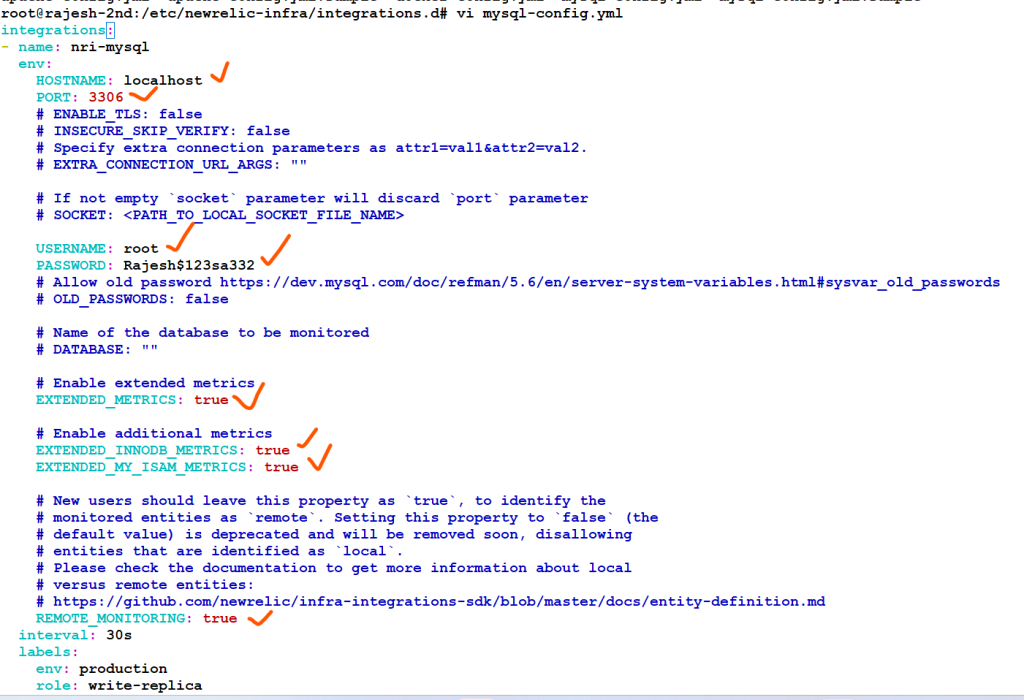
Reference
- https://docs.newrelic.com/docs/integrations/host-integrations/installation/install-infrastructure-host-integrations/
- https://docs.newrelic.com/docs/integrations/host-integrations/host-integrations-list/mysql-monitoring-integration/

I’m Rajesh Kumar, a DevOps, SRE, DevSecOps, Cloud, and Platform Engineering expert passionate about sharing practical knowledge, real-world experiences, and industry best practices. I have worked at Cotocus and regularly write about technology, travel, investing, health, product reviews, and digital marketing through my various platforms.
I publish technical articles at DevOps School, travel stories at Holiday Landmark, stock market insights at Stocks Mantra, health and fitness guidance at My Medic Plus, product reviews at TrueReviewNow, and SEO and digital marketing strategies at Wizbrand.
Find Trusted Cardiac Hospitals
Compare heart hospitals by city and services — all in one place.
Explore Hospitals