
What is Puppet?
Puppet is an open source software configuration management and deployment tool.
It helps us in basically keeping configurations consistent with what we require and what is there on production on our test and a developer environments. Now the awesome thing about puppet is that you can basically be installed on various platforms like Microsoft windows and Linux platforms. It is very versatile in terms of its working on difference platforms and also. it basically does not use any programing language it has own declarative format. It is a model-driven solution that requires limited programming knowledge to use. When you use Puppet, you define the desired state of the systems in your infrastructure that you want to manage.
Companies adopt puppet is because a lot other companies have also adopted puppet and basically there is tried and tested tool which every companies it companies it configuration management needs.
History
Puppet is produced by Puppet, Inc, founded by Luke Kanies in 2005
The first public beta of the language was called Puppet 0.9.x. This was followed by the earlier versions of the language from 0.10.x to 0.21.x. In the versions ranging from 0.22.x to 0.25.x various enhancements and an increased support for wider range of operating systems were introduced. Windows support was introduced with the version 2.7.x. Version 3.0.x. till 3.2.x.
Why do we use Puppet?
Most reason that companies adopt puppet is because a lot other companies have also adopted puppet and basically there is tried and tested tool which every companies it companies it configuration management needs.
There are following reasons to explain why we ues.
- Puppet provides more support for the platform.
- Debian / Ubuntu
- Microsoft Windows
- Redhat, Centos, Fedora
- MACOS X server
- Puppet has better documentation
- Unlike other configuration management tools
Written in Which language?
Puppet itself is written in Ruby, while Facter is written in C++.
Founder company
Luke Kanies
Features of Puppet System
- Idempotency: It supports Idempotency . Like Chef, in Puppet, you can safely perform the same set of settings several times on the same machine. The Puppet Idempotency function is very useful for keeping the machine updated for years, instead of rebuilding the same machine several times when a configuration change occurs. In this flow, Puppet verifies the current state of the destination machine and will only make changes when there is a specific configuration change.
- Cross-platform: In Puppet, with the assistance of Resource Abstraction Layer (RAL) that utilizations Puppet assets, you can coordinate the predetermined framework design without stressing over the subtleties of the execution and how the arrangement order will function inside the framework, which is characterized. in the basic arrangement document.
Advantages of puppet
- It is open source
- It allows resource abstraction
- It does a transaction only if needed
- It boosts manageability and productivity
- It is cross-platform
- It’s language is clean and easily learnable
- It has override mechanism
- It has an active community
Alternatives of Puppet
- Chef.
- Saltstack.
- Rudder.
- Cfengine.
- Nanobox.
- DCImanager.
- Gitlab.
- Ansible.
Architecture of puppet
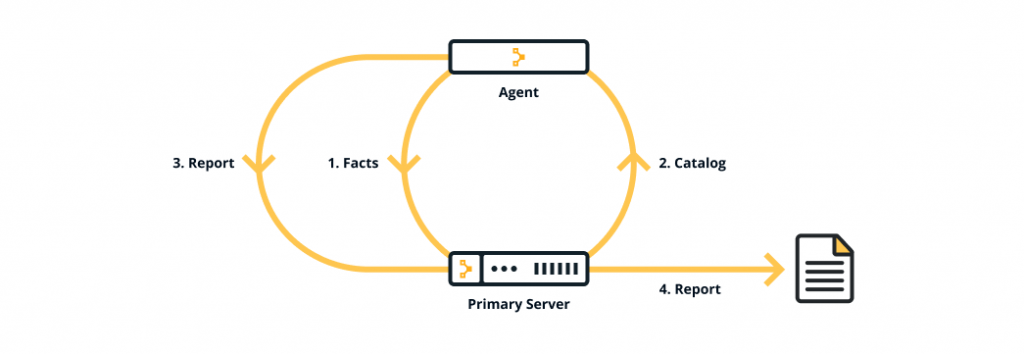
The clients are distributed across the network and communicate with the primary-secondary environment where Puppet modules are present. The client agent sends a certificate with its ID to the server; the server then signs that certificate and sends it back to the client. This authentication allows for secure and verifiable communication between the client and the master.
The factar then collects the state of the clients and sends it to the master. Based on the fact sent, the master compiles the manifests into the catalogs, which are sent to the clients, and an agent executes the manifests on its machine. A report is generated by the client that describes any changes made and is sent to the master.
This process is repeated at regular intervals, ensuring all client systems are up to date. In the next section, let us find out about the various companies adopting Puppet as a part of our learning about what is Puppet.
Interview questions and answers of puppet
https://www.devopsschool.com/blog/puppet-interview-questions-and-answer-part-1/
https://www.devopsschool.com/blog/puppet-interview-questions-and-answer-part-2/
https://www.devopsschool.com/blog/puppet-interview-questions-and-answer-part-3/
Best Resources, Tutorials and Guide for Puppet
Best Courses and Insitute for learning
If you want certification course for such top course. So please visit “Devopsschool.com”. You will find more certification courses here.


I’m Rajesh Kumar, a DevOps, SRE, DevSecOps, Cloud, and Platform Engineering expert passionate about sharing practical knowledge, real-world experiences, and industry best practices. I have worked at Cotocus and regularly write about technology, travel, investing, health, product reviews, and digital marketing through my various platforms.
I publish technical articles at DevOps School, travel stories at Holiday Landmark, stock market insights at Stocks Mantra, health and fitness guidance at My Medic Plus, product reviews at TrueReviewNow, and SEO and digital marketing strategies at Wizbrand.
Find Trusted Cardiac Hospitals
Compare heart hospitals by city and services — all in one place.
Explore Hospitals