
Find the Best Cosmetic Hospitals

Explore trusted cosmetic hospitals and make a confident choice for your transformation.

“Invest in yourself — your confidence is always worth it.”

Explore Cosmetic Hospitals

Start your journey today — compare options in one place.

How to Use Postman API Client.

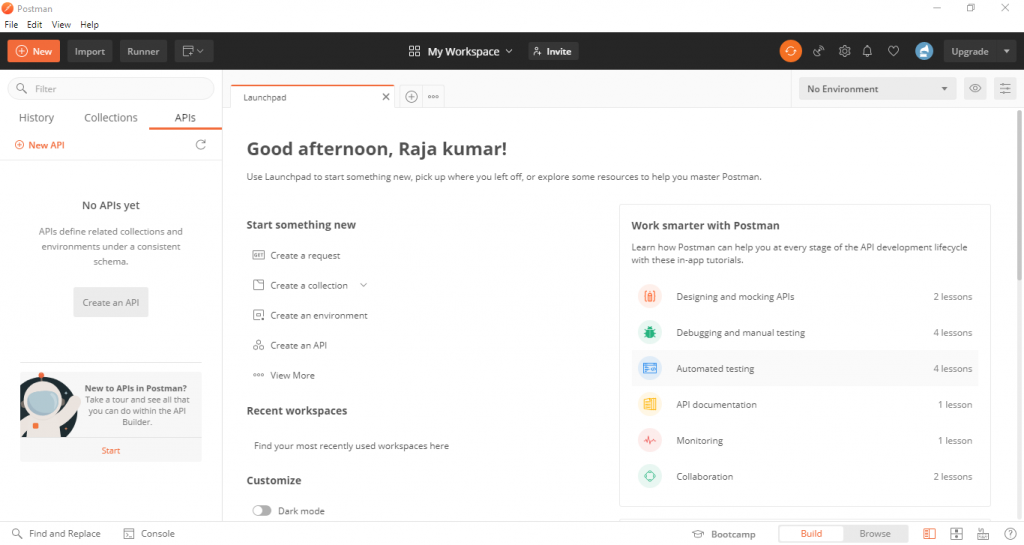
This is the interface with which we will work a lot throughout this course, and which allows you to send requests to RESTful APIs, It looks a bit like a browser with different tabs here, and this bar to enter a URL. Notice that you have a drop-down on the left of the top bar, which allows you to specify
different types of HTTP requests you want to send, and this will become important throughout this article where we will not only send Get request but also PostPutPatch, and much more.

Lets take an Example to understand better.

I’m taking example of google map API where i’ll make a GET Request to get data from Google Map. Lets Open our Postman and follow the below steps :-

Fill the API link to get data. Basic URL is given below :-
http://www.your_url.com/api/api_url

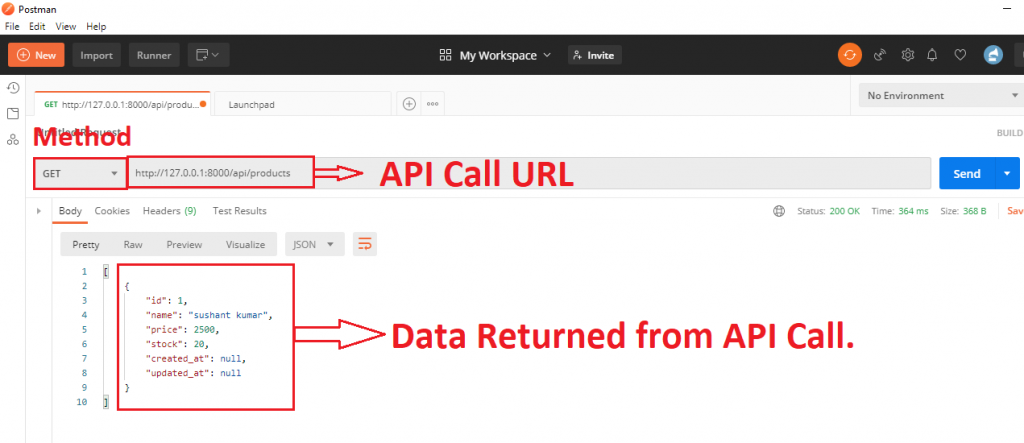
1. GET Method

Set the method as GET and fill the URL and click on Send.
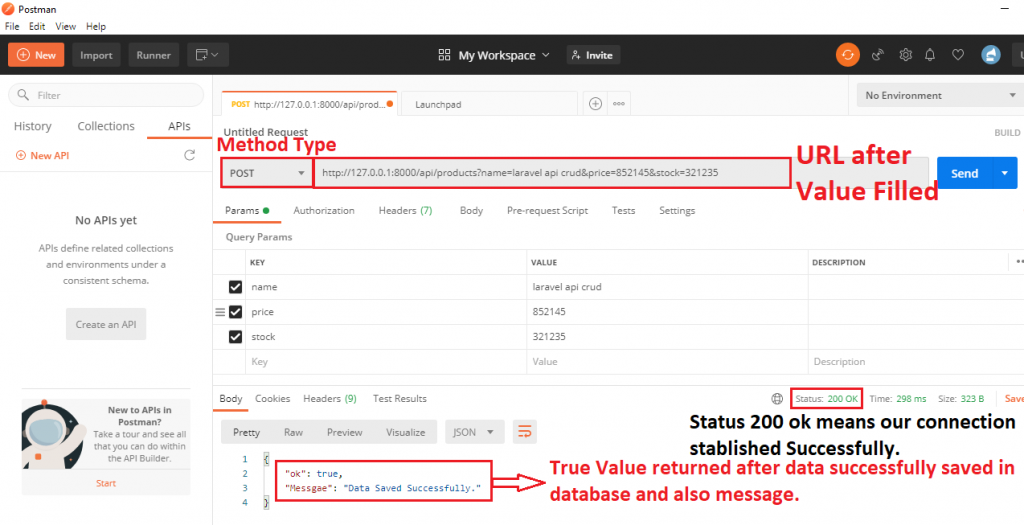
2. POST Method

Set the method as POST, fill the URL, in Params fill the Key and Key_Value as your table in database, i have Name, Price , and Stock to fill in database so I’ve filled all and click on Send. See the Below ScreenShot to Understand better.
Find Trusted Cardiac Hospitals

Compare heart hospitals by city and services — all in one place.

Explore Hospitals
With MotoShare.in, you can book a bike instantly, enjoy doorstep delivery, and ride without worries. Perfect for travelers, professionals, and adventure enthusiasts looking for a seamless mobility solution.

Related Posts

What to choose: front-end or backend development?

Regarding web development, two main areas play a crucial role in creating a functional and visually appealing website: frontend and backend development. Frontend development focuses on the…

Read More

Top 10 Construction Management Software Tools in 2026: Features, Pros, Cons & Comparison

Introduction Construction Management Software (CMS) has become indispensable in 2026 for efficiently handling various aspects of construction projects, ranging from budgeting, scheduling, resource allocation, project tracking, to…

Read More

Top 10 Personal Finance Software Tools in 2026: Features, Pros, Cons & Comparison

Introduction In the fast-paced world of 2026, managing personal finances efficiently is more crucial than ever. With rising inflation, economic uncertainties, and the complexity of multiple financial…

Read More

Top 10 AI Pricing Optimization Tools in 2026: Features, Pros, Cons & Comparison

Introduction In 2026, AI pricing optimization tools have become indispensable for businesses navigating the complexities of dynamic markets. These tools leverage artificial intelligence, machine learning, and real-time…

Read More

Top 10 On-premise Backup Tools in 2026: Features, Pros, Cons & Comparison

Introduction In 2026, on-premise backup tools are still essential for businesses that need complete control over their data security and disaster recovery plans. Unlike cloud-based solutions, on-premise…

Read More

Top 10 Server Backup Tools in 2026: Features, Pros, Cons & Comparison

Introduction Server backup tools are essential for businesses in 2026 to ensure the safety, security, and reliability of their data. With the growing threats of cyberattacks, hardware…

Read More