

Perforce Server Disk Cleanup and Repository Size Management: A Safe, Practical Playbook
Running out of storage on a Perforce (Helix Core) server can quickly become an availability risk. This guide shows a safer cleanup workflow: measure space first, compare options, then execute changes with minimal operational risk.

Using Gerrit to Strengthen Git Code Review and Automated Code Analysis
Gerrit extends Git with patch-set based code review and CI gating so teams can catch quality issues before merge. This guide shows the workflow, key commands, and practical integration patterns.
Jenkins Command-Line Authentication and Job Triggers with cURL and Wget
Learn practical ways to authenticate scripted requests to Jenkins and trigger jobs from the command line using cURL and wget. This revision also covers CSRF crumb handling, version caveats, and troubleshooting.
How to Assign Computer Startup Scripts with Group Policy (Local and Domain GPO)
Learn the exact steps to assign computer startup scripts through Group Policy, including where to configure them, how script order works, and how to validate deployment. This guide expands the original quick tip into a practical, production-ready reference.

IBM Build Forge Troubleshooting Guide: Version Checks, Log Collection, and Triage Workflow
This guide turns a legacy Build Forge troubleshooting checklist into a practical triage process. Use it to gather the right evidence, map common symptoms to first checks, and escalate faster.
MySQL Basic Troubleshooting Guide: Service, Port 3306, Logs, and Crash Repair
This Linux-first runbook helps you troubleshoot common MySQL issues quickly, from startup failures to port conflicts and slow performance. You will learn practical checks for service health, configuration, logging, and table repair.

BuildForge bfexport: How to Export Projects and Snapshots to XML
This guide explains how to use BuildForge’s bfexport command to list projects and export project data to XML. It includes option references, workflow, and practical command examples.
Build Server Performance Optimization: Practical Checklist for Faster CI Pipelines
Build server performance issues usually come from unnecessary rebuilds, poor retention policies, and host-level contention. This updated guide turns the original checklist into a practical workflow with commands, architecture guidance, and CI guardrails you can apply immediately.
SCM Versioning Done Right: Four-Part File Versions, Build Numbers, and Safer Installers
Versioning in Software Configuration Management is how teams trace binaries to source, reproduce builds, and ship safer upgrades. This guide turns the original notes into a practical, modern workflow with version structure, CI stamping, and installer safeguards.

How to Choose the Right Version Control System for Your Organization
Choosing a version control product is a process decision, not just a tooling decision. Use this practical framework to evaluate requirements, compare models, run pilots, and select confidently.
How to Use `p4 duplicate` for a Perforce Branch Path Rename (Deep Rename)
When you need to move a Perforce branch path while preserving revision and integration history, `p4 duplicate` is the key command. This guide shows the workflow, exact commands, and cleanup considerations.

Executing External Commands in Perl: system, exec, backticks, and open Explained
Perl provides multiple ways to run external commands, and each one behaves differently. This guide shows when to use system, exec, backticks, or open, with safe patterns for output capture and exit-code handling.
Perforce Changelist Numbers Explained: Default, Numbered, and Submit-Time Renumbering
Perforce changelist numbers are simple once you understand when numbers are assigned and why pending changelists can be renumbered at submit time. This guide clarifies the default changelist, numbered changelists, and practical p4 command usage.
Perforce Network Troubleshooting: A Practical Workflow for Port, DNS, and Firewall Issues
This guide turns a classic Perforce troubleshooting checklist into a structured workflow you can run quickly during incidents. You will validate server listening state, P4PORT configuration, client connectivity, DNS, firewall rules, and network path health.
Gitflow Branching Model: Practical Guide to Feature, Release, and Hotfix Branches
Learn how the classic Gitflow model organizes development with long-lived and short-lived branches. This guide covers branch rules, workflow, and production-ready Git command examples.
Perforce Depot Migration Between Servers Without Losing History or Changelists
A practical migration workflow for moving Perforce depot data between servers while preserving history and changelist continuity. Includes a decision table, migration flow diagram, and command examples for backup, cleanup, and validation.
Perl File Test Operators Explained for DevOps Automation
Perl’s built-in file test operators let you check existence, type, size, permissions, and ownership without external commands. This guide explains the operators, real vs effective ID checks, and production-friendly patterns for automation scripts.
How to Make Team-Building Exercises Actually Work: A Practical Facilitation Guide
Team-building activities only create value when they are tied to real team goals and followed by concrete actions. This guide gives managers and team leads a repeatable workflow, activity comparison, and facilitation checklist.
Install Apache on Windows 7 (Legacy): MSI Setup, UAC Prompts, and PHP Integration
A practical, legacy-focused guide to installing Apache HTTP Server on Windows 7 for local development. It covers package selection, UAC behavior, verification steps, and basic PHP wiring.
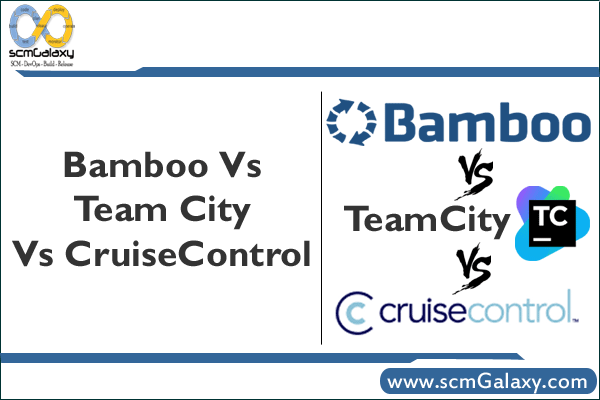
Bamboo vs TeamCity vs CruiseControl: Historical CI Comparison and Practical Evaluation Guide
This revised guide turns a brief 2010 comparison into a structured, engineering-focused reference. It preserves the original claims, adds a CI workflow diagram, and provides a practical checklist for modern tool evaluation.

Apache Ant: Set the Current User Home Directory with env.HOME (and Safe Fallbacks)
Learn how to read the logged-in user’s home directory in Ant using env.HOME, then make it portable with a user.home fallback. Includes build.xml patterns you can use in local builds and CI.

Ant-Contrib for Apache Ant: Introduction and Installation Guide for Legacy Builds
Ant-Contrib extends Apache Ant with additional procedural and utility tasks. This updated guide explains prerequisites, installation options, and verification steps for maintainable Ant-based builds.
devenv.exe Command-Line Switches: Build, Run, Deploy, and Troubleshooting Reference
A practical reference to commonly used devenv.exe switches, including build, clean, deploy, run, and recovery flags. It also shows switch dependencies and realistic command patterns for automation.
Run Remote Desktop from the Command Line with mstsc.exe (Including Legacy Console Mode)
Learn how to launch Remote Desktop sessions from Command Prompt or batch files using mstsc.exe. This updated guide covers syntax, common command patterns, and legacy console-session behavior.

File Comparison Tools for DevOps: Revised Review of Beyond Compare, WinMerge, Diffutils, and More
File comparison is core to safe change management in DevOps, from reviewing config drift to resolving merge conflicts. This revised review summarizes the original tool list with a practical workflow, side-by-side comparisons, and command examples.
CVS Installation and Configuration on Linux (Legacy Server and Client Setup)
A practical, modernized runbook for legacy CVS environments: install CVS on Linux, configure a pserver with xinetd, and connect clients correctly. Includes command examples, workflow, and security-aware guidance.
Perforce Triggers Guide: Types, Execution Order, and Practical Patterns
Perforce triggers let you enforce workflow rules and launch automation directly from the server. This revised guide explains trigger types, execution order, trade-offs, and practical configuration patterns.
CVS Command-Line Guide for Developers: Logs, Diffs, Tags, Branches, and Merges
A practical, modernized CVS reference for teams maintaining legacy repositories. Learn the core commands for history, diffs, tagging, branching, and repeatable merge workflows.
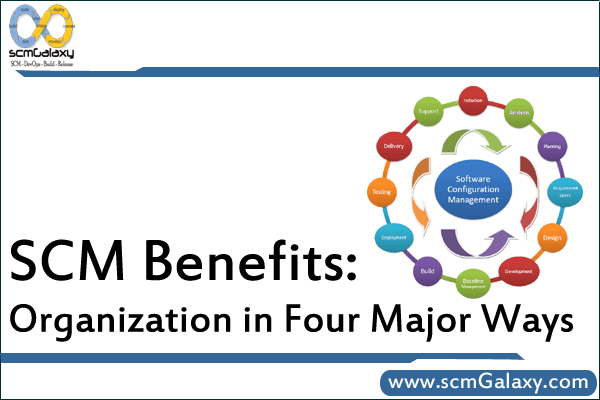
SCM Process Benefits in Practice: Control, Management, Cost Savings, and Quality
Software configuration management (SCM) creates disciplined control over change, versions, and releases. This updated guide explains the four core organizational benefits and how to operationalize them with practical workflows.
5 Pillars of Automated Configuration Management for Application Infrastructure
Application infrastructure breaks when configuration changes are manual, disconnected, and hard to audit. This revised guide explains five practical pillars for automating discovery, change control, release, reporting, and integration.