
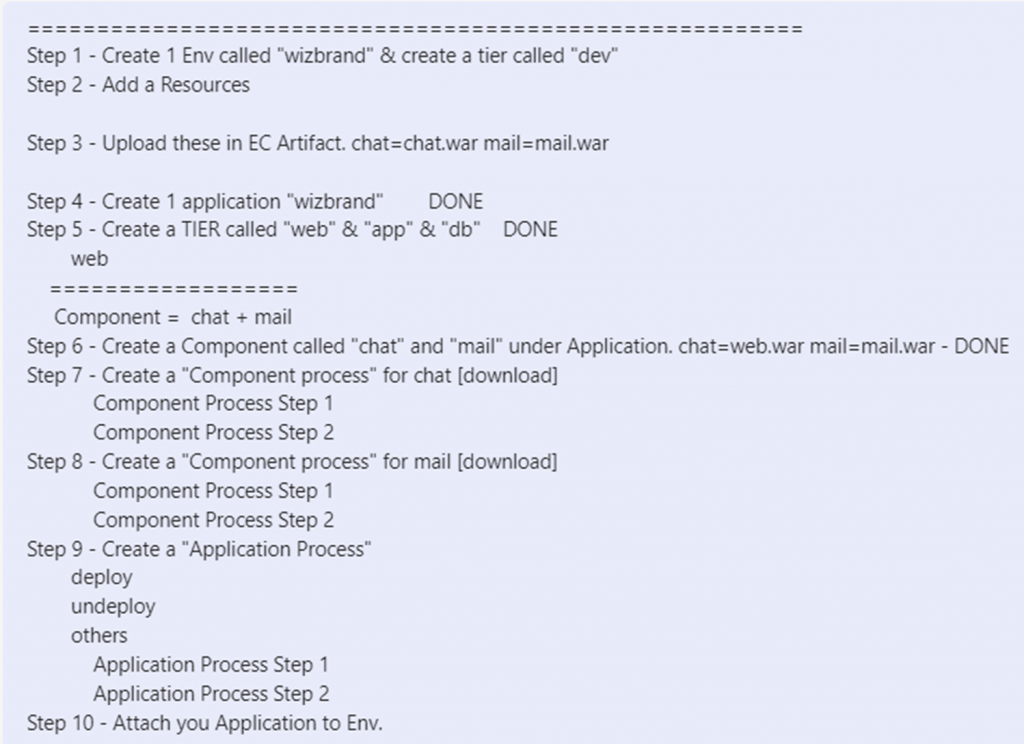
Here’s a basic outline of the steps you might follow:
- Access CloudBees CD RO:
- Log in to the CloudBees CD RO web interface using your credentials.
- Create a New Application:
- Create a new application or project in CloudBees CD RO. This application will represent your “Hello World” project.
- Create a New Pipeline:
- Within your application, create a new pipeline. The pipeline will define the stages and tasks required to deploy your “Hello World” application.
- Define Stages and Tasks:
- Within the pipeline, define stages that represent the different steps in your deployment process. For a “Hello World” project, you might have stages like “Build” and “Deploy.”
- Configure Tasks:
- Within each stage, configure tasks that represent the actions to be performed. For example, in the “Build” stage, you might have a task to build your application code.
- Add Artifacts:
- Define the artifacts (files or packages) that your “Hello World” project consists of. These could be source code files, configuration files, or any other resources needed for deployment.
- Define Dependencies:
- If there are dependencies between tasks or stages, configure them appropriately. For example, you might want the “Deploy” stage to wait until the “Build” stage has successfully completed.
- Configure Triggers:
- Define triggers that initiate your pipeline. Triggers can be manual (user-initiated) or automated (based on events or schedules).
- Test and Validate:
- Validate your pipeline configuration to ensure that it’s set up correctly. This might involve checking task settings, dependencies, and other parameters.
- Run the Pipeline:
- Once your pipeline is configured and validated, initiate a run of the pipeline to deploy your “Hello World” application.
- Monitor and Review:
- Monitor the progress of your pipeline run using the CloudBees CD RO interface. Review logs, status updates, and any potential issues.
- Celebrate Your Success:
- If all goes well, you’ve successfully created and deployed a “Hello World” project using CloudBees CD RO!

I’m Rajesh Kumar, a DevOps, SRE, DevSecOps, Cloud, and Platform Engineering expert passionate about sharing practical knowledge, real-world experiences, and industry best practices. I have worked at Cotocus and regularly write about technology, travel, investing, health, product reviews, and digital marketing through my various platforms.
I publish technical articles at DevOps School, travel stories at Holiday Landmark, stock market insights at Stocks Mantra, health and fitness guidance at My Medic Plus, product reviews at TrueReviewNow, and SEO and digital marketing strategies at Wizbrand.
Find Trusted Cardiac Hospitals
Compare heart hospitals by city and services — all in one place.
Explore Hospitals




