
Jenkins agents are the machines, containers or processes that run build work for the Jenkins controller. The controller schedules jobs, stores configuration and serves the web UI. Agents provide the executors where pipeline steps actually run. Older posts and plugins call agents slaves or nodes, and call the controller the master.
The posts on this topic explain how the controller and agents fit together in the Jenkins architecture. A hands-on lab walks through adding Linux and Windows nodes over SSH, and another guide shows how to copy files from the controller to an agent with stash and unstash. For troubleshooting, there is a general triage guide, fixes for PermGen OutOfMemoryError on controllers and agents, and a Groovy script that monitors offline agents and restarts them. An admin cheatsheet for large installations and several sets of interview questions on executors, labels and agents complete the topic.
These posts help Jenkins administrators spread builds across several machines, engineers debugging nodes that disconnect or fail, and candidates preparing for CI/CD interviews.
Start here
- How Jenkins works? Jenkins Architecture Explained!!! – Shows where agents fit in the Jenkins architecture before you configure any nodes.
- Jenkins Labs and Exercise – 2 – Hands-on lab: add Linux and Windows nodes over SSH and run jobs on them.
- Copy a files from jenkins server to jenkins node/slave using pipeline plugins – Practical ways to move files from the controller to an agent inside a pipeline.
- Monitor and Restart Offline Slaves – A Groovy script that finds offline agents, restarts them and sends email alerts.
- Jenkins Troubleshooting Guide: Fast Triage, Log Analysis, and Common Failure Fixes – A triage workflow and log order for diagnosing hangs, crashes and failing builds.
- Fix Jenkins java.lang.OutOfMemoryError: PermGen Space (Controller, Agents, and Build Tools) – JVM flag fixes for PermGen errors on the controller, agents and build tools.
- Jenkins Interview Questions and Answer – Part 2 – Interview questions on the master, agents, executors and labels to test your understanding.
Latest Jenkins Agents articles

Jenkins at Scale: Practical References and Admin Cheatsheet
This revised guide upgrades a short 2015 Jenkins link post into an operations-ready reference for teams running Jenkins at scale. It preserves the original links and adds a workflow diagram, comparison table, and practical API/CLI examples.
Fix Jenkins java.lang.OutOfMemoryError: PermGen Space (Controller, Agents, and Build Tools)
Jenkins PermGen errors are usually caused by JVM memory limits set in the wrong place. This guide shows where to configure memory flags for controllers, agents, and build tools, plus how to handle Java 8+ where PermGen was replaced.
Jenkins Troubleshooting Guide: Fast Triage, Log Analysis, and Common Failure Fixes
A practical Jenkins troubleshooting guide for DevOps teams: find the right logs first, separate controller vs. agent vs. job failures, and resolve common outage patterns quickly.
Top Jenkins interview questions and answers
1. What is Jenkins? Jenkins is an open-source automation server that helps automate various aspects of software development, such as building, testing, and deploying code. It allows…
Jenkins Labs and Exercise – 2
Exercise 2 Add a Linux Node (Also Check SSH Slaves plugin plugins) Add a Windows Node Assign a Java Based Job to Linux and Build it Assign a MSBuild…
Jenkins interview questions on requirements, components, plugins
What is a basic requirement for using Jenkins? To use Jenkins you require: A source code repository that is accessible, for instance, a Git repository. A working build…
Jenkins Interview Questions and Answer – Part 2
beginner Explain what is Jenkins and what is it used for Explain each of the following in the context of nodes: Master Slave Executor Agent Label Explain…
Copy a files from jenkins server to jenkins node/slave using pipeline plugins
Workarond 1 – Try to use stash/unstash, but it is bad for large files. [code]node(‘master’) {dir(‘/path/on/master/1’) {stash ‘master-stuff’}}node(‘slave’) {dir(‘/path/on/slave/1’) {unstash ‘master-stuff’}dir(‘/path/on/slave/2’) {stash ‘slave-stuff’}}node(‘master’) {dir(‘/path/on/master/2’) {unstash ‘slave-stuff’}} [/code]…
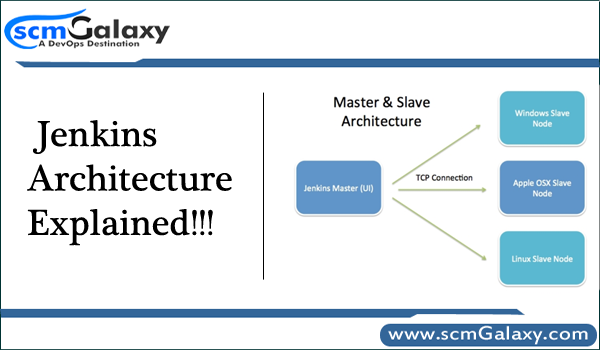
How Jenkins works? Jenkins Architecture Explained!!!
Jenkins is continuous integration tools which help to integrate other tools to automate the software development activity and repetitive tasks. Jenkins has 2 releases. One, Community version…
Monitor and Restart Offline Slaves
rajeshkumar created the topic: Monitor and Restart Offline Slaves If you facing a problem of jenkins node disconnect automatically, you can try this script- This script can…
Jenkins Agents: frequently asked questions
What is the difference between a Jenkins controller and an agent?
The controller manages configuration, plugins, scheduling and the web UI. Agents run the builds the controller gives them. Running builds on agents instead of the controller is the recommended practice for both security and performance.
How do Jenkins agents connect to the controller?
With an SSH agent, the controller starts the agent process over SSH. With an inbound agent, the agent process connects to the controller over TCP or WebSocket. Cloud plugins such as the Kubernetes, Docker or EC2 plugins can also create agents on demand.
What are executors and labels in Jenkins?
An executor is a slot on a node that runs one build at a time, so a node with two executors can run two builds at once. Labels are tags assigned to nodes so that jobs can target matching agents, for example agent { label 'linux' } in a declarative pipeline.
Why does a Jenkins agent keep going offline?
Common causes are network interruptions, Java version mismatches between the controller and the agent, low disk or temp space thresholds, and the agent process being killed or running out of memory. Start with the agent's log on its node page under Manage Jenkins, then check the system log on the agent machine.