
Introduction
AI customer support chatbots are intelligent software platforms that help businesses answer customer questions, resolve support tickets, guide users, and automate repetitive service workflows through conversational AI. Unlike old rule-based chatbots, modern AI support bots can understand natural language, retrieve answers from company knowledge bases, summarize issues, recommend next steps, and hand over complex cases to human agents with context.
Why it matters: customer expectations are increasing across every digital channel. Buyers want instant answers, personalized support, multilingual service, and smooth escalation without repeating their problem again and again. Support teams also face rising ticket volume, higher labor costs, and pressure to improve response time while maintaining quality. AI customer support chatbots help teams reduce repetitive work, improve availability, support global customers, and make human agents more productive.
Real-world use cases include ecommerce order tracking, refund and return support, SaaS onboarding, product troubleshooting, banking and insurance service requests, healthcare appointment support, IT helpdesk automation, multilingual customer support, and internal employee service desks.
Evaluation criteria for buyers should include answer accuracy, hallucination control, knowledge base integration, workflow automation, human handoff, multilingual support, data privacy, security controls, reporting, admin governance, model flexibility, cost visibility, latency, integrations, and ease of deployment.
Best for: SaaS companies, ecommerce brands, fintech teams, healthcare support teams, IT service desks, BPOs, marketplaces, and enterprises with high support volume, repetitive queries, or global customer operations. Not ideal for: very small teams with limited support volume, businesses where every customer interaction must be fully human-led, or organizations that cannot allow cloud-based AI processing and do not have the resources to run secure self-managed AI systems.
What’s Changed in AI Customer Support Chatbots
- AI customer support chatbots are shifting from simple FAQ answering to agentic workflows that can take actions, update systems, and complete multi-step tasks.
- Retrieval-based answers are becoming essential because buyers want bots grounded in approved knowledge rather than generic AI responses.
- Human review and escalation design now matter more because companies need safe automation rather than uncontrolled self-service.
- Multimodal support is becoming more important for screenshots, images, invoices, documents, and product issue diagnosis.
- Privacy controls are now a major buying requirement, especially for support teams handling personal, financial, healthcare, or account data.
- Evaluation and testing are becoming standard because support leaders need to measure accuracy before allowing AI to respond to customers.
- Guardrails are now critical for preventing unsafe answers, policy violations, prompt injection, and unauthorized workflow execution.
- AI observability is becoming a core feature, including conversation analytics, fallback tracking, cost monitoring, latency tracking, and containment rates.
- Cost control is becoming more important as high-volume support automation can create large AI usage bills if not monitored carefully.
- Support teams increasingly want AI copilots for agents along with customer-facing chatbots.
- Integration depth matters more because bots need access to CRM, ticketing, order management, billing, knowledge base, and help desk tools.
- Enterprises are asking for flexible model choices, stronger admin controls, and safer deployment options.
Quick Buyer Checklist
Use this checklist to shortlist AI customer support chatbot platforms quickly:
- Confirm whether the tool supports your main channels such as website chat, mobile app, email, WhatsApp, social messaging, or voice.
- Check if the chatbot can connect to your knowledge base, help center, product documentation, and CRM.
- Review how the platform reduces hallucinations and handles low-confidence answers.
- Verify whether human handoff keeps conversation history and customer context.
- Check if admins can define policies, roles, permissions, and escalation rules.
- Confirm whether the tool supports multilingual support for your target regions.
- Review data privacy, retention controls, encryption, and audit logging.
- Check if the platform supports hosted models, BYO models, or multi-model routing.
- Evaluate whether AI testing, regression testing, and conversation review are available.
- Confirm whether you can monitor latency, response quality, cost, and token usage.
- Check whether the vendor supports APIs, webhooks, SDKs, and custom workflow automation.
- Review vendor lock-in risk and data export options before committing.
- Test support quality using your real tickets, not only demo scenarios.
- Confirm pricing model clarity, especially usage-based AI costs.
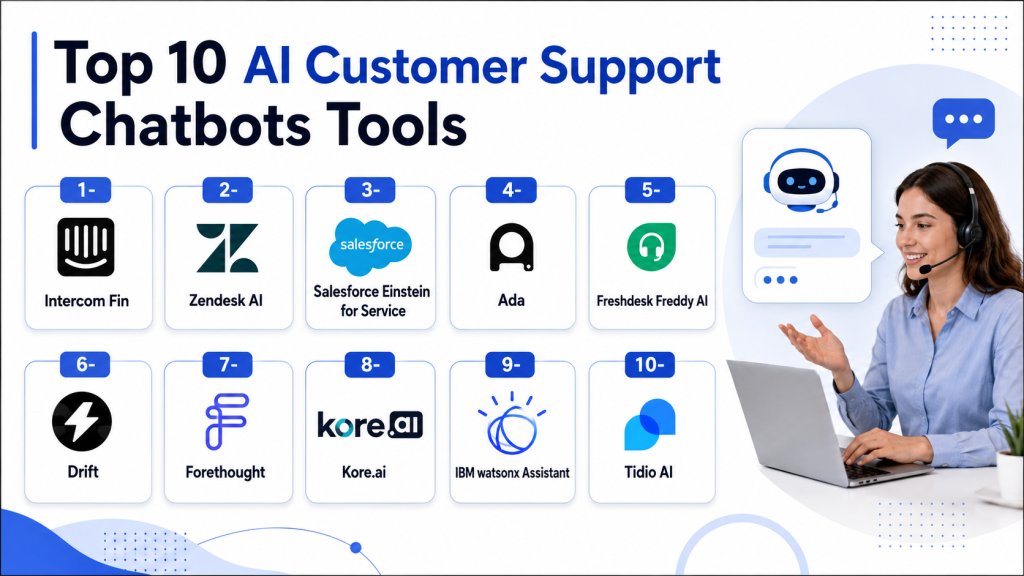
Top 10 AI Customer Support Chatbots Tools
1- Intercom Fin
One-line verdict: Best for SaaS and digital businesses that want polished AI-first customer support automation.
Short description:
Intercom Fin is an AI customer support chatbot built into the Intercom customer service platform. It helps support teams answer questions, resolve repetitive issues, assist agents, and automate customer conversations using company knowledge and conversational workflows.
Standout Capabilities
- AI-powered support automation for customer-facing chat
- Strong integration with Intercom inbox and help center
- Human handoff with conversation context
- AI-generated summaries and agent assistance
- Modern interface suitable for SaaS teams
- Workflow automation for routing and escalation
- Knowledge-based answer generation
- Analytics for support performance tracking
AI-Specific Depth
- Model support: Hosted AI model approach
- RAG / knowledge integration: Native help center and knowledge base integration
- Evaluation: Conversation analytics and support performance review
- Guardrails: Escalation rules, admin controls, and answer grounding
- Observability: Conversation reporting, resolution tracking, and support analytics
Pros
- Easy for SaaS teams to adopt and manage
- Strong user experience for customers and agents
- Good balance of automation and human handoff
Cons
- Costs can increase as usage and team size grow
- Best value is usually for teams already using Intercom
- Deep custom AI workflows may require extra setup
Security & Compliance
Intercom provides enterprise security features such as access controls, encryption, admin permissions, and SSO options on applicable plans. Specific certifications, retention controls, and regional options vary by plan and contract. If a compliance detail is not confirmed during procurement, treat it as Not publicly stated.
Deployment & Platforms
- Web-based platform
- Cloud deployment
- Mobile apps available for support workflows
- Self-hosted deployment: Varies / N/A
Integrations & Ecosystem
Intercom has a strong ecosystem for SaaS support, customer messaging, and product-led growth workflows. It works well when customer conversations, help center content, automation, and support inbox workflows need to live together.
- CRM integrations
- Help center integration
- Slack integration
- Billing and customer data tools
- Analytics integrations
- APIs and webhooks
- Support workflow integrations
Pricing Model
Intercom generally follows SaaS subscription pricing with AI usage and advanced support features depending on plan. Exact pricing varies by package and usage.
Best-Fit Scenarios
- SaaS companies with high chat support volume
- Product-led growth teams needing fast self-service answers
- Support teams wanting a polished customer experience
2- Zendesk AI
One-line verdict: Best for enterprise support teams needing AI inside a mature omnichannel service platform.
Short description:
Zendesk AI brings generative AI, automation, routing, agent assistance, and analytics into the Zendesk customer service ecosystem. It is a strong fit for organizations already using Zendesk or those needing structured enterprise support operations.
Standout Capabilities
- AI-powered ticket classification and routing
- Generative response suggestions for support agents
- Omnichannel customer service workflows
- Help center and knowledge base integration
- Strong marketplace and integration ecosystem
- Enterprise reporting and analytics
- Automation for ticket triage and escalation
- Agent productivity features
AI-Specific Depth
- Model support: Hosted AI with vendor-managed capabilities
- RAG / knowledge integration: Native help center and support content integration
- Evaluation: Ticket analytics, QA workflows, and performance reporting
- Guardrails: Admin workflows, escalation controls, and permissions
- Observability: Dashboards for support performance, automation, and ticket operations
Pros
- Mature platform for large support teams
- Strong omnichannel and ticketing capabilities
- Large ecosystem of integrations and extensions
Cons
- Can feel complex for small teams
- Advanced features may require careful configuration
- Premium AI and enterprise capabilities can increase cost
Security & Compliance
Zendesk offers enterprise security controls such as SSO, role permissions, encryption, audit capabilities, and admin governance features depending on plan. Certifications and retention options should be confirmed directly during vendor review.
Deployment & Platforms
- Web-based platform
- Cloud deployment
- Mobile apps for support teams
- Self-hosted deployment: N/A
Integrations & Ecosystem
Zendesk has a broad customer service ecosystem, making it suitable for companies that need to connect support operations with CRM, product, engineering, and communication tools.
- CRM integrations
- Slack and collaboration tools
- Jira and engineering workflows
- Ecommerce platforms
- Help center integrations
- APIs and webhooks
- Marketplace applications
Pricing Model
Zendesk typically uses seat-based SaaS pricing with additional AI and enterprise features depending on plan.
Best-Fit Scenarios
- Large customer support teams
- Enterprises with complex ticket routing
- Companies already using Zendesk
3- Salesforce Einstein for Service
One-line verdict: Best for enterprises that want AI-powered support connected deeply with Salesforce CRM data.
Short description:
Salesforce Einstein for Service adds AI-powered automation, case summarization, agent assistance, and intelligent recommendations to Salesforce Service Cloud. It is strongest for enterprises where customer support, sales, account history, and service workflows are already connected through Salesforce.
Standout Capabilities
- Deep Salesforce CRM and Service Cloud integration
- AI-generated case summaries and response assistance
- Workflow automation across customer records
- Predictive service insights
- Agent productivity recommendations
- Strong enterprise customization
- Large partner ecosystem
- Cross-functional customer data access
AI-Specific Depth
- Model support: Hosted AI and enterprise AI ecosystem options
- RAG / knowledge integration: Salesforce knowledge and customer data integration
- Evaluation: Analytics, case performance review, and admin monitoring
- Guardrails: Governance tools, permissions, and workflow controls
- Observability: CRM analytics, service metrics, and operational reporting
Pros
- Excellent for Salesforce-centered organizations
- Strong enterprise workflow customization
- Deep customer data context for support teams
Cons
- Implementation can be complex
- Usually requires Salesforce admin expertise
- May be costly for smaller businesses
Security & Compliance
Salesforce offers enterprise-grade security controls including SSO, RBAC, encryption, audit logging, and admin governance. Exact compliance posture, data residency, and retention options vary by product edition, region, and contract.
Deployment & Platforms
- Web-based platform
- Cloud deployment
- Mobile access through Salesforce apps
- Hybrid integrations supported through enterprise architecture
Integrations & Ecosystem
Salesforce has one of the largest enterprise ecosystems for CRM, service, analytics, workflow automation, and partner applications.
- Salesforce Service Cloud
- Salesforce Data Cloud
- Slack
- MuleSoft
- App marketplace ecosystem
- APIs and workflow tools
- Enterprise system integrations
Pricing Model
Salesforce uses enterprise subscription pricing with AI and data consumption elements depending on package and usage.
Best-Fit Scenarios
- Large enterprises using Salesforce
- CRM-driven customer support teams
- Complex account-based service operations
4- Ada
One-line verdict: Best for no-code customer service automation across web, messaging, and multilingual support channels.
Short description:
Ada is an AI customer service automation platform designed to help businesses build and manage conversational support flows without heavy coding. It is often used by support and CX teams that want scalable self-service automation across customer channels.
Standout Capabilities
- No-code AI chatbot builder
- Strong multilingual customer support capabilities
- Omnichannel automation workflows
- Human handoff and escalation routing
- Personalization using customer context
- Support automation analytics
- Knowledge base integration
- Business-user-friendly workflow management
AI-Specific Depth
- Model support: Hosted AI model approach
- RAG / knowledge integration: Knowledge base and support content integrations
- Evaluation: Conversation analytics and support performance monitoring
- Guardrails: Admin-defined flows, escalation paths, and response controls
- Observability: Analytics dashboards for automation and customer conversations
Pros
- Easy for non-technical teams to manage
- Good fit for multilingual support operations
- Strong automation without requiring heavy engineering
Cons
- Advanced customization may need vendor support
- Less flexible than developer-first platforms
- Best suited for customer service rather than broad AI engineering
Security & Compliance
Ada provides enterprise support features such as access controls, security configuration, and admin governance. Specific certifications, retention options, and residency details should be verified during procurement.
Deployment & Platforms
- Web-based platform
- Cloud deployment
- Customer-facing web and messaging channels
- Self-hosted deployment: Varies / N/A
Integrations & Ecosystem
Ada integrates with common support and customer experience tools, making it useful for support teams that want automation layered over existing systems.
- CRM integrations
- Help desk integrations
- Ecommerce integrations
- Messaging channels
- APIs
- Knowledge base connections
- Analytics tools
Pricing Model
Ada generally follows enterprise SaaS pricing based on usage, channels, automation volume, and support needs.
Best-Fit Scenarios
- Multilingual customer support
- No-code support automation
- Ecommerce and digital service teams
5- Freshdesk Freddy AI
One-line verdict: Best for SMB and mid-market teams needing affordable AI support inside a help desk platform.
Short description:
Freshdesk Freddy AI brings AI-powered ticketing, response suggestions, automation, and customer self-service into the Freshdesk ecosystem. It is a practical option for teams that want AI support without the complexity of large enterprise platforms.
Standout Capabilities
- AI-assisted ticket responses
- Ticket summarization and categorization
- Workflow automation for support operations
- Knowledge base integration
- Omnichannel customer service tools
- SMB-friendly setup
- Agent productivity features
- Reporting and ticket analytics
AI-Specific Depth
- Model support: Hosted AI model approach
- RAG / knowledge integration: Native knowledge base and support content integration
- Evaluation: Ticket analytics and support reporting
- Guardrails: Workflow controls, escalation rules, and admin permissions
- Observability: Dashboards for ticket volume, automation, and response performance
Pros
- Easier to adopt for SMB teams
- Strong value for help desk automation
- Good balance of ticketing and AI assistance
Cons
- Less advanced than enterprise AI platforms
- Highly complex workflows may need customization
- AI depth can vary by plan
Security & Compliance
Freshdesk offers security and admin controls such as encryption, user roles, and access management depending on plan. Specific certifications, residency, and retention controls should be confirmed directly.
Deployment & Platforms
- Web-based platform
- Cloud deployment
- Mobile apps available
- Self-hosted deployment: N/A
Integrations & Ecosystem
Freshdesk connects with many business tools used by SMB and mid-market support teams.
- CRM integrations
- Slack and team collaboration tools
- Ecommerce integrations
- Jira and project tools
- APIs
- Knowledge base tools
- Marketplace extensions
Pricing Model
Freshdesk generally uses tiered SaaS pricing with AI features depending on edition and add-ons.
Best-Fit Scenarios
- SMB support teams
- Mid-market help desk operations
- Teams wanting practical AI without heavy complexity
6- Drift
One-line verdict: Best for revenue-focused teams combining conversational support, lead qualification, and customer engagement.
Short description:
Drift focuses on conversational engagement across websites, sales journeys, and customer interactions. While it is often associated with revenue teams, it can also support routing, customer questions, and AI-assisted conversations for support and sales-aligned workflows.
Standout Capabilities
- Website conversational engagement
- Lead qualification and routing
- Meeting scheduling automation
- CRM-connected customer conversations
- Real-time visitor targeting
- Sales and support handoff workflows
- Conversation analytics
- AI-assisted engagement flows
AI-Specific Depth
- Model support: Hosted AI model approach
- RAG / knowledge integration: CRM and content integrations where configured
- Evaluation: Conversation analytics and engagement reporting
- Guardrails: Workflow-based routing and admin controls
- Observability: Funnel analytics, conversation metrics, and engagement reporting
Pros
- Strong for website engagement
- Useful for sales and support alignment
- Good CRM workflow fit
Cons
- Not as support-ticket focused as Zendesk or Freshdesk
- Less suitable for deep technical support automation
- Enterprise support governance may be limited compared with larger platforms
Security & Compliance
Security controls vary by plan and enterprise configuration. Buyers should verify SSO, RBAC, retention, audit logging, and compliance requirements during evaluation.
Deployment & Platforms
- Web-based platform
- Cloud deployment
- Website and messaging channel focused
- Self-hosted deployment: N/A
Integrations & Ecosystem
Drift integrates well with marketing, sales, and CRM systems, making it useful for revenue teams that also need conversational support.
- Salesforce
- HubSpot
- Marketing automation tools
- Calendar tools
- APIs
- Web chat integrations
- Analytics tools
Pricing Model
Drift generally uses SaaS subscription pricing with plan-based capabilities and enterprise options.
Best-Fit Scenarios
- B2B website engagement
- Sales-support handoff workflows
- Lead qualification with customer assistance
7- Forethought
One-line verdict: Best for AI-first support teams focused on ticket deflection, resolution automation, and agent assistance.
Short description:
Forethought is an AI customer support platform focused on automating support resolution, assisting agents, and improving ticket operations. It is designed for teams that want AI to reduce support volume while improving customer experience.
Standout Capabilities
- AI-powered ticket deflection
- Automated customer issue resolution
- Agent assistance and suggested replies
- Knowledge-based support automation
- Workflow intelligence
- Support platform integrations
- Analytics for automation performance
- Escalation and routing support
AI-Specific Depth
- Model support: Hosted AI and multi-model capabilities may vary
- RAG / knowledge integration: Knowledge base and support platform integrations
- Evaluation: AI performance analytics and support review workflows
- Guardrails: Escalation workflows and response controls
- Observability: Automation analytics, ticket insights, and resolution tracking
Pros
- Strong focus on AI support automation
- Useful for high-volume ticket environments
- Good agent productivity capabilities
Cons
- May require support operations maturity
- Pricing and packaging may suit larger teams better
- Smaller ecosystem than major help desk vendors
Security & Compliance
Forethought supports enterprise security features, but specific certifications, residency, audit, and retention controls should be verified during vendor evaluation.
Deployment & Platforms
- Web-based platform
- Cloud deployment
- Support platform integrations
- Self-hosted deployment: Varies / N/A
Integrations & Ecosystem
Forethought works well as an AI layer connected to existing support platforms and knowledge systems.
- Help desk integrations
- CRM integrations
- Knowledge base integrations
- APIs
- Support workflow tools
- Analytics integrations
Pricing Model
Forethought typically follows enterprise SaaS pricing based on automation scope, usage, and support requirements.
Best-Fit Scenarios
- High-volume support teams
- Ticket deflection programs
- AI-first service automation projects
8- Kore.ai
One-line verdict: Best for enterprises needing highly customizable conversational AI across customer and employee support.
Short description:
Kore.ai is an enterprise conversational AI platform used to build virtual assistants for customer service, employee support, IT help desks, and contact centers. It is suited for organizations that need flexibility, governance, and deeper workflow orchestration.
Standout Capabilities
- Enterprise virtual assistant development
- Voice and chat automation
- Low-code and pro-code customization
- Multi-channel support
- Workflow orchestration
- Enterprise system integrations
- Industry-specific assistant patterns
- Contact center automation
AI-Specific Depth
- Model support: Hosted, BYO, and multi-model flexibility depending on configuration
- RAG / knowledge integration: Enterprise knowledge connectors and data integrations
- Evaluation: Testing, analytics, and assistant performance monitoring
- Guardrails: Enterprise controls, policies, and workflow restrictions
- Observability: Conversation analytics, operational dashboards, and performance reporting
Pros
- Highly flexible enterprise platform
- Strong fit for complex workflows
- Supports customer and internal use cases
Cons
- Implementation can be more complex
- Requires technical and operational planning
- May be too advanced for simple SMB needs
Security & Compliance
Kore.ai offers enterprise security features such as SSO, RBAC, encryption, admin controls, and audit capabilities depending on deployment. Certifications and residency options should be verified directly.
Deployment & Platforms
- Web-based platform
- Cloud deployment
- Hybrid deployment options may be available
- Self-hosted deployment: Varies by enterprise configuration
Integrations & Ecosystem
Kore.ai is designed for enterprise integration across service, contact center, IT, and business systems.
- CRM integrations
- Contact center integrations
- Enterprise application integrations
- APIs and SDKs
- Knowledge systems
- Voice systems
- Workflow automation tools
Pricing Model
Kore.ai usually uses enterprise pricing based on use case, deployment scope, channels, and usage.
Best-Fit Scenarios
- Complex enterprise support automation
- Contact center AI transformation
- Internal and external virtual assistants
9- IBM watsonx Assistant
One-line verdict: Best for regulated enterprises needing governance, deployment flexibility, and structured AI assistant control.
Short description:
IBM watsonx Assistant is an enterprise conversational AI platform focused on building AI assistants for customer service, employee support, and regulated workflows. It is well suited for organizations that need governance, deployment flexibility, and integration with enterprise systems.
Standout Capabilities
- Enterprise conversational AI assistant builder
- Support for chat and voice workflows
- Governance-focused AI assistant design
- Flexible deployment patterns
- Integration with enterprise systems
- Dialog and generative AI capabilities
- Analytics and assistant performance monitoring
- Suitable for regulated environments
AI-Specific Depth
- Model support: Hosted and configurable enterprise AI options
- RAG / knowledge integration: Enterprise content and document integration
- Evaluation: Testing, analytics, and assistant performance review
- Guardrails: Governance features, controlled workflows, and admin policies
- Observability: Operational analytics, assistant metrics, and performance tracking
Pros
- Strong enterprise governance orientation
- Suitable for regulated industries
- Flexible deployment and integration options
Cons
- Can require technical implementation effort
- Less simple for small teams
- User experience may feel enterprise-heavy
Security & Compliance
IBM provides enterprise security features including RBAC, SSO options, encryption, audit controls, and data governance capabilities depending on deployment. Specific certifications and compliance details should be confirmed by buyers.
Deployment & Platforms
- Web-based platform
- Cloud deployment
- Hybrid deployment options
- Self-hosted options may vary by enterprise agreement
Integrations & Ecosystem
IBM watsonx Assistant integrates with enterprise systems, contact centers, data environments, and automation workflows.
- IBM ecosystem tools
- Contact center platforms
- CRM integrations
- APIs
- Enterprise middleware
- Knowledge and document systems
- Analytics platforms
Pricing Model
IBM typically uses enterprise pricing based on deployment model, assistant usage, and service requirements.
Best-Fit Scenarios
- Regulated industries
- Enterprise contact center automation
- Companies needing governance-first AI assistants
10- Tidio AI
One-line verdict: Best for small businesses and ecommerce stores needing simple AI chat support with fast setup.
Short description:
Tidio AI is a lightweight customer communication and chatbot platform used by small businesses, ecommerce stores, and growing support teams. It combines live chat, AI responses, and automation in a simple interface.
Standout Capabilities
- Easy AI chatbot setup
- Live chat and automation in one platform
- Ecommerce support workflows
- FAQ automation
- Visitor engagement tools
- Simple dashboard for SMB teams
- Website chat deployment
- Basic analytics and reporting
AI-Specific Depth
- Model support: Hosted AI model approach
- RAG / knowledge integration: Basic knowledge and content integration
- Evaluation: Basic conversation reporting
- Guardrails: Workflow controls and human handoff
- Observability: Basic analytics and customer conversation metrics
Pros
- Fast to deploy
- Easy for non-technical users
- Good fit for small ecommerce teams
Cons
- Limited enterprise governance
- Not ideal for complex regulated workflows
- Less advanced evaluation and observability
Security & Compliance
Tidio provides basic security and admin features suitable for small teams. Enterprise-grade compliance, detailed audit controls, and advanced residency options should be verified before regulated use.
Deployment & Platforms
- Web-based platform
- Cloud deployment
- Website chat focused
- Self-hosted deployment: N/A
Integrations & Ecosystem
Tidio works well for small business websites and ecommerce environments.
- Ecommerce platform integrations
- Website chat widgets
- CRM connections
- Email tools
- Messaging integrations
- APIs
- Basic analytics tools
Pricing Model
Tidio generally uses tiered SaaS pricing with AI and automation capabilities depending on plan.
Best-Fit Scenarios
- Small ecommerce stores
- Startup websites
- Lightweight FAQ and live chat automation
Comparison Table
| Tool Name | Best For | Deployment | Model Flexibility | Strength | Watch-Out | Public Rating |
|---|---|---|---|---|---|---|
| Intercom Fin | SaaS support teams | Cloud | Hosted | Polished AI support UX | Cost can rise with scale | N/A |
| Zendesk AI | Enterprise service teams | Cloud | Hosted | Mature omnichannel support | Setup can be complex | N/A |
| Salesforce Einstein for Service | Salesforce-led enterprises | Cloud and hybrid integrations | Hosted and configurable | Deep CRM context | Requires Salesforce expertise | N/A |
| Ada | No-code automation teams | Cloud | Hosted | Multilingual automation | Less developer flexibility | N/A |
| Freshdesk Freddy AI | SMB and mid-market support | Cloud | Hosted | Practical help desk AI | Advanced AI varies by plan | N/A |
| Drift | Revenue and support engagement | Cloud | Hosted | Website engagement | Less ticketing depth | N/A |
| Forethought | AI-first support automation | Cloud | Hosted and configurable | Ticket deflection | Enterprise-focused fit | N/A |
| Kore.ai | Complex enterprise assistants | Cloud and hybrid | BYO and multi-model options | Custom workflow depth | Implementation effort | N/A |
| IBM watsonx Assistant | Regulated enterprises | Cloud and hybrid | Hosted and configurable | Governance focus | Enterprise complexity | N/A |
| Tidio AI | Small ecommerce teams | Cloud | Hosted | Fast setup | Limited enterprise controls | N/A |
Scoring & Evaluation
This scoring is comparative, not absolute. It is based on visible product positioning, category maturity, AI depth, support workflow fit, integration ecosystem, usability, governance readiness, and practical buyer value. The scores are meant to help shortlist tools, not replace a pilot. Every buyer should test tools with real tickets, real knowledge base content, real escalation scenarios, and real privacy requirements. Security, pricing, and compliance should always be verified directly with vendors before purchase.
| Tool | Core | Reliability and Eval | Guardrails | Integrations | Ease | Perf and Cost | Security and Admin | Support | Weighted Total |
|---|---|---|---|---|---|---|---|---|---|
| Intercom Fin | 9 | 8 | 8 | 9 | 9 | 7 | 8 | 8 | 8.4 |
| Zendesk AI | 9 | 8 | 8 | 10 | 7 | 7 | 9 | 9 | 8.5 |
| Salesforce Einstein for Service | 10 | 9 | 9 | 10 | 6 | 7 | 10 | 9 | 8.9 |
| Ada | 8 | 7 | 7 | 8 | 9 | 8 | 8 | 8 | 8.0 |
| Freshdesk Freddy AI | 8 | 7 | 7 | 8 | 9 | 9 | 7 | 8 | 8.0 |
| Drift | 7 | 7 | 6 | 8 | 8 | 8 | 7 | 7 | 7.4 |
| Forethought | 9 | 9 | 8 | 8 | 7 | 8 | 8 | 7 | 8.3 |
| Kore.ai | 9 | 8 | 9 | 9 | 6 | 7 | 9 | 8 | 8.3 |
| IBM watsonx Assistant | 9 | 8 | 9 | 8 | 6 | 7 | 10 | 8 | 8.2 |
| Tidio AI | 7 | 6 | 6 | 7 | 9 | 9 | 6 | 7 | 7.3 |
Top 3 for Enterprise
- Salesforce Einstein for Service
- Zendesk AI
- IBM watsonx Assistant
Top 3 for SMB
- Freshdesk Freddy AI
- Intercom Fin
- Tidio AI
Top 3 for Developers
- Kore.ai
- IBM watsonx Assistant
- Forethought
Which AI Customer Support Chatbots Tool Is Right for You
Solo / Freelancer
Solo users and freelancers usually need a simple tool that can answer common questions, capture leads, and provide basic support without heavy setup. Tidio AI is a strong fit for simple websites and ecommerce support. Freshdesk Freddy AI can also work well when ticketing and organized support workflows are needed.
SMB
Small and growing businesses should prioritize fast setup, clean workflows, affordable pricing, and easy knowledge base integration. Freshdesk Freddy AI, Intercom Fin, and Tidio AI are practical choices. Freshdesk is strong for ticketing, Intercom is strong for modern SaaS customer conversations, and Tidio is useful for lightweight ecommerce support.
Mid-Market
Mid-market companies usually need stronger reporting, better workflow automation, more integrations, and consistent escalation rules. Intercom Fin, Zendesk AI, Ada, and Forethought are good options depending on whether the team values SaaS UX, enterprise ticketing, no-code automation, or AI-first deflection.
Enterprise
Enterprises should focus on governance, admin control, auditability, integration depth, knowledge management, and scalable workflow automation. Salesforce Einstein for Service is strong for Salesforce-led companies. Zendesk AI is strong for large customer service operations. Kore.ai and IBM watsonx Assistant are stronger when deployment flexibility and complex AI assistant design are required.
Regulated industries
Finance, healthcare, insurance, government, and public sector organizations should prioritize security, data handling, audit logs, access control, data residency, and clear retention policies. IBM watsonx Assistant, Kore.ai, Salesforce Einstein for Service, and Zendesk AI are better suited for regulated evaluation because they offer stronger enterprise governance patterns. Buyers should still verify every compliance claim directly.
Budget vs premium
Budget-conscious teams should start with Freshdesk Freddy AI or Tidio AI because they offer practical automation without heavy enterprise complexity. Premium buyers should consider Salesforce Einstein for Service, Zendesk AI, Kore.ai, or IBM watsonx Assistant when they need deep governance, complex integrations, global operations, and stronger customization.
Build vs buy
Building your own AI support chatbot may make sense if you have a strong AI engineering team, custom data workflows, strict internal model requirements, or highly specialized support processes. Buying is usually better for most teams because mature platforms already include ticketing, handoff, analytics, integrations, security controls, and admin workflows. A hybrid approach can also work: buy a platform for support operations and build custom AI extensions only where needed.
Implementation Playbook 30 / 60 / 90 Days
First 30 Days
- Define success metrics such as response time, resolution rate, containment rate, CSAT, escalation rate, and cost per conversation.
- Select low-risk support topics for the first pilot.
- Clean and organize your knowledge base before connecting it to the chatbot.
- Create approved answers for high-volume questions.
- Define clear escalation rules for billing, security, legal, medical, or account-sensitive issues.
- Test the chatbot with real historical tickets.
- Build a basic evaluation set with correct answers and failure examples.
- Train agents on when to trust AI suggestions and when to override them.
- Review privacy and retention settings before launch.
- Start with human review for sensitive answers.
Days 31 to 60
- Expand the chatbot to more channels after reviewing pilot performance.
- Add regression testing for prompts, workflows, and knowledge base changes.
- Introduce red-team testing for prompt injection and unsafe requests.
- Improve fallback messages for low-confidence answers.
- Connect CRM, help desk, billing, order, or product systems where needed.
- Set up dashboards for cost, latency, resolution, escalation, and failure patterns.
- Define prompt and workflow version control.
- Create incident handling processes for wrong answers or unsafe behavior.
- Add approval workflows for high-risk content updates.
- Review access permissions and admin roles.
Days 61 to 90
- Optimize token usage, response length, and retrieval quality to reduce cost.
- Expand automation into more complex workflows such as refunds, renewals, password resets, or appointment changes.
- Add multilingual support where required.
- Tune knowledge retrieval using real failure cases.
- Build executive reporting for automation impact and customer satisfaction.
- Standardize governance across teams and regions.
- Create a regular review cycle for prompts, policies, and knowledge content.
- Add vendor risk monitoring and export planning.
- Scale successful use cases across departments.
- Continue human review for high-risk conversations.
Common Mistakes and How to Avoid Them
- Launching the chatbot before cleaning the knowledge base.
- Allowing AI to answer sensitive questions without escalation rules.
- Ignoring prompt injection and jailbreak attempts.
- Trusting AI responses without evaluation testing.
- Not monitoring hallucinations or incorrect answers.
- Failing to track token usage and AI cost.
- Over-automating cases that require empathy or human judgment.
- Not giving agents visibility into AI conversation history.
- Choosing a tool only because the demo looks impressive.
- Ignoring data retention and privacy settings.
- Forgetting multilingual testing for global customers.
- Not versioning prompts, workflows, and knowledge updates.
- Building too many custom workflows before proving value.
- Failing to define ownership between CX, IT, security, and product teams.
FAQs
1. What is an AI customer support chatbot?
An AI customer support chatbot is a software tool that uses conversational AI to answer customer questions, automate support workflows, and assist human agents. It can work through websites, apps, messaging platforms, and help desk systems.
2. How is an AI chatbot different from a traditional chatbot?
Traditional chatbots usually follow fixed scripts and decision trees. AI chatbots understand natural language, retrieve answers from knowledge bases, summarize conversations, and respond more flexibly to customer intent.
3. Can AI customer support chatbots replace human agents?
They can reduce repetitive work, but they should not fully replace human support in most businesses. Complex, emotional, sensitive, or high-risk cases still need human review and escalation.
4. Are AI customer support chatbots safe for private customer data?
They can be safe if configured correctly with privacy controls, access permissions, encryption, retention settings, and vendor governance. Buyers should verify data handling and security terms before deployment.
5. Can these chatbots use our own knowledge base?
Yes, many leading tools connect to help centers, documentation, FAQs, CRM records, ticket history, and internal knowledge sources. The quality of answers depends heavily on how clean and updated that content is.
6. What is RAG in AI customer support?
RAG means retrieval-augmented generation. It helps the chatbot retrieve relevant approved information before generating an answer, which can reduce hallucinations and improve accuracy.
7. Do AI support chatbots support BYO models?
Some enterprise platforms support BYO models or configurable model options. Many simpler tools rely on hosted AI models managed by the vendor.
8. Can AI customer support chatbots be self-hosted?
Some enterprise-focused platforms may support hybrid or self-hosted options, but many customer support chatbot tools are cloud-based. Regulated buyers should confirm deployment options early.
9. How do I evaluate chatbot accuracy?
Use historical tickets, approved answers, difficult edge cases, multilingual examples, and policy-sensitive questions. Measure correctness, escalation quality, hallucination rate, response time, and customer satisfaction.
10. What guardrails should a chatbot have?
Important guardrails include escalation rules, restricted topics, prompt injection defense, answer grounding, approval workflows, role permissions, audit logs, and low-confidence fallback behavior.
11. How much do AI customer support chatbots cost?
Costs vary by vendor, usage, seats, conversation volume, AI messages, automation features, and enterprise controls. Buyers should check both subscription cost and AI usage cost.
12. What are the best alternatives to AI customer support chatbots?
Alternatives include traditional help desk software, live chat tools, searchable knowledge bases, community forums, ticket automation rules, contact center platforms, and custom AI assistants built in-house.
Conclusion
AI customer support chatbots are now a major part of modern customer experience strategy because they help teams deliver faster answers, reduce repetitive tickets, support customers across channels, and improve agent productivity. The best tool depends on your company size, support volume, compliance needs, workflow complexity, knowledge base quality, and integration requirements. SaaS teams may prefer Intercom Fin, large support operations may prefer Zendesk AI, Salesforce-heavy enterprises may choose Salesforce Einstein for Service, regulated organizations may evaluate IBM watsonx Assistant or Kore.ai, and smaller ecommerce teams may start with Tidio AI or Freshdesk Freddy AI. The safest approach is to shortlist a few tools, run a real pilot with your own tickets and knowledge base, verify privacy and evaluation controls, then scale gradually with clear governance, human review, and cost monitoring.

Find Trusted Cardiac Hospitals
Compare heart hospitals by city and services — all in one place.
Explore Hospitals
Very helpful article highlighting how AI chatbots are reducing workload and improving 24/7 customer support efficiency.