
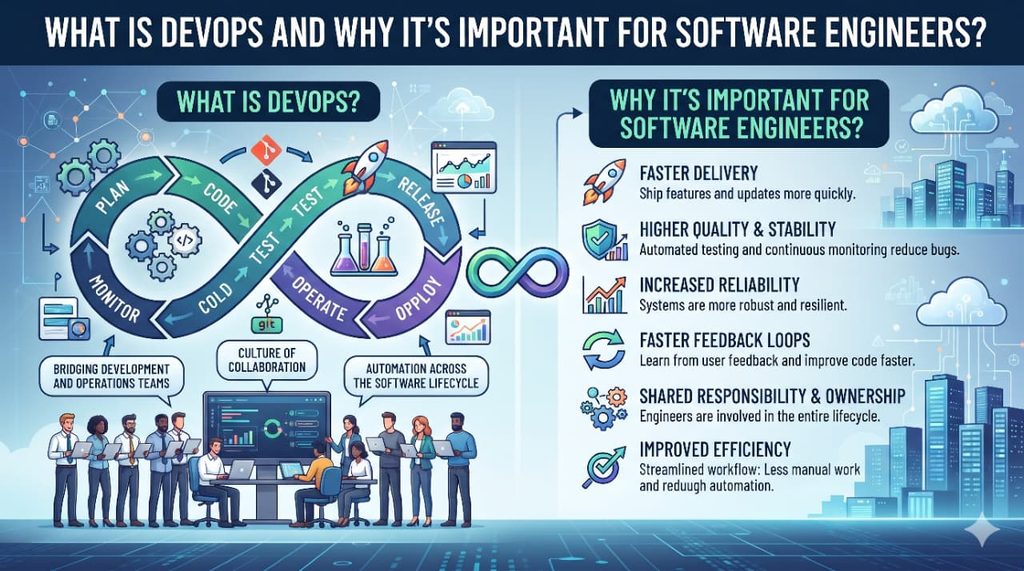
Introduction
Modern software engineering is no longer limited to writing code and building applications. A successful software product must also be tested, deployed, monitored, secured, and continuously improved. As applications become more complex and businesses expect faster releases, software engineering teams need reliable ways to manage the entire software delivery process. This is where DevOps becomes important.
DevOps is an approach that brings software development and IT operations closer through collaboration, automation, continuous integration, continuous delivery, and continuous feedback. It helps engineering teams reduce manual work, improve deployment consistency, and respond to software issues more effectively. For software engineers, understanding DevOps means gaining a broader view of how applications move from development environments into production systems and how they are maintained after release.
DevOps does not replace software engineering fundamentals or make developers responsible for every infrastructure task. Instead, it encourages engineers to understand the complete application lifecycle and work more effectively with the people and systems involved in delivering software.
Why Traditional Software Development Needed a Change
In traditional software development environments, development and operations teams often worked separately. Developers concentrated on writing features and delivering code, while operations teams managed servers, deployments, configurations, and production environments. Although this division created specialized responsibilities, it frequently introduced communication gaps and delivery delays.
A common problem occurred when software worked correctly on a developer’s machine but failed after deployment because the production environment had different dependencies, configurations, or system requirements. Operations teams then had to investigate deployment problems, while developers might not have enough visibility into the production environment to identify the root cause quickly.
Other challenges included:
- Manual Deployment Processes: Releasing software often required several manual steps, increasing the possibility of configuration mistakes and deployment failures.
- Delayed Feedback: Developers sometimes discovered testing or production problems long after writing the original code.
- Environment Inconsistency: Differences between development, testing, and production environments created unexpected application behavior.
- Limited Collaboration: Separate responsibilities could make it difficult to identify who should investigate a release-related problem.
- Slow Release Cycles: Manual testing, approvals, and deployment activities could make frequent software releases difficult.
DevOps evolved as a response to these challenges. It promotes shared responsibility, automated workflows, and continuous communication so that teams can deliver software more consistently.
What Is DevOps?
DevOps is a combination of the words Development and Operations. It describes a set of cultural practices, engineering processes, and automation techniques designed to improve collaboration between software development and IT operations teams.
The main objective of DevOps is to improve the way software is built, tested, released, deployed, and maintained. Instead of treating development and operations as completely separate activities, DevOps encourages teams to share information, responsibilities, and feedback throughout the software lifecycle.
DevOps is not a single technology or a specific software product. It is supported by different tools and practices, including Git, automated testing, Continuous Integration, Continuous Delivery, Docker, Kubernetes, Infrastructure as Code, and monitoring platforms.
For software engineers, DevOps provides a better understanding of how code behaves beyond the development environment. It also helps developers consider deployment requirements, application reliability, security, scalability, and operational performance while designing and building software.
How DevOps Works in a Modern Software Engineering Environment
A DevOps workflow connects different stages of software delivery into a continuous process. Each stage provides information and feedback that helps the next stage operate more effectively.
The process generally includes:
- Planning: Teams define software requirements, prioritize features, identify dependencies, and plan development activities.
- Code Development: Engineers write application code and manage changes through version control systems such as Git.
- Continuous Integration: Developers regularly integrate code changes into a shared repository, where automated builds and tests can identify problems early.
- Automated Testing: Testing tools execute predefined checks to verify application functionality and detect regressions.
- Continuous Delivery: Verified application changes are prepared for release through an automated pipeline.
- Deployment: Applications are released to staging or production environments using repeatable deployment procedures.
- Monitoring: Teams observe application health, performance, logs, errors, and infrastructure behavior.
- Feedback and Improvement: Information from testing and production monitoring helps engineers identify issues and improve future releases.
This workflow creates a continuous feedback loop between development and operations. Rather than waiting until the end of a project to discover problems, teams can identify and address many issues earlier in the delivery process.
Why DevOps Is Important for Software Engineers
DevOps has become an important part of modern software engineering because software quality depends on more than the code itself. Engineers must understand how applications are built, tested, deployed, operated, and maintained in real environments.
Several benefits explain why software engineers increasingly need DevOps knowledge.
- Faster Software Delivery: Automated build, testing, and deployment processes reduce repetitive manual activities. Engineers can deliver verified changes more frequently without depending entirely on lengthy manual release procedures.
- Improved Collaboration: DevOps encourages developers, testers, security professionals, and operations teams to communicate throughout the development lifecycle. Shared responsibility helps teams resolve problems with better context.
- Better Software Quality: Continuous Integration and automated testing help identify code defects and integration problems earlier. This gives engineers an opportunity to correct issues before they reach production.
- Reduced Manual Errors: Repeatable automation reduces the number of deployment and configuration steps that must be performed manually. This improves consistency across environments.
- Faster Troubleshooting: Logs, metrics, traces, and monitoring dashboards help engineers investigate application failures and understand system behavior.
- Improved Scalability: Cloud platforms, containers, and orchestration tools help teams manage applications that need to operate across changing workloads and infrastructure requirements.
- Greater Security Awareness: DevSecOps practices encourage security checks, dependency scanning, secrets management, and secure configuration throughout the delivery process.
- Stronger Engineering Skills: DevOps knowledge helps software engineers understand version control, automation, infrastructure, deployment pipelines, and production operations.
For example, a backend developer who understands CI/CD can create code changes that are automatically built and tested before release. If the application fails after deployment, knowledge of logs, metrics, and monitoring can help that developer investigate the issue more effectively.
Essential DevOps Tools Every Software Engineer Should Know
DevOps tools support different activities across the software delivery lifecycle. Software engineers do not need to master every available tool, but understanding common tool categories helps them select appropriate technologies for project requirements.
- Version Control – Git and GitHub: Git tracks source code changes, supports collaboration, and allows developers to work with branches and code reviews. GitHub provides repository hosting and collaboration features.
- CI/CD Automation – Jenkins and GitHub Actions: These tools automate activities such as building applications, running tests, checking code, and preparing deployments.
- Containerization – Docker: Docker packages applications and their dependencies into containers, helping maintain more consistent execution environments.
- Container Orchestration – Kubernetes: Kubernetes manages containerized workloads, including deployment, scaling, service discovery, and recovery from certain failures.
- Infrastructure as Code – Terraform: Terraform allows infrastructure resources to be described and managed through configuration files, making infrastructure provisioning more repeatable.
- Configuration Management – Ansible: Ansible automates system configuration, software installation, and infrastructure management tasks.
- Cloud Platforms – AWS, Microsoft Azure, and Google Cloud: Cloud services provide computing, networking, storage, databases, and managed infrastructure for modern applications.
- Monitoring and Observability – Prometheus and Grafana: Prometheus collects metrics, while Grafana helps visualize operational data through dashboards and alerts.
The right toolchain depends on the application’s architecture, team experience, security requirements, infrastructure, and operational needs. Selecting tools based on actual engineering problems is more useful than adopting technologies simply because they are popular.
Understanding the DevOps Lifecycle
The DevOps lifecycle describes the continuous activities involved in developing and operating software. Although organizations may organize these stages differently, the commonly used lifecycle includes eight connected phases.
- Plan: Define requirements, user needs, technical priorities, and development tasks.
- Code: Write application code and manage changes using version control.
- Build: Compile source code, resolve dependencies, and create application packages.
- Test: Execute automated and manual tests to verify functionality, reliability, and security.
- Release: Prepare a verified version of the application for deployment.
- Deploy: Move application changes into the target environment using controlled deployment procedures.
- Operate: Maintain the application, infrastructure, availability, and operational configuration.
- Monitor: Collect application and infrastructure information to identify performance issues, failures, and improvement opportunities.
These phases are connected through continuous feedback. Monitoring results may lead to new development tasks, while testing results may require changes to application code or configuration.
How CI/CD Improves the Software Development Process
Continuous Integration and Continuous Delivery are two important DevOps practices that help software engineers manage code changes and software releases.
Continuous Integration (CI) involves regularly integrating code changes into a shared repository. Automated builds and tests help identify integration problems early. This reduces the risk of discovering major compatibility issues near a release deadline.
Continuous Delivery (CD) extends the process by keeping successfully tested software ready for release. Teams can use automated pipelines to package and prepare application versions for production deployment.
Continuous Deployment goes further by automatically releasing qualifying changes to production after they pass the required checks. Organizations choose this approach according to their risk tolerance, testing maturity, compliance requirements, and release strategy.
For example, when a developer pushes code to a Git repository, a CI/CD pipeline can automatically install dependencies, build the application, run unit tests, perform security checks, and prepare a deployment package. This creates a more consistent process than relying on a developer to perform every step manually.
Real-World Example: Applying DevOps to a Web Application
Consider a software engineering team developing an online shopping application. The application includes user authentication, product listings, shopping carts, payment integration, and order management.
A developer begins by implementing a new product search feature. The code is committed to a Git repository and submitted through a pull request. After review, the CI pipeline builds the application and executes automated tests to check whether the new feature works and whether existing functionality remains stable.
Once the checks pass, the application can be packaged into a Docker image. The team deploys the image to a staging environment where additional integration and acceptance tests are performed. After the required approval, the release is deployed to production through the organization’s deployment pipeline.
Monitoring systems then collect application metrics, logs, and error information. If users experience slow search responses, engineers can examine performance data and investigate the cause. The team can use this feedback to optimize database queries, improve application code, or adjust infrastructure resources.
This example demonstrates how DevOps connects development, testing, deployment, and operations. It also shows why software engineers benefit from understanding the systems that support their applications after the code has been written.
Technical Challenges and Limitations of DevOps
Although DevOps offers important engineering benefits, adopting it successfully requires planning, technical knowledge, and organizational cooperation. Introducing automation tools alone does not automatically create an effective DevOps environment.
Common challenges include:
- Cultural Resistance: Teams accustomed to separate responsibilities may find shared ownership and collaboration difficult at first.
- Toolchain Complexity: Using too many disconnected tools can create maintenance overhead and make workflows harder to understand.
- Insufficient Automated Testing: A pipeline cannot provide reliable release confidence if important application behavior is not adequately tested.
- Security Risks: Poor secrets management, excessive permissions, and insecure pipeline configurations can expose applications and infrastructure.
- Monitoring Gaps: Without useful logs, metrics, and alerts, engineers may struggle to understand production failures.
- Infrastructure Complexity: Managing cloud resources, networking, containers, and distributed applications requires appropriate architecture and operational skills.
- Skill Gaps: Engineers may understand application development but have limited experience with Linux, automation, cloud infrastructure, or production troubleshooting.
Organizations can address these challenges by introducing DevOps practices gradually, documenting workflows, improving test coverage, applying security controls, and investing in practical technical learning.
How Software Engineers Can Start Learning DevOps
Software engineers do not need to learn every DevOps technology at once. A structured learning path helps them build foundational knowledge and apply it to real development projects.
- Learn Linux Fundamentals: Understand files, permissions, processes, services, shell commands, and basic system administration.
- Understand Git: Practice repositories, branches, commits, merging, pull requests, and resolving conflicts.
- Learn Basic Networking: Study IP addresses, DNS, HTTP, HTTPS, ports, firewalls, and common connectivity issues.
- Understand CI/CD: Create a basic pipeline that builds an application and runs automated tests whenever code changes.
- Practice Docker: Containerize a small application and understand images, containers, volumes, and networks.
- Explore Cloud Computing: Learn how cloud platforms provide compute, storage, networking, identity, and managed services.
- Study Infrastructure as Code: Use a tool such as Terraform to describe and provision basic infrastructure.
- Understand Kubernetes: Explore container orchestration concepts such as pods, deployments, services, and configuration.
- Practice Monitoring: Use metrics, logs, and dashboards to observe application behavior.
- Build Practical Projects: Develop, test, containerize, deploy, and monitor a small application using a complete workflow.
Hands-on practice is especially important because DevOps involves connecting multiple systems. Building and troubleshooting a real project provides a better understanding of these relationships than studying tool definitions alone.
The Future of DevOps in Software Engineering
DevOps continues to evolve as software architectures, cloud platforms, security requirements, and automation technologies change. Several related practices are becoming increasingly relevant to engineering teams.
DevSecOps integrates security activities into software development and delivery workflows. It encourages teams to consider security during coding, testing, dependency management, and deployment rather than treating it only as a final review.
GitOps uses Git repositories as a central source of truth for declarative infrastructure and application configuration. Automated controllers can reconcile the actual environment with the desired state stored in version control.
Platform Engineering focuses on building internal platforms and reusable capabilities that help development teams provision infrastructure and deploy applications through standardized workflows.
Observability combines metrics, logs, and traces to help engineers understand the internal behavior of complex distributed systems. It supports investigation of issues that cannot be explained by a single monitoring metric.
AI-Assisted Operations uses machine learning and AI-based capabilities to support tasks such as anomaly detection, log analysis, incident investigation, and operational automation. These capabilities can assist engineers, but human review and reliable operational controls remain important.
As these practices develop, software engineers will benefit from understanding not only how to write application code but also how modern systems are delivered, secured, operated, and improved.
Frequently Asked Questions
1. What is DevOps in simple terms?
DevOps is a way of working that brings software development and IT operations together. It uses collaboration, automation, testing, deployment practices, and continuous feedback to help teams build and deliver software more reliably.
2. Why is DevOps important for software engineers?
DevOps helps software engineers understand the complete software delivery lifecycle. It introduces practices such as automated testing, CI/CD, containerization, monitoring, and infrastructure automation, allowing engineers to collaborate more effectively and manage application releases.
3. Is DevOps a programming language?
No. DevOps is not a programming language. It is a collection of cultural practices, processes, and engineering approaches. However, programming and scripting skills are useful for automating workflows and managing infrastructure.
4. Do software developers need to learn DevOps?
Software developers do not necessarily need to become full-time DevOps engineers, but understanding DevOps concepts is valuable. Knowledge of Git, CI/CD, containers, deployment processes, and monitoring helps developers understand how their applications operate in real environments.
5. What are the most commonly used DevOps tools?
Common tools include Git and GitHub for version control, Jenkins and GitHub Actions for CI/CD, Docker for containerization, Kubernetes for container orchestration, Terraform for Infrastructure as Code, and Prometheus and Grafana for monitoring.
6. What is the difference between DevOps and traditional software development?
Traditional software development environments often separate development and operations responsibilities. DevOps encourages closer collaboration, shared responsibility, automated workflows, and continuous feedback across the software lifecycle. DevOps complements software development rather than replacing it.
7. What is the role of CI/CD in DevOps?
CI/CD automates important software delivery activities. Continuous Integration helps developers integrate and test code changes regularly, while Continuous Delivery keeps verified software ready for release. Continuous Deployment can automatically release qualifying changes to production.
8. Is coding required to learn DevOps?
Coding is not always required to understand basic DevOps concepts, but scripting and programming knowledge are highly useful. Languages such as Python and Bash can help engineers automate tasks, work with APIs, and manage deployment workflows.
9. How can a beginner start learning DevOps?
Beginners can start with Linux, networking fundamentals, Git, and basic scripting. They can then learn CI/CD, Docker, cloud platforms, Terraform, Kubernetes, and monitoring through small practical projects.
10. What career opportunities are related to DevOps?
DevOps knowledge is relevant to several technology roles, including DevOps Engineer, Cloud Engineer, Site Reliability Engineer, Platform Engineer, Build and Release Engineer, and DevSecOps Engineer. The required skills vary according to the role and organization.
Conclusion
DevOps has become an important part of modern software engineering because delivering reliable software requires effective collaboration between development, testing, security, and operations. By combining automation, Continuous Integration, Continuous Delivery, infrastructure management, and continuous monitoring, DevOps helps engineering teams create more consistent software delivery workflows.
For software engineers, learning DevOps provides a broader understanding of the application lifecycle. It helps developers work with CI/CD pipelines, understand deployment environments, troubleshoot production issues, and collaborate more effectively with infrastructure and operations teams.
Engineers can begin with practical foundations such as Linux, Git, scripting, and CI/CD before progressing to containers, cloud platforms, Infrastructure as Code, and Kubernetes. DevOpsSchool provides technical learning resources and training-oriented content that readers can explore as part of their DevOps learning journey. The most valuable progress comes from applying these concepts to real projects and continuously improving engineering practices.

Find Trusted Cardiac Hospitals
Compare heart hospitals by city and services — all in one place.
Explore Hospitals