
Find the Best Cosmetic Hospitals

Explore trusted cosmetic hospitals and make a confident choice for your transformation.

“Invest in yourself — your confidence is always worth it.”

Explore Cosmetic Hospitals

Start your journey today — compare options in one place.

Use Postman in Laravel Project.

So here’s what we’re going to build, a RESTful service, which allows you to sign up as a user, and then create meetings, sign up for meetings, and
register for meetings, delete a meeting, or change meeting. So a little organizer-like application.
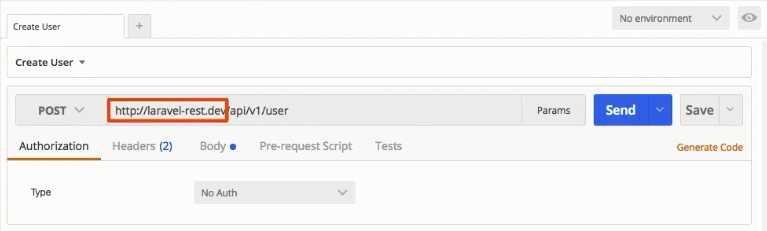

Here, I’m on the route of creating a new user, and make sure that later on in this course when you try this on you own application we’re building
throughout this course, to change the URL you see here to the URL pointing to your RESTful server, or to your server hosting create a new user,
which is why I have the Post method selected here.
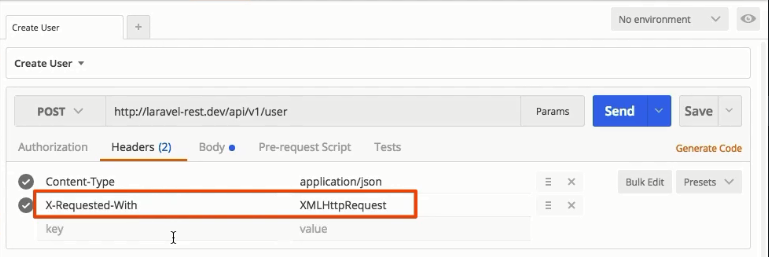
And also, later in another article, make sure to provide one extra post. Besides the Content-Type, which is application/JSON, make sure to provide the X-Requested-With header with a value of XMLHttp Request. This is required by Laravel to handle your requests correctly, especially when it comes to things like validation and returning errors.
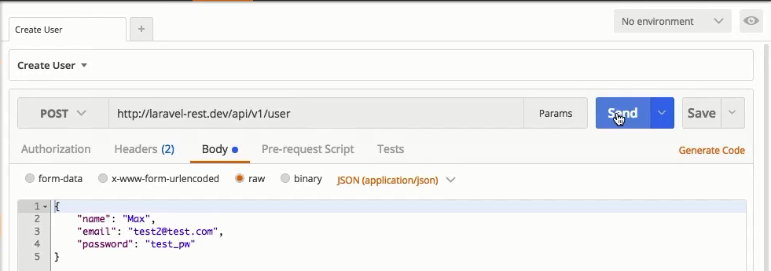
Here for creating a new user, I pass a Post body, so a JSON object where I pass the name of the user I want to create, and email, and a password.
Now if I click Send, you see that I also get a JSON response where, well, I’m told that the user was created. I can then use this user to sign in this route,
and pass in the credentials I just created, which returns me a JSON token, which is the security mechanism used in this course.

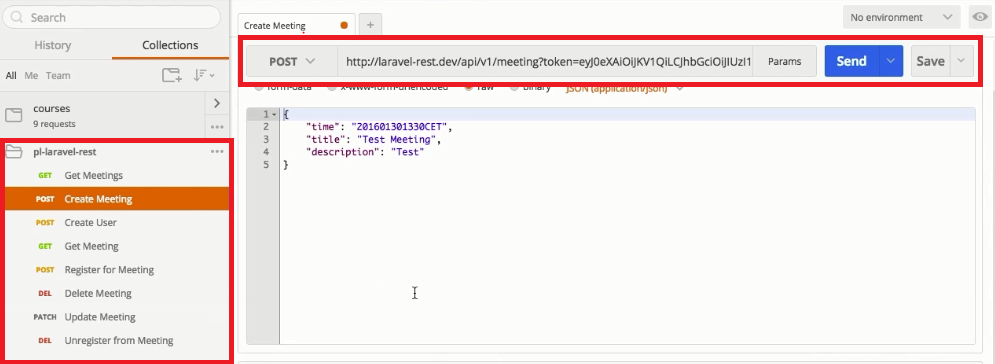
And of course, you will learn more about this in my upcoming articles. And with that, I’m for example, able to create a new meeting bypassing
the token with the request, passing some meeting data like the time when I want this meeting to happen, a name, and a description,
I’m going to click send here; this actually creates such a new meeting. Now I’m not going to go through all these routes here, but I think you get
the idea of what this application does, and how it works. And I’m very excited to get started with that.

Find Trusted Cardiac Hospitals

Compare heart hospitals by city and services — all in one place.

Explore Hospitals

Related Posts

Team Foundation Server 2015 Installation Guide (SQL Express + Update 3)

Install Team Foundation Server 2015 using the original Microsoft download paths, with clear guidance for online, offline, and ISO-based setup. This revised guide also includes an installation workflow, command example, and practical pitfalls to avoid.

Read More

How to Access a Running Docker Container Shell: docker exec vs docker attach

Need a shell inside a running container that is already in detached mode? This updated guide shows the correct workflow, compares docker exec and docker attach, and explains when SSH does and does not make sense.

Read More

Host Your Own NuGet Feed: Local Source vs NuGet.Server vs NuGetGallery

Learn how to host a private NuGet feed using three practical approaches: a local folder source, NuGet.Server, and NuGetGallery. This revised guide includes setup steps, command examples, and a workflow diagram to help you choose the right model.

Read More

Publish NuGet Packages to NuGet.org: CLI Steps, Workflow, and CI Example

Learn how to publish a NuGet package to NuGet.org using either nuget.exe or the dotnet CLI. This revised guide includes a workflow diagram, command comparison, and a CI-friendly example.

Read More

How to Create NuGet Packages with nuget.exe (Assembly, .nuspec, and .csproj Methods)

Learn three practical ways to build NuGet packages using nuget.exe: from an existing assembly, from a convention-based folder layout, or directly from a Visual Studio project. This guide includes commands, folder conventions, token behavior, and common pitfalls.

Read More

Virtualization in DevOps: Using Vagrant, Docker, and Cloud Platforms Together

This guide explains how VM-based workflows, containers, and cloud platforms complement each other in DevOps. It includes a practical workflow, trade-off table, and command examples for day-to-day use.

Read More




