
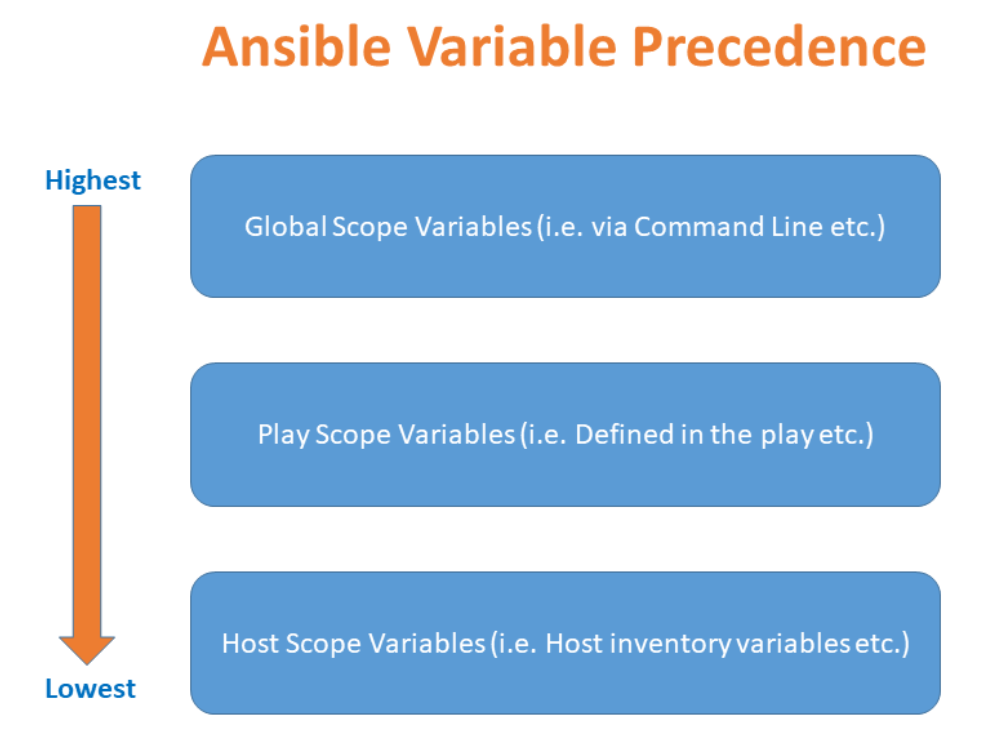
- Inventories: You can define variables in your inventory files, either globally for all hosts or specific to particular groups or hosts.
- Host or Group Variables: Create separate files for host or group variables inside the
host_varsandgroup_varsdirectories within your Ansible project. - Playbook-level Variables: Declare variables at the top level of your playbook using the
varskeyword.
Ansible Variable in Playbook with following ways:
- Use variables in playbook directly
- Use variables using external var files in playbook
- Use variables using include_vars into task in playbook
- Use variables using User Prompt in playbook
- Use variables using outout of task using register
List of Way to declare variables in Playbook
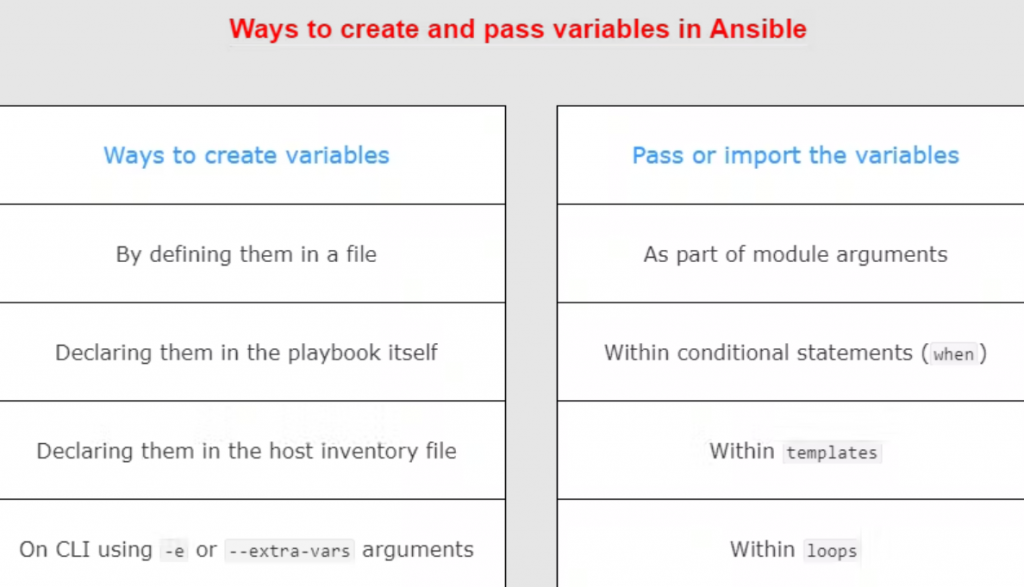
- Playbook-level Variables: Declare variables at the top level of your playbook using the vars keyword.
- Task-level Variables: You can also define variables within specific tasks.
- Register Variables: You can capture the output of a task into a variable using the register keyword.
- Environment Variables: You can use environment variables by accessing them using Ansible’s ansible_env dictionary.
- Using Facts: Ansible gathers facts about managed hosts, and you can use these facts as variables in your playbooks.
- Prompting for User Input: You can use the vars_prompt keyword to prompt the user for input during playbook execution.
Declare variables at the top level of your playbook using the vars keyword.
- name: Example playbook
  hosts: all
  vars:
    variable_name: value
  tasks:
    # Your tasks here
Code language: PHP (php)
Task-level Variables:
- name: Example playbook
  hosts: all
  tasks:
    - name: Task with variables
      debug:
        msg: "My variable: {{ variable_name }}"
      vars:
        variable_name: value
Code language: JavaScript (javascript)
Register Variables:
- name: Example playbook
  hosts: all
  tasks:
    - name: Task with register
      shell: echo "Hello, world!"
      register: output
    - name: Display registered variable
      debug:
        var: output.stdout
Code language: JavaScript (javascript)
Environment Variables:
- name: Example playbook
  hosts: all
  tasks:
    - name: Display environment variable
      debug:
        var: ansible_env.VARIABLE_NAME
Code language: JavaScript (javascript)
Using Facts:
- name: Example playbook
  hosts: all
  tasks:
    - name: Display fact
      debug:
        var: ansible_facts['ansible_os_family']
Code language: JavaScript (javascript)
Prompting for User Input:
- name: Example playbook
  hosts: all
  vars_prompt:
    - name: variable_name
      prompt: "Enter a value for the variable:"
  tasks:
    - name: Display input variable
      debug:
        var: variable_name
Code language: JavaScript (javascript)
Ansible Playbook with Variable for Centos/RHEL
---
- name: Update web servers
  hosts: web
  vars:
    myname: "Rajeshkumar"
    age: "18"
    packagename: "httpd"
    servicename: "httpd"
  vars_files:
    - "vars.yaml"
  vars_prompt:
    - name: "version"
      prompt: "Which version Do you want to install?"
      private: no

  tasks:
  - name: Install Apache in centos7
    ansible.builtin.yum:
      name: "{{ packagename }}"
      state: latest
  - name: Copy index.html
    ansible.builtin.copy:
      src: index.html
      dest: /var/www/html/index.html
  - name: Starting a Apache Server
    ansible.builtin.service:
      name: "{{ servicename }}"
      state: started
  - name: Print return information from the previous task
    ansible.builtin.debug:
      var: myname
  - name: include default step variables
    include_vars: tasks_var.yaml
  - name: Print return information from the previous task
    ansible.builtin.debug:
      msg: "My Name is {{ myname }} and My age is {{ age }}"
  - name: Print return information from the previous task
    ansible.builtin.debug:
      var: version
  - name: Ansible register variable basic example
    shell: "find *.txt"
    args:
      chdir: "/home/azureuser/rajesh"
    register: find_output
  - debug:
      var: find_output
  - debug:
      var: find_output.stdout_lines
  - debug:
      var: find_output.stdout_lines[0]Code language: PHP (php)
Ansible Playbook with Variable for Ubuntu
---
- name: Update web servers
  hosts: web
  vars:
    myname: "Rajeshkumar"
    age: "18"
    packagename: "apache2"
    servicename: "apache2"
  vars_files:
    - "vars.yaml"
  vars_prompt:
    - name: "version"
      prompt: "Which version Do you want to install?"
      private: no

  tasks:
  - name: Install Apache in ubuntu
    ansible.builtin.apt:
      name: "{{ packagename }}"
      state: latest
  - name: Copy index.html
    ansible.builtin.copy:
      src: index.html
      dest: /var/www/html/index.html
  - name: Starting a Apache Server
    ansible.builtin.service:
      name: "{{ servicename }}"
      state: started
  - name: Print return information from the previous task
    ansible.builtin.debug:
      var: myname
  - name: include default step variables
    include_vars: tasks_var.yaml
  - name: Print return information from the previous task
    ansible.builtin.debug:
      msg: "My Name is {{ myname }} and My age is {{ age }}"
  - name: Print return information from the previous task
    ansible.builtin.debug:
      var: version
  - name: Ansible register variable basic example
    shell: "find *.txt"
    args:
      chdir: "/root/ansible"
    register: find_output
  - debug:
      var: find_output
  - debug:
      var: find_output.stdout_lines
  - debug:
      var: find_output.stdout_lines[0]Code language: PHP (php)
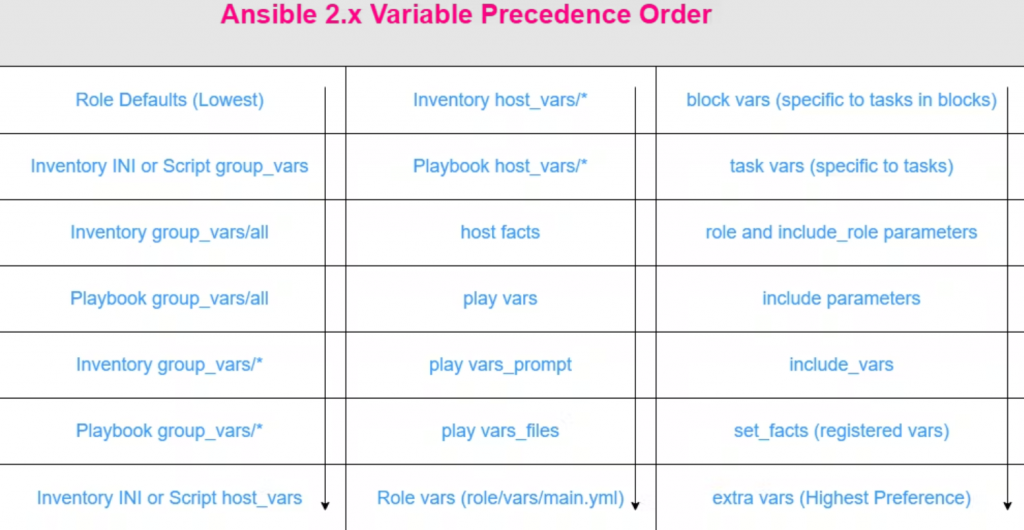
Ansible Varialble Precedence
Sorry, there was a YouTube error.

I’m Rajesh Kumar, a DevOps, SRE, DevSecOps, Cloud, and Platform Engineering expert passionate about sharing practical knowledge, real-world experiences, and industry best practices. I have worked at Cotocus and regularly write about technology, travel, investing, health, product reviews, and digital marketing through my various platforms.
I publish technical articles at DevOps School, travel stories at Holiday Landmark, stock market insights at Stocks Mantra, health and fitness guidance at My Medic Plus, product reviews at TrueReviewNow, and SEO and digital marketing strategies at Wizbrand.
Find Trusted Cardiac Hospitals
Compare heart hospitals by city and services — all in one place.
Explore Hospitals





