Find the Best Cosmetic Hospitals

Explore trusted cosmetic hospitals and make a confident choice for your transformation.

“Invest in yourself — your confidence is always worth it.”

Explore Cosmetic Hospitals

Start your journey today — compare options in one place.

How to install & configure Maven

How to install & configure Maven in Linux?

Step 1 – Install JAVA 11

Step 2 – Download and Extract Maven to a destination dir.

eg. 

$ sudo yum install wget unzip zip -y
$ cd /opt
$ wget https://mirrors.estointernet.in/apache/maven/maven-3/3.8.1/binaries/apache-maven-3.8.1-bin.zip
$ unzip apache-maven-3.8.1-bin.zipCode language: JavaScript (javascript)

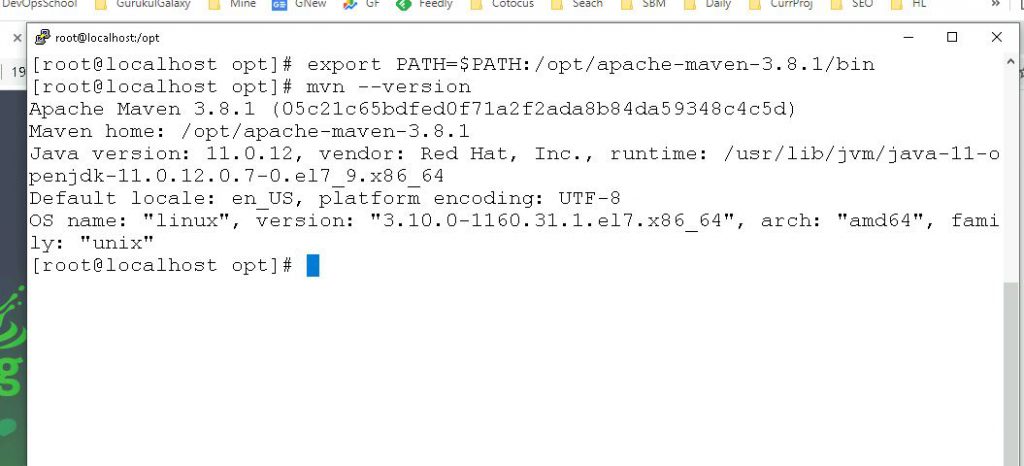
Step 3 – Set Maven PATH

$ export PATH=$PATH:/opt/apache-maven-3.8.1/binCode language: JavaScript (javascript)

Step 4 – Verify Maven Installation

$ mvn --version
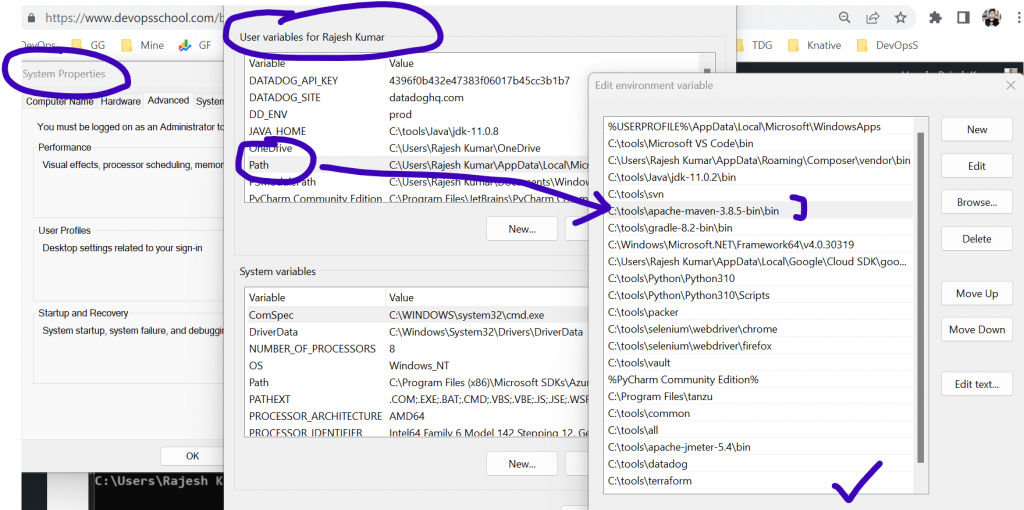
How to install & configure Maven in Windows?


- Download maven from https://maven.apache.org/download.cgi
- Extract into a directory such as C:\tools\apache-maven-3.8.5-bin
- Add C:\tools\apache-maven-3.8.5-bin\bin into env "path"
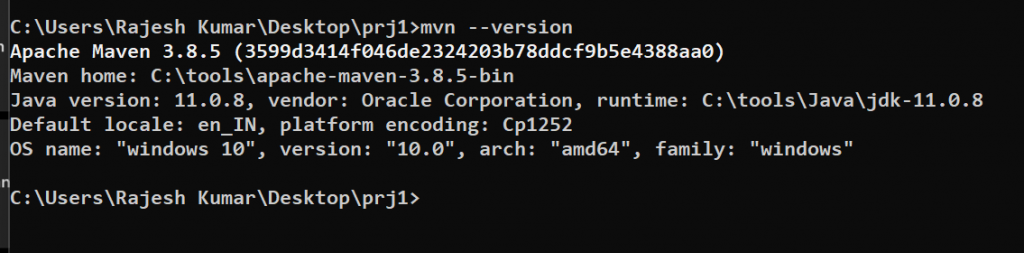
- Go to cmd and type $ mvn --version
Code language: JavaScript (javascript)
Find Trusted Cardiac Hospitals

Compare heart hospitals by city and services — all in one place.

Explore Hospitals
I'm Rajesh Kumar, a DevOps, SRE, DevSecOps, Cloud, and Platform Engineering expert passionate about sharing practical knowledge, real-world experiences, and industry best practices. I have worked at Cotocus and regularly write about technology, travel, investing, health, product reviews, and digital marketing through my various platforms. I publish technical articles at DevOps School, travel stories at Holiday Landmark, stock market insights at Stocks Mantra, health and fitness guidance at My Medic Plus, product reviews at TrueReviewNow, and SEO and digital marketing strategies at Wizbrand.

Related Posts

Sonar Maven Plugin 1.0-beta-2: What Changed for Archiva/Nexus-Based Builds

This historical release note introduced simpler Sonar Maven Plugin behavior when using repository managers like Archiva or Nexus. Here’s what changed from beta-1, how compatibility works with Sonar versions, and how to validate legacy CI behavior.

Read More

Sonar Maven Plugin 1.0-beta-2: What Changed and How to Configure Legacy Builds

This update from the Mojo team simplified Sonar Maven Plugin configuration when using repository managers like Archiva or Nexus. Here’s a clear breakdown of compatibility, behavior differences from beta-1, and practical legacy setup guidance.

Read More

Hudson Master-Slave Setup: Distributed Build Architecture and Agent Launch Methods

Learn how Hudson distributes builds between a master and one or more slave nodes, and how to launch agents using SSH, JNLP, scripts, or Windows service mode. This revised guide clarifies the execution flow, configuration options, and common pitfalls in legacy Hudson environments.

Read More

Ant build.xml for WAR Packaging and Tomcat Deployment (Annotated Reference)

This guide turns a legacy Ant WAR build sample into a practical reference you can reuse. You will learn the target flow, required layout, runnable commands, and common pitfalls before using it in CI/CD.

Read More

Sonar PDF Report Plugin 2.1: Integrations, SVG Support, and What the Release Actually Added

This revised note explains what was explicitly announced for Sonar PDF Report Plugin 2.1: broader plugin data inclusion and SVG image support. It also maps the reporting workflow and gives a practical adoption checklist for DevOps teams maintaining legacy Sonar setups.

Read More

Sonar 2.2 Release Highlights: Filters, Plugin Classloaders, and Upgrade Notes

Sonar 2.2 introduced homepage filters and independent plugin classloaders, aimed at faster quality triage and easier plugin development. This revised guide explains what changed, why it mattered, and where to find the original release resources.

Read More