
Friends, In this blog I’m going to let you know about Azure SignalR Service but first of all, let’s know SignalR, is an open-source .NET library for building web applications that require live user interaction or real-time data updates. Examples include social applications, multi-user games, business collaboration, and news, weather, or financial update applications. These are often called real-time applications.
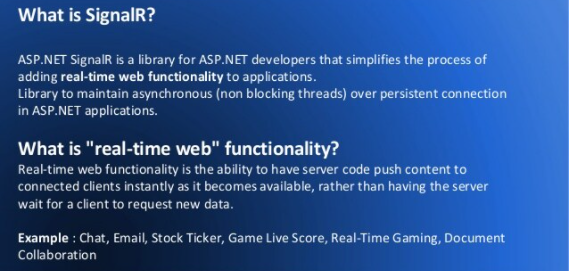
How Does SignalR work?
- It has a concept of transportation. Each transport decides, how data will send or receive and how it will connect and disconnect.
- It is a reflection of a connection. It gives you 2 programming models over that connection.
- It handles connection management automatically and lets you broadcast messages to every single associated customer simultaneously like a chat room. The connection between the client and server is persistent, unlike a classic HTTP connection, which is re-established for each communication.
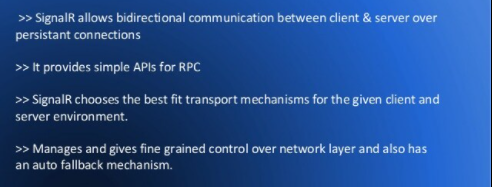
What is Microsoft Azure SignalR Service?
It is an Azure service that helps developers easily create web applications with real-time functionality. This Service simplifies the process of adding real-time web functionality to applications over HTTP. It is a fully managed service that allows developers to focus on building real-time web experiences without worrying about capacity provisioning, reliable connections, scaling, encryption, or authentication, and You can also sign up for a free Azure trial.
Microsoft Azure SignalR Service used for?
It has been used in a wide variety of industries, for any application type that requires real-time content updates. If any Traditional real-time features that often require polling from the server can also use Azure SignalR Service. If any scenario requires pushing data from server to client in real-time, those can use.
Below you can get some examples that are good to use Azure SignalR Service:
- Automation: real-time trigger from upstream events.
- High-frequency data updates: gaming, voting, polling, auction.
- Collaborative apps: coauthoring, whiteboard apps, and team meeting software.
- Personalized real-time push ads and offers, interactive ads.
- Real-time IoT metrics, remote control, real-time status, and location tracking.
- Chat live chat room, chatbot, online customer support, real-time shopping assistant, messenger, in-game chat, and so on.
- Dashboards and monitoring: company dashboard, financial market data, instant sales update, multi-player game leader board, and IoT monitoring.
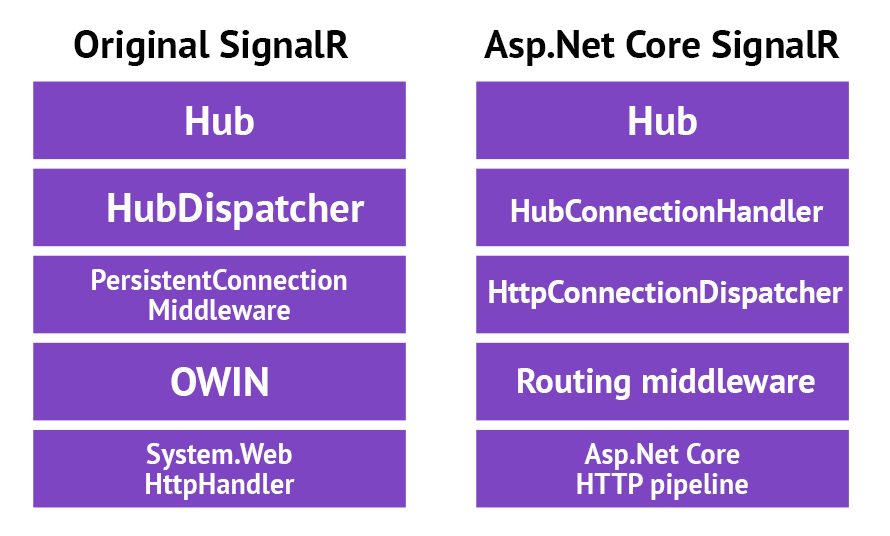
Original SignalR Vs Asp.Net Core SignalR
I hope this blog will be helpful for you!
Thanks!

I’m Rajesh Kumar, a DevOps, SRE, DevSecOps, Cloud, and Platform Engineering expert passionate about sharing practical knowledge, real-world experiences, and industry best practices. I have worked at Cotocus and regularly write about technology, travel, investing, health, product reviews, and digital marketing through my various platforms.
I publish technical articles at DevOps School, travel stories at Holiday Landmark, stock market insights at Stocks Mantra, health and fitness guidance at My Medic Plus, product reviews at TrueReviewNow, and SEO and digital marketing strategies at Wizbrand.
Find Trusted Cardiac Hospitals
Compare heart hospitals by city and services — all in one place.
Explore Hospitals





